How Instagram SEO Works + Tips for Making Your Content Appear in Search

According to Forbes, 67% of Gen Zers use Instagram to search. It’s their preferred search engine, followed by TikTok. Google comes in third place (*screams in millennial*).
The bright side of this for the creators and brands posting content on Instagram is that there’s a real chance your content could be seen by people searching for…well, whatever it is you post about.
Think about it: someone opens the Instagram search bar, types in a phrase or idea, and within seconds, they're scrolling through accounts and posts that match what they're looking for.
So the question is: How do you make sure your content shows up? Instagram SEO is how. Just like optimizing a website for Google, you can optimize your Instagram profile and content to make it easier for people to find you through search.
Below, we'll explain how Instagram SEO works today and provide practical steps you can take to get your content discovered by more people.
TL;DR
- Instagram SEO helps creators and brands make their profiles, posts, and reels easier to discover through Instagram search. Eligible public content can also appear in Google Search results.
- To optimize your Instagram content for search, research keywords your audience actually uses, incorporate them naturally into your profile and content, and create posts that address their questions and needs.
- Instagram SEO isn't about stuffing keywords everywhere or sacrificing creativity to please the algorithm. Focus on reaching the right audience and track metrics like non-follower reach, profile visits, and website clicks to see what's working.
How Does Instagram SEO Work?
When someone types a word or phrase into Instagram's search bar, Instagram looks for relevant accounts and content to show them. That includes profiles, posts, and reels, so people can discover your content even if they've never heard of you.
Instagram doesn't simply display every post containing a particular keyword. According to Instagram's explanation of how its search function works, three main factors influence which results appear:
- Search text: The words someone types into the search bar are the most important signal. Instagram looks for matches in usernames, profile names, bios, captions, hashtags, and locations.
- User activity: Search results are personalized based on accounts someone follows, posts they've viewed, and content they've interacted with before.
- Popularity signals: When there are many relevant results, Instagram also considers factors like clicks, likes, shares, and follows to help determine which results appear higher.
Keep in mind that appearing in Instagram search results isn't the same as being recommended through Explore or the reels feed. Different parts of Instagram use different ranking systems, so improving your SEO doesn't guarantee more reach across the platform.
Important update: In July 2025, Instagram expanded search-engine indexing for eligible public posts and reels from professional accounts. That means a reel about beginner yoga poses or a carousel featuring the best coffee shops in Austin could potentially appear when someone searches for those topics on Google. For creators and brands, that's another opportunity for useful content to reach new audiences, even after initial engagement on Instagram has slowed.
6 Instagram SEO Tips
If you want to make your Instagram content easier to find, these SEO tips are for you.
Tip #1. Research Instagram SEO keywords
Keywords are an important part of any SEO strategy, but before you start rewriting your bio or drafting captions, you need to figure out what your audience is searching for.
There are a few ways to find SEO keywords for Instagram, including:
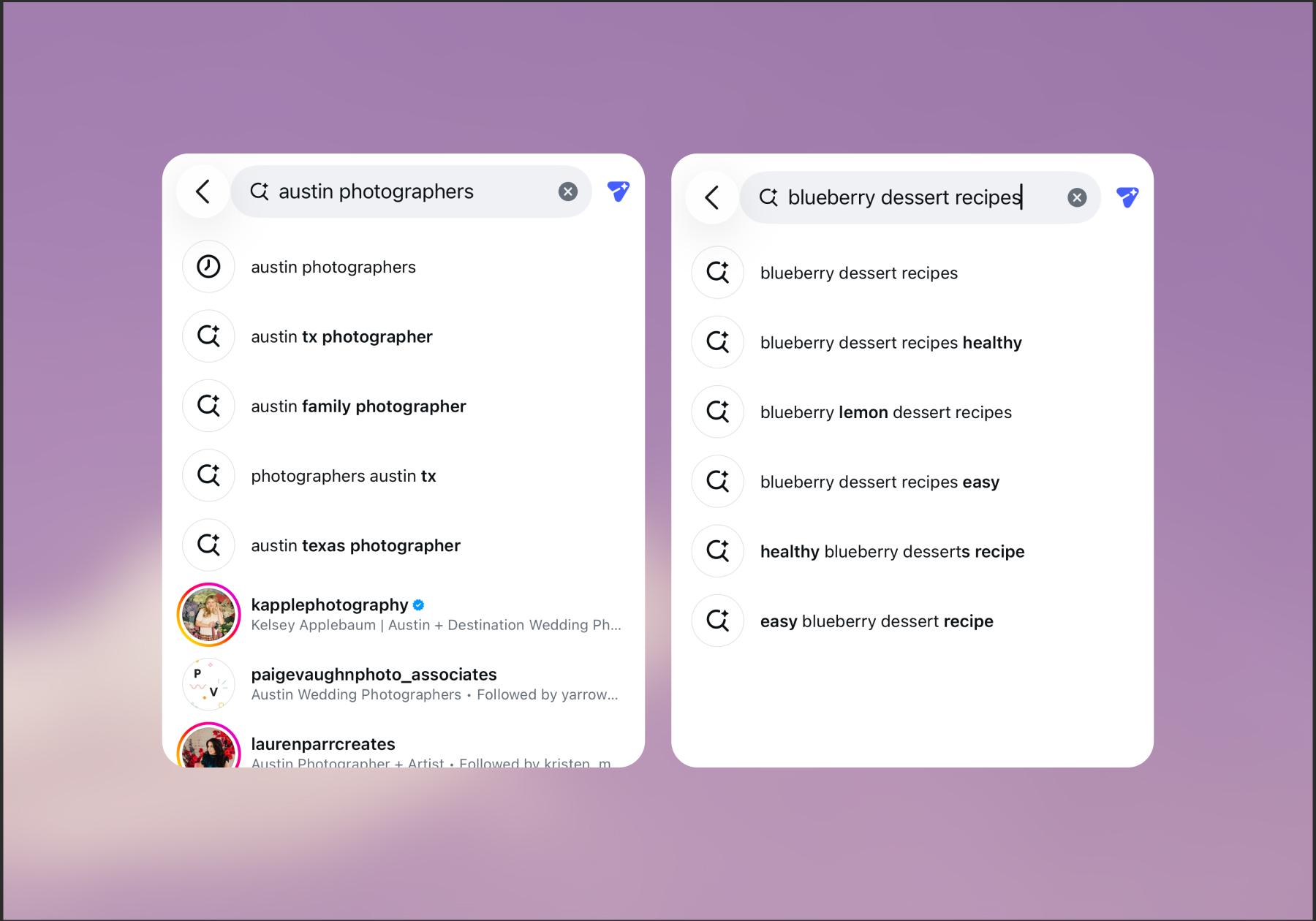
- Start with a broad topic: Enter a word related to your niche in Instagram's search bar and note the suggested searches. For example, typing “Austin photographers” shows related searches for “Austin, TX photographer” and “Austin family photographer.” Typing “blueberry dessert recipe” shows related searches for “blueberry dessert recipes healthy” and “blueberry lemon dessert recipes.”
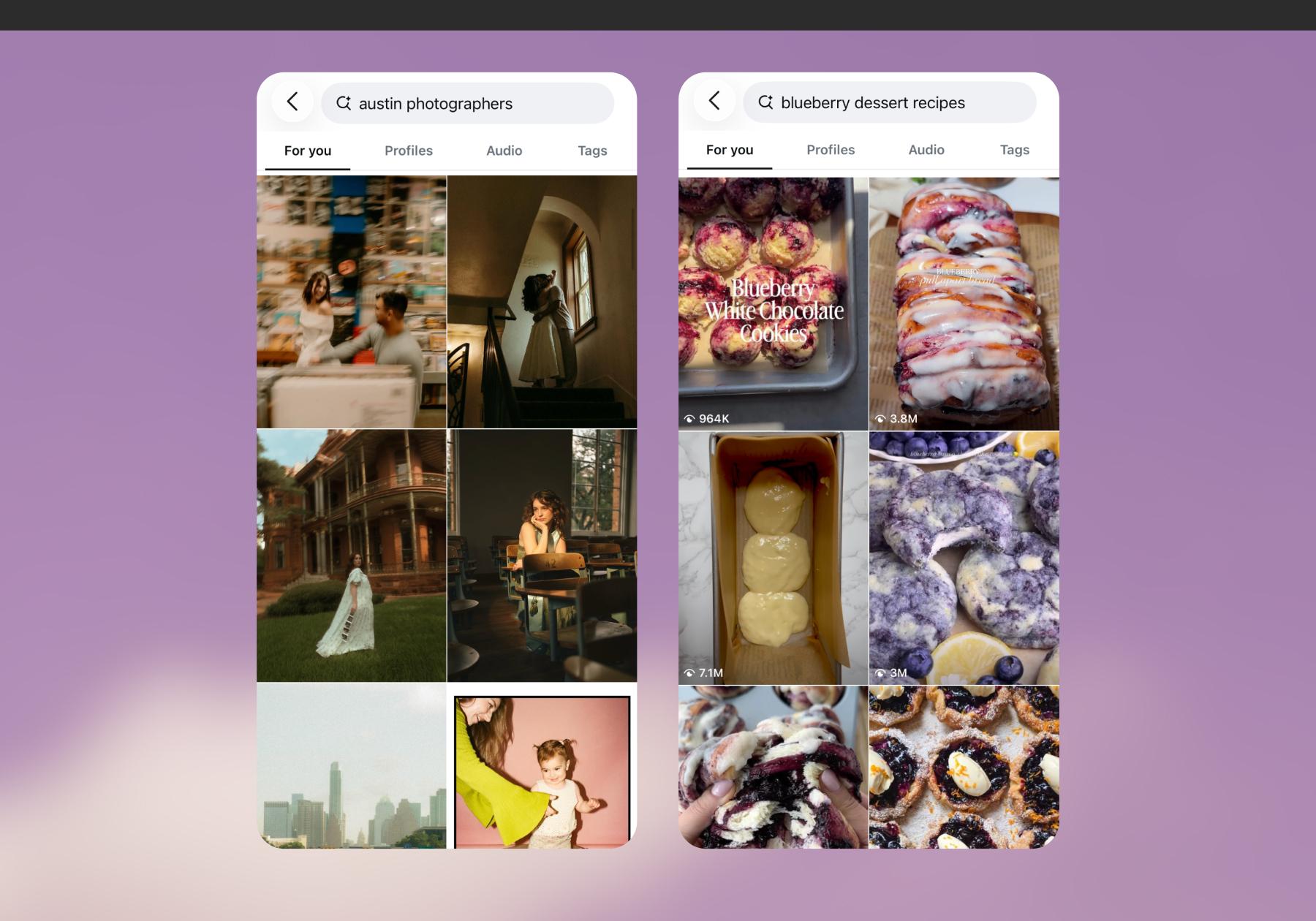
- Look at the search results. Once you’ve noted related phrases, hit enter on your search and see what content comes up. Determine which questions or needs the content serves, and whether there's an opportunity to offer a unique perspective.
In the “Austin photographers” search, much of the content shown is the photography itself. But for “blueberry dessert recipes,” there’s more variety, with videos of cookies, loaves, muffins, and more.
- Consider the questions your audience often asks: "Your customers often give you the right wording before you even open a keyword tool," says Mercedes Mollett, Marketing Director at after.marketing.
Mercedes recommends reviewing the questions you receive in your comments section and Instagram inbox, especially those from people considering a purchase. What do they want to know about pricing, suitability, comparisons, or how something works?
Mercedes makes the point that a phrase like "hair extensions" can be very broad, while "clip-in extensions for fine hair" speaks to a specific customer need.
Niall Mellonie, co-founder of Laik, a holiday home management company in England's Lake District, takes a similar approach.
Niall’s team pays attention to the questions potential guests ask before booking a trip. Someone wondering whether they can explore Windermere without a car, for example, might not be searching for accommodation yet, but they're already planning a visit.
Creating content that answers that question could help Laik reach potential guests before they even start looking for somewhere to stay.
"A question searched by only a handful of people could still be right for you if it means someone has found you on Instagram and is now looking to book," Niall says.
- Build a keyword list: Once you’ve done some research in the Instagram app, create a list of keywords that are relevant to your niche and audience. Use these keywords to inform your strategy as you plan content and write captions.
Tip #2. Optimize your username, name, and bio
Your Instagram profile should tell someone what you do before they even scroll through your posts, and your username, display name, and bio are the most useful places to communicate that information.
For example, imagine you're a yoga instructor in Austin. Here's how you might optimize your profile:
Profile element | Before | After |
Display name | Sarah Jones | Sarah Jones | Austin Yoga Instructor |
Username | @sarahjones123 | @sarahjonesyoga |
Bio | Movement, wellness & good vibes ✨ | Beginner-friendly yoga in Austin. Private sessions, classes, and at-home workouts. |
The idea is to include terms that best describe your niche, expertise, or location.
And if you've already established a recognizable username, don't feel obligated to change it. You can make your display name and bio more descriptive without giving up the identity you've already built.
Go deeper on the ideal Instagram bio: How to Set Up Your Instagram Bio.
Tip #3. Write descriptive, keyword-rich captions
Instagram captions help the platform understand what your content is about, so you should include keywords when relevant.
Mercedes made the point that creators and brands sometimes write captions that make sense to existing followers but give new audiences very little context. Here’s an example:
- Unoptimized: "Your next obsession has arrived. ✨"
- Optimized: "How do you choose clip-in extensions for fine hair? Here's what to look for if you want extra volume without weighing your hair down."
The optimized version of the caption tells readers exactly what they'll learn, and incorporates a relevant search phrase (“clip-in extensions for fine hair”).
If you're creating a post around a specific search topic, including a relevant keyword in your caption is a smart move. It gives Instagram more context about your content and helps people understand what they're about to watch or read. You can still be funny, clever, or conversational. Just make sure the subject is clear to someone discovering your content for the first time.
Tip #4: Optimize on-screen text, covers, and scripts
Instagram also uses the text on your videos and photos, as well as what’s said out loud, to identify what your content is about. So, in addition to writing a good caption:
- Use descriptive on-screen text. You can do this through captions (which can be auto-generated with a video editing tool) or text. Either way, introduce the topic at the beginning of the video so that users watching without sound know what it’s about immediately.
- Create clear reel and carousel covers: Your reels and carousels can be discovered long after they go live by people visiting your profile for the first time. Make your content covers self-explanatory so people know what they’re about to watch before clicking.

- Say your keywords naturally: Instagram can process information from videos, including spoken language and visual elements. While the exact role of these signals in search rankings isn't fully clear, making your video's topic obvious through dialogue, on-screen text, and captions is a sensible approach.
Of course, there's a balance to strike. Not every reel needs a keyword-dense caption or a cover that spells out exactly what's in the video. These are strategies you can use to help people discover your content; use them where they make sense, but never at the expense of the creativity and personality that make your content yours.
Tip #5: Use a few relevant hashtags
Are hashtags dead? Do they still work? People love to debate this; the truth is, hashtags are not what they used to be. In fact, Instagram now limits posts to five hashtags.
Even so, hashtags can still help categorize your content and make it easier to find, especially when you're targeting a specific topic or audience. For example, if you're sharing a pumpkin bread recipe, you could use #pumpkinrecipe or #pumpkinbread, both of which are better options than a generic tag like #food or even #recipe.
Learn more: An Instagram Hashtag Strategy That Actually Works Today.
Tip #6: Add location information
If you're a local business or a creator making content about a particular area, location-specific keywords can help people understand where you operate. For example, creator Jaala James posts about experiences in the Sedona area, and often includes mentions of Arizona in her captions and hashtags:
You can make your location clearer by:
- Including your city or service area in your profile name or bio.
- Mentioning your location in captions or tagging it on posts.
- Creating content about places, events, or questions specific to your area.
Instagram SEO mistakes to avoid
Before you start optimizing every inch of your Instagram account, here are a few mistakes worth avoiding:
- Stuffing keywords everywhere. Repeating the same phrases in your bio or captions doesn't guarantee better rankings, and it can make your content awkward to read. Instagram also discourages spam, so prioritize natural language over repetitive, manipulative tactics.
- Targeting overly broad keywords. A term like "fitness" is less specific than "workouts for new runners." Broad keywords can make it harder to match your content with people looking for exactly what you offer.
- Changing your username unnecessarily. Adding a keyword to your username isn't worth making your account harder for existing followers to recognize or find. For starters, Instagram limits how often you can change your display name, but keeping your handle consistent across platforms like TikTok and YouTube helps people easily find you wherever you post.
- Optimizing for search instead of your audience. Keywords won't do much good if your content isn’t serving the need that brought someone to your profile in the first place. Whether the point of your account is to educate people, make them laugh, or sell something you believe in, you should protect what makes it uniquely yours from over-optimization.
How to Measure Your Instagram SEO Results
So, you've optimized your profile, added relevant keywords to your content, and started creating posts around what your audience is searching for. But how do you know if any of it is working?
Instagram Insights is a good place to start, but there's a catch: It doesn't give you a complete picture of how your content ranks in search.
Instead, keep an eye on these metrics:
- Non-follower reach: Are your posts and reels reaching more people who don't already follow you?
- Profile visits and follower growth: Are people discovering your content and sticking around to learn more?
- Engagement: Are your keyword-focused posts generating saves, shares, and comments?
- Website clicks and inquiries: Are people interested enough to visit your website, ask questions, or explore your offerings?
Keep in mind that these are indicators of discoverability, not definitive proof that you're ranking higher in Instagram search.
"Non-follower reach measures broader discovery; it doesn’t prove search performance," says Mercedes. After all, someone could discover your content through Explore or their reels feed without ever searching for a keyword.
Mercedes recommends comparing similar posts at consistent intervals, such as seven and 28 days, and accounting for factors like paid promotions or collaborations that might influence your results.
Look for patterns over time rather than judging your SEO strategy by a single post. And remember, reaching the right people matters more than reaching the most people.
Want more tips for maximizing your Instagram content reach? A Creator’s Guide to Cracking the Instagram Algorithm.
Frequently asked questions
Yes, Instagram SEO can help make your profile and content more discoverable by using relevant keywords and creating posts that match what people are searching for. However, Instagram considers multiple factors when ranking search results, so optimizing your content doesn't guarantee higher rankings or more reach.
Start typing a topic related to your niche into Instagram's search bar and look at the suggested searches. You can also explore what similar creators are posting and pay attention to the language your audience uses in comments, DMs, and questions. Focus on keywords that accurately describe your content and reflect what your audience wants to find.
Hashtags can help Instagram categorize your content and make it discoverable through relevant searches, but they're not what they once were. Instead of relying on hashtags alone, use a few relevant ones alongside descriptive captions and useful content.
There's no set timeline. Some changes may help your content appear in relevant searches relatively quickly, while building consistent discoverability can take weeks or longer. Track your results over time, compare similar posts, and look for patterns rather than expecting an immediate boost.
Absolutely. Instagram's search bar, autocomplete suggestions, profile editing tools, and Instagram Insights are all free to use. You can research keywords, optimize your bio, and create search-friendly content without spending a dime. Paid keyword research and analytics tools are optional, not essential.



Originally published: Oct 28, 2026
More stories worth reading
More content that's too good to miss