
The creator economy is booming, but it’s also an ever-evolving beast. It used to be that only big-name creators could land brand deals; now, nano and micro influencers are the ones being offered those partnerships. And because brand deals are no longer a predictable source of income, creators of all sizes have started creating their own income streams — events, newsletters, premium content, tools, templates, and, of course, courses (see what I did there?).
Around 67% of monetizing creators now sell digital products, including courses, memberships, coaching sessions, templates, and e-books. It’s a popular monetization path because it offers scalable income once it’s built. Yes, you do have to spend some time creating the thing and finding somewhere to host it (Kajabi, Gumroad, Stan Store, etc.). But once it’s live, you can kick back and watch the downloads happen.
If you’ve put time into making a course or other digital product and you’re not seeing the sales you want, I’ve got some advice for you: add Manychat to the mix.
A HypeAuditor study comparing creators who used Manychat with those who didn't found that creators who used Manychat received more comments and gained new followers than those who didn’t. And you know what an increase in comments and followers usually leads to? An increase in sales. 😉
5 Manychat Use Cases for Course Creators

If you offer a course, online program, or other digital product as part of your creator business, you can benefit from signing up for Manychat. Manychat is an automation tool that works with TikTok, Instagram, Facebook Messenger, and WhatsApp. So, if you’re using any of these social platforms as a marketing channel, Manychat is the move.
To prove it, here are five ways you can use Manychat to help you convert casual scrollers into loyal followers and customers.
1. Drive more visits to your course pages
Be honest: are you asking people to visit a link in your bio? And does that link take them to a landing page with 15 more links to scroll through? If so, sorry, but you’re likely losing most of them before they even reach your course registration page.
Instead, you should send the course registration link directly to their inbox with Manychat’s comment-to-DM Quick Automation. That way, all they have to do is comment on your post, open their DMs, and sign up.
Here’s an example from Amy Porterfield, a course creator and marketing expert, that shows what that experience looks like from the user's perspective:
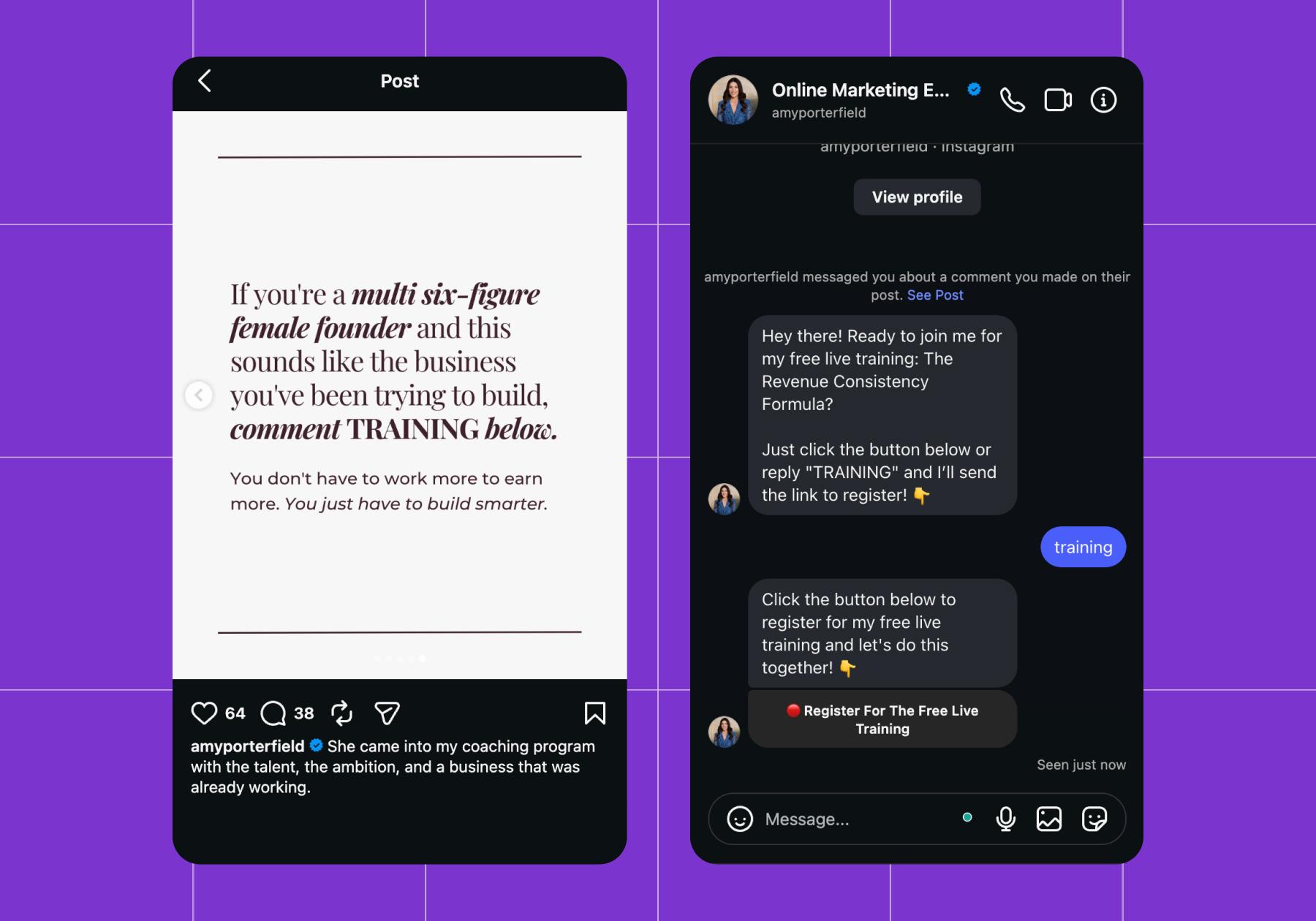
Read more in Landing Pages vs. Instagram DM Automation: Which one Made $1.4M for Amy Porterfield?
If you’re new to Manychat, check out our guide that walks you through setting up a comment-to-DM automation. Or, if you need a visual, here’s how it works in less than 60 seconds:
2. Grow your followers with a lead magnet
Lead magnets are great because they give people a taste of what you have to offer. And ideally, people like your lead magnet enough to shell out for the full experience — your course. But if they’re not ready to do that right away, you can still collect their email address and use it later on (more on that in the next section).
If you haven’t developed a lead magnet yet and you need some ideas, check out Lead Magnet Examples: 7 High-Converting Ideas to Try Today. You can always use a preview of your course (like the first module) as a lead magnet.
If you have a lead magnet ready to go, create a video or a carousel post that promotes it, then set up Manychat’s Grow followers with a freebie template.
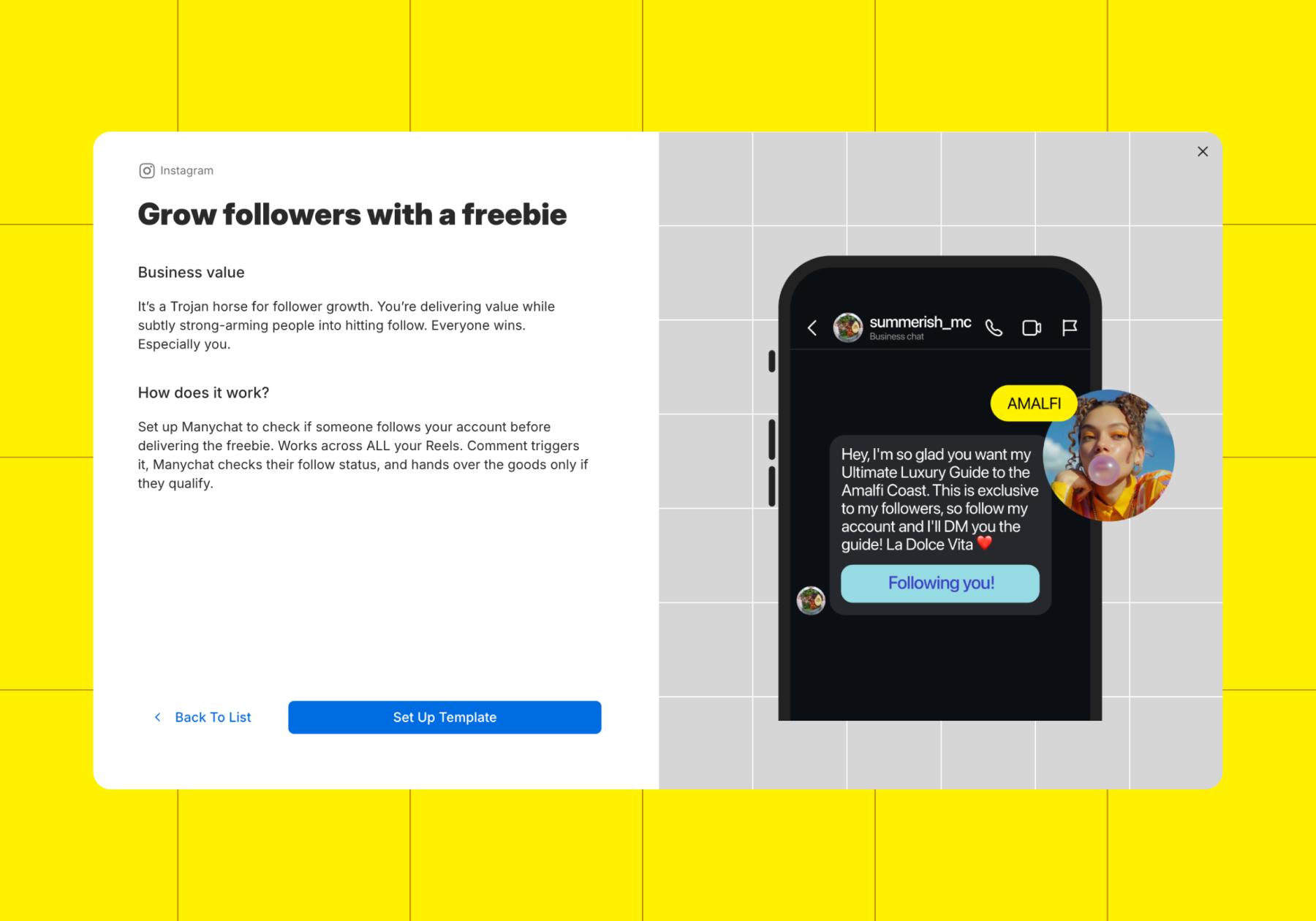
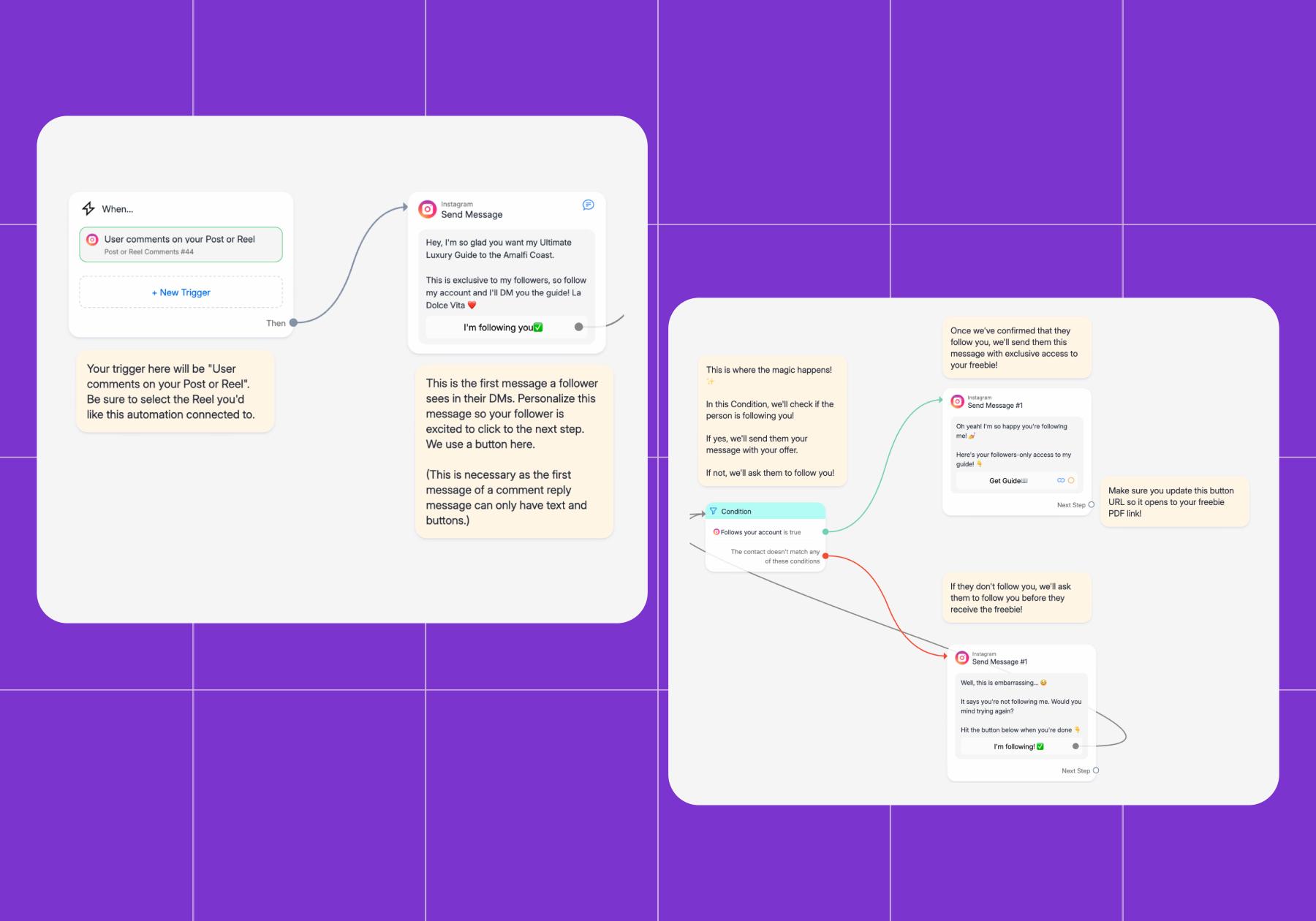
Here’s how this template works:
- When a user comments on your post, Manychat sends them a DM.
You can set up a trigger keyword for this, or have Manychat respond to every comment. If you set up a keyword, make sure your post mentions it in the CTA, a la “Comment FREEBIE for the preview!”
- The DM will ask the user to follow your account in exchange for the freebie.
- A condition block will check whether or not they follow you.
- If they do, your freebie will be automatically sent to them.
3. Grow an email list directly from Instagram
Turning a casual scroller into an owned contact? That’s tough.
However, it’s a lot easier when there’s something in it for them (like a lead magnet/freebie). Manychat’s Grow your email list template is designed with this exact strategy in mind.
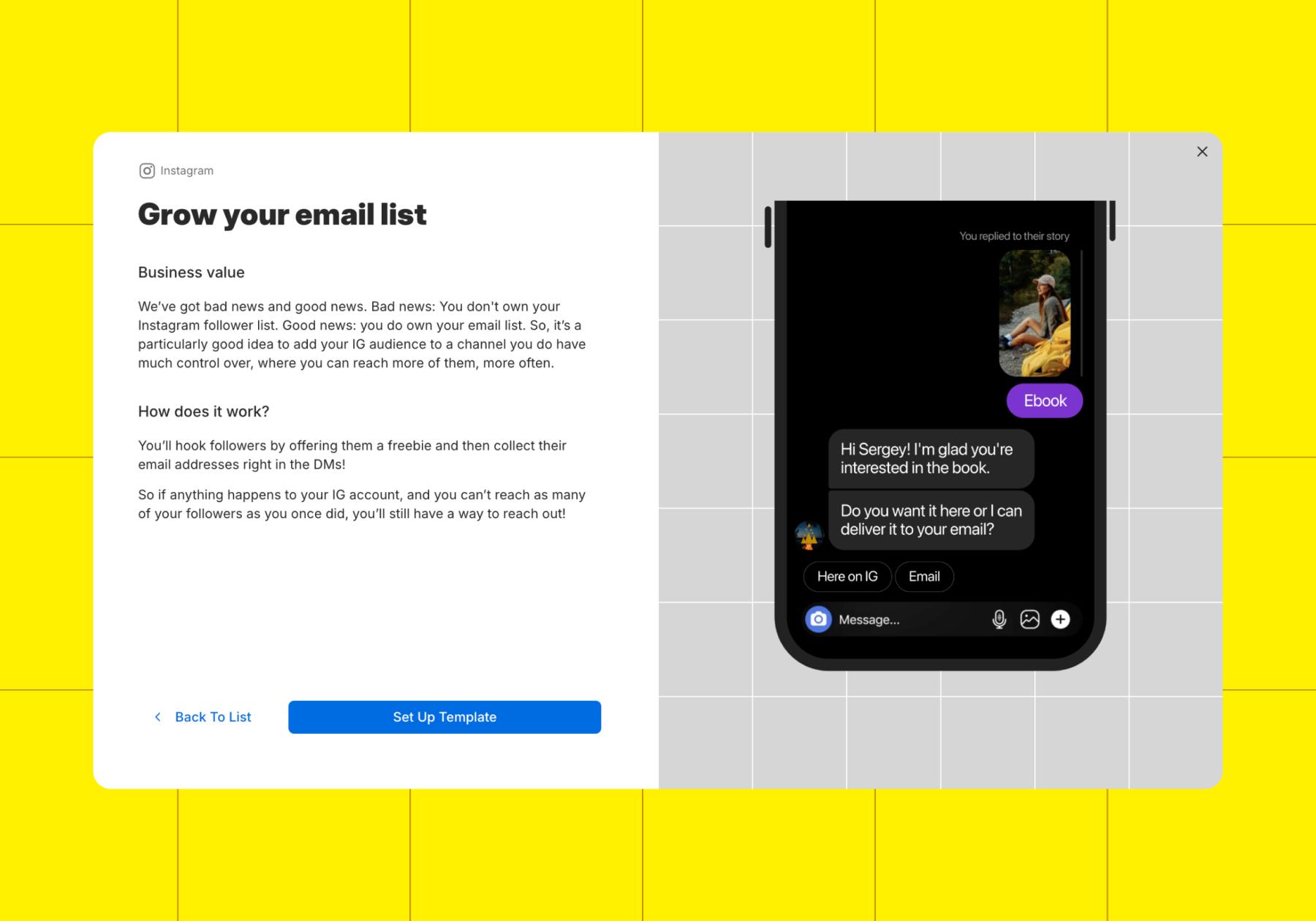
It works like the Grow followers with a freebie template, but instead of asking the user to follow you, it prompts them to enter their email address to access the content. It’s a great strategy for filling your email list with warm leads.
4. Qualify leads for specific courses or offerings
Imagine someone finds your account via a post that went viral on Instagram or TikTok. They head to your profile, scroll through your content, and notice you reference your courses often. Their interest is piqued, but they have questions — like where the best place to start is.
This is more common than you’d think, and the best way to ensure those new followers become customers is to set up an automation that qualifies leads. With Manychat, you’ve got options. You can use the Qualify with a quiz template or build your own automation with the AI Flow Builder assistant.
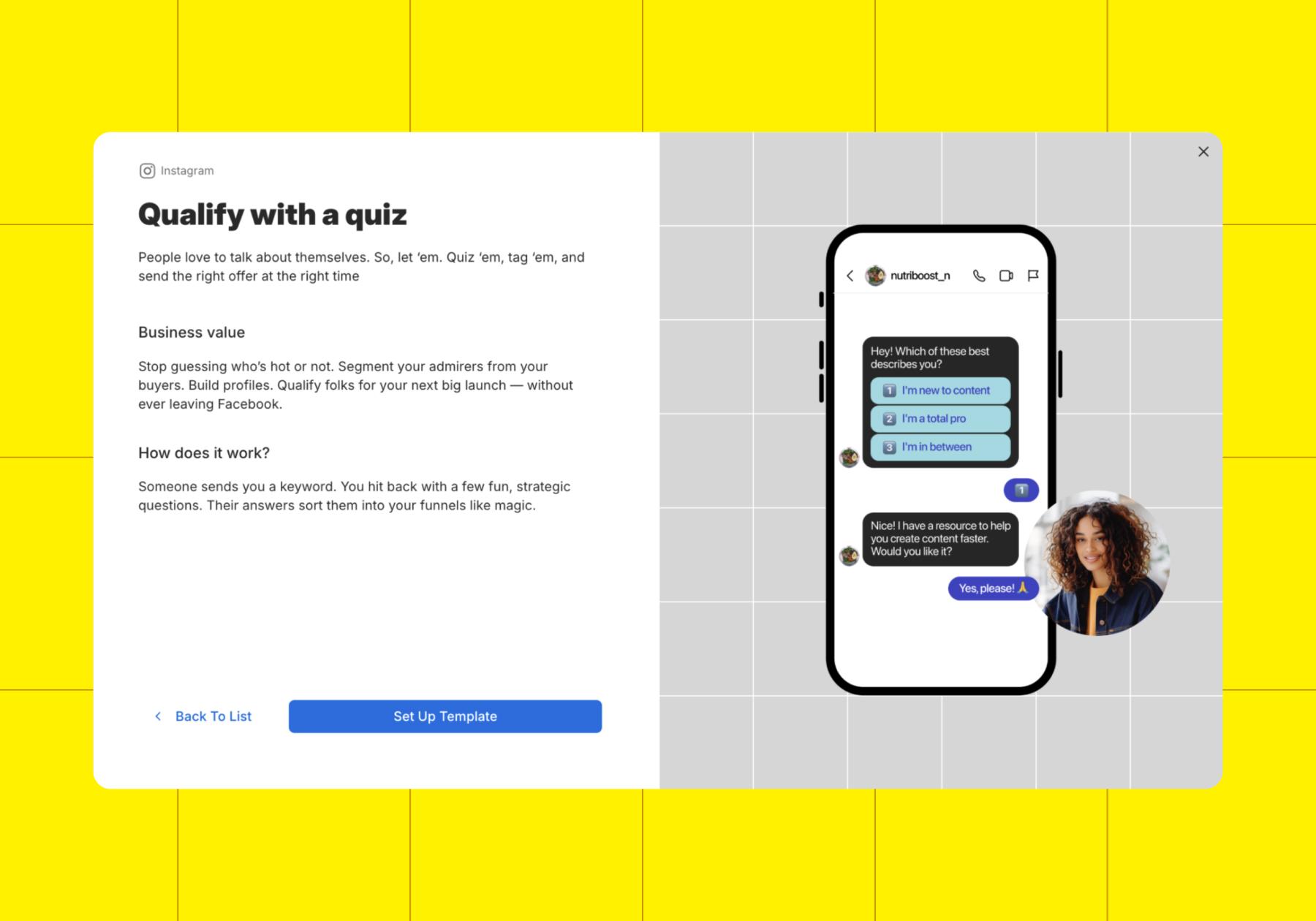
If you have multiple courses or other digital products like workbooks and tools, a quiz like this can help provide personalized recommendations to warm leads. You can attach your automations to specific posts or have them run 24/7.
For example, the Qualify with a quiz template is designed to be an always-on automation that triggers when someone DMs your account the word “quiz.”
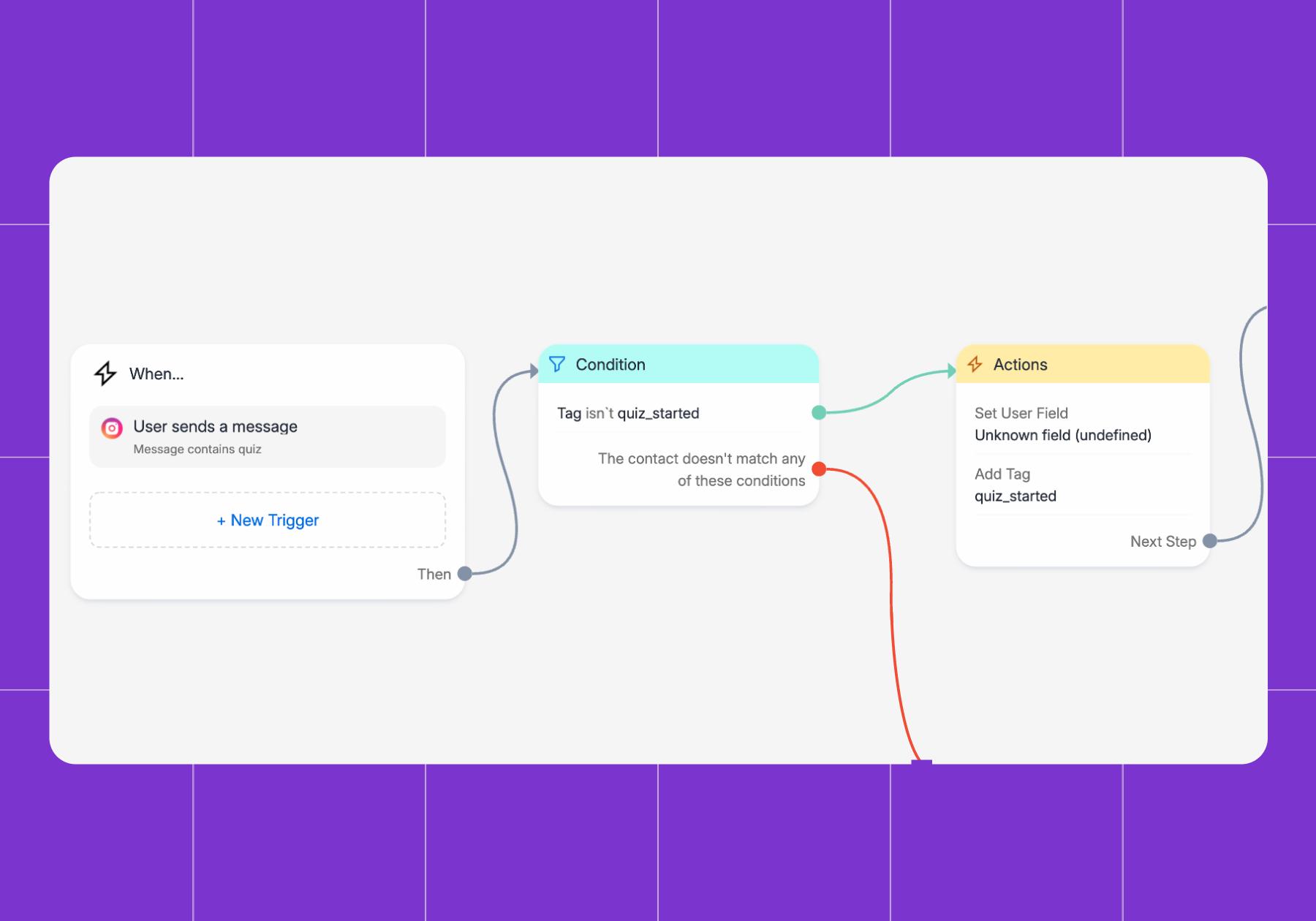
With an evergreen flow like this, you can add a CTA to your bio (“DM me QUIZ to figure out which course is right for you!”), and/or use the CTA “DM me QUIZ for your personal learning plan” when you post. It’s another example of how putting in a little effort up front lets you do less later without losing sales.
5. Follow up with interested users automatically
How many potential sales have been passed up because people were too [lazy, busy, burnt-out, etc.] to send a follow-up message? Answer: many, which is why automating follow-ups is one of the best use cases for Manychat.
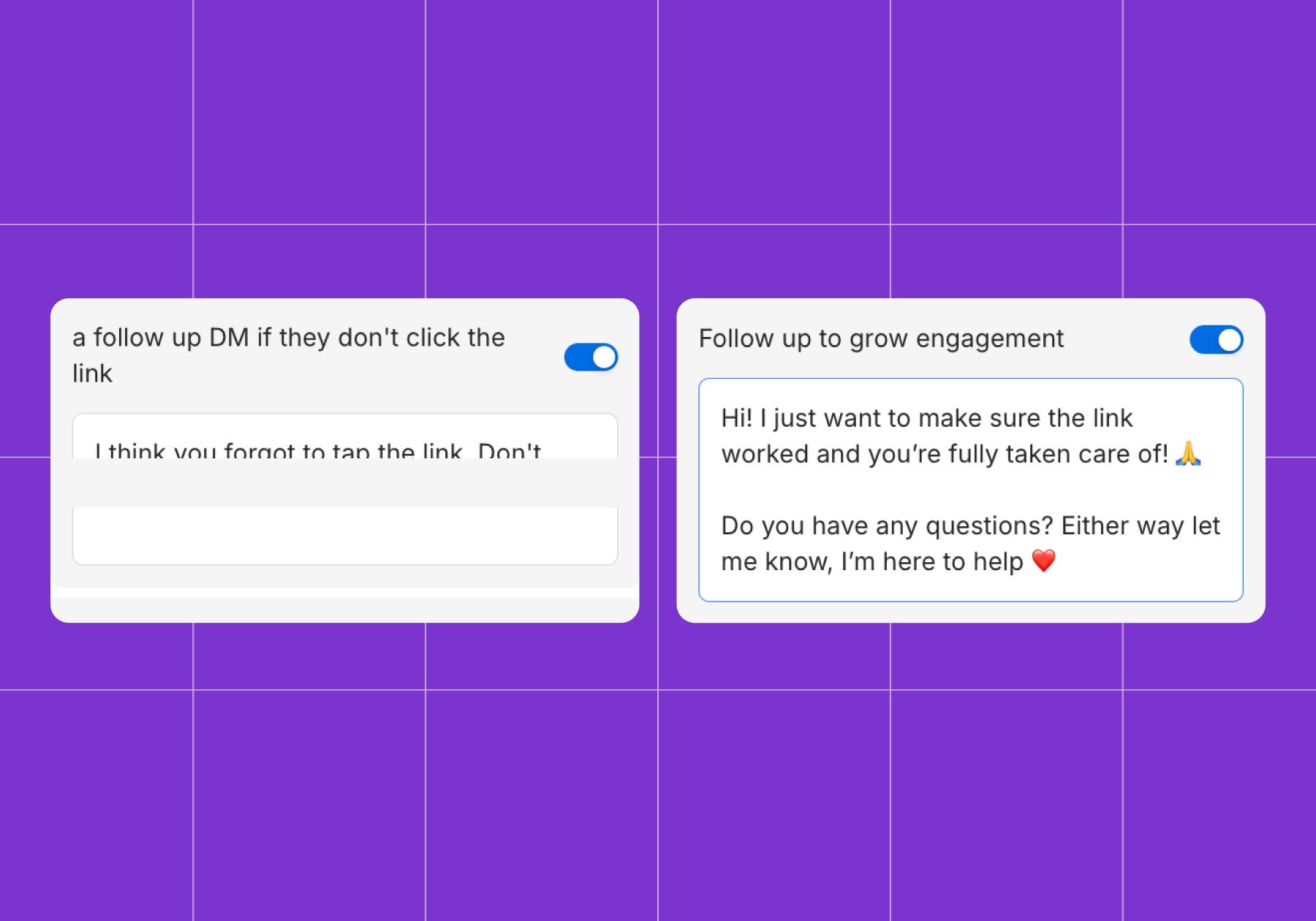
Plus, it’s really easy to follow up with Manychat. Most Quick Automations offer the option to follow up if the user doesn’t take action; for instance, the comment-to-DM automation has a feature called "send a follow-up DM" if they don't click the link.
Generate leads with Story, another Manychat Quick Automation, has the Follow up to grow engagement option, which is very similar. Make sure to toggle these options on whenever you set up Quick Automations.
Create, Automate, Sell, Repeat

These automations will keep working long after you’ve published the posts and written the messages. A reel can keep generating leads weeks after you post it; a lead magnet can keep growing your email list while you sleep; and a qualification quiz can help new followers find the right course without you answering the same questions over and over again.
So, if you want to earn more from your courses, set up some automations that support each part of the selling journey — from the link requests and FAQs to the follow-ups and email campaigns. You don’t need to know how to code to get started; you just need some basic writing skills and a Manychat account.
What are you waiting for? Start for free.
Frequently asked questions
Manychat isn't a course-hosting platform, but it can automate much of the communication and course-delivery experience that occurs before and after the sale.
So…yes, but only through an integration with your course platform. If your course platform doesn't have a direct integration, you can often connect it to Manychat using Zapier or other automation tools.
Manychat can automatically send course access links, welcome messages, onboarding information, and reminders after someone makes a purchase. It works especially well with course platforms like Kajabi, Gumroad, Hotmart, and other tools that can trigger automations when a sale occurs.
For example, when someone purchases your course, you can use an integration to:
- Send a confirmation message in Instagram, WhatsApp, or Messenger
- Deliver a course access link
- Share onboarding instructions or bonus resources
- Remind students to complete unfinished modules
- Upsell related courses, coaching, or memberships based on their progress
Manychat can capture leads through comments and messages on Instagram, Facebook Messenger, TikTok, and WhatsApp. You can use Manychat to automatically collect contact information, qualify prospects, segment them by interest, and nurture them toward enrollment.
Manychat doesn’t directly integrate with course platforms. Instead, you’d have to use Zapier or APIs/webhooks to connect Manychat to your course platform. For a list of tools Manychat integrates with directly, see manychat.com/integrations.
Yes. Manychat can help automate the sales process by responding to comments and DMs, answering FAQs, delivering lead magnets, promoting webinars, sending enrollment reminders, and directing prospects to checkout pages. It shortens the path from discovery to purchase without requiring constant manual responses. For more on this topic, check out How to Sell Your Course on Instagram.



Originally published: Jun 30, 2026, Updated: Jul 6, 2026
More stories worth reading
More content that's too good to miss