We’ve all been there: tasked with creating video content for social media, whether you’re a creator and it’s self-imposed or you’re a social media manager and your boss said, “So, uh…where are the TikToks?”
It can be daunting if you’ve never dabbled in the art of short-form video content, but the good news is that pretty much anyone can learn how to film, edit, and post videos that get views and inspire action.
And it’s worth learning because that’s where your audience already is (scrolling on social, watching videos). Reels now account for more than half of all content consumed on Instagram, and the average person is spending up to 2.5 hours per day watching video content on platforms like YouTube and TikTok.
If you’re not creating video, you’re missing the main event. So, let’s get you to the party (social anxiety not included).
The Basics of a Short-Form Video Strategy

If you’re rethinking your video strategy or starting from scratch, this section is for you. We’ll cover everything you need to know to start making short-form videos.
1. Create a content plan
Before you grab your tripod and ring light, take the time to create a simple content plan. It doesn’t need to be complex, just a lightweight strategy doc that covers the essentials: your content pillars, a few repeatable formats, and how often you plan to post.
Content pillars
Content pillars are the topics you will consistently talk about on your account. When identifying your pillars, consider what your audience cares about, what your content/product helps with, and what you can realistically create content around every week.
For example, an e-commerce brand might choose pillars like:
- Product education (how to use it, why it works)
- Social proof (reviews, testimonials, UGC)
- Behind-the-scenes (packing orders, day-in-the-life)
- Tips and inspiration related to their niche
A lifestyle creator might go with something like:
- Fashion and style
- Daily life/routines
- Products and recommendations (monetization pillar)
Content formats
Once you have content pillars, turn them into repeatable formats. Why? Because one of the best ways to stay consistent is to create a few go-to formats you can reuse.
For example, a lifestyle creator could cycle through GRWM (get-ready-with-me), DITL (day-in-the-life), and storytime content, while a food creator might focus on recipe reels, restaurant reviews, and technique explainers.
It’s okay to start with generic formats and become more specific over time. For instance, a food creator may start with ‘recipe reels’ as one of their formats, and over time, evolve it into a recurring series like ‘dinner in under 30 minutes’ or ‘recipes even a picky kid will love.’
Get inspired: 13 Instagram Post Ideas for Your Tired Creator Brain
Posting schedule
Set a posting schedule that’s sustainable for you (two to three posts a week is always a good place to start), then stay ahead by keeping a backlog of ready-to-publish content.
When you separate the creating part of the process from the posting part of the process, it’s much easier to stay consistent, and consistency is what gives your strategy a chance to actually work.
2. Film content
Once you’ve got a content plan drafted, it’s time to hit record. How you approach filming makes a huge difference in how consistent (and successful) you’ll be.
Batch your content
Instead of filming one video at a time, set aside a window to shoot multiple videos in a single session. This is called “block shooting,” and it’s how many creators stay consistent without burning out. The idea is that you’re already set up and in the headspace to record, so you might as well get a few videos out of it.
Hook ‘em
Every video you post needs to have a hook within the first three seconds — otherwise, scrollers will keep on scrollin’.
Think about what will grab attention right away, whether it’s a hot take, a surprising fact, a relatable problem, or even something completely unhinged like screaming off the roof of a building.
If you don’t think of a hook ahead of time, you’ll end up with content people swipe past.
Video length
When it comes to the ideal length for social content, the truth is that shorter is usually better. Most viral videos are less than 15 seconds long. Both the TikTok and Instagram algorithms tend to favor videos that people watch all the way through (or, bonus: rewatch), and shorter videos make that much more likely.
Technically, Instagram reels can be up to 20 minutes long, and TikToks can be up to 60 minutes long. But let’s be real: most people who watch long-form content do so on YouTube. So, if you’re posting your video on Instagram, TikTok, Facebook, and/or YouTube Shorts, the best practice is to keep it under 60 seconds.
Fiming equipment
Don’t overcomplicate your setup. If all you have to work with is your phone, that’s fine — many creators make do with simple talking-to-camera videos.
If you have a budget, get a tripod or something similar, like an OctoBuddy, to keep your shot steady. Also, film in good lighting (in front of a window or a simple ring light). And if you can access a lav mic, use it — clear audio can be a game changer.
3. The editing process
You could post a raw clip to Instagram or TikTok and call it done, but editing your videos is what actually makes them fun to watch (we’ve all seen those “this is why editing is so important” videos).
Editing is how you add flair and style to your content, and it’s also how you tighten the pace, which is extremely necessary when you’re trying to make a video that’s less than a minute long.
Video editing tools creators swear by
Good news, fam: you don’t need crazy expensive software to make good videos. Many creators stick with the native editors in TikTok and Instagram (also, the Edits app for IG). These tools give you direct access to each platform’s trending audio, filters/effects, stickers, and more. Historically, platforms have favored in-app content, so that’s a good reason to stick with the native tools.
Aside from native editors, CapCut is considered the gold standard for editing short-form content. CapCut offers many of the same features as Edits and TikTok — templates, captions, transitions, effects, and all that jazz.
If you’re working on longer-form content too, tools like Adobe Premiere Pro, Final Cut Pro, or DaVinci Resolve are worth exploring. But honestly, these options are usually overkill for short-form content.
Check out our full roundup: The Social Media Video Apps Creators Swear By
How to edit short-form videos
Every creator’s editing process looks different. If you’ve never edited a video before, here’s a bog-standard editing process you can start working with right now:
- Upload your clips to your tool of choice (TikTok, Instagram, Edits, or CapCut).
- Arrange the clips in your preferred order. Make sure the hook is the first thing viewers experience when they come across your video.
- Trim the clips so the video’s pace feels right (fast and engaging).
- Add captions, on-screen text, transitions, and anything else you want.
Before you post, add a trending song from the platform you’re posting to’s library. This is one of many ways you can give your video a good shot at getting views, likes, comments, and so on.
While I’ve edited a handful of short-form videos for the Chronically Online Magazine Instagram account, I figured it’d be best to find out how creators and social media managers approach video editing as well. Here’s what they said.
Sierra Marie Bonn, a creator and pageant consultant, starts her video editing process by thinking about exactly what she’s trying to communicate.“I ask myself, ‘What story do I need to tell here?’ That helps me determine my shot list and plot.”
“I then film far too much, but I prefer to have oodles of unused content instead of not enough,” she says.
She also prefers to edit clips together in the order they were shot. “I default to telling the story chronologically since it’s one, authentic to what occurred, and two, easy to comprehend from the audience side.” Here’s one really great example of this from her TikTok page:
Bianca Garcia, social media specialist at Leadhub, says that she likes to edit her clips together first, then add the extras.
“I start with the ‘rough cut’ phase. I strip out the fluff to ensure the hook happens within the first 1.5 seconds, then after the flow is established, I add captions and layer in B-roll or music if needed,” she says.
Bianca notes that flashy transitions and effects aren’t always a good move. “I often see creators prioritize complex effects over the actual message. If a video is so heavily filtered or edited that it loses the human touch, your audience will immediately scroll right past it.”
Finally, Mike Vannelli, creative director at Envy Creative, told me that he thinks of videos as musical compositions, where “every cut is a beat that should drive the viewer toward a specific action.” I love that metaphor, and it’s a great way to transition to the next part of your strategy: using video content to drive growth and sales.
How to Use Videos to Drive Growth (and Sales) on Social

In case you haven’t heard yet, video content is one of the best ways to reach new people. Long gone are the days when the feed was exclusively populated with content from accounts you follow.
Today, the Instagram reels algorithm is designed to serve people content from accounts it thinks they will like, and TikTok’s algorithm works the same way. (YouTube has long been ahead of the game on this.)
If you want to grow your account and eventually turn followers into paying customers, video content is your best bet. But you can’t just post and ghost and think that’s going to work.
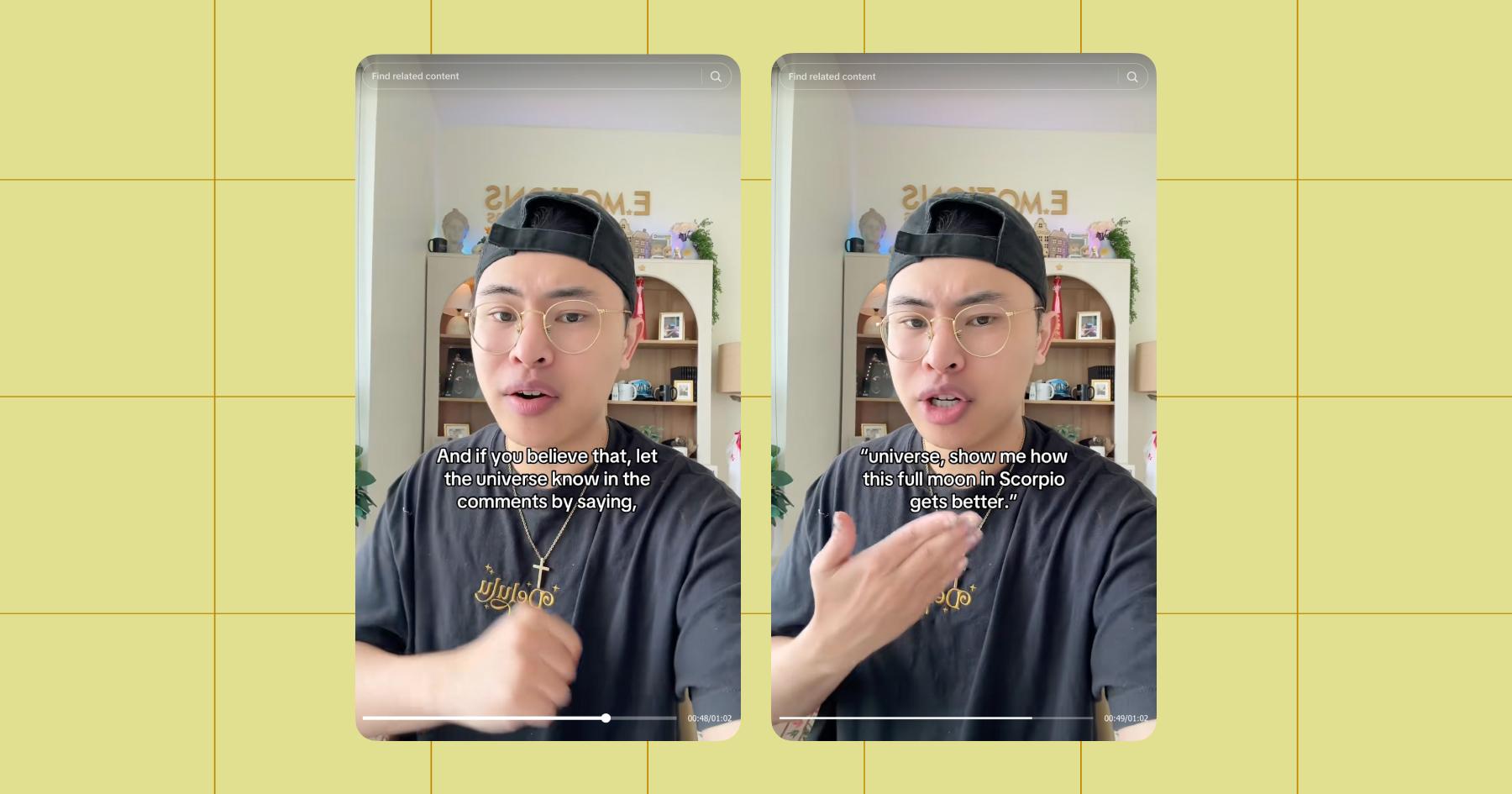
Instead, guide viewers in the direction you want them to go by including a call to action (CTA) in every video, even if it’s just a nudge to engage with the content, which is something creator and podcaster Ryan Lu does really well on her TikTok page.
If your goal is to get more followers, your CTA should be something like “follow me for more content like this” or “hit the follow button if you liked this video.”
CTAs for other conversions, like email sign-ups or sales, are also really important. When you’re selling something, you need to make the process of purchasing the thing as simple as possible — no answering questions in the comments and/or copying and pasting the same link into a dozen DM conversations. Instead, use Manychat to automate the whole process.
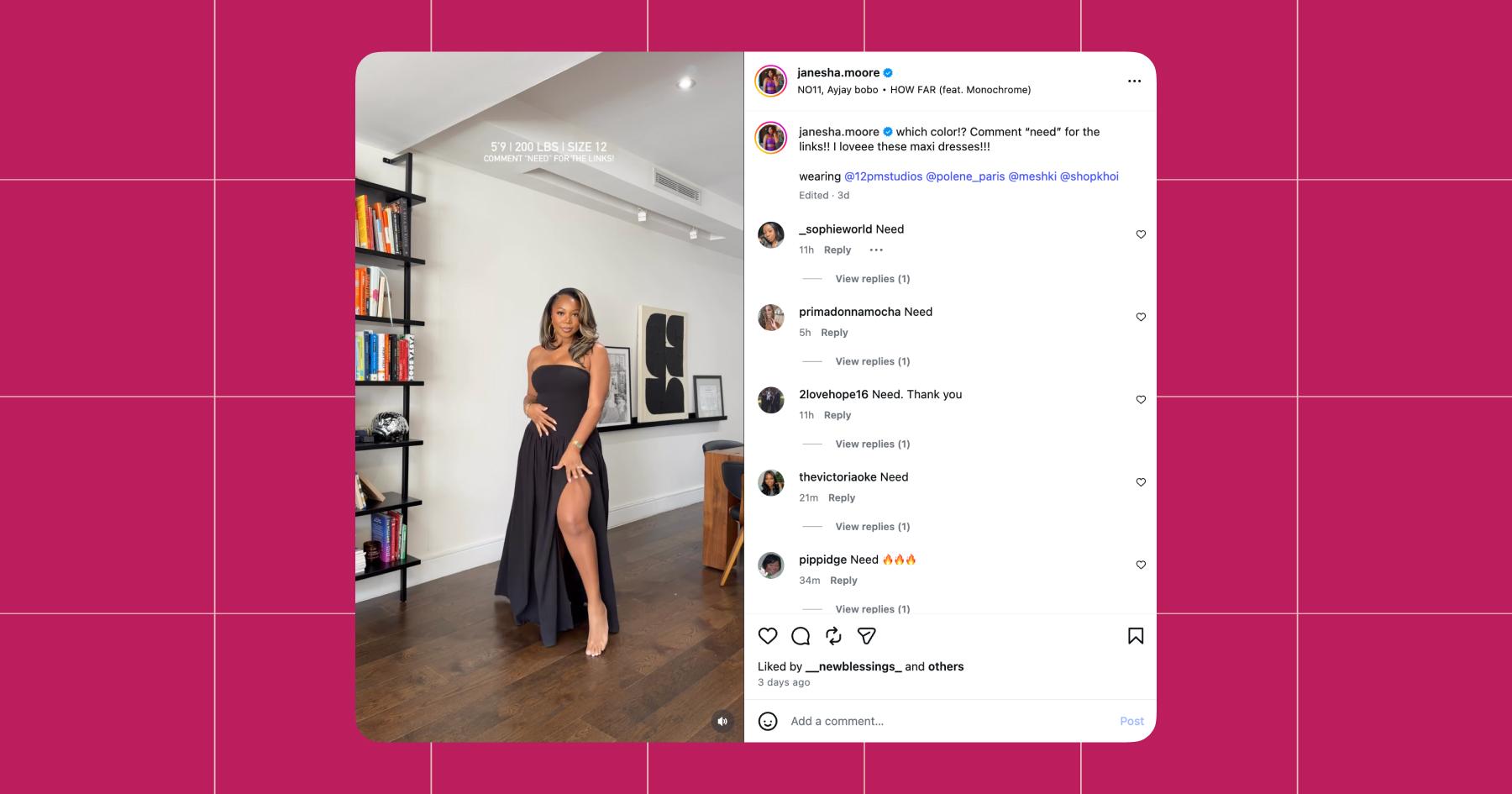
Example: Janesha Moore, a creator and affiliate marketer, sets up a Comment to DM flow for her posts showcasing different outfits. She tells the audience to comment “need” (the trigger keyword) for the link to buy the style. Manychat responds to the comments and automatically sends them a DM with the link. Janesha kicks back and watches the affiliate income roll in.
If this sounds like something you could benefit from, I’ve got good news — you can sign up for free and set up your first automation in less than 10 minutes.
Frequently asked questions
Track what happens after someone watches your video. Are people following you, commenting, clicking your links, or sending you DMs?
If you’re getting views but no engagement or conversions, your content is probably entertaining, but not effective. That usually means your hook is working, but your message or call to action needs work.
Nope, and relying on virality is a risky strategy. Ever heard of the virality trap?
A video that gets 5,000 views but drives 50 people to your email list or DMs is more valuable than a video with 500,000 views and no next step. So, instead of chasing viral moments, focus on repeatable formats, clear messaging, and strong calls to action. That’s what turns attention into something you can actually build on.
Not planning ahead. Filming on the same day you want to post might work once or twice, but it’s one of the fastest ways to burn out and fall off your posting schedule entirely.
That’s why block filming is so important. By setting aside dedicated time to batch multiple videos at once, you remove the pressure of creating on demand. You’re able to stay ahead, maintain a backlog, and focus on execution instead of last-minute brainstorming.



Originally published: Apr 28, 2026, Updated: Apr 30, 2026
More stories worth reading
More content that's too good to miss