If you want to post a Reel, TikTok, or YouTube Short, you’re going to have to do (at least a little) video editing. And if that thought made you shudder, don’t worry: There are tools out there that make the process painless — sometimes, even fun.
I asked around to find out which apps and tools people use to create social media videos these days. Keep scrolling to find out what they said.
The Best Video Editing Apps for Reels, TikToks, and Shorts

This list starts with easy-to-use options and ends with more advanced tools. If you’re new to making videos, start with the native editors and work your way up from there.
1. Native editors (TikTok, Edits, Instagram)
One of the best places to start your video editing journey is with the platform you plan to post on.
TikTok and Instagram’s built‑in editors are pretty powerful, and both platforms reward content created in their apps with reach. Also, Meta now has the Edits app, which rivals TikTok for trending effects and templates.
Ben Kim (Manychat’s video producer) particularly likes the TikTok editor. “The green screen tool is probably the most-used feature. It lets you resize and position yourself anywhere on the screen.” Here’s an example of Ben using the green screen feature.
Both TikTok and the Edits app offer green-screen tools and caption generation, the latter of which is a must-have, considering that up to 85% of scrollers watch videos without sound.
“[TikTok’s] closed captions tool is quite versatile and offers many styles that would otherwise take a lot of time to try and do within Adobe Premiere,” says Ben.
And then there’s the music. Adding trending audio to your video can help it take off. But the best practice is to add music from the app you’re going to publish on. So, if you’re posting an Instagram Reel, use Instagram’s music library. If you’re posting a TikTok, use TikTok’s.
Finally, YouTube Create is a great choice if YouTube is your primary platform and you want a simple, free way to edit Shorts or long-form content. It’s built specifically for YouTube videos, and it also offers native audio and caption generation features.
2. CapCut
CapCut has been the go‑to tool for short‑form video editing for a while now. It’s free (but you can upgrade to Pro for more features) and packed with templates, effects, and captions designed specifically for Reels, Shorts, and TikToks.
Ben crowned CapCut the most popular mobile editing tool amongst creators. “They offer a lot of templates that can make your life a lot easier. There’s also a desktop versionif you feel more comfortable on a computer,” he says.
Mike Vannelli, creative director at Envy Creative, swears by CapCut’s desktop version for short‑form content. Mike has produced over 5,000 video ads to date for clients such as McDonald’s, Warner Bros., USAA, Costco, and more. Videos like this one:
Mike’s team relies on CapCut’s AI captions and templates to move “at the speed of culture,” as he says. It’s a good choice for anyone who wants access to trending effects and the ability to edit on mobile or desktop.
3. Adobe Premiere and After Effects
When you need full editing power, the Adobe suite is where to go. Specifically, Adobe Premiere Pro and After Effects.
JD and Maddy Alewine, the couple behind the brand Them Bites, often post Reels and TikToks that show the process behind a dish.
As a former video journalist, Maddy has familiarity with Adobe Premiere, which is why she and JD use it. “It may seem a little intimidating at first,” says JD. “But once you get used to the basics, it’s easy to see why it’s the gold standard.”
“For recipe and food videos with a lot of clips like I make, editing on a mobile app like CapCut or InShot just isn’t feasible, so that’s another reason I use Premiere on desktop.”
In general, Adobe products are best suited for those with some video editing experience. And if you’re working with motion design or you want to create your own animated text, After Effects is a top choice for that.
4. Honorable mentions: Final Cut Pro and DaVinci Resolve
If your content leans toward the cinematic, a tool like Final Cut Pro is worth the learning curve.
“We definitely utilize Final Cut Pro for our heavy lifting and cinematic sequences,” says Mike of Envy Creative.
When a project needs an extra layer of visual polish, Mike uses DaVinci Resolve for advanced color grading. “When a brand requires that high-end, commercial sheen, Resolve delivers something mobile tools simply can’t,” he explains.
That said, he’s quick to point out that Final Cut Pro isn’t a starting point for most creators. His advice is to master pacing, rhythm, and storytelling in a native editor or app like CapCut. Then, when your creative vision outgrows your software, switch to a powerhouse tool like Final Cut Pro.
Bonus: Filming Tips from The Pros

You’re already here (and thinking about creating videos), so why not pick up a few extra tips?
1. Hook viewers in the first three seconds
Lock in your opening moment first. “Before we even touch the timeline, we identify the hook,” says Mike. A hook can be visual, text, audio, or all of the above. Brock Johnson (@brockjohnson11) is a great person to follow if you need help brainstorming hooks.
2. Start simple and build from there
If you’re just starting, resist the urge to over-tool. Sierra Marie Bonn (@sierramariebonn), creator and founder of impACT Consulting, recommends focusing on storytelling first:
“I start with asking myself, ‘What story do I need to tell here?’ which helps me determine my shot list and plot,” she says.
“I then film far too much; I prefer to have oodles of unused content instead of not enough,” she says. For short social videos, Sierra suggests editing and posting content on-site (in Instagram, TikTok, or YouTube) to give it the best shot at engagement.
3. Prioritize pacing over flashy edits
Multiple creators emphasized that good pacing beats advanced editing every time. “We treat editing like a musical composition; every cut is a beat,” Mike explains. Get the timing of your clips right before getting fancy with transitions or overlays.
4. Don’t underestimate audio quality and captions
Strong sound can carry a video, even if the visuals are simple. “You can have average visuals, but if your audio is crisp and your message is clear, people will stay,” says Mike. This is why creators like JD and Maddy from Them Bites record voiceovers and make sure their captions are dialed in.
5. Skip the AI-generated content (for now)
“Every day I’m advertised a new AI video editing app, and every single one of those is overrated,” says Sierra Marie Bonn.
Authenticity usually outperforms AI on social. In fact, AI is now becoming a red flag for scrollers.
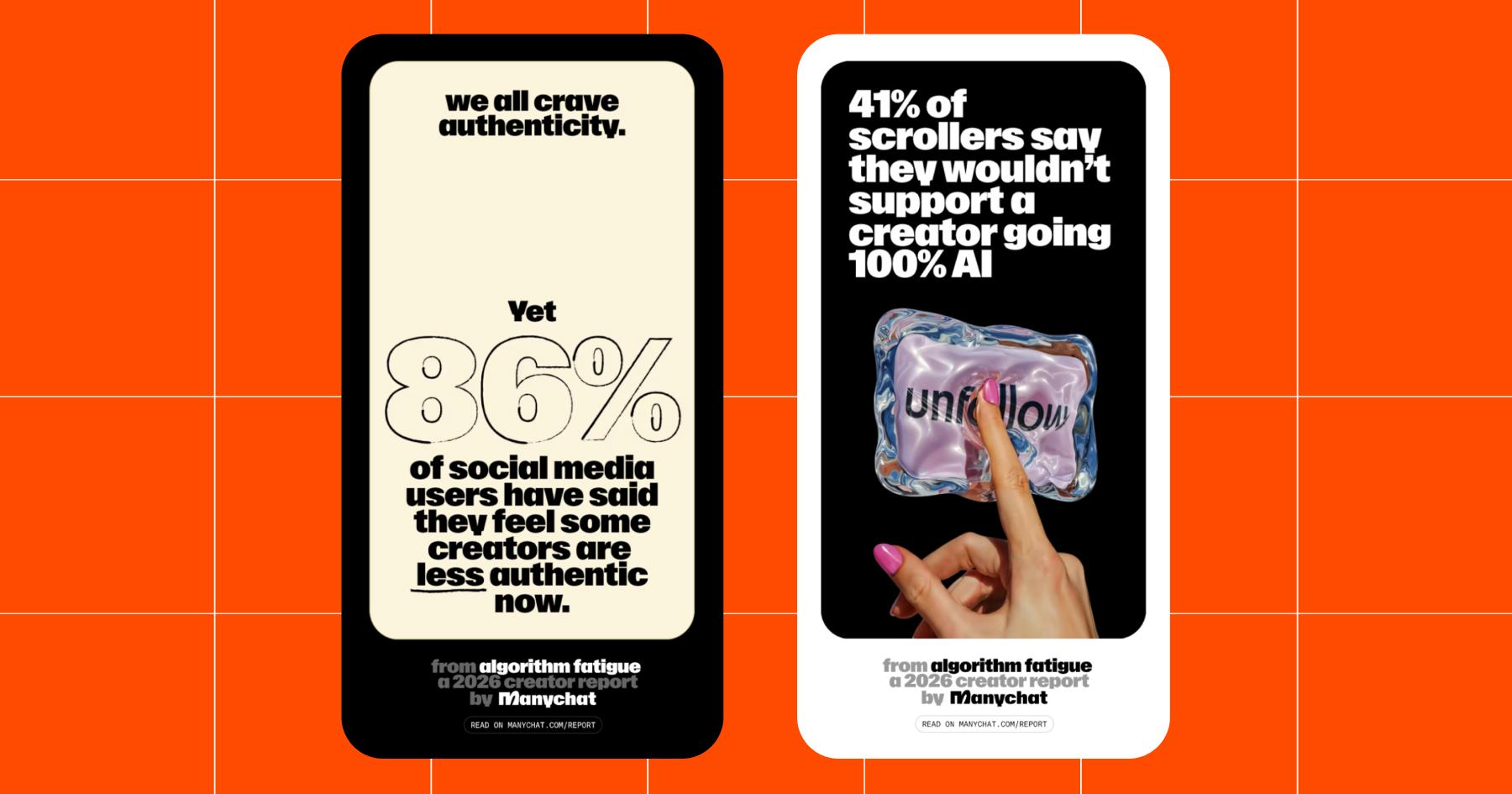
Unless you’re known for posting AI-generated content, do yourself a favor and skip apps like Sora and Meta’s Vibes. “Just start with editing inside Instagram or TikTok, and keep it simple as you build your skillset (finding the right clips, regulating audio, etc.),” advises Sierra.
Make the Most Out of Your Masterpiece

Imagine spending hours editing a video…only to watch it flop. Been there. 😔
Good news: When you need to post and ghost, Manychat can step in to keep engagement rolling.
- Questions? Answered.
- New followers? Greeted.
- Emojis? Liked.
- Links? Sent.
Manychat helps you build your account without being glued to your phone. And you can get started for free.
Frequently asked questions
The best social media video apps depend on your experience level and where you publish. Native editors (like TikTok, Instagram, and YouTube Create) and CapCut are great for fast social video. Tools like Adobe Premiere, Premiere Rush, and Final Cut Pro offer more control for advanced video content and longer-form projects.
Most creators start with mobile apps because they’re faster and built for social platforms. As your video creation needs grow (more clips, tighter pacing, and so on), desktop tools make editing large amounts of video content easier and more reliable.
Adobe Express and Premiere Rush are solid middle-ground tools for social video. They’re easier to learn than Adobe Premiere Pro and work well for simple video creation, branded templates, and quick edits — especially if you’re already in the Adobe ecosystem.
No. High-performing social video is more about hooks, pacing, sound, and captions than advanced effects. Many creators see great results using native editors or CapCut, upgrading to tools like Adobe Premiere only when their creative vision or workflow demands it.



Originally published: Feb 17, 2026, Updated: Feb 18, 2026
More stories worth reading
More content that's too good to miss