Is Automating Instagram Worth It? The Pros and Cons of Instagram Automation

Running an Instagram as a creator or business owner takes hustle. It's your job to juggle creating memorable content, engaging with your audience, promoting and monetizing what you make, and boosting brand awareness — all while running your business behind the scenes.
It's a lot.
So naturally, when you're drowning in DMs and comments, Instagram automation starts sounding like a good idea. But here's what every creator worries about: automation can make you more efficient, but it can also lead to you sounding like a robot (and maybe even getting your account flagged).
To help you strike the right balance between efficiency and authenticity, we're covering all the bases: the pros, the cons, automation habits that'll get you banned, and how to do it the right way.
TL;DR
- Instagram automation saves hours, boosts engagement, and captures leads. But only when you use the right tools the right way.
- The biggest Instagram automation risks come from shady bots (auto-follow, auto-like) that violate Instagram's terms — not from official API-based tools like DM automation.
- The sweet spot is automating repetitive tasks (DM replies, comment responses, lead capture) while keeping your actual content and voice human.
What Is Instagram Automation?
Instagram automation means using tools to handle repetitive tasks for you — things like DM replies, comment responses, story mention follow-ups, scheduling, and reporting.
Automation tools exist on a spectrum; on one end, you’ve got official API-based tools that work within Instagram's Messaging API. On the other end, you've got sketchy third-party bots that auto-follow, auto-like, and scrape data.
Keeping your account safe comes down to where you fall on that spectrum. If you’re using a Meta-approved tool like Manychat, you’re in the clear. If you’re paying random websites to automate things for you, that’s where you can get into hot water.
Essentially, it's not automating that will get you in trouble; it's the kind of tool you use to do it.
Safe vs. unsafe Instagram automation | ||
|---|---|---|
Automation type | Examples | Risk level |
Safe (official API) | DM auto-replies, comment-to-DM flows, story mention responses, lead capture, post scheduling | Low; built on Instagram's official API |
Unsafe (third-party bots) | Auto-follow / unfollow, auto-like tools, password-sharing services, mass identical DMs, data scraping | High; violates Instagram's terms, can get you banned |
The pattern is simple: anything that fakes human behavior at scale (following, liking, mass-messaging identical junk) or hands your login to a shady service is a fast track to suspension. Anything built on Instagram's official API through a Meta Business Partner is the safe path.
When in doubt, ask one question: Does this tool need my Instagram password? If yes, run.
What can you safely automate on Instagram?
Here's what you can put on autopilot without breaking Instagram's rules:
- DM auto-replies: Answer common questions instantly, day or night, without lifting a finger.
- Comment-to-DM flows: When someone comments a keyword on your post, they automatically get a DM with a link, offer, or freebie.
- Story mention responses: When a follower shares your story, they get a friendly automated reply that keeps the conversation going.
- Lead capture: Collect emails and phone numbers right inside the DM, turning casual followers into contactable leads.
- Post scheduling: Schedule your content in advance so you're not glued to the app at posting time.
- Analytics and reporting: Track what's working so you can double down on it.
The highest-ROI tasks here are DM replies and comment-to-DM flows. They directly impact engagement and lead capture, which is exactly where the money is for most creators and businesses.
The Pros of Instagram Automation

Let's start with what Instagram automation does well.
1. You get time back in your week
Time is money, but with 1,000+ unread DMs in your inbox…you won't have much of it. (Time, that is.) Manychat’s 2026 Creator Report found that most creators spend between two and three hours a week responding to DMs and comments.
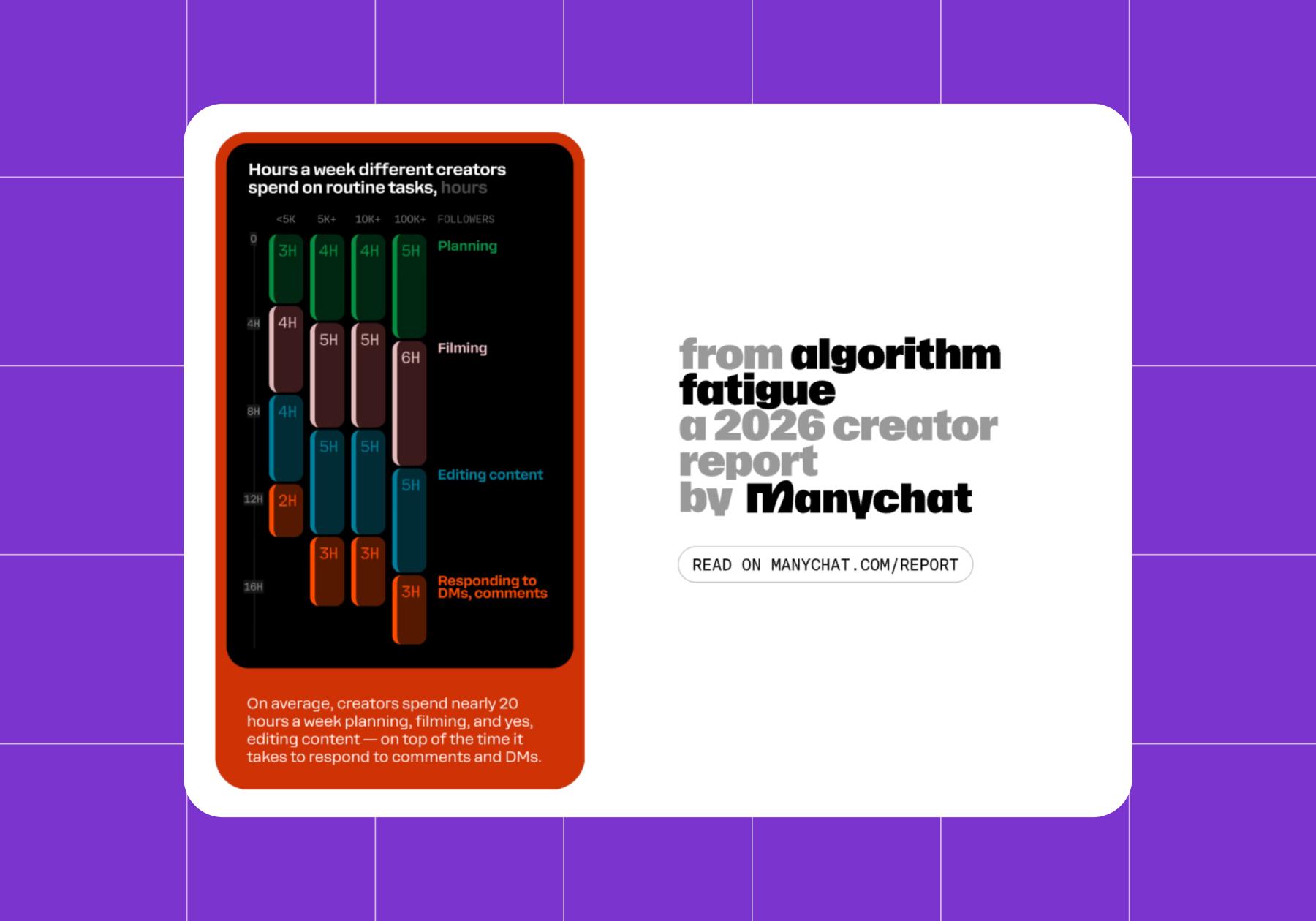
With an automation tool like Manychat, you can set up flows that handle FAQs and link delivery, helping you get some of those hours back.
2. Engagement doesn’t stop when you log off
Responding to comments is a great way to keep engagement going, but occasionally, you need to log off. Automation tools trigger auto-responses to every comment and Story mention, so you’ll never miss an opportunity to acknowledge a scroller.
This isn’t speculation; it’s proven. In a HypeAuditor x Manychat study, creators who automated their DMs drove 40% to 150% more comments per post.
3. You can capture more leads
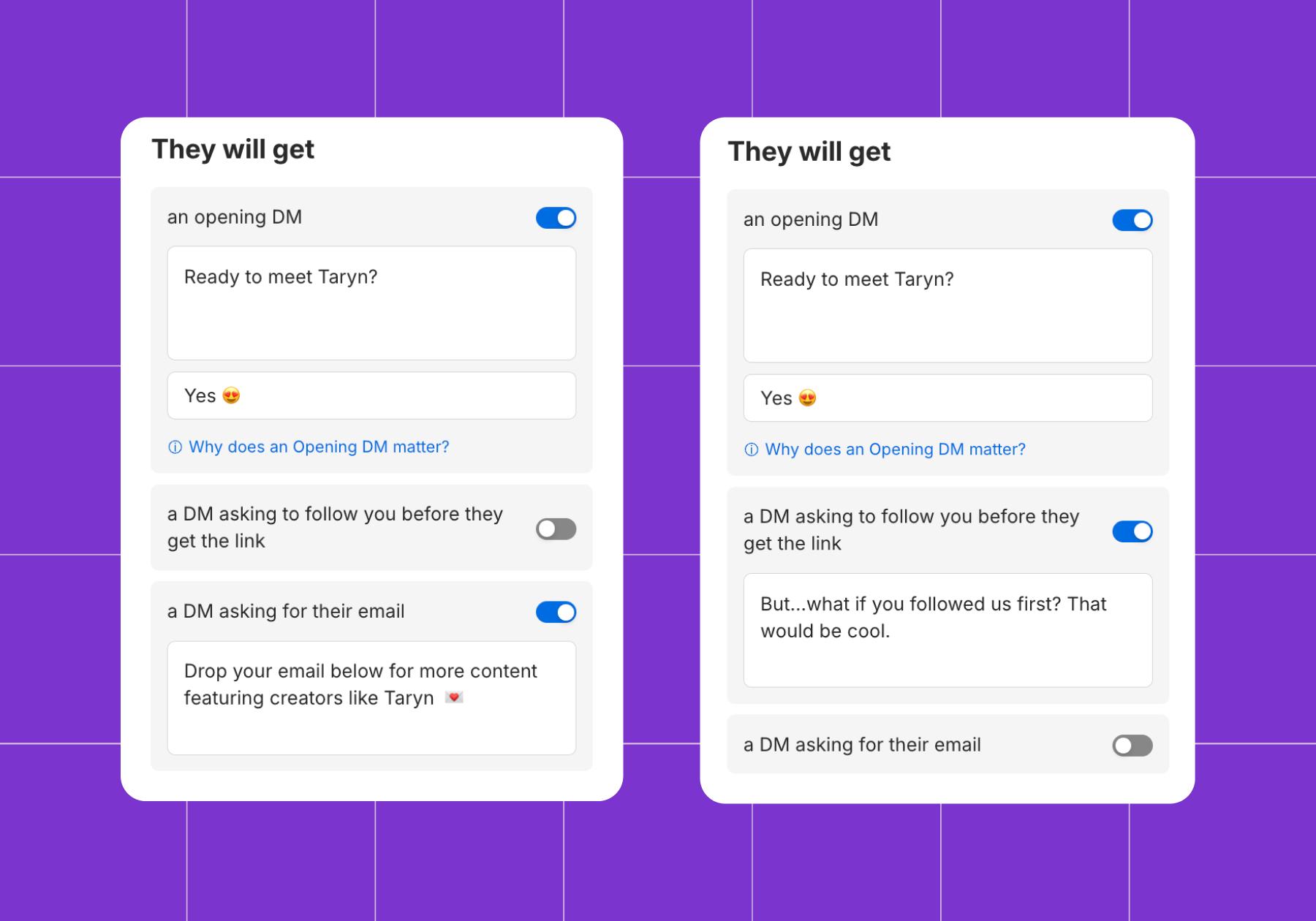
When you automate Instagram DMs, you can collect emails and phone numbers automatically. If you’re using Manychat, this is as easy to do as toggling on the “Ask for an email” option in the Comment-to-DM Quick Automation.
FYI: Collecting emails and phone numbers through DM automation triggers GDPR (and similar laws) the moment an EU or UK follower is on the other end of the flow. Consent has to be explicit, collected before the data is used, and specific to its purpose — an email collected for a lead magnet doesn't automatically clear a business to send marketing later; that's a separate opt-in.
4. Automation provides consistency you can count on
An automated message will send the same answer to someone at 2 p.m. and 2 a.m. You, when you’re tired, might not.
That matters more than it sounds; chatbot interactions that maintain brand voice see 35% higher customer satisfaction scores. And consistency compounds, with companies that keep their voice steady across every touchpoint see revenue increases of 23-33%, and 68% of companies running brand-consistency programs report double-digit revenue growth.
5. It scales when a post blows up
A viral moment can lead to thousands of comments and DMs in your inbox within hours. Automation absorbs the spike within Meta's own rate limits (Instagram caps private replies at roughly 750 per hour per account), so the flood gets triaged rather than buried, and the people asking the most common questions get answered instantly instead of waiting in a queue behind everyone else.
One creator on our very own Manychat community forum describes a Reel that pulled in roughly 15,000 comments in three hours; the automation queued the excess and sent it out within Instagram's private-reply rate limit rather than losing it, since Meta gives a 7-day window to send an initial private reply to a comment. That's not instant for everyone in a real spike, but it's a flood no human team is triaging by hand in real time.
6. 24/7 access for followers and customers
64% of consumers say 24/7 availability is the single most helpful thing a chatbot offers, and more than half expect AI to deliver exactly that.
The Cons of Instagram Automation

Instagram automation has some downsides, and pretending otherwise would be unwise. Here's what to watch out for.
1. Losing your personality
If your goal is to form meaningful relationships, the last thing you want is for your followers to feel like they’ve lost access to you and are instead stuck chatting with a robot. The goal shouldn’t be to hide that you’re automating; it should be to personalize your automation so your personality still shines through.
- Here's a bad automated reply: "Thanks for your message! Check out our link in bio."
- Here's a good one: "Hey! Saw you're into reels strategy — want the free template I mentioned?"
The difference is customization. In Manychat, you have full editing access and can craft messages to match your tone. And if you’re using the AI version, you can upload your brand messaging guidelines to the knowledge base.
2. Spammy automation will tank your account
Yes, the convenience of automation is great. But you know what's not great? Straight-up spamming your followers.
Instead of automating likes and comments left and right (especially generic or irrelevant ones), make every interaction purposeful and personalized.
The line is simple: if a message helps the person on the other end, it's automation. If it exists only to serve you, it's spam.
Blasting the same "Check out my sale!" DM to everyone who follows you? That crosses the line and puts your account at risk of being shadowbanned or suspended.
3. Instagram is built to identify unsanctioned automation
On the note of spam… Instagram hates it, too. Instagram has separate algorithms for the feed, Stories, Explore, and Reels. Each of these algorithms is built to identify spammy content and behaviors, like auto-follow and unfollow bots, mass-liking, identical mass DMs, and password-sharing tools that scrape data. (FYI, Instagram's Terms of Use spell out that data scraping and unauthorized access can get your account restricted.)
The best way to stay safe is to use tools built on Instagram's official API (Meta Business Partners), as they adhere to the platform's rules and are endorsed by Meta itself.
4. The math doesn't always favor automation
Chatbot platforms aren't free, and the time required to build and test flows adds real cost even before a subscription fee is incurred. Industry pricing data puts small-business chatbot tools at roughly $15 to $500 a month. Pricing goes well past that for advanced tiers.
Learn more: Chatbot Pricing: How to Pick the Right Plan Without Overpaying.
At scale, automation is genuinely cheaper (AI-handled interactions run an estimated $0.50 to $5 each versus $5 to $25 for a human agent), but that math only works past a volume threshold, typically a few hundred conversations a month. Below that, a part-time VA or just answering DMs yourself may cost less than a subscription.
💡Tip: Before committing to a tool, tally your actual DM and comment volume and compare it against the tool's price tag.
5. Automation still needs an exit ramp
86% of customers want the option to reach a human, and 40% will abandon a conversation entirely if there is no escalation path.
That matters because chatbots don't get much benefit of the doubt: 72% of customers escalate after just one or two mistakes.
The handoff itself is often where things fall apart, too — one industry analysis found only 15% of AI-to-human handoffs are smooth, with 85% losing context along the way, forcing the person to repeat themselves (something 73% of consumers say is one of the most frustrating parts of support). A flow without a clear "hand this off to a person" moment isn't finished.
6. Official doesn't mean permanent
Building on Meta's official API means your costs and capabilities move when Meta moves.
WhatsApp's Business API is the clearest example: Meta made service conversations free and uncapped in November 2024, then less than a year later, on July 1, 2025, scrapped conversation-based pricing entirely in favor of per-message billing, with rates that vary by country and message category. Nothing about being "compliant" or "Meta-approved" protects a flow from a pricing model changing underneath it — it protects the account from getting banned, which is a different guarantee.
7. Some places require you to say, "This is a bot"
California's B.O.T. Act makes it unlawful to use an automated account to nudge someone toward a purchase without clearly disclosing that they're talking to a bot — and the disclosure has to live in the conversation itself, not a linked policy page. The law applies to platforms with 10 million-plus monthly U.S. users, a bar Instagram clears easily, so creators and businesses running sales-oriented DM automation with California followers should factor in a disclosure line, not just a compliant tool.
Instagram Automation Best Practices

There is a right (and wrong) way to do this. It all boils down to staying authentic and using automation as a tool. Here are a few best practices.
Start with one flow and build from there
There are plenty of easy-to-use tools out there, but that doesn't mean you should go all in overnight. Instead, start with a single comment-to-DM automation on your best-performing post type. Measure the results for a week, then expand from there. Monitor your performance and pivot as needed, just like you would with organic content.
Make it sound like you (not a template)
Even if you’re automating, your messages should sound like you. Write them as if you were responding to a follower personally. Send personalized offers, custom recommendations based on past purchases — whatever makes the person feel like more than a data point.
Segment so you're not blasting everyone
You've got sub-audiences with different ages, interests, and engagement levels within your audience. Your automation strategy should reflect that. New followers might get a welcome flow, repeat customers a loyalty offer, and curious lurkers a quick FAQ flow. Take time to segment before you dive in.
Stick with official API tools
This one's non-negotiable: only use tools built on Instagram's official API, ideally ones in Meta's Business Partner program. They keep you compliant and safe.
Manychat is one of those official partners, which is exactly why it won't put your account at risk.
Learn more: Is Manychat Officially Approved by Instagram?
So, Is Instagram Automation Worth It?
Our take: Yes, Instagram automation is absolutely worth the time and money, but only when you use the right tools the right way.
If you're shopping around, here's a quick checklist of features worth having:
- Official API and Meta partnership: Non-negotiable for keeping your account safe.
- No-code flow builder: You shouldn't need to write a single line of code to set up a DM flow.
- AI capabilities: For tone matching and smarter, more human-sounding replies.
- Multi-channel support: Bonus points if it covers Instagram, WhatsApp, TikTok, and Messenger in one place.
- Analytics and reporting: So you can see what's converting and double down.
- Lead capture and tagging: To collect and organize contacts automatically.
And wouldn’t you know it, Manychat has every one of ‘em. Plus, you can get started for free.
Frequently asked questions
Yes, for most creators and businesses, the time saved and engagement gains far outweigh the cost, especially when using official API-based tools. Automation handles repetitive DM replies and comment responses so you can focus your energy on content and real conversations.
You can, but only if you use the wrong kind. Password-sharing bots, auto-follow tools, and mass identical DMs are what trigger bans — not compliant DM automation built on Instagram's official API. Stick with a Meta Business Partner, and you're in the clear.
It can. Creators using DM automation often report significant revenue increases because automated flows capture leads, deliver offers, and close sales around the clock without manual effort.
Instagram bots typically refer to third-party tools that auto-follow, auto-like, or scrape data in ways that violate Instagram's terms. Instagram automation refers to official API-based tools that handle DM replies, comment responses, and lead capture within Instagram's rules.
Never automate follows, unfollows, likes, or mass identical outbound DMs. These actions violate Instagram's terms and put your account at risk of suspension or a permanent ban. Stick to DM replies, comment-to-DM flows, and lead capture instead.



Originally published: Sep 10, 2024, Updated: Aug 19, 2026
More stories worth reading
More content that's too good to miss