
ATTN: Agency marketers. We’re officially in the late 2020s. By now, most of your clients know they need to post content on Instagram and try to drum up engagement. That’s not what they need help with.
What they really need help with is turning that engagement into business, and that requires a dedicated person whose whole job is responding to people, sending them the links they want, collecting their contact information, and guiding them toward becoming a customer.
Doing all of that manually for your clients isn’t an option when you’re a small business yourself with a limited team and resources. But there’s good news: you don’t have to do it all yourself. You can just use Manychat.
Manychat lets agencies automate Instagram, TikTok, and Messenger interactions that would otherwise require a dedicated social media manager. Ahead, we’ll look at the types of agencies that use Manychat, how they use it, and walk you through three Instagram DM automation workflows you can build yourself.
What Types of Agencies Use Manychat?

Most of the agencies that currently use Manychat are small, performance-oriented marketing/automation agencies that manage social-to-revenue systems for clients. They typically have between one and 10 employees and serve creators, DTC/ecommerce brands, or small businesses.
Oftentimes, these agencies’ clients are already active on social (particularly Instagram) but have reached the point where “just post more content” isn't enough. So, the agency will use Manychat to build automations to support that content and drive more conversions.
More specifically, Manychat’s customer base contains three agency archetypes:
Agency type | What they mainly do | How Manychat fits |
Automation/funnel | Builds technical infrastructure for clients | Advanced flows, segmentation, integrations, and qualification |
Creator growth/monetization | Help coaches, course creators, and creators turn audiences into revenue | Automates lead magnet delivery, captures leads from Instagram engagement, and moves them toward offers or launches |
Full-service performance | Everything: content + funnels + ads + conversion | Turns engagement from organic posts and Meta ads into DM conversations, then captures, qualifies, and routes leads toward conversion |
These agencies make money through a mix of monthly retainers, one-time system setups, digital-product builds/marketing strategy packages, and occasional revenue-share or performance contracts.
What do agencies build in Manychat?
The way agencies use Manychat differs quite a bit from the way the average, self-serve creator uses Manychat. Agencies generally adopt more advanced functionality, particularly Conditions and Tags for audience segmentation, and sometimes connect multiple automations so that the end of one automation conditionally starts another.
A generic funnel for an agency built in Manychat could look like:
- Capture intent. Someone comments on a client's Reel or replies to a Story.
- Start the DM. Manychat automatically starts the conversation and delivers the promised lead magnet/offer.
- Qualify. The automation asks questions such as which program they're interested in, their goals and needs, etc.
- Segment. Conditions and Tags categorize a person based on their answers.
- Capture contact data. Name, email, phone number, and other useful information are collected.
- Route the lead. Manychat’s integrations can push lead information to a CRM or to tools like ActiveCampaign, HubSpot, or Google Sheets; in LATAM, leads are often routed to WhatsApp.
- Move toward conversion. The flow can send a booking link, a webinar registration link, a product page, a sales page, or another next step. Smart Delays can remind someone who hasn't completed that step.
- Human handoff when appropriate. For clients with sales teams, qualified leads can be directed to a salesperson.
Basically, while a creator may stick with Comment-to-DM automations, agencies are more likely to turn Manychat into a lightweight social lead-management and conversion system.
3 Example Instagram DM Automations for Agencies

Manychat agencies tend to be Instagram-first because that's where their clients (creators, e-commerce brands, etc.) already generate attention and engagement. They use Manychat to turn that engagement into leads and sales through automated DMs.
If you want to learn how to build some of the most common Instagram DM automation workflows used by agencies, this section is for you. We’ll walk you through three different automation examples and how to replicate them in Manychat.
Manychat account setup for agencies
Agencies aren't building automations for their clients from one giant Manychat account. They typically have separate workspaces per client.
Here’s how that works: Each client has their own Manychat account connected to their own Instagram, TikTok, and/or Messenger account(s). The agency is granted access to their Manychat account via user roles, allowing them to build and run automations for the client.
Ideally, the agency user can access multiple client workspaces from their own Manychat login, rather than maintaining separate credentials for each client.
Automation #1: Capture the lead
For a straightforward lead magnet campaign, you can use the Comment-to-DM Quick Automation. The Flow Builder is available when you need more advanced logic, branching, or multi-step lead capture, but Comment-to-DM works well for a simple lead generation push.
Here’s how to use Comment-to-DM in this way:
- Open Manychat and head to Automations. Click + New Automation, then choose the Auto-DM links from the comments template.
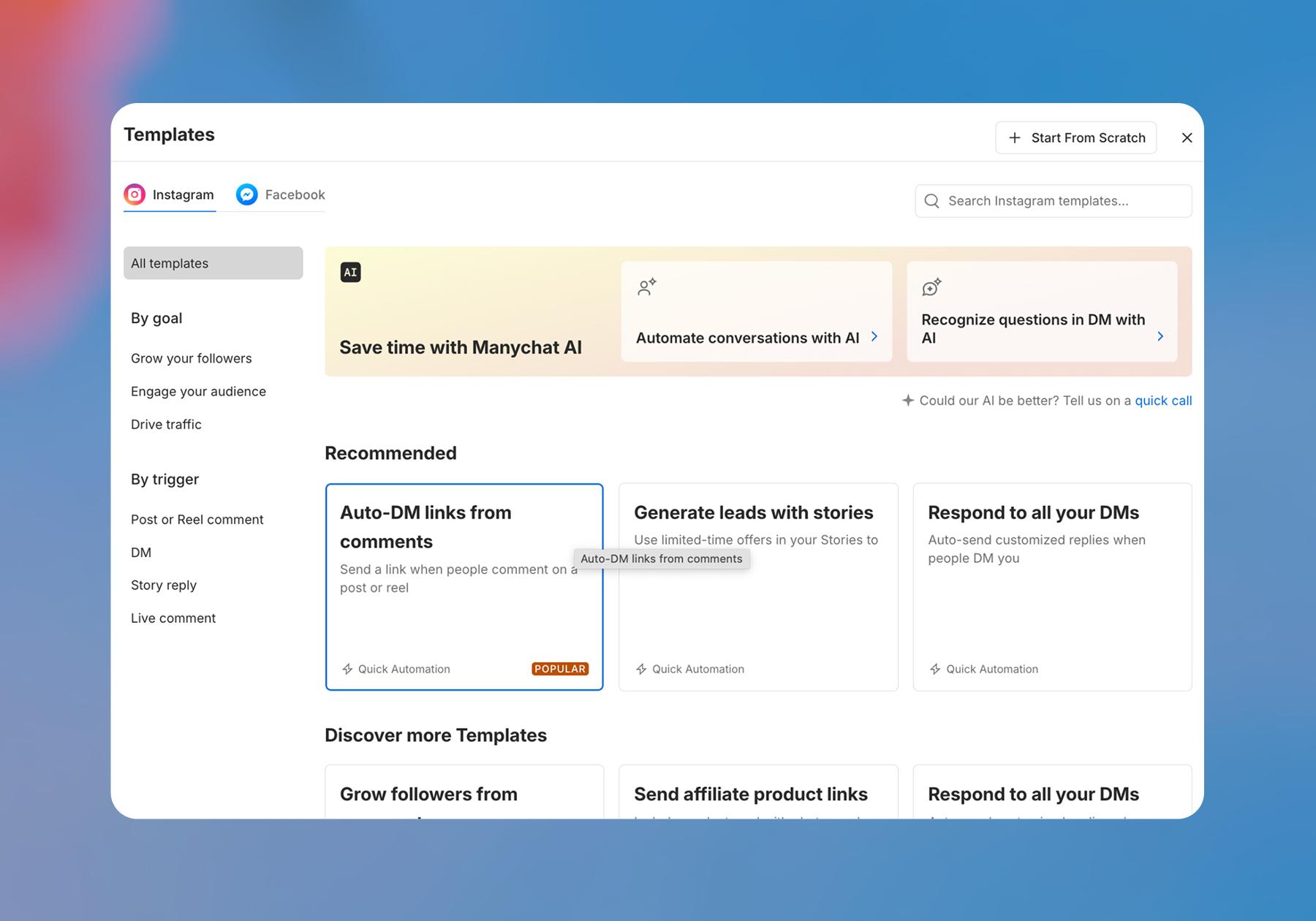
You’ve found the Comment-to-DM Quick Automation; now it’s time to customize it for your client.
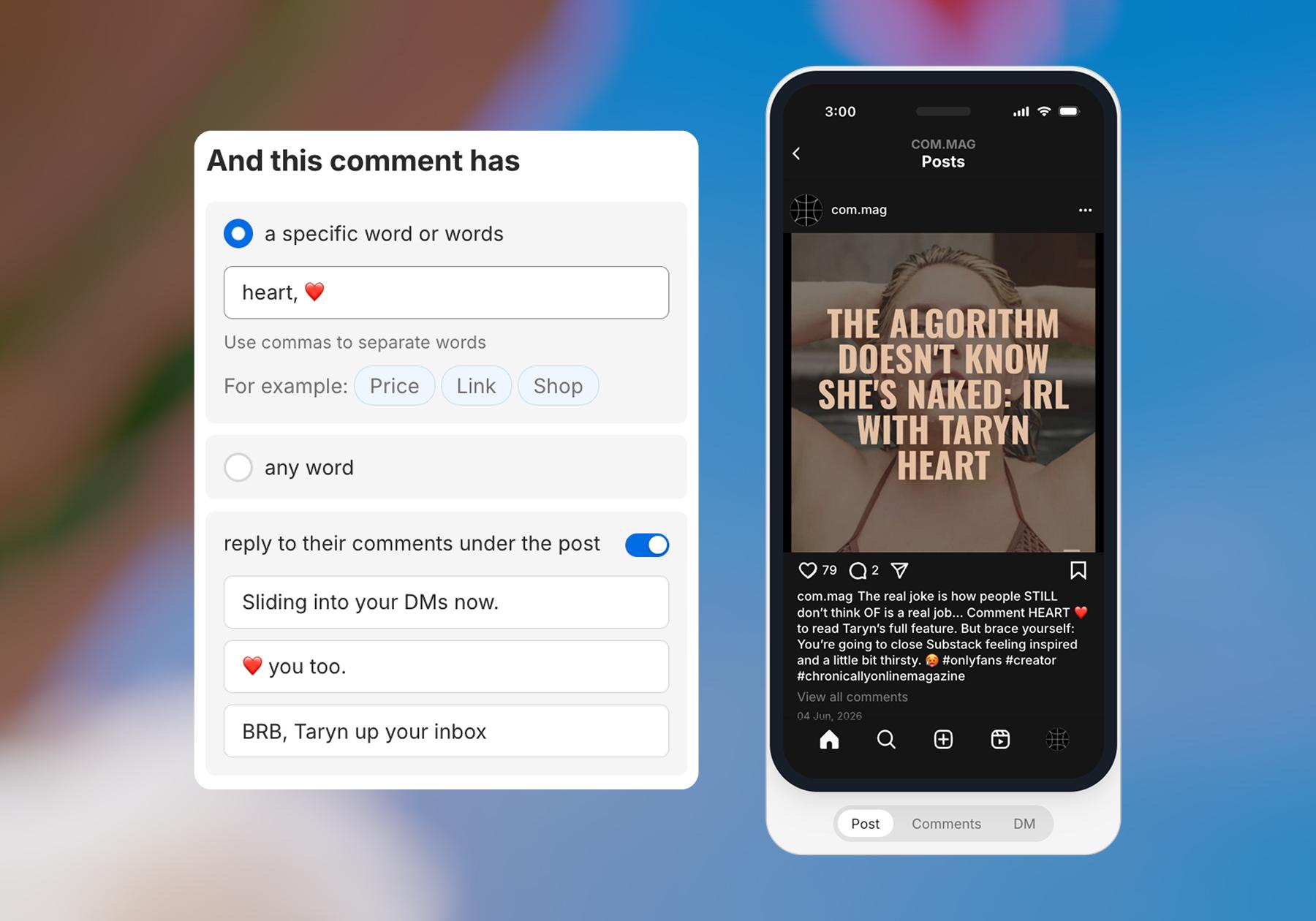
- Choose whether the flow will trigger when someone comments on any of your posts, a specific post, or the next post. Then, choose whether you want to use a trigger keyword or have any comment trigger the automation.
- At this point, you also need to choose whether you want Manychat to respond to comments in addition to sending them a DM. Toggle on reply to their comments under the post, and write some responses if you want to do this.
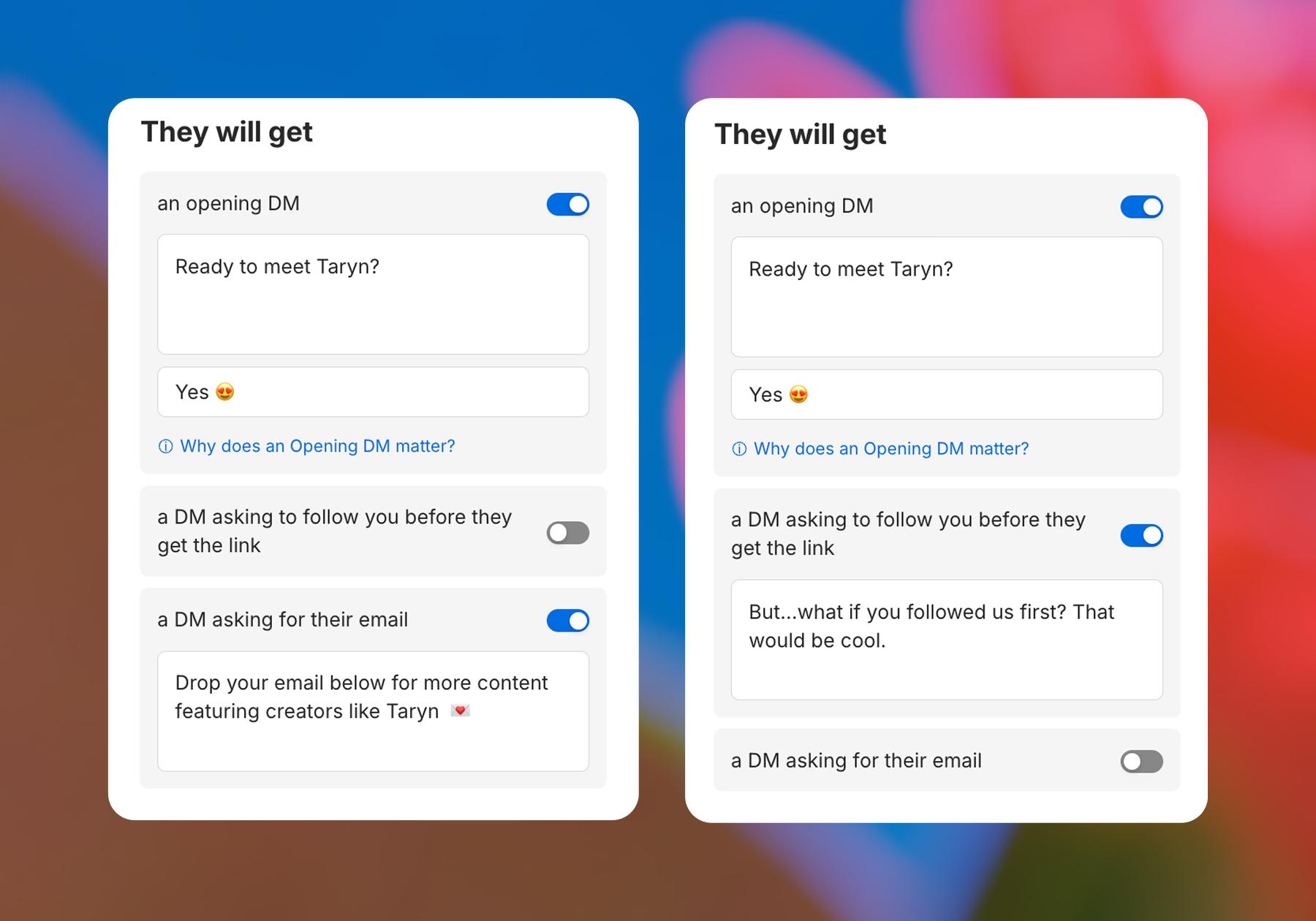
- Next, customize the DMs the scroller will get, starting with your opening DM. Toggle on a DM asking for their email; this is how you can actually capture leads for your client. Customize that message too, as well as the following one, which will send the link to your client’s lead magnet to scrollers.
- Hit Set Live when you’re ready to launch. Test the automation immediately to make sure it works properly.
Automation #2: Qualify the lead
Now you know how to generate and capture leads for your clients. Next, let’s talk about how to qualify leads.
The idea behind this workflow is simple: it starts like the one above, where you use a freebie or lead magnet to attract leads. But instead of collecting their email address in exchange for the link, you ask a question or two to understand their level of interest and readiness to buy what your client is selling.
- Open Manychat and head to Automations. Click + New Automation, then choose Start From Scratch. This will open the Flow Builder, where you can build a custom lead qualification automation.
- Add a trigger to start the automation. Click + New Trigger and choose the Instagram trigger that starts an automation when someone comments a specific word or phrase on a specific post.
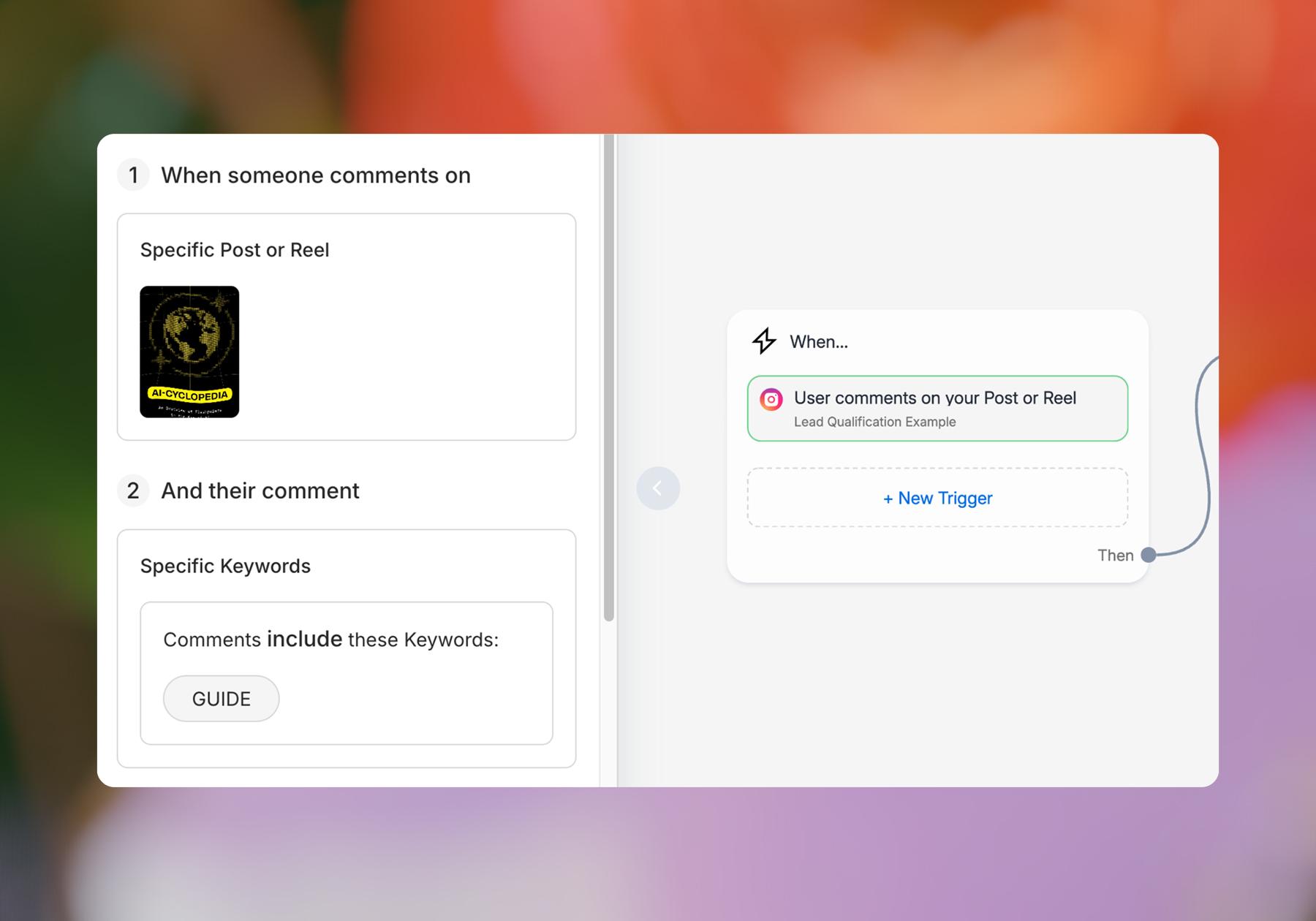
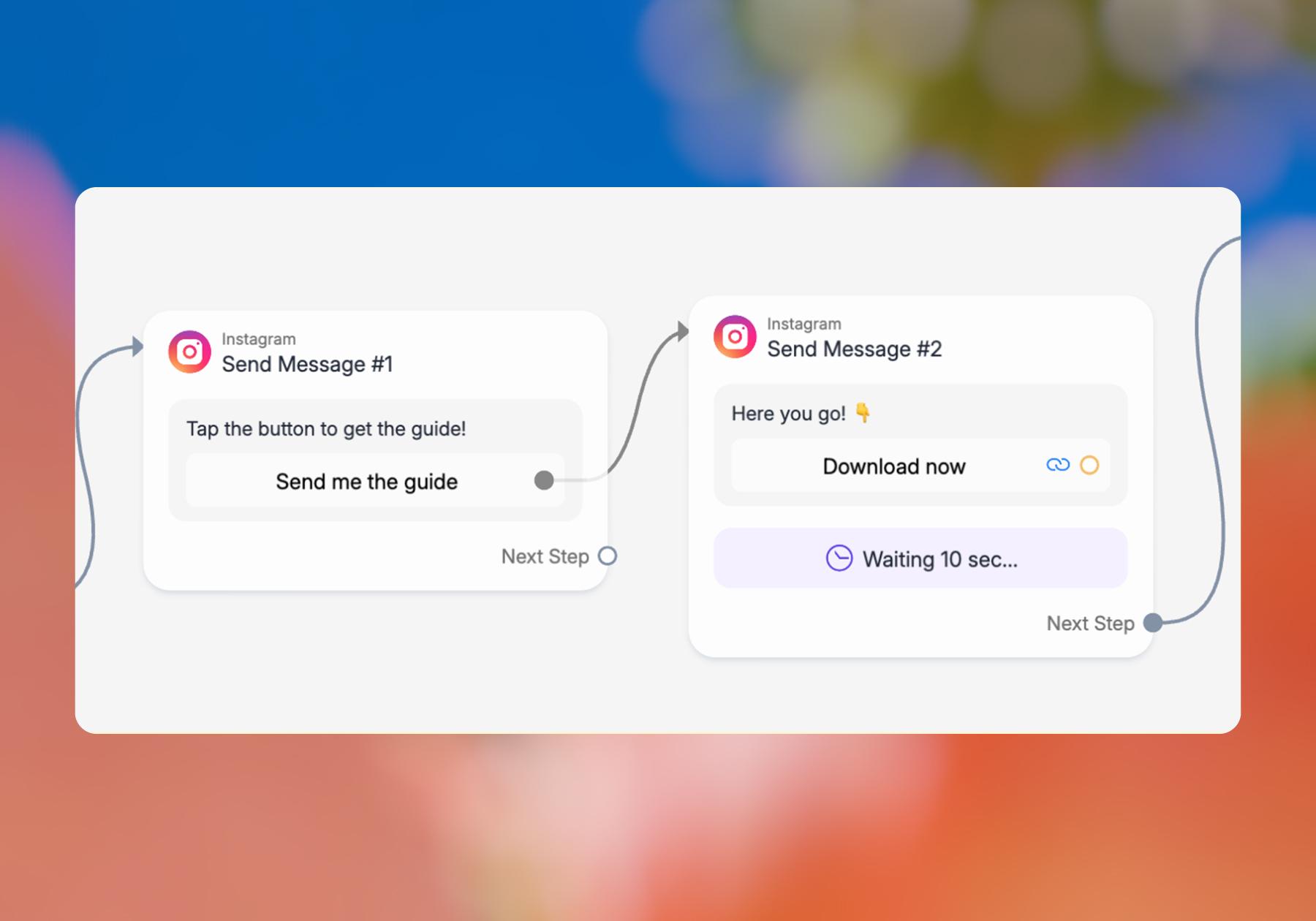
FYI: The first private reply generated by the Instagram Comments trigger has restrictions: before the rest of your automation can continue, the contact needs to interact with the message. So rather than asking a question immediately, you need to start with a simple prompt such as: “Tap the button to get the guide!”
- Add a message block that says something like the suggestion above — “Tap the button to get the guide!” — then add a button or Quick Reply that confirms the scroller wants it.
- Add another message block to your flow that connects to the button or Quick Reply and shares the actual resource with the scroller. Add a Smart Delay to this block so that the person isn’t immediately spammed with a question after they get the link.
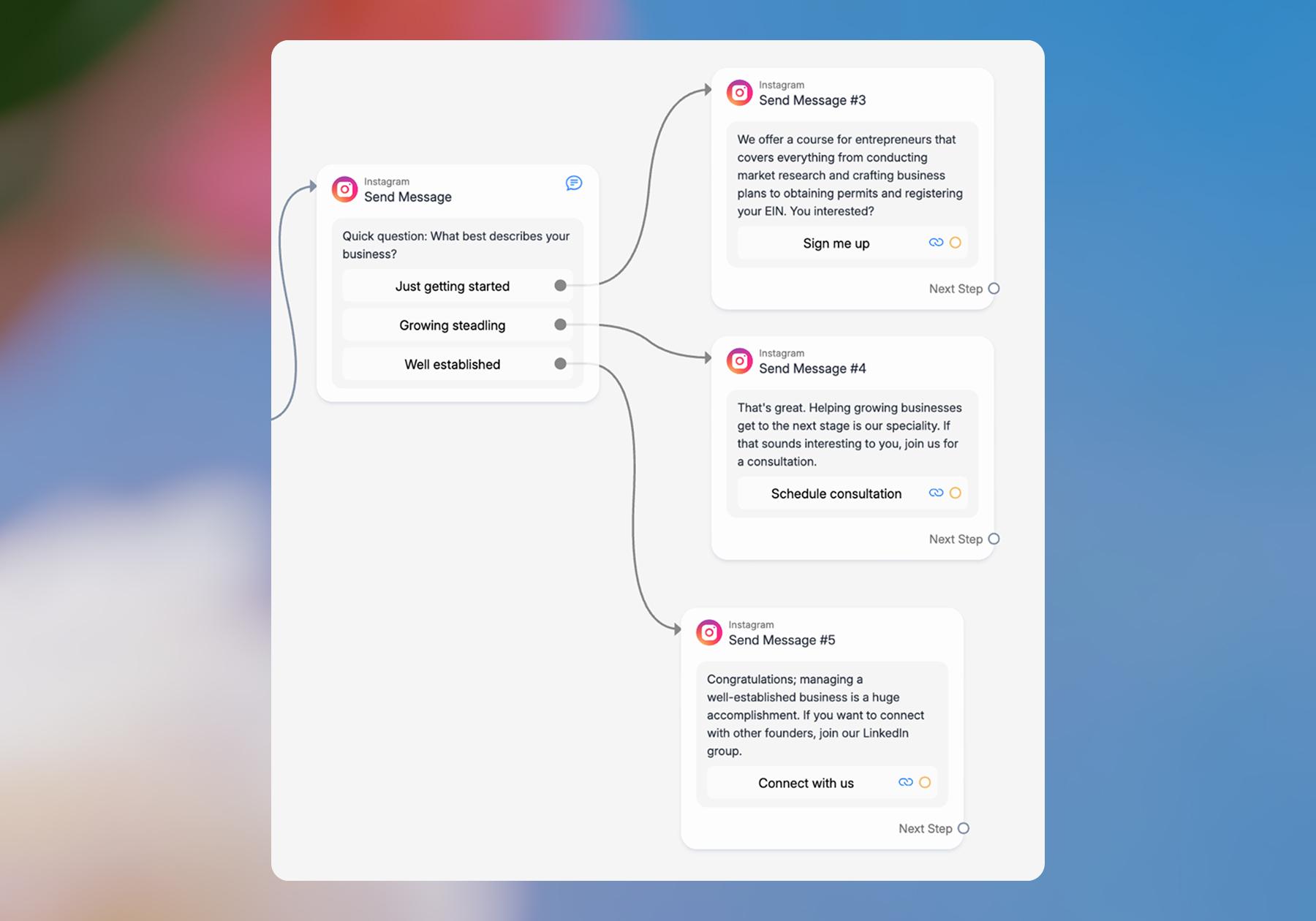
- Add another message block with a question you want to ask the lead. Keep it simple and give them a few predefined answers to choose from (using buttons or Quick Replies).
For example, if you have a client who’s a business coach, you might ask, “What best describes your business?” with options like: - Just getting started
- Growing steadily
- Well established
Note: You can add more questions and expand this flow into a full lead-scoring setup. If you want to learn how to do that, check out How to Set Up Lead Scoring in Manychat
- Add more message blocks that connect to each button or Quick Reply. For now, keep the outcome simple.
For example, a qualified lead (e.g., “Just getting started” or “Growing steadily”) might get a message saying they're a good fit for a course or coaching session. Someone who isn't a good fit for those offers (like a scroller who chooses “Well established”) could instead receive an invitation to connect on a networking platform like LinkedIn.
[Editor's note: see image below #7] - Publish the automation (hit Set Live) and test each possible path to ensure it’s working as intended.
Automation #3: Capture and route the lead for follow-up
In the example above, we set up an automation to qualify and convert leads immediately. After the scroller answers the question, the lead is qualified and then sent to the next relevant step: a course, consultation, sales page, etc.
But you don't have to try to convert a qualified lead immediately. If your client has a sales team or wants to nurture leads beyond Instagram, you can use Manychat to collect the lead's contact information and send it to the client's CRM.
If you want to do this, start with steps 1 through 4 from the last example, then:
5. Add a message block with your qualification question. As in the example above, give the lead a few predefined answers via buttons or Quick Replies.
6. Connect the answers that indicate a qualified lead to a new message block that asks for their email address. Make sure to add a Data Collection step to save their responses.
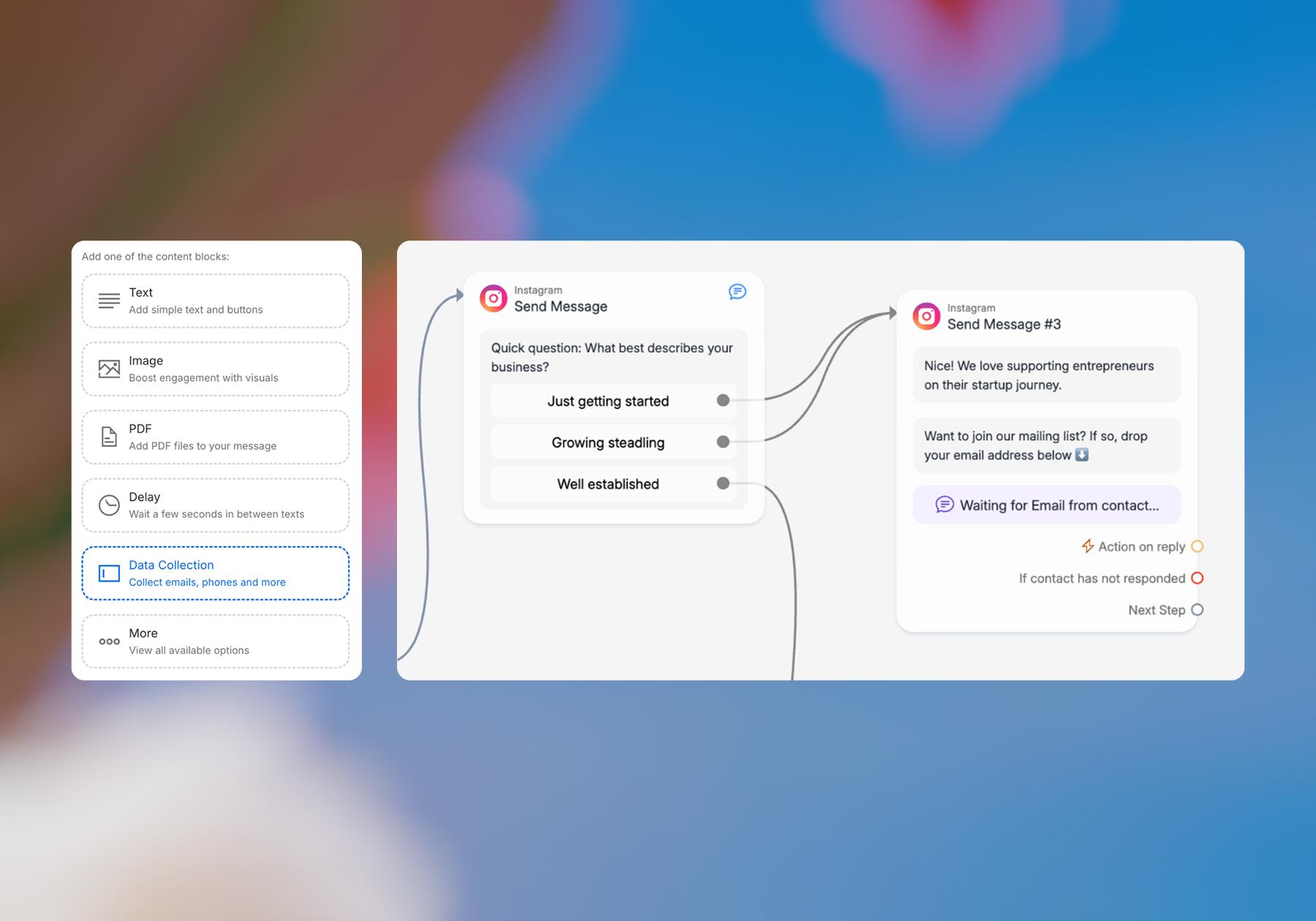
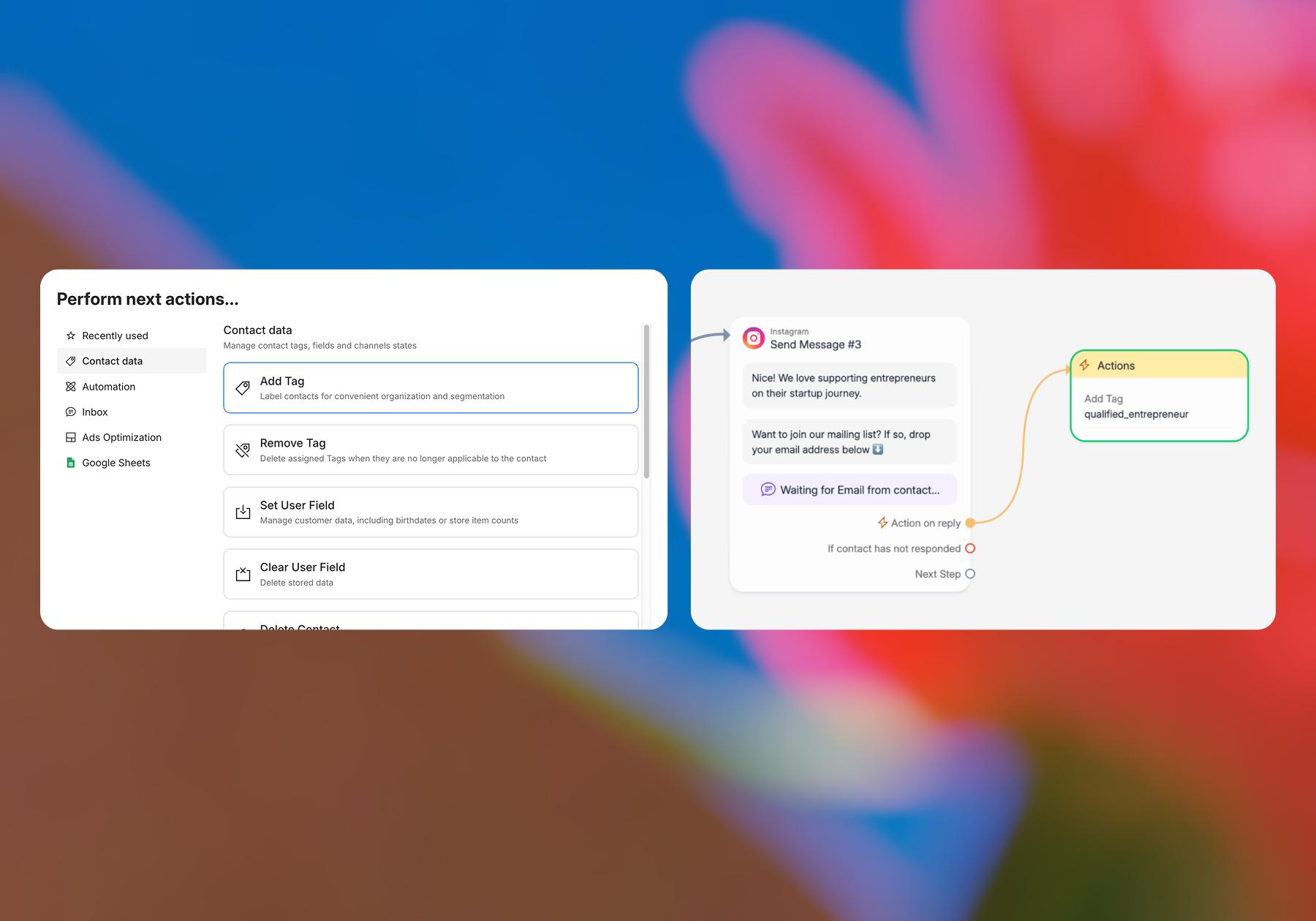
7. Add an Action step after you've collected their information. In the Perform next actions menu under Contact data, click Add Tag to the contact. Give the Tag a descriptive name like Qualified Lead – Entrepreneur so your client can distinguish these leads from other contacts in Manychat.
8. Connect the flow to your client's CRM or lead-management tool. Depending on the client's setup, you can use one of Manychat's native integrations or an integration platform like Zapier to send the contact information you've collected to the appropriate system.
9. Wrap up the automation with a message that lets the lead know what will happen next. For example: “Thanks! See you in your inbox soon.”
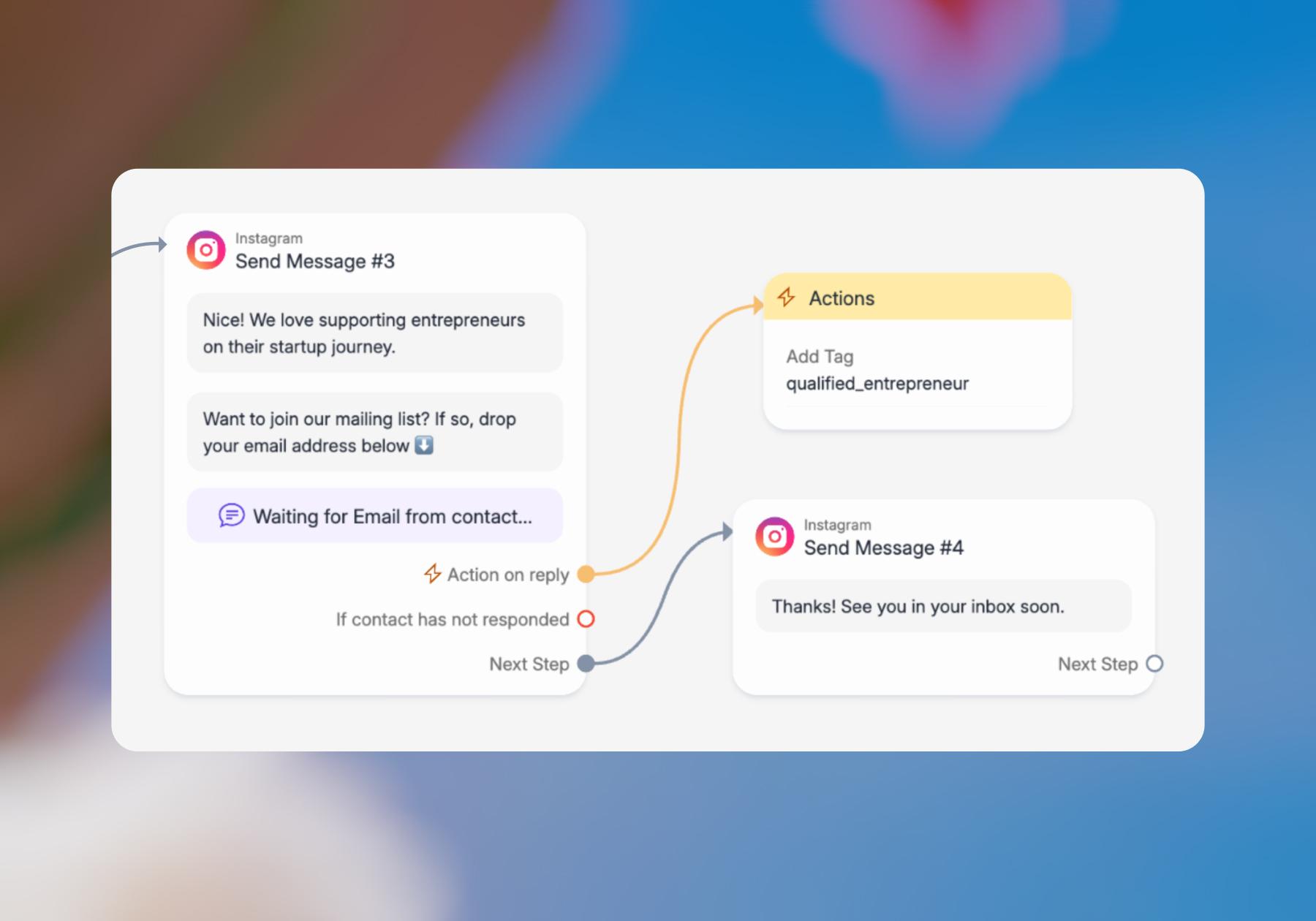
10. Hit Set Live and test the entire workflow. Submit a test lead that meets your qualification criteria and make sure their contact information is collected correctly, the Tag is applied, and the lead actually appears in your client's CRM.
Get Manychat — Your Clients Will Thank You

As the examples above show, an agency can start using Manychat for something as simple as automatically sending a lead magnet when someone comments on a client’s post. Then, once you’re comfortable with the basics, you can build on that foundation by creating custom flows that collect contact information, qualify leads, create different paths based on their answers, and pass promising prospects into your client’s existing sales process.
This flexibility is what makes Manychat particularly useful for agencies. You can keep it simple for a creator who just wants to grow their email list, or create a more advanced lead-generation system for a client with a CRM and sales team. What you build is up to you and your clients, and we’ll be here to help you along the way.
Frequently asked questions
Yes. Agencies work with separate Manychat accounts/workspaces for each client rather than putting every client into one account. Clients can grant agency team members access using user roles, allowing an agency user to work across client accounts without sharing login credentials. This is especially useful when you’re managing automations, contacts, integrations, and reporting for several businesses at once.
No. Manychat’s Quick Automations let you build common workflows without coding. For more customized workflows, agencies can use the Flow Builder to visually connect messages, questions, delays, actions, and different paths. All that’s required is clicking, typing, and dragging.
Yes. You can collect information such as an email address or phone number during an Instagram DM conversation and then use Manychat integrations to pass it to other systems your client uses.
For example, an agency could qualify someone in Instagram DMs, tag them as a qualified lead, and send their information to the client’s CRM for the sales team to follow up. Depending on the client's tech stack, this can be done via a native integration or a platform like Zapier.



Originally published: Sep 10, 2026
More stories worth reading
More content that's too good to miss