Chatbot Pricing: How to Pick the Right Plan Without Overpaying

Chatbot pricing looks simple…until you actually start using the tool. A plan that seemed like a steal at signup can quietly balloon once your contact list grows, you add a new social channel to the mix, or you need a feature that’s only offered with the highest-paid tier.
Luckily, chatbot pricing traps are easy to spot once you know what to look for, so let’s dive into how chatbot plans work and how to find the right chatbot for your situation.
The Anatomy of a Typical Chatbot Plan

If you’re looking for a chatbot (a tool that can automate conversations without coding), you’re probably wondering what kind of plan you need.
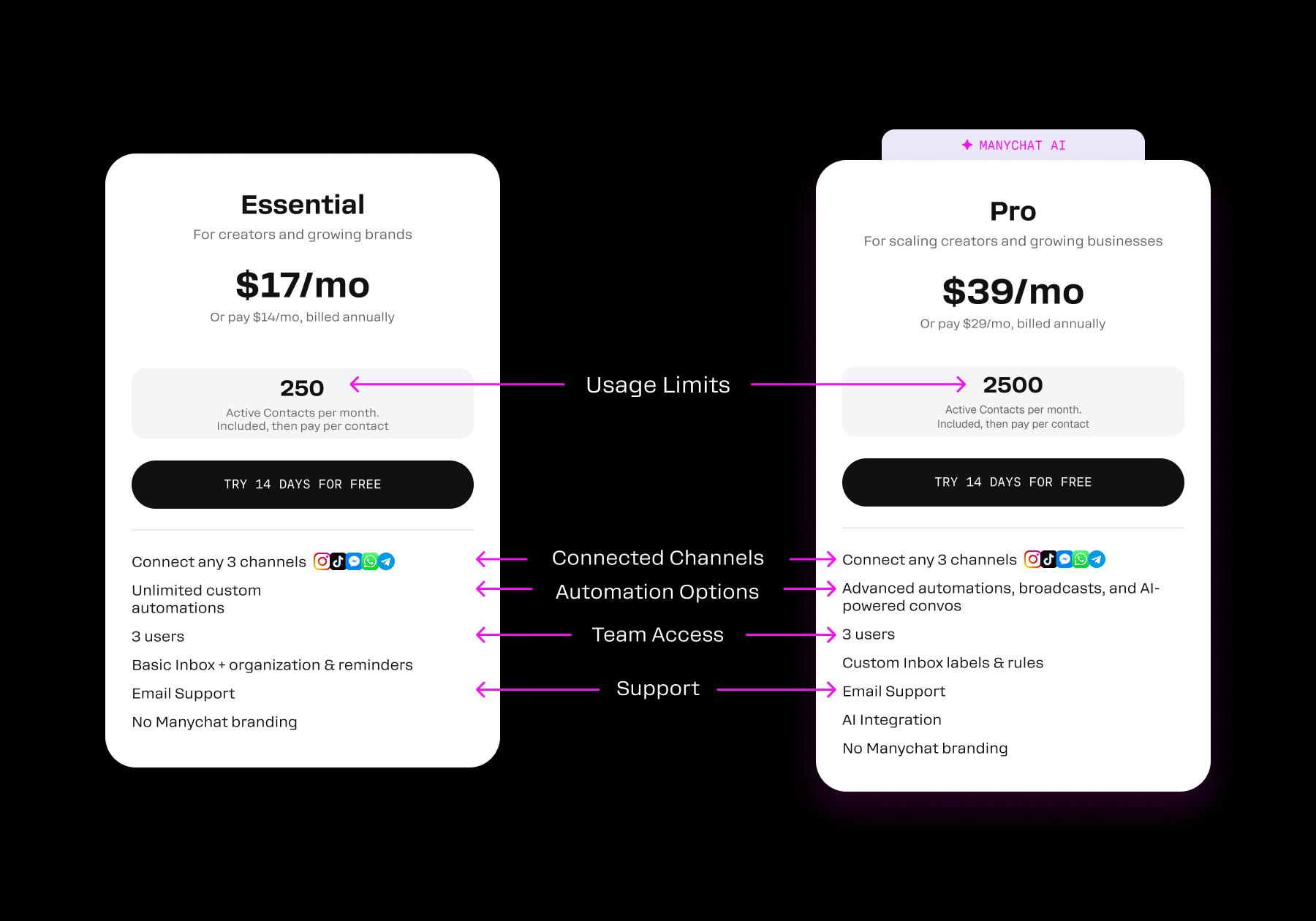
Most chatbot plans are built around a combination of:
- Usage limits, such as the number of contacts, messages, or conversations included
- Connected accounts or channels, like Instagram, WhatsApp, Messenger, or a website
- Automation features, from simple auto-replies to more advanced branching flows and AI responses
- Team access, including how many people can build automations or manage conversations
- Customer support, which may range from self-service resources to priority or dedicated support
Green flags to look for in a chatbot plan 🚦
Most chatbot plans are designed to look cheap at the trial stage and get expensive once you're dependent on the tool. Here are a few things to look out for when comparing options:
- Transparent, predictable pricing: You should be able to see exactly what a contact, message, or channel costs before you sign up, with no hidden overage fees or forced upgrades buried in fine print. Switching platforms after your automations are built around one tool can be expensive and disruptive, so make sure you know the real cost of what you’re committing to before you're locked in, not after.
- Core automation available at entry tiers: The chatbot’s key automation offerings should be available with lower-cost plans. If you can’t run an automation without shelling out for an expensive plan, that’s a red flag.
- Multi-channel support included, not stacked: You should be able to access all of the channels you need (Instagram, WhatsApp, SMS, web chat) without separate per-channel fees, so your quoted price is close to what you'll actually pay.
- Flexible or gradual contact tiers: The pricing limits should scale in reasonable increments. There should be a warning before you’re forced to upgrade, instead of a steep increase the moment you cross a threshold.
- Clear cancellation terms: You should be able to scale back down or leave without penalty. The pricing model shouldn’t be designed to lock you in.
- Free trial or free tier that's actually usable: Lastly, a big green flag is the ability to test a real automation (not just a demo) before committing to a tool. Look for platforms that offer free trials or plans with enough contacts and features to take the tool for a test drive.
3 Approaches to Finding The Right Chatbot Plan

You know what to look for in a chatbot plan. You’ve visited our listicles of the best automation tools (hopefully). If you’re still not sure exactly how to approach shopping around for chatbots, take one of these tactics for a spin.
1. Start with a free trial/plan and graduate (best for solo creators)
If you’re a solo creator, your automation needs are likely simple to start, so the smartest move is to avoid paying for a tool until it proves its worth. You can pick a platform with a genuinely usable free tier (hello, that’s Manychat), and run automations until you hit a contact limit or need access to features locked behind a paid tier. Once you run into one of those challenges, you upgrade. Then, rinse and repeat.
2. Match features to your funnel first (best for e-commerce)
If you run a business or e-commerce brand with sales funnels in place, you can map out your automation needs and compare them with chatbot plan features.
So, for example, your acquisition funnel needs an automation that triggers a flow when someone comments on a keyword in an ad. Your abandoned cart funnel requires an automation designed to recover abandoned Shopify carts via WhatsApp. Note down these needs so you can use them as requirements for a chatbot. If a platform doesn’t offer the ability to run the automations you need, move on.
Also, make sure you understand which mechanics the chatbot supports natively versus those that require a third-party integration through a tool like Zapier, since workarounds add cost, latency, and failure points.
3. Go multi-channel from day one with Manychat (best for growing businesses)
Starting on Manychat's free plan is an excellent choice for both creators and growing businesses. Let me tell you why.
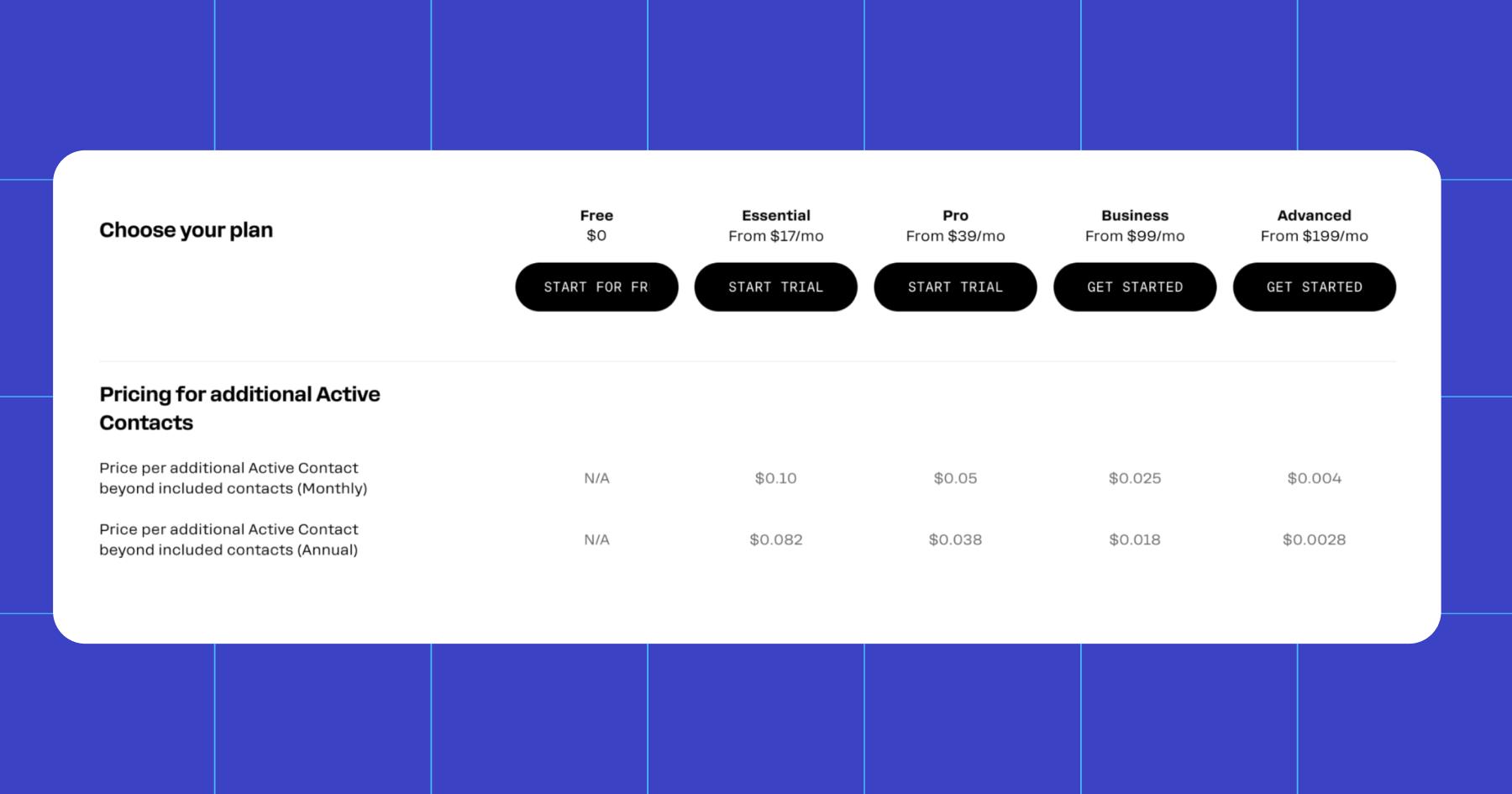
All of the Manychat plans (Free, Essential, Pro, Business, and Advanced) are the same product, so if you build an automation or integration on the free plan, it will carry over if you decide to move up to Essential. On top of that:
- There are no hard contact cliffs: If you go over your monthly Active Contact limit, your automations will keep running; you're just billed a small overage fee. Upgrade mid-cycle, and Manychat forgives those charges and rolls the contacts into your new plan.
- AI features aren’t locked behind the most expensive plan. AI-powered replies to DMs and comments are available with Pro, the second-cheapest paid tier.
- Scaling is gradual and transparent: Our contact tiers are set up in reasonable increments, and we make overage rates clear so that you can model costs before you need to.
- It works. A Manychat x HypeAuditor study revealed that creators using DM automation grow their audience 30% to 140% faster year over year (and yeah, those creators were using Manychat to do so).
Learn more about Manychat plans: Pricing Info from Free to Pro
What is the cost of choosing the wrong chatbot?
There's no way to calculate exactly how much choosing the wrong chatbot tool will cost you, but you can build a reasonable estimate from three cost categories that consistently show up in switching-cost research: direct migration cost, the hidden multiplier on top of subscription price, and the productivity/opportunity cost of the switch itself.
- Data migration: It typically costs $500 to $3,000 for a simple setup and $3,500 to $17,000 for a more complex setup with CRM syncs and multiple channels.
- Hidden multiplier: The advertised price is rarely the real price. Once you add implementation, training, integrations, and "necessary" add-ons, the real cost often runs 3x to 5x the sticker price, putting a $29/month plan closer to $100 to 150/month.
(BTW, the hidden multiplier isn’t a problem with Manychat because of our transparent pricing. Even overage fees are outlined on our pricing page.)
- Productivity cost: Running two tools in parallel, relearning a new builder, rebuilding flows, and the risk of leads being dropped mid-switch. Migration budgets typically add 20% to 30% just to absorb this.
For a business, that amounts to roughly $3,000 to $15,000 to switch within a year, on top of whatever was already spent building the initial setup. Creators typically won’t have to face a costly migration invoice, but they will lose hours rebuilding automations from scratch and learning how to use a new tool.
Either way, the real cost of the wrong chatbot isn't the plan you switch to; it's the switching itself.
Let The Math Do The Talking

Let’s run the numbers, shall we?
Say you're a creator or a brand on Manychat's Essential plan. You’re being billed $14 to $17 a month (depending on whether you pay annually or monthly).
You get 250 Active Contacts with this plan, but then you have a strong month and grow to 500 contacts. Now, you're paying roughly $35 a month (250 extra contacts at $0.082 each).
Even if you went viral and blew up to 750 contacts, you'd still only be paying about $55/month. Compare that to the $3,000 to $15,000 it can cost to migrate off a platform you outgrew or got locked out of, and it's not even close.
That's the actual case for transparent pricing: it's not that Manychat is cheap; it's that you can see exactly what growth costs before it happens, instead of getting surprised by an overage fee, a paywalled feature, or a per-channel charge nobody mentioned at signup.
Still comparing your options? Check out these guides to see how the other major chatbot platforms stack up:
- Best Instagram DM Automation Tools (2026 Guide)
- Top 10 Manychat Alternatives Comparison (Honest Breakdown)
- Manychat vs. The Competition: How We Stack Up to Other Automation Tools
Frequently asked questions
The best free chatbot tool depends on where you want to automate conversations. Manychat is a strong option for beginners looking to automate conversations on Instagram, TikTok, Messenger, or WhatsApp. HubSpot’s free chatbot builder is better suited to website chat and businesses that also need a CRM.
Both offer no-code tools so that you can build basic automations without programming experience.
Before choosing a free chatbot platform, check its limits on contacts, messages, active automations, channels, branding, and team members. A free plan may be enough to test an idea, but businesses with growing audiences will usually need to upgrade.
To choose the right chatbot pricing plan, start with the channels you need, the number of people you expect to message, and the type of conversations you want to automate. A basic plan may be enough for simple FAQs, lead collection, or automated replies. More advanced plans are usually required for AI responses, complex workflows, broadcasts, multiple team members, and higher conversation volumes.
Pay close attention to how each platform measures usage. Some chatbot tools charge based on active contacts, while others charge based on messages, conversations, AI resolutions, team seats, or connected accounts. Comparing the monthly price alone can therefore be misleading.
For less than $50 per month, the best chatbot plan depends on your primary use case. Manychat’s lower-priced paid plans are designed for creators and businesses automating conversations across social messaging channels. Manychat Essential costs only $14 or $17/month (depending on whether you bill monthly or annually) and lets you connect two channels and run unlimited custom automations.
When comparing plans under $50, look beyond the advertised starting price. Check how many contacts or conversations are included, which channels are supported, whether AI use incurs an extra fee, and whether the price changes as your audience grows.
For social media chatbots, Manychat’s free plan is one of the best ways to test automation without a time limit. You can connect up to two channels (including Instagram, TikTok, or Facebook Messenger) and run up to four live automations for up to 25 active contacts per month. That’s enough to experiment with automations that reply to comments or answer common DMs before committing to a paid plan.
A multichannel chatbot can cost anywhere from $0 to several hundred dollars per month. The total depends on how many channels you connect, how many contacts or conversations you manage, which automation features you use, and how many team members need access.
Before subscribing, estimate your expected monthly usage across every channel and check for contact overages, conversation charges, AI fees, additional seats, and third-party messaging costs.



Originally published: Jul 29, 2026
More stories worth reading
More content that's too good to miss