Instagram DM Automations for E-Commerce (ft. EZContacts’ Head of Growth)

If you’ve got an e-commerce business, Instagram is a great place to promote it. The platform has billions of users; millions log in and scroll every day, and thousands of them are primed to shop. And many e-commerce brands are already taking advantage of this: 92% of the top 500 US online shops in the fashion category already have an Instagram presence.
The right combination of Instagram shop setup and automations can help you capture audience interest and turn the platform into your highest-converting channel. And to help you learn how to do that, I talked to the Head of Growth at EZContacts, Rafael Sarim Oezdemir.
The Instagram Automation for E-Commerce Playbook

After EZContacts automated comment-to-DM flows, the retailer's leads increased by up to 400% within 30 days, and its comment-to-lead conversion rate grew from 2% to 8%.
Plus, there was the change in response time we mentioned earlier: down from 4 hours to 12 minutes. That matters because a 4-hour reply window is long enough for a shopper to lose interest, get distracted, or buy from a competitor. Twelve minutes is fast enough to (hopefully) catch them before they close the Instagram app and move on with their day.
Let’s talk about how you can do the same for your business.
What you need before you start automating
To start automating, you need a few things:
- IG Business/Creator account: You can’t automate with a personal Instagram account, so make sure you have a professional account, either Business or Creator.
- Automation tool: You’ll also need to sign up for an automation tool like Manychat. Manychat has a free plan that makes for a great starting point, so I’d recommend starting there. If you want more options, check out the Top 10 Manychat Alternatives Comparison (Honest Breakdown).
- Meta Business portfolio: Finally, to make your products shoppable on Instagram, you’ll need a Meta Business portfolio and a product catalog set up in Meta Commerce Manager.
How to set up a product catalog in Meta Commerce Manager
If you don’t have a product catalog set up in Meta just yet, here are the general steps to set one up.
- Set up your Business portfolio
Make sure you have a Meta Business Portfolio (business.facebook.com), with your Facebook Page and Instagram professional account both linked to it.
- Create the catalog
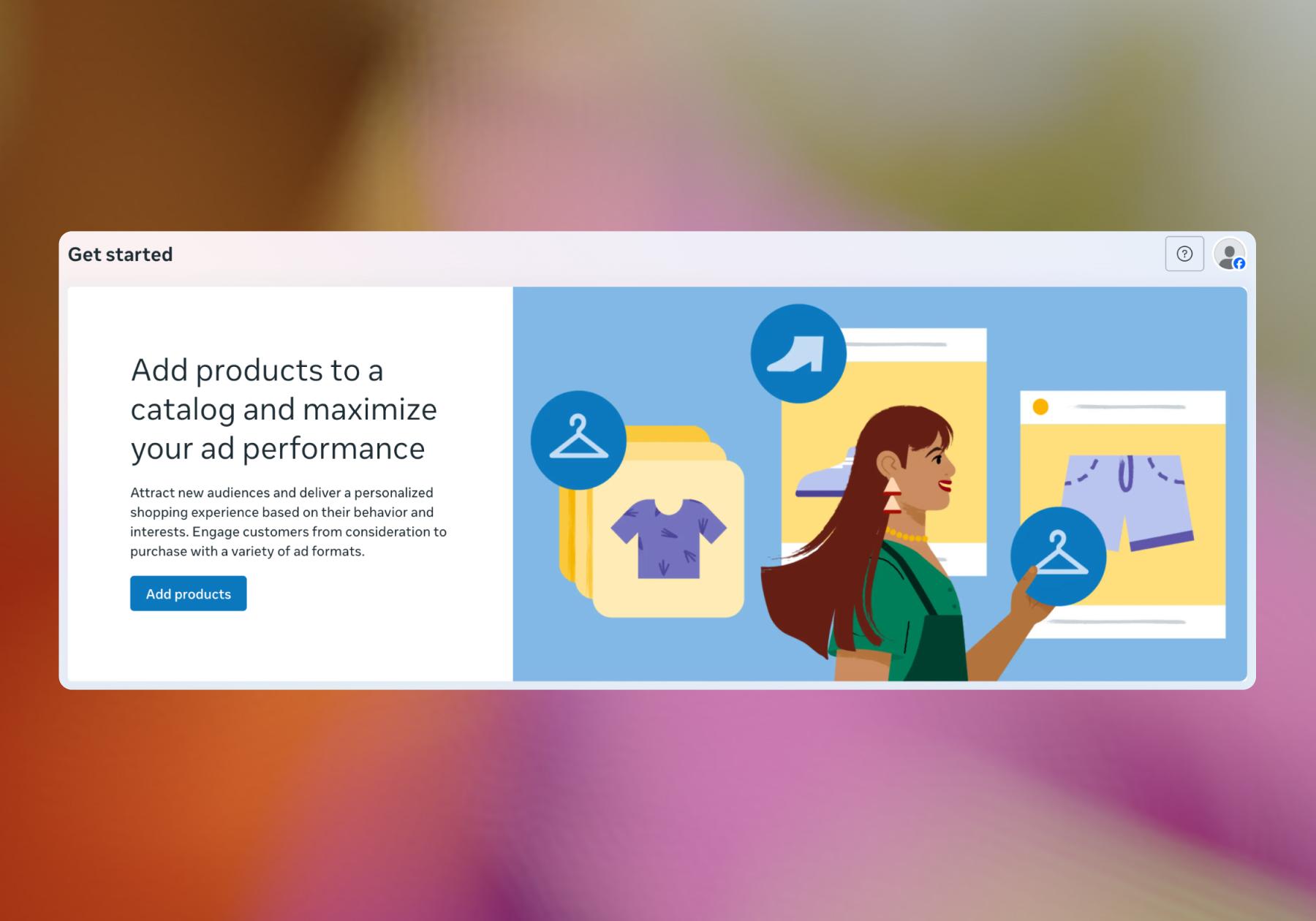
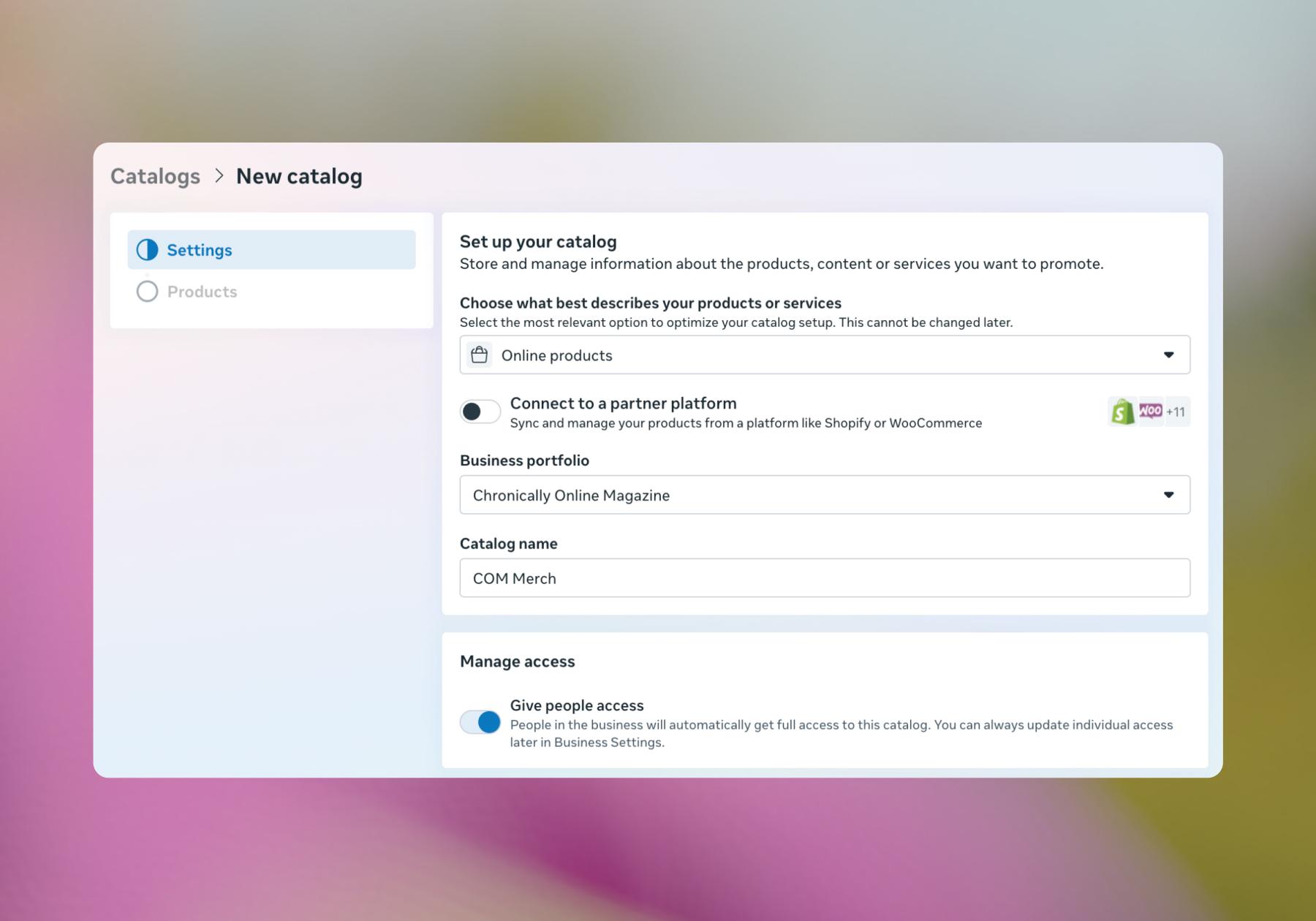
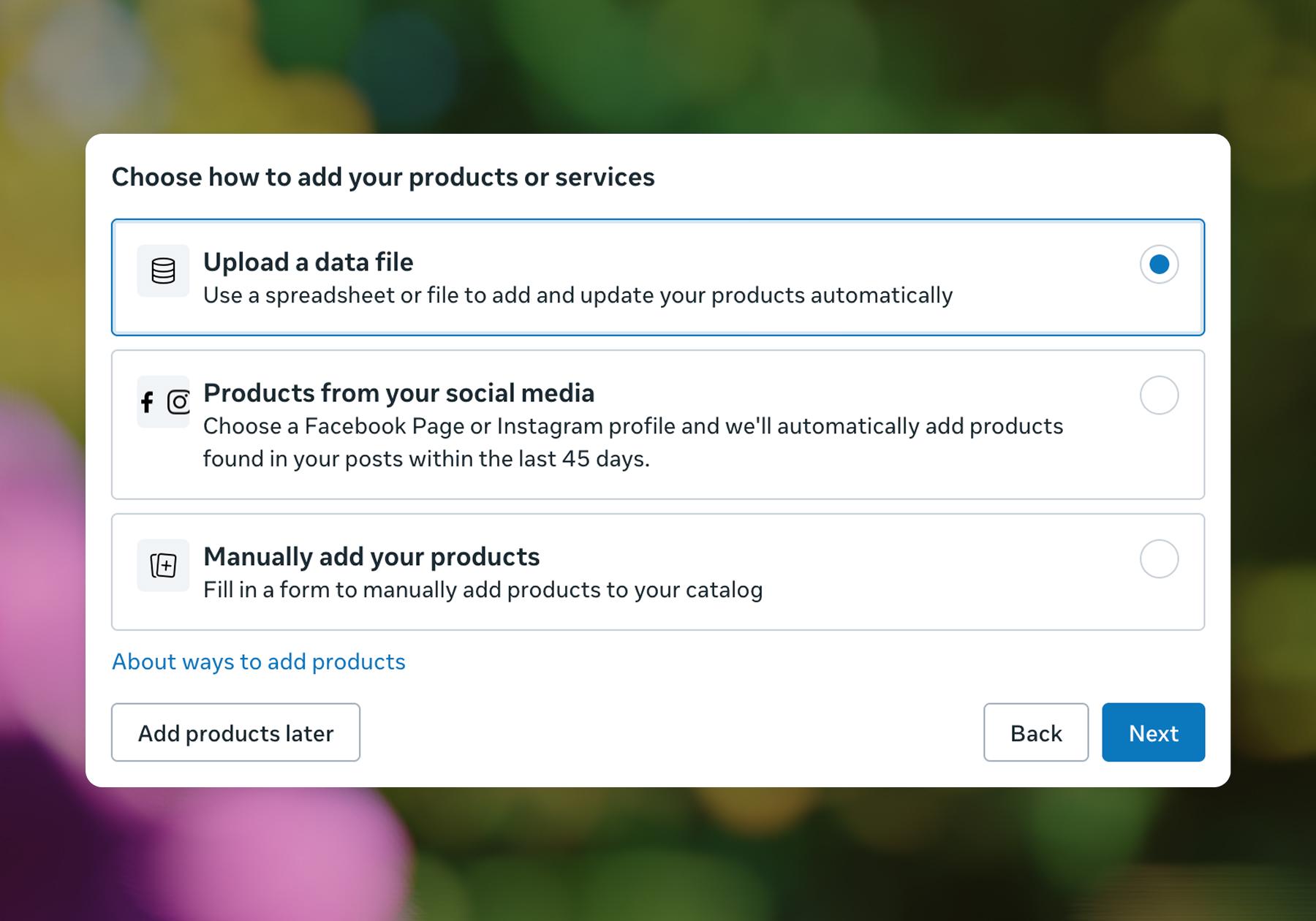
Go to Commerce Manager. Click Add products and follow the prompts to create a new catalog. Populate the catalog with product images, titles, prices, descriptions, and availability.
EZContacts manages a catalog of over 50,000 products, so they don't try to feature everything equally on their Instagram.
“Generally speaking, we pay special attention to posts where there is a high customer interest, seasonality, or something new. Eyewear trends are also quite important in terms of generating interest because people see a certain style on Instagram and want to learn more about where they could buy it,” says Rafael.
The lesson is this: While you can bulk upload your product catalog and have everything you offer listed in Meta Commerce Manager, it’s probably best to focus your Instagram content and automations on the offerings your audience is most interested in at any given point in the year.
- Create the shop
Go back to Commerce Manager, then click Shops → Create shop and follow the instructions.
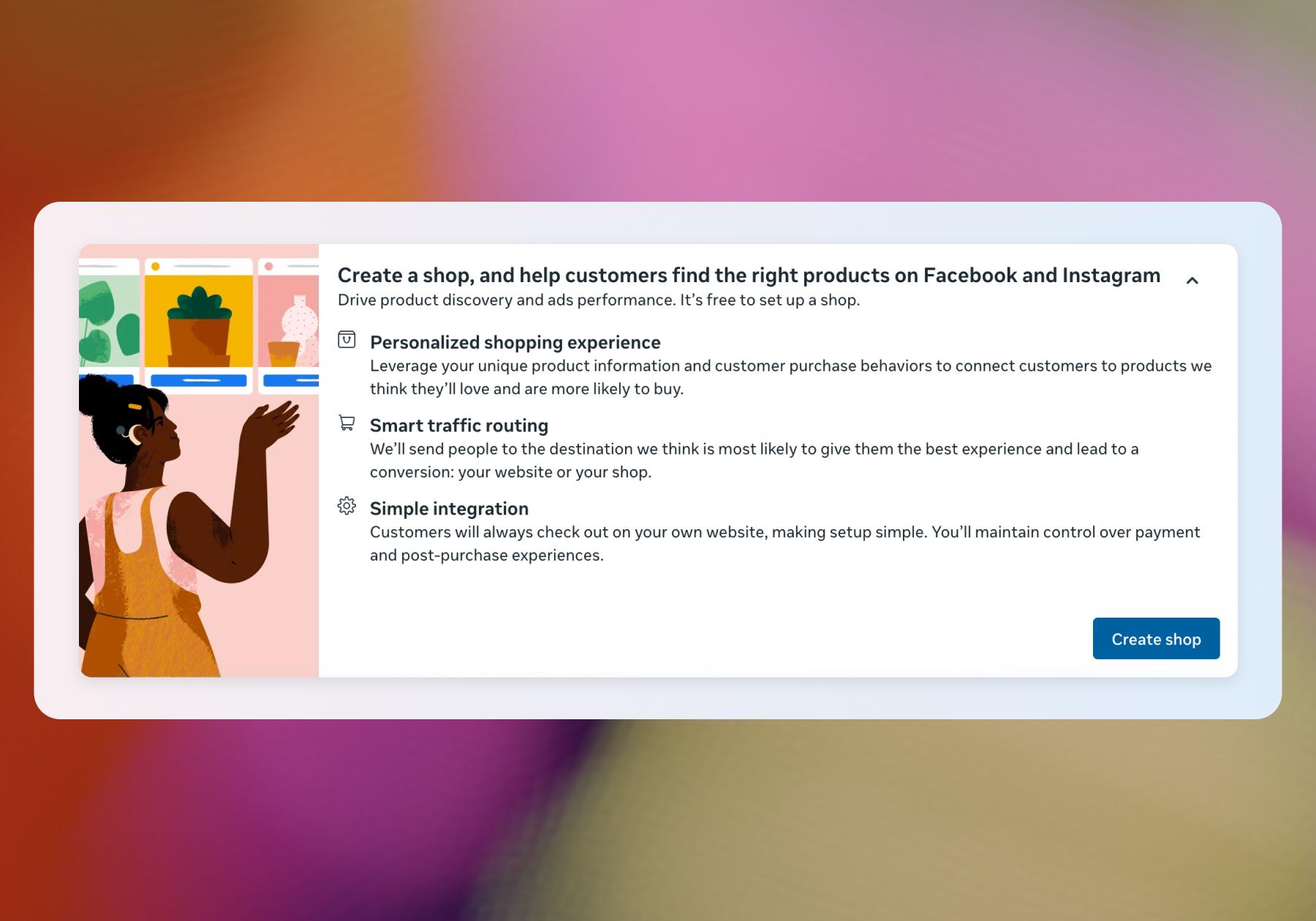
Connect your Facebook Page and Instagram account, select the catalog you just built, set up your shop's layout, and submit for Meta's review.
- Turn on Instagram Shopping
Once your shop is approved, go to Instagram → Settings → Business → Shopping, and select the catalog to connect. This is what makes products tappable in posts, Reels, Stories, and DM conversations.
- Connect Manychat
If you’re using Manychat, make sure to connect it to Instagram via the "Via Meta" option so it can access the Business Portfolio and, in turn, the catalog associated with it.
With all that set up, let’s get into the specifics of what your automation strategy should look like.
Automate specific keywords and posts
Not every comment or post warrants automation. Before you build any flow, consider which keywords should trigger it and which posts it should be connected to.
EZContacts learned this the hard way. "At first, we set up any-comment triggers for our flows and received plenty of low-intent leads," Rafael says. "Now we are using specific keywords and capturing high-intent buyers in a very easy way.”
“[Keywords] give us a chance to concentrate on people who actually want to buy rather than those who just interact with the posts."
The same selectivity applies to which posts get automated in the first place. Rafael's rule of thumb: automate around purpose, not volume.
"The main criterion is the purpose of this particular post," he says. "If we’re talking about promotions, new arrivals, or trends, we’ll automate. We don’t apply automation to every post — sometimes we want the interaction to seem natural."
Those are best practices for Instagram automation: set a specific keyword as the trigger, not "any comment," and reserve automation for posts where people are already showing purchase intent. Let your other content breathe and bring in organic, unautomated engagement.
For the deep dive into keywords, check out Instagram Keywords 101: How to Use Automation to Drive Engagement, Leads, and Sales.
Run a flash sale with automated DMs
Flash sales are great for e-commerce brands because they can drive significant sales in a short period. But that also means they’re all about speed. If a promotion is only valid for a couple of hours, there's no room to wait for someone on your team to reply manually. By the time they do, the sale could be over (and now they’re pissed they missed it). Automation solves this problem by providing details immediately.
"In the case of limited-time promotions and flash sales, we can’t afford to wait for a manual reply if someone commented on a post — we want them to get the offer right now," says Rafael.
You can set up a flash sale automation using Manychat’s Comment-to-DM Quick Automation. We’ve got a whole guide that walks you through that step by step: How to Set Up Instagram Quick Automation (A Comment-to-DM Guide), but here’s the general idea.
- Announce the sale
Post a carousel or reel announcing the flash sale, paired with a keyword trigger — something short and relevant, like "FLASH" or "DEAL."
💡Tip: Keep the keyword specific rather than opening it up to any comment; EZContacts found that specific keywords surface actual buyers, while generic triggers mostly pull in low-intent commenters who are just interacting with the post.
- Build the flash sale flow
Use the Comment-to-DM Quick Automation to set up your automation. Tie it to your announcement post so that when someone comments the keyword on that post, Manychat will send them a DM with the sale link and a promo code.
- Close the sale
When the sale is over, unpublish your automation and edit the caption on your Instagram post to make sure followers know the sale is over.
Follow up with abandoned DM conversations
You’re not always going to make a sale during the first interaction with a scroller. Sometimes people will just browse your catalog, tap into a few products, maybe even get to checkout, and then ghost.
People who behave in this way are warm leads, and oftentimes, all it takes is a nudge or a follow-up to turn them into paying customers.
One easy way to do this in Manychat is by toggling on the “send a follow-up DM if they don't click the link” option. Here’s an example based on an automation I built for Chronically Online Magazine:
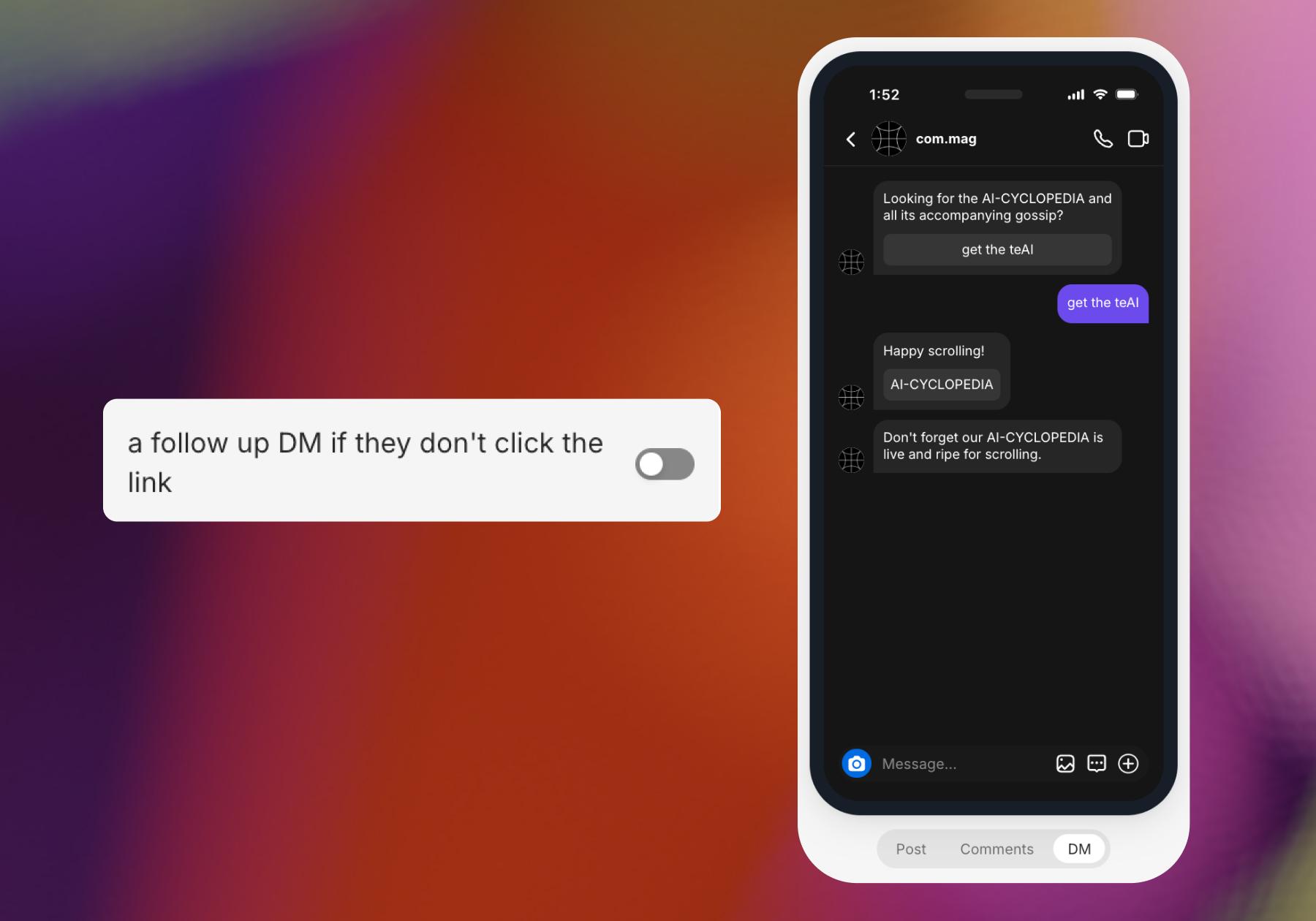
This will send an automated message to people who trigger your automation but don’t click the link you sent over. It’s a great way to re-engage without overwhelming people, and you can keep the follow-up message short and simple; something like "Still thinking about it?" will do the job.
Measuring the effectiveness of your automations
Automation is only useful if you pay attention to whether it's actually working. So, make sure you’re keeping an eye on your analytics in Instagram Insights and Manychat (or your automation tool of choice).
EZContacts ties every DM automation it runs to trackable links and campaign-specific discount codes. "For us, the connection between Instagram activity and sales is created through using trackable links and campaign-specific discount codes in the DMs," Rafael says. "That way, we can see the traffic and purchases coming from a particular Instagram campaign or automation.”
In practice, this means you should:
- Give every flow its own discount code. Avoid establishing a blanket promo code for all of Instagram; create a distinct code for each automation (or keyword, campaign, or flash sale), so you can attribute sales back to the exact automation that drove them.
- Track leads and sales as two separate metrics. Leads tell you a flow is generating interest. Sales tell you it's converting. A flow with high leads and low sales is a signal to revisit the offer or the keyword targeting.
- Keep an eye on response time. For EZContacts, reducing response time was one of the clearest wins they achieved through automation. If your response time isn’t improving, you’re not automating the right things. The best next step is to set up keywords to answer FAQs. Learn how: Get Smart(er): Answering Instagram FAQs With Manychat.
Your DMs Just Became a Storefront

Automation is best used when it captures a buyer at the peak of their interest. Truthfully, the brands getting the most out of Instagram automation aren't automating everything; they're automating a few things that drastically improve their followers’ experience.
Moral of the story: Let your content and organic engagement do most of the work. Automate the easy wins — sales, follow-ups, and FAQs — and let everything else stay human.
Looking for more help with your Instagram automation strategy? We’ve got you covered over on our YouTube channel.
About EZContacts
EZContacts is one of the largest eyewear retailers in the USA (and a top-20 company among all US retailers), with over 5 million customers and 500,000 positive reviews online.
Rafael says, “Automating our Instagram DMs has helped to convert comments into sales without any extra ad spend. It’s also decreased the average response time from 4 hours to 12 minutes, and the number of leads we get from Instagram has significantly increased.”
Keep reading to learn more from Rafael about EZContacts’ automation strategy and how you can replicate it.
Frequently asked questions
Yes. You can send product images, descriptions, prices, and payment links right inside DMs. Once your catalog is connected through Meta Commerce Manager, you can pull live product data — images, prices, availability — directly into your DM flows instead of typing it out manually.
Post a story or reel announcing the sale with a keyword trigger (like "FLASH"). When someone comments the keyword, they automatically get a DM with the sale details, a clear expiration window, and a checkout link. Speed matters here more than in any other flow — a flash sale often runs for just a couple of hours, so the offer needs to land the moment someone comments, not whenever someone on your team gets to it.
Set up a follow-up message that fires 2 to 4 hours after someone browses products but doesn't click the payment link. Keep it short and friendly; something like "Still thinking about it?" with the product link works well.
No. You can send any payment link — Stripe, PayPal, your own site's checkout — through DMs without any store integration at all. Connecting a product catalog via Meta Commerce Manager makes it easier to automatically pull product data, but it's optional.
Don't try to make your whole catalog browsable at once. Connect it through Meta Commerce Manager, then build separate DM flows keyed to specific keywords or categories — one for new arrivals, one for a trending style, one for a seasonal push. Prioritize the products with the most current interest rather than exposing everything equally; a catalog of thousands works best in DMs when it's segmented into a few high-intent flows instead of one giant browsing experience.


Originally published: Sep 8, 2026
More stories worth reading
More content that's too good to miss