Over 1 billion people open TikTok daily, and most of them spend nearly an hour on the app, scrolling, watching, and engaging with content. With numbers like that, it's no wonder that TikTok is considered one of the best places to reach new audiences and build communities.
Even so, TikTok's rapid pace — from posting and chasing trends to managing the flood of notifications that comes with virality — can quickly become overwhelming.
To keep up, many people turn to TikTok automation. With the right tools and features in place, you can automate the tedious, repetitive parts of your TikTok strategy and spend more time creating, connecting, and growing on the platform.
In this guide, we'll break down what you can automate on TikTok (and what you can’t), as well as the most popular use cases for Manychat, an automation tool and TikTok Marketing Partner.
- TikTok automation helps creators and businesses scale repetitive tasks like responding to DMs, answering FAQs, sending links, capturing leads, and qualifying prospects.
- Manychat is a TikTok automation tool that you can use to turn views and engagement into owned contacts, leads, and potential sales.
- Automation should complement (not fake) human engagement. Spammy automation, such as buying fake followers, views, or likes, violates TikTok’s rules.
- If you’re just getting started, automate one high-volume task first, then layer in lead capture, qualification, giveaways, and human handoffs as needed.
What Can You Do With TikTok Automation?

TikTok automation simply means using software to handle repetitive tasks on the platform instead of doing them manually. TikTok supports automation through its own tools and APIs; the platform has several native automation features, including the Content Posting API for scheduling and publishing, and automatic messages for Business Accounts. You can also use approved third-party automation tools like Manychat to automate beyond what TikTok offers.
Approved TikTok automation use cases
TikTok automation isn't used for just one thing. There’s a whole category of tools out there designed to help brands and creators with different tasks, including:
- Content creation and editing: In addition to TikTok’s native editor, many brands and creators use video editing apps like CapCut for auto-captioning, templated edits, and AI-generated effects.
- Content scheduling and publishing: Tools like Buffer, Later, Publer, and SocialBee connect to TikTok's official Content Posting API to queue up videos, batch-create weeks of content in one sitting, and auto-publish on a set cadence.
- Dropshipping order fulfillment: E-commerce brands that dropship on TikTok rely on platforms like AutoDS, DSers, and Dropified to connect to vetted suppliers, sync inventory and pricing in real time, and automatically route orders so fulfillment keeps up with TikTok Shop's delivery SLAs. TikTok Shop also has its own native Order Handling Capacity tool that sets daily order caps and triggers automatic extensions during surges.
- TikTok Shop order shipping: Once an order is placed on TikTok Shop, tools like ShipStation and Shippo can automate label printing, carrier rate comparisons, and tracking-number updates.
- Replying to TikTok users: TikTok Business Accounts have access to some basic tools that allow them to send automated welcome messages, keyword auto-replies, and answer suggested questions. If you want to do more, third-party chat automation platforms like Manychat can help build more sophisticated conversation flows.
What you can’t automate on TikTok
TikTok's Terms of Service and Community Guidelines ban bots or scripts used to buy or fake followers, auto-like or auto-comment at scale, mass-register or mass-operate accounts, or otherwise manipulate engagement signals. TikTok has been increasingly aggressive about enforcing this: in the first half of 2024 alone, its automated moderation prevented more than 700 million fake accounts from being created.
Essentially, if the automation is doing something a real person could reasonably do (publishing your own content, answering your own DMs), you're fine. If it's designed to trick TikTok's systems into thinking a real person is more popular or active than they are on the platform, your accounts could get flagged, shadowbanned, or suspended.
Why automate your TikTok at all?
Automation helps you be everywhere at once without burning out. Here's why it's worth setting up:
- It allows you to reply faster. Auto replies fire the second someone messages you, so nobody's left waiting hours for an answer to "How much is this?"
- It makes you available around the clock. Automated flows keep the conversation going while you sleep, travel, or film your next video.
- It helps you capture leads. Instead of leads vanishing into a chaotic inbox, automation collects emails and phone numbers and syncs them to the tools you already use.
- It drives conversions. Quick, relevant replies move people toward a purchase faster — and brands using Manychat have gained over 1M followers through automated interactions.
- It gives you time back in your day. Offloading the repetitive stuff frees you up to do the thing only you can do: create.
What You Can Automate on TikTok with Manychat

Manychat is an official TikTok Marketing Partner, which means it connects directly with TikTok's Business Messaging API to automate DM conversations.
FYI: As of September 2026, TikTok automations through Manychat require a TikTok account with Advanced Access or a Verified Business Account (the base-level general TikTok account doesn't qualify), and they're not yet available in the European Union, the United Kingdom, or Switzerland.
If you’re new to Manychat, you can visit the help center to learn how to connect TikTok to Manychat.
Now, let’s talk about what you can automate on TikTok with Manychat.
- Building an owned audience
Attention on TikTok is notoriously ephemeral. Someone watches your video, maybe likes it (maybe), then disappears into the ether…unless you capture their information and store it somewhere you control.
Manychat can help with this by collecting email addresses and/or phone numbers from scrollers so you can keep the relationship going after the algorithm moves on. You can set up a lead-capture flow that’s triggered by multiple actions — someone DMing your account a specific keyword, tapping a personalized Ref URL from a link-in-bio or paid ad, or scanning a QR code on packaging or a receipt. That way, you have one evergreen automation that can capture leads no matter how they arrive on your TikTok profile. - Answering frequently asked questions (FAQs)
There are probably questions you get over and over again, like “What’s your return policy?” or “Where’s the link to your course?”
A reply that comes too late (or worse, not at all) can cause you to miss out on potential sales. So, you can build a keyword-triggered automation that answers instantly and consistently. For example, “RETURN” could be a keyword that triggers an automated message with details about your return policy, and “COURSE” could be a keyword that triggers a message with the link to sign up for your courses. - Sending links
Automating link delivery has always been a top use case for Manychat, and that’s still true on TikTok. Whether it's a website, a product page, or an event registration site, most brands eventually need to move a TikTok conversation off-platform to achieve their goal of getting conversions.
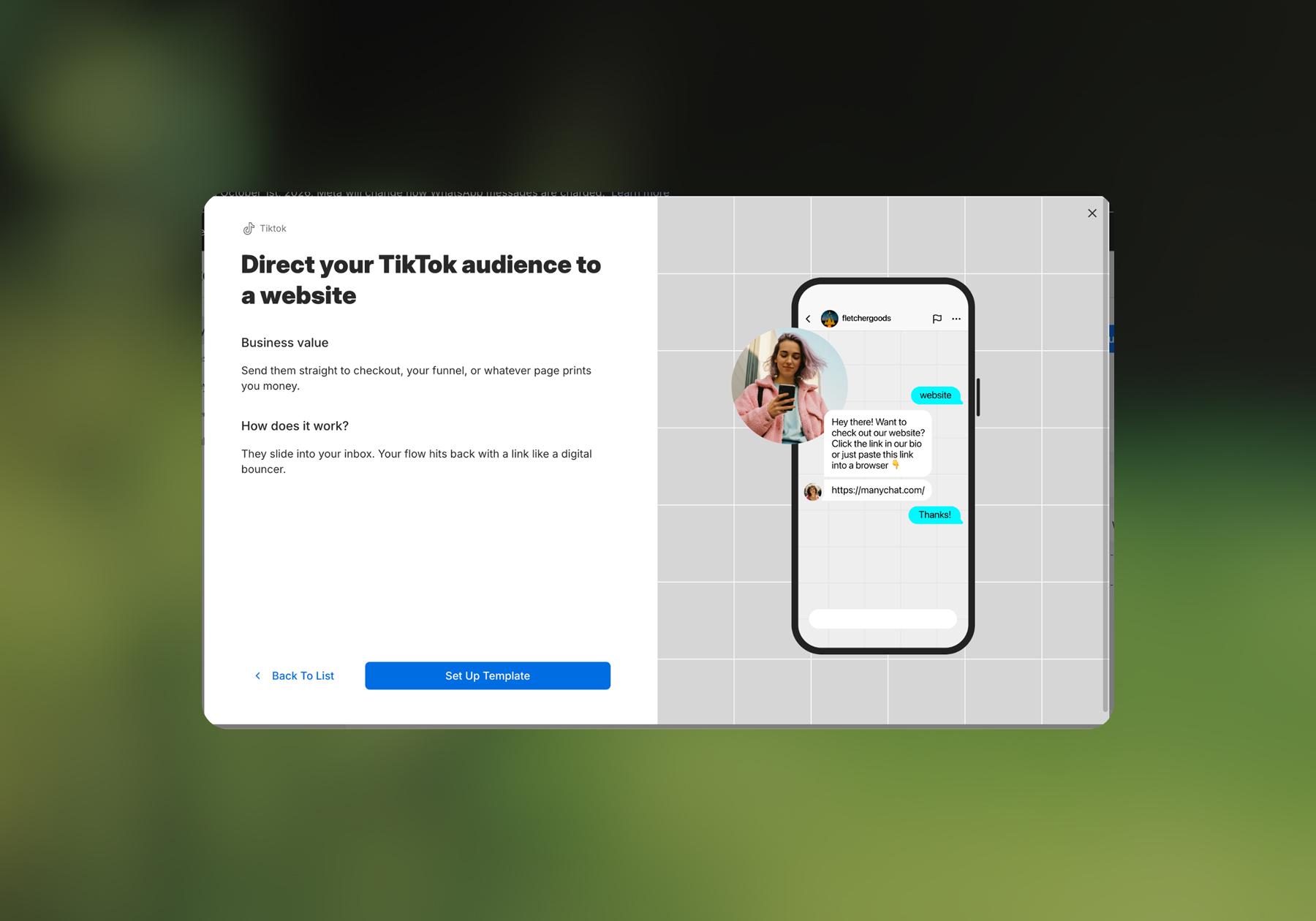
On Instagram, you can do this with a comment-to-DM automation. Currently, Manychat doesn’t have Quick Automations like comment-to-DM for TikTok, but you can easily replicate the idea by building a flow that automatically sends a link when someone sends your account a keyword. There’s even a template for this named Direct your TikTok audience to a website.
- Running a giveaway
Running a giveaway is a reliable way to increase engagement and followers, but manually tracking entries and selecting a winner fairly is a logistical headache. You can automate giveaway entry collection with Manychat (something like DM me “GIVEAWAY” to enter) and use the Randomizer feature to pick a winner. Manychat even integrates with Google Sheets, so you can easily store and scroll through entrants’ data. - Routing conversations to a person
It’s a Manychat best practice to give people the option to talk to a real person whenever they want. Certain situations call for this, like complaints, nuanced questions, or collab opportunities.
To make this always available, create a keyword like "AGENT" or "HUMAN" that triggers the Live Chat handoff action; that way, a scroller can type it at any point — mid-FAQ-flow, mid-giveaway-entry, whatever — and get routed to a person immediately.
- Qualifying leads
If you want to collect useful data about leads beyond their contact information, you can do so by building a flow that asks a few questions and uses Conditions to segment people based on their responses.
For example, you could ask "What are you shopping for?" and tag contacts based on their answer. You could also use a Condition to check whether they follow your account, have bought from you before, or where they entered the flow. Tags stay on the contact's profile, so future automations can pick up with full context instead of starting the conversation over.
Learn more: How to Let Your DMs Qualify Leads While You Sleep
Where to Start Your TikTok Automation Journey

You don’t need to build all of these use cases on day one. Start with an easy win: pick a question you get in your inbox daily and set up a keyword automation to answer it. Then, once it's live and you can see it actually working — replies going out instantly, fewer messages clogging up in your inbox — it’s time to build the next thing.
Maybe that next thing is a simple lead capture flow that uses a Data Collection block to grab an email address before sending over a link. Or maybe it’s that automation exit hatch we talked about, where a phrase like “talk to a person” triggers an escalation to Live Chat.
At the end of the day, what you automate on TikTok is up to you. We’re just happy to help make it happen.
Want to learn more? Subscribe to our YouTube channel for the latest Manychat product updates and tutorials.
Frequently asked questions
Not if you're using it the way TikTok intends. Automating your publishing schedule or DM replies using official APIs and approved tools is explicitly supported. What gets accounts banned is automation designed to fake authenticity — bots that auto-follow, auto-like, or auto-comment on other people's content, or tools that buy followers and engagement. The distinction is publishing/responding versus manipulating.
In everyday use, people use these words interchangeably, but TikTok's policies treat them differently in practice. Automation generally refers to scheduling and response tools that operate on your account with your permission (often via TikTok's APIs). "Bots," in the sense TikTok's guidelines target, usually means scripts that impersonate genuine human activity across many accounts to inflate metrics — a very different and prohibited use case.
Yes. TikTok has its own native scheduler, plus an official Content Posting API that third-party tools like Buffer, Later, and Hootsuite plug into. The API currently allows up to 15 posts per account within a rolling 24-hour window, shared across all connected apps, so scheduling ahead is well within the rules.
DMs, yes — TikTok's own Business Account tools support welcome messages and keyword auto-replies, and platforms like Manychat build more advanced automated conversations on top of that. Comment automation is more limited on TikTok today than on platforms like Instagram, so most of the heavy lifting happens in DMs.
Match the tool to the problem. If the goal is publishing consistency, a scheduler like Buffer or Later is the simplest entry point. If the goal is turning DM volume into leads, sales, or a real audience list you own, a conversational automation platform like Manychat is built specifically for that. If you're running TikTok Shop, order and fulfillment automation (AutoDS, Dropified, and similar) solves a completely different problem and is worth layering in once you're seeing consistent order volume.



Originally published: Sep 15, 2025, Updated: Oct 8, 2026
More stories worth reading
More content that's too good to miss