Dropshipping can be a lucrative business if you do it right. Dropshipping margins tend to land in the 20% to 50% range, and the perks are obvious: you don’t manufacture or store the products yourself. Instead, your job is to work with suppliers who handle the inventory for you while you focus on marketing and selling the products to customers.
Speaking of selling, TikTok is one of the best places for e-commerce today: 34% of TikTok scrollers use the platform to learn about products, which means plenty of people open the app daily to browse, learn about, and buy products. Taking advantage of that is wise, but you need systems set up so people actually find and purchase the products you’re dropshipping.
TL;DR
- TikTok is a great place for dropshipping because it’s designed for impulse buys, and it has its own native e-commerce platform and tools (TikTok Shop).
- Dropshippers can integrate with TikTok Shop to sell, or they can send scrollers to an external link to buy.
- You can automate several parts of the dropshipping process on TikTok, including product listing, order tracking, and marketing through ads, comments, and DMs.
How Dropshipping On TikTok Works

Dropshipping is an e-commerce model that involves selling products online without keeping any physical items in stock. That model stays the same whether the customer discovers your business on TikTok or elsewhere.
- A customer places an order.
- The order is sent to your supplier or fulfillment partner.
- That partner ships the product directly to the customer.
- You earn the difference between what the customer pays and your costs (including product, shipping, platform fees, advertising, and other expenses).
On TikTok, dropshippers use a combination of organic content and ads to promote products. That content either sends shoppers to an external storefront, such as Shopify or WooCommerce, or to TikTok Shop, where eligible products can appear in videos, LIVE shopping, and on the seller's profile.
In many cases, dropshippers integrate their stores with specialized supply chain apps like AutoDS (a dropshipping automation platform that connects online stores with supported suppliers), CJ Dropshipping (a supplier platform that sources products and offers fulfillment and warehousing services), and Zendrop (a sourcing and fulfillment platform designed specifically for dropshippers).
FYI: TikTok Shop sellers are responsible for meeting its shipping and fulfillment requirements. In the U.S., TikTok currently specifies supported shipping methods and tracks fulfillment metrics such as valid tracking, late dispatch, on-time delivery, and seller-fault cancellations.
Why is TikTok a good place for dropshipping?
Today, many people use TikTok for dropshipping, either by driving traffic to external stores or by selling directly through the TikTok Shop native checkout. TikTok is well-suited for dropshipping because its For You feed is known to surface engaging content, whether it’s from someone the users follow or not.
In other words, you can get a lot of visibility by creating genuinely good content; no massive following needed.
Aside from the low barrier to entry, there are a few more reasons why dropshippers use TikTok.
- It’s primed for impulse buying: Dropshipping thrives on products that have a wow factor, and TikTok's short-form video format lets you show off a product in just a few seconds. Plus, TikTok Shop lets users buy directly in the app with a couple of taps, reducing the chance someone changes their mind because they have to leave TikTok.
- Organic content can double as ad creative: When creating dropshipping content for TikTok, you can try different hooks and formats, see what resonates, then put paid promotion behind successful content. It’s a great way to test creative in a low-stakes environment.
- Built-in affiliate network: The TikTok Shop Affiliate Program lets sellers make products available for creators to promote in exchange for a commission on sales. TikTok creators can discover products, request eligible samples, and promote them through shoppable videos and LIVE streams.
Related: How to Build a TikTok Sales Funnel
What Can You Automate on TikTok for Dropshipping?

Running a dropshipping business involves a lot of moving parts. Fortunately, you can automate many parts of the process, from getting a product into your store to responding when someone comments that they want to buy it.
Here are some parts of the dropshipping process that can be automated today.
1. Product listings and inventory
If you're sourcing products from a third-party supplier, you don’t need to manually copy product information over to your store and check whether every item is still available.
Dropshipping platforms like AutoDS can help automate this side of the business. Sellers can import products into their stores and use AutoDS's monitoring features to check stock and price changes. Depending on the supplier and configuration, AutoDS can then update the connected store when those details change.
Zendrop offers similar tools for TikTok Shop sellers. Its TikTok Shop integration lets sellers import Zendrop products directly into their shop, review and edit details such as titles, descriptions, images, pricing, and shipping information, then publish the listing to TikTok Shop.
These tools are especially useful for dropshippers because you don't physically control the inventory you're selling. If a supplier runs out of an item or changes its price, automated monitoring can reduce the amount of work required to keep your listings accurate.
2. Order fulfillment and tracking
Automation can also take over much of what happens after someone buys a product from you.
For example, when a customer purchases a product from a TikTok Shop connected to Zendrop, the order automatically syncs to Zendrop for fulfillment. Once the supplier fulfills and ships the order, the tracking info can be sent back to TikTok Shop. This is ideal because TikTok Shop requires sellers to meet certain shipping and fulfillment standards, including providing valid order tracking and dispatching orders in a timely manner.
Other dropshipping platforms (including AutoDS) also offer automated order processing and fulfillment features, though exactly what's available depends on the supplier, selling channel, and automation method you use.
3. TikTok Shop advertising
TikTok Shop has an automated ad campaign type called GMV Max; it’s the default when you set up a TikTok Shop campaign. Instead of manually deciding which creative, target audience, and placements to use in ads, you can choose which products you want to promote and set your budget and ROI target. GMV Max will then automate a campaign around those goals, creating and pausing ads, optimizing audience settings, and distributing ads across TikTok.
Want to learn more? The Ultimate Guide to TikTok Advertising
4. Affiliate marketing
TikTok Shop also offers tools in the Seller Center to automate aspects of working with creators. For instance, sellers can create an open collaboration, which makes eligible products available for any affiliate creator to discover and promote, or a target collaboration, which lets you invite specific creators to partner up.
Affiliate content can feed into TikTok's other automation tools, too. For example, authorized affiliate videos can become creative assets for GMV Max campaigns.
5. Comments and DMs
Lastly, dropshippers can automate parts of the conversations that happen when a scroller shows interest in a product.
One of the most popular use cases here is automated link delivery. Let’s say you dropship exercise equipment. You create a time-lapse video of a full kettlebell workout. Then, you add a CTA to the video: “DM me the word ‘FIT’ for the link to my exact equipment!” Then, when someone DMs you the keyword, a tool like Manychat can automatically send them the product link.
While this is the most obvious application for conversational automation, you can automate other tasks as well, like answering FAQs or collecting email addresses and phone numbers to build an owned contact list.
Set Up Your First Dropshipping Flow with Manychat

For the sake of simplicity, we’re going to walk through a Manychat flow that is triggered by a keyword and automatically delivers a product/deal link. It’s the fastest way to start automating and turn TikTok attention into traffic to your product page.
Step 1. Sign up for Manychat and connect TikTok
If you don’t have a Manychat account yet, get one.
You must have a TikTok Account with Advanced Access or a Verified Business Account to access TikTok automations. So, make the switch if you don’t have a TikTok Business Account, if you haven’t yet, so you can actually use Manychat.
Step 2. Access the Flow Builder
Once you’re in Manychat:
- Head to Automations and make sure you’ve selected TikTok as the platform.
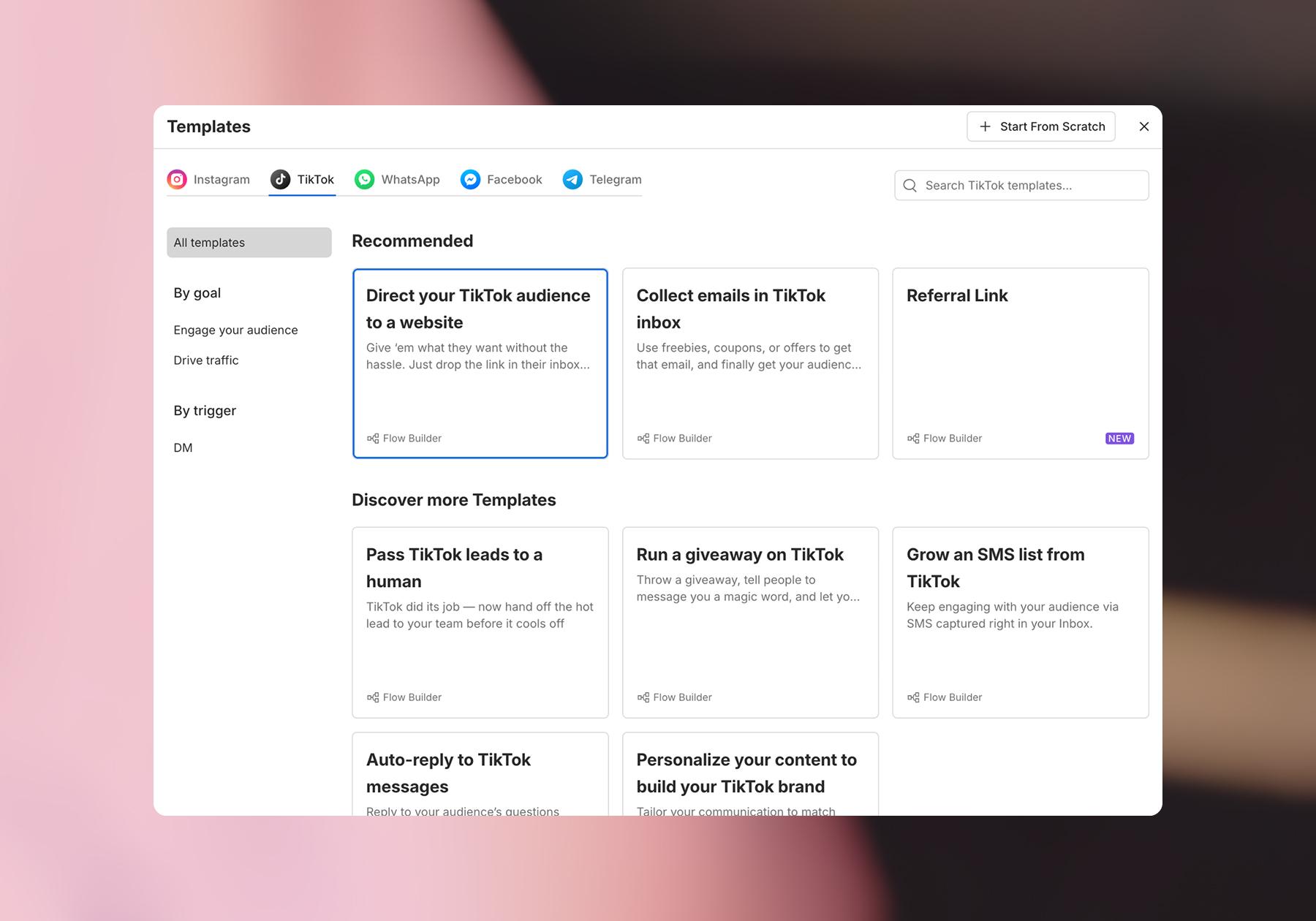
Here, you’ll see some of the most popular Manychat TikTok templates.
- Select the “Direct your TikTok audience to a website” template.
Step 3. Add a trigger to start your flow
Once you’ve opened the template, it’s time to customize it.
- For the first block (User sends a message), add a trigger keyword.
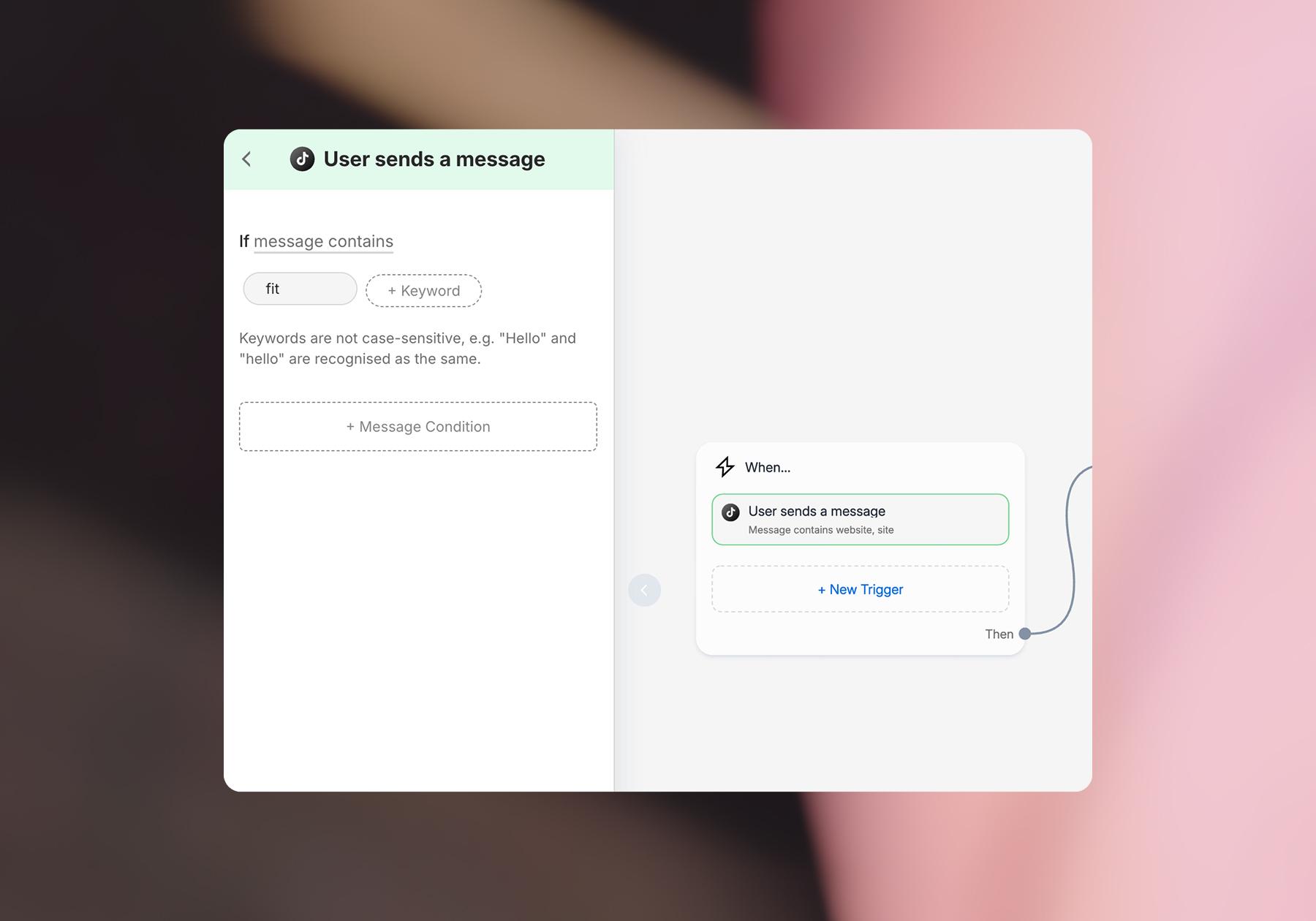
You can add several keywords here if you’d like to.
Step 4. Customize the automated message users will receive
- For the second block (Send Message), customize the message to sound like your brand and include a link to your product.
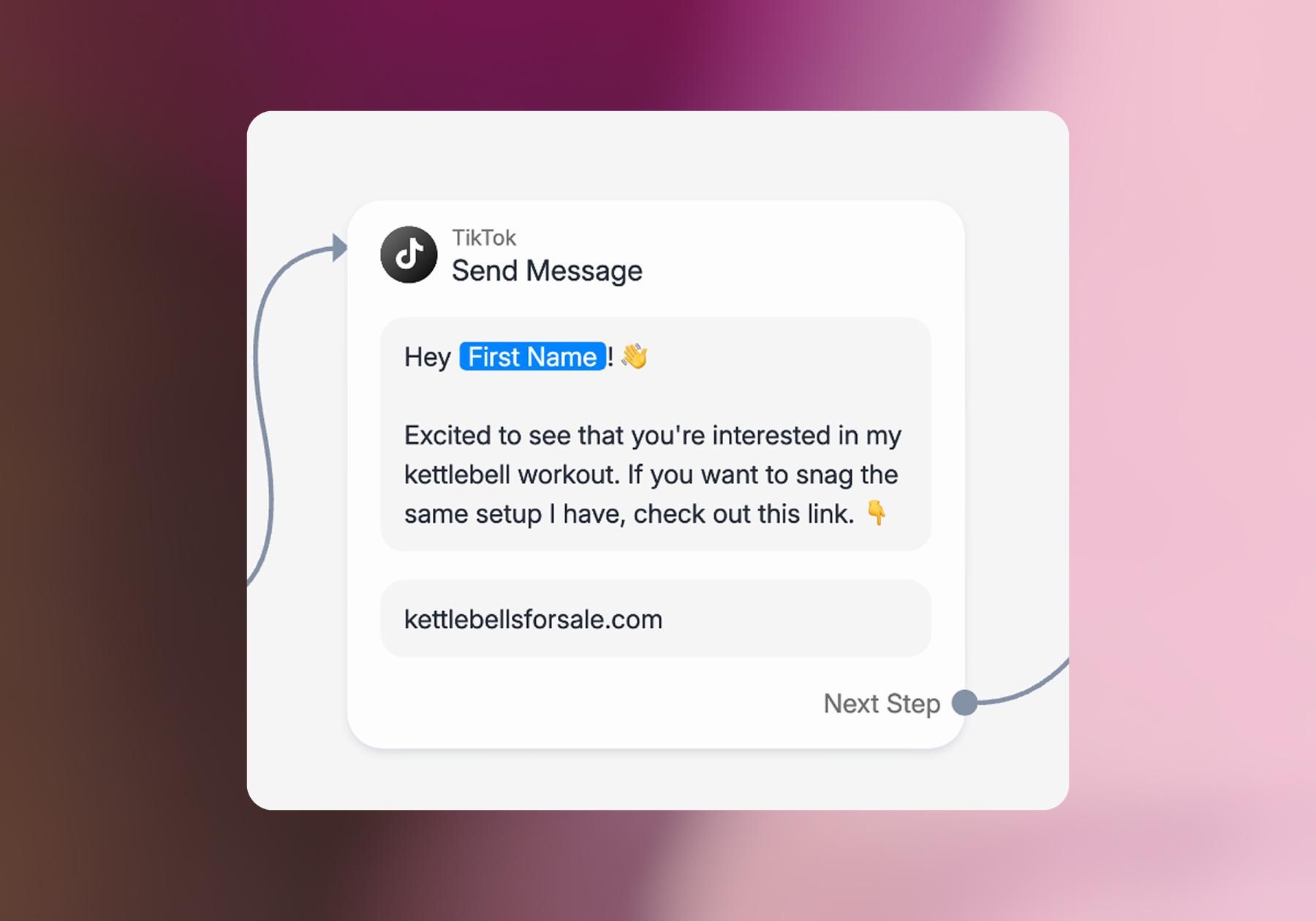
Note: The “First Name” variable is a part of this Manychat template, but you can remove it if you’d like.
Step 5. Customize (or delete) the follow-up
You’ve got the two most important steps of your flow set up; now just bring it home.
The next block in the template is a message block with a 35-second delay. The purpose of this addition is to follow up with the user and give them another chance to either click on the link or ask you a question.
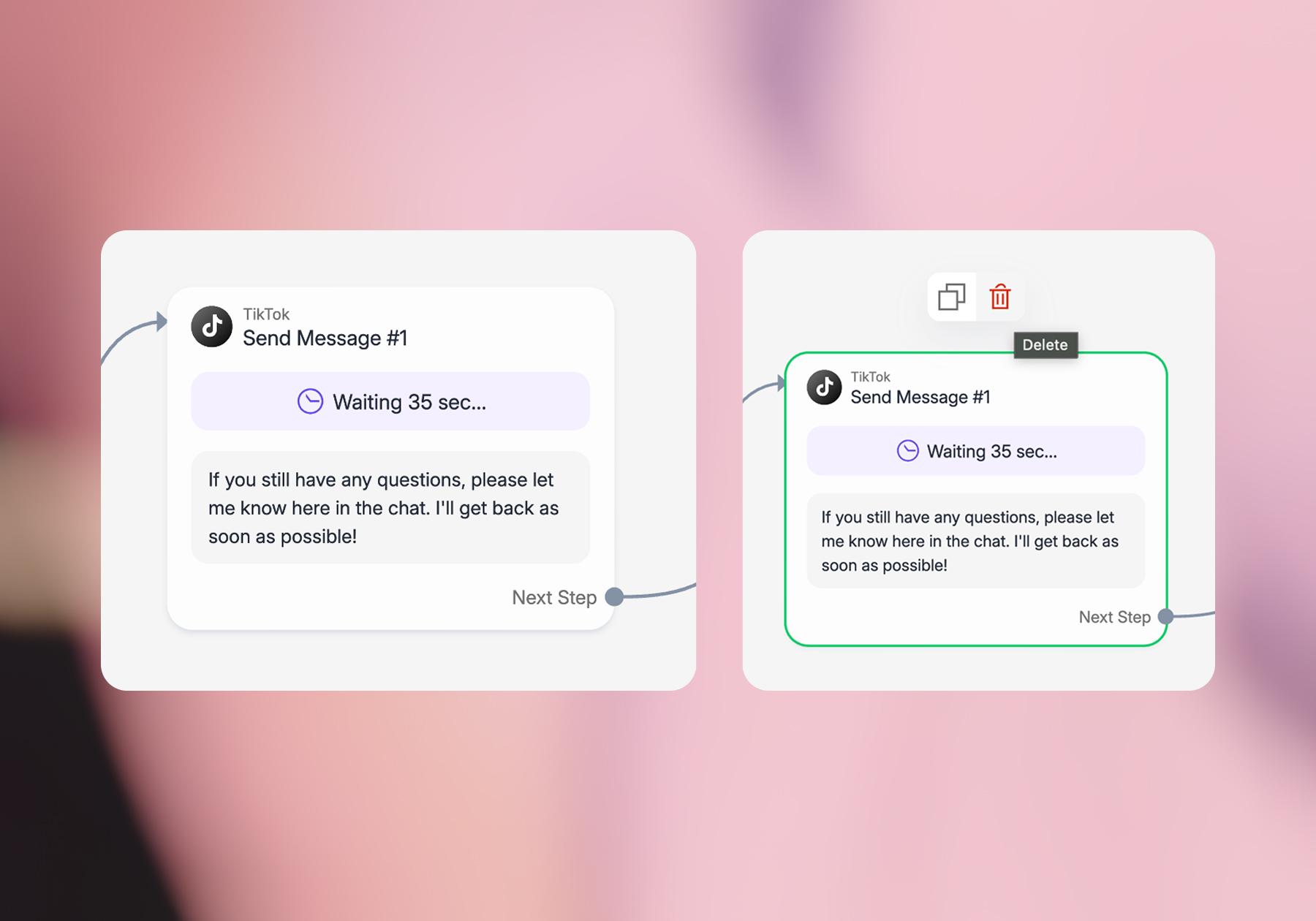
- Customize the message so it sounds like you, or if you don’t want a follow-up, click on the trash can to delete it.
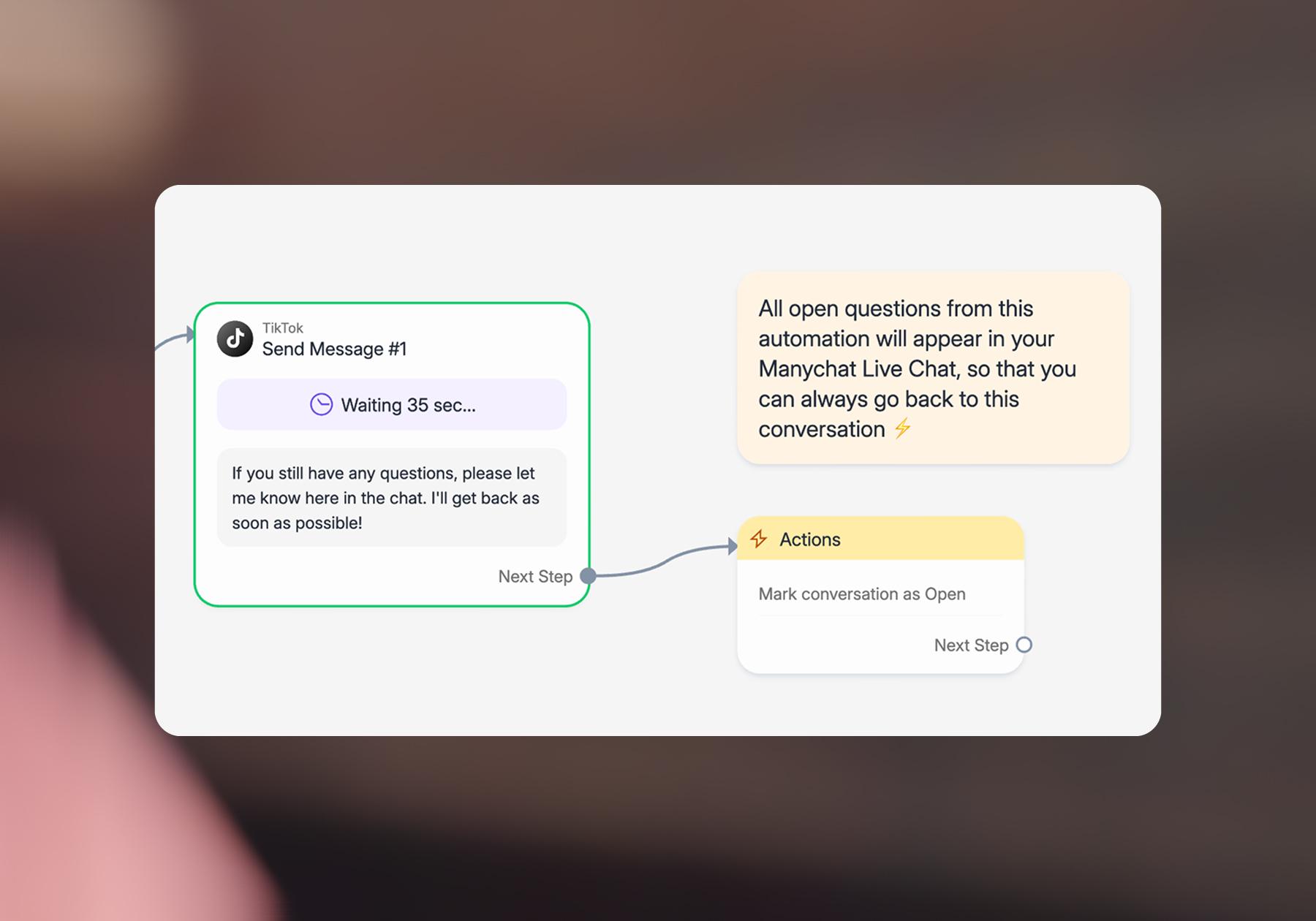
- If you decide to delete this message, make sure you delete the Action attached to it too — the “Mark conversation as Open” block.
Step 6. Test and publish
- Once you’ve customized the template, hit the Preview button to see how it will work.
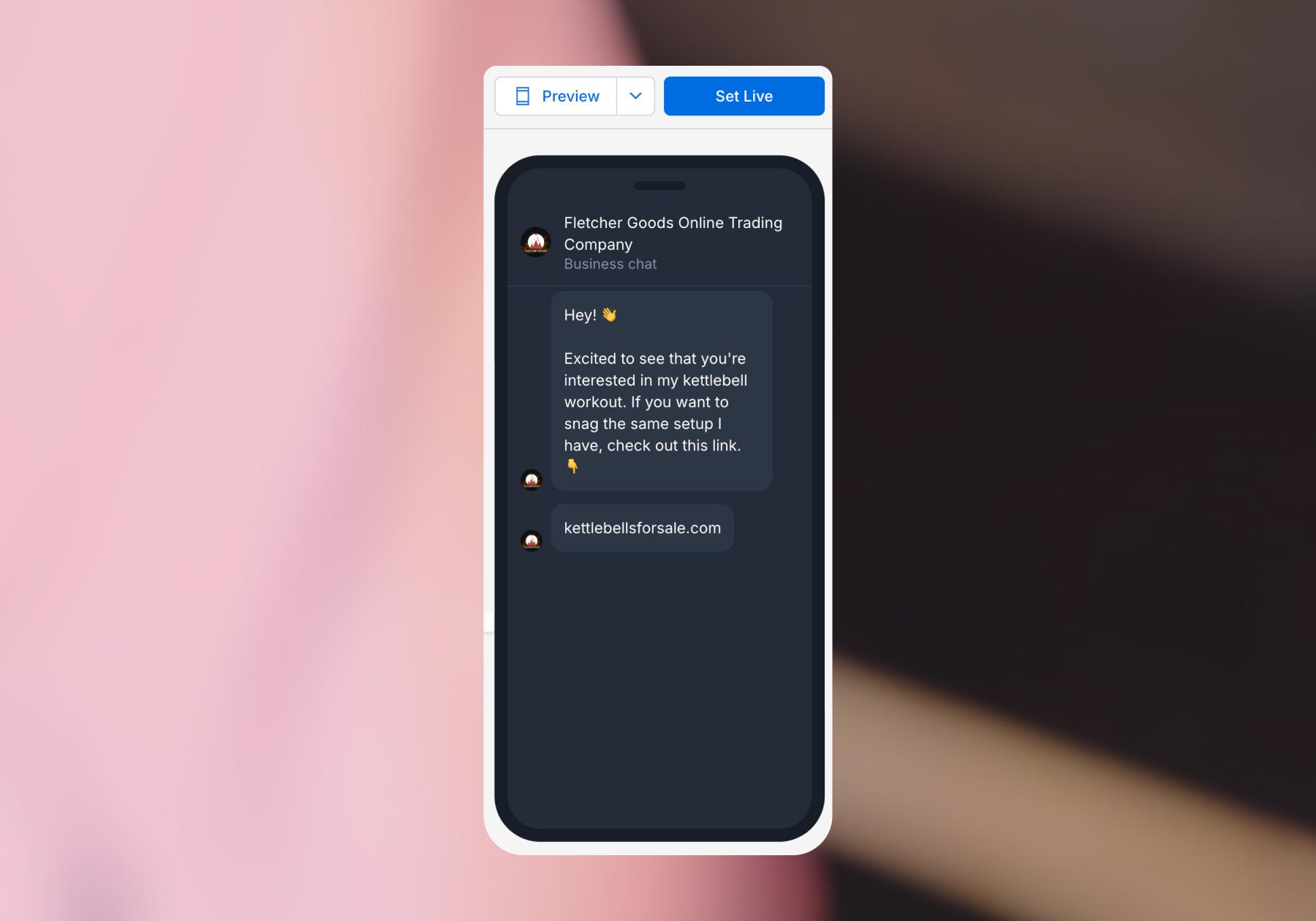
- If you’re happy with how the automation works, click Set Live.
- Once it’s live, test the automation by DMing the keyword to your account from another TikTok account. Make sure the URL opens to the correct product page and that there aren’t any typos or other issues with your automation.
Link Delivery? Consider it Done

Dropshipping isn’t a set-it-and-forget-it business. You need to find products people want, work with suppliers, create content, manage your store, monitor margins, and ensure customers receive what they ordered.
That’s a lot… so, why not let us help handle your TikTok DMs?
As you can see from the walkthrough above, getting started with Manychat is super simple. And once you’ve mastered the basics, you can build on that foundation with FAQs, lead collection, personalized recommendations, and live-chat handoffs.
Frequently asked questions
Yes. With a TikTok automation tool like Manychat, eligible accounts can create automations that respond when someone sends a particular keyword or phrase. You can use these automated conversations to share product information, answer common questions, collect customer details, or send someone to your store.
Yes. Links sent in TikTok messages can be clickable, making this especially useful for dropshippers.
Quite a few. As covered in this article, dropshipping platforms can help automate product listings, inventory monitoring, order fulfillment, and tracking. TikTok also offers automation for Shop advertising and affiliate collaborations. Then, tools like Manychat tackle the conversational side, including automated DMs, product-link delivery, FAQs, and lead collection.
Yes, provided your account meets TikTok’s eligibility requirements and you’re in a supported region. Learn more: Turn TikTok Views Into Customers With Manychat.
Yes, when you’re using automation features and third-party tools supported by TikTok and following TikTok’s applicable policies. Account eligibility, features, and geographic availability can differ, so stick to supported functionality and avoid spammy tactics.



Originally published: Oct 1, 2026, Updated: Oct 6, 2026
More stories worth reading
More content that's too good to miss