
Picture this: You wake up to 400 comments on a post that finally took off, a DM inbox that looks like a natural disaster, and the sinking feeling that you're about to lose a bunch of leads simply because you can't reply fast enough.
The truth is that manual engagement doesn't scale, and every hour you spend answering the same questions is an hour you could have spent on your content or business.
This is why so many creators and brands turn to Instagram automation. With the right setup, you can spend less time on Instagram while engaging more. Ahead, we’ll dive into why engagement is a good goal, what actually impacts engagement, and examples of automations you can use to boost your Instagram engagement rate further.
TL;DR
- Engagement is a worthwhile goal because it affects how your content performs,
- The biggest engagement wins come from a combination of good content and thoughtful automation.
- Five examples of automations that can support Instagram engagement, from simple comment-to-DM flows to a full-blown lead qualification pipeline.
Why Instagram Engagement is Worth the Effort

If you're going to spend time (and automation budget) chasing engagement, it's worth understanding what you're actually chasing, and why.
Instagram isn't just a place people scroll; it's where they decide what to buy and who to trust. 92% of Americans who use Instagram follow at least one business, and more than a quarter of them check out a business profile every single day. Meanwhile, 60% of users say they interact directly with brands on the app, and Instagram consistently ranks among the top platforms people use to discover new products.
So engagement isn't just a vanity number — it's the thing standing between "someone saw your post" and "someone became a customer." No comments, no saves, no replies means no signal that you're worth showing to anyone else, and no bridge from casual scroller to actual buyer.
How the algorithm responds to engagement signals
Instagram's algorithm has gotten more specific about what "engagement" means to it. A few things worth knowing:
- Sends beat likes. Instagram's own head, Adam Mosseri, has said publicly that "sends per reach" — how often someone DMs your post to a friend — is now one of the platform's strongest ranking signals, reportedly carrying several times the weight of a like when it comes to reaching people who don't already follow you. Saves come in a close second, especially for practical or reference-worthy content people want to come back to.
- Speed matters. Posts that rack up likes, saves, and shares within the first 30 to 60 minutes get pushed to a wider audience — the algorithm treats that early burst as a sign the content's worth spreading.
- Two-way conversation counts, too. Instagram will show the accounts you actually talk to — the ones you DM, comment on, or reply to via Stories — your content over accounts you just silently follow. Passive engagement (a like, a follow) matters less than the algorithm equivalent of a real back-and-forth.
- Also, most accounts are working with a low bar. The median engagement rate across industries is well under 1% (and it's been sliding — down from around 0.70% in early 2024 to roughly 0.45% to 0.50% now, per Socialinsider's 2026 benchmarks). Anything in the 1% to 5% range is considered good. So the goal isn't chasing an impossible number; it's making sure the engagement you do get is the kind the algorithm — and your business — actually values.
Posting strategies that actually drum up engagement
A few things the data backs up if you're trying to build engagement organically, before automation ever enters the picture:
- Reels for reach, carousels for saves. Reels still win for getting in front of new people (especially for smaller accounts), generating more than 4x the interactions of a single-image post. But once an account grows past around 50K followers, carousels tend to become the strongest performer, generating the highest engagement and save rates of any format.
- Stories for connection. Story replies are up 88% year over year, suggesting people are still using Stories to talk to brands and creators, not just to watch them.
- Consistency over volume. The current sweet spot is two to three feed posts or Reels a week and near-daily Stories. Posting more than that doesn't reliably move the needle; posting on a schedule your audience can count on does.
- Write captions that ask for something. A caption that invites a comment, a tag, or a DM does more work than one that just describes the photo.
Where automation comes in
Automation is what lets you keep up with the conversations that the Instagram algorithm rewards, at a volume no human can sustain manually.
Consider the scale. Over 150 million people message a business on Instagram every month, and 90% of customers say an immediate response is a make-or-break moment when they have a question. You're not going to personally reply to all of that, especially not the moment it happens, which is exactly when it matters most for both the customer and the algorithm.
That's the case for automation: DMs triggered by comments and keywords keep the "two-way conversation" going at scale, they show up fast (automated DMs see 70% to 90% open rates within the first few hours, and convert qualified leads at 12% to 20%, compared to roughly 10% for the average landing page), and every reply, whether from a human or a flow, tells Instagram your account is worth having a conversation with.
Automation doesn't replace a strong content strategy. It's what makes sure the engagement your content earns doesn't go to waste.
5 Instagram Automation Plays That Support Engagement

Here are five ways to turn Instagram automation into something more useful than an instant “Thanks for commenting!” DM.
The first three help turn engagement into traffic, leads, or sales. The last two are less about growth and more about protecting the relationships you just worked so hard to build.
1. Give followers one very specific keyword to comment
Don't make people guess how to get the thing you're offering. Tell them exactly what to type.
Take Meredith Mann (@thepeachiespoon), a cookbook author and recipe creator. In one example, she directed followers to comment “cookie” to get the recipe for her buckeye brownie cookies to their DMs.
This is a great example of Manychat’s Comment-to-DM automation in action.
In Manychat, you can choose the exact post or Reel you want the comment-to-DM automation to trigger off of, then specify which word or words should trigger it (in Meredith’s case, “cookie”).
This approach is better than automatically DMing everyone who comments because the follower has explicitly told you what they want. You're delivering the right resource to someone who has already raised their hand for it — instead of blasting a link at people who may have been commenting about something completely unrelated.
2. Turn a comment into a lead you can reach outside Instagram
A comment-to-DM automation doesn't have to end after you send someone a link. You can use the DM as a starting point to collect contact information, so the person can become an email or SMS subscriber instead of remaining someone you can reach only when Instagram's messaging rules allow it.
Say a fitness coach posts: “Comment PLAN, and I'll send you my free 4-week workout program.” Someone comments “PLAN,” and Manychat sends the opening DM. After they tap through, the automation delivers the basic program and then asks:
“Want the printable version too? Drop your email below, and I'll send it over.”
Then, a Data Collection block validates the email address and saves it directly to the contact's Email System Field. You can then connect that information to the next part of your funnel.
For example, you could:
- send the promised resource through Manychat's email channel;
- add the contact to a Klaviyo list;
- tag them based on which lead magnet they requested; or
- trigger another automation that introduces the next relevant offer.
Now “Comment PLAN” hasn't just generated another comment. It has generated a contact you can continue nurturing beyond that one Instagram interaction.
Bookmark this: Build Your Email List from Instagram in 5 Easy Steps
3. Use different keywords to send different people different offers
Personalization doesn't need to involve some gigantic AI recommendation engine. Sometimes it can be as simple as paying attention to the word somebody typed.
For example, Disney-inspired workout-wear company Crowned Athletics promoted its Encanto-inspired collection by asking followers, “Which sister are you?”
That question gives the brand a perfect opportunity for a more personalized comment-to-DM campaign. Instead of sending every commenter the same product link, Crowned Athletics could create separate paths around the answers from Isabela, Luisa, and Mirabel.
Someone who comments “Isabela” could get: “You're a true, unique flower in our eyes 🌸 Here's the Blossom Hermana set.”
Someone who comments “Luisa” gets the Luisa-inspired products. Someone who comments “Mirabel” gets the Mirabel collection.
You could even take it one step further and attach a different promotion, product link, tag, or follow-up to each path.
In Manychat, one way to do this is to create separate comment triggers around the relevant keywords and connect each one to its corresponding automation. Just be deliberate when multiple comment triggers are active on the same account, because their order can affect which automation fires.
The point is that automation doesn't have to flatten everyone into the same generic response. The information your followers give you can determine what they see next.
4. Build an FAQ flow before your inbox needs one
This one isn't about growing your following as much as it’s about protecting the relationships the plays above help build.
If you get the same questions in your inbox every day, those are great candidates for automation. For example, suppose people regularly DM you about your shipping policies.
You can create an Instagram Keyword trigger in Manychat for terms like:
- “Shipping”
- “Ship”
- “Delivery
- “How long does shipping take”
Then start a flow that says:
“Most orders leave our warehouse within two to three business days. Are you looking for general shipping info or help with an existing order?”
Give them two buttons:
- Shipping info: Send your normal delivery timelines and international shipping policy.
- Find my order: Ask for the information your support team needs, then route the conversation to a person.
Manychat's Keyword trigger gives you several ways to recognize messages, including exact matches and messages that contain, begin with, or contain the full keyword. You can also account for multiple phrases people commonly use rather than expecting everyone to phrase the question identically.
That's a much stronger FAQ experience than firing off one canned answer and calling the conversation done. Answer the easy part automatically, give the follower a logical next step, and leave yourself an escape hatch for anything the flow can't solve.
Learn more: Get Smart(er): Answering Instagram FAQs With Manychat
5. Give the automation a clear exit ramp to a human
Automation should know its job description.
It's great at instantly delivering a link, answering “What are your store hours?”, collecting an email address, or asking a few qualification questions.
It's much less useful when the answer depends on details that change from person to person.
Makeup brand Glossier, for example, received a comment on one post asking whether its 10th anniversary birthday candle would ever come back.
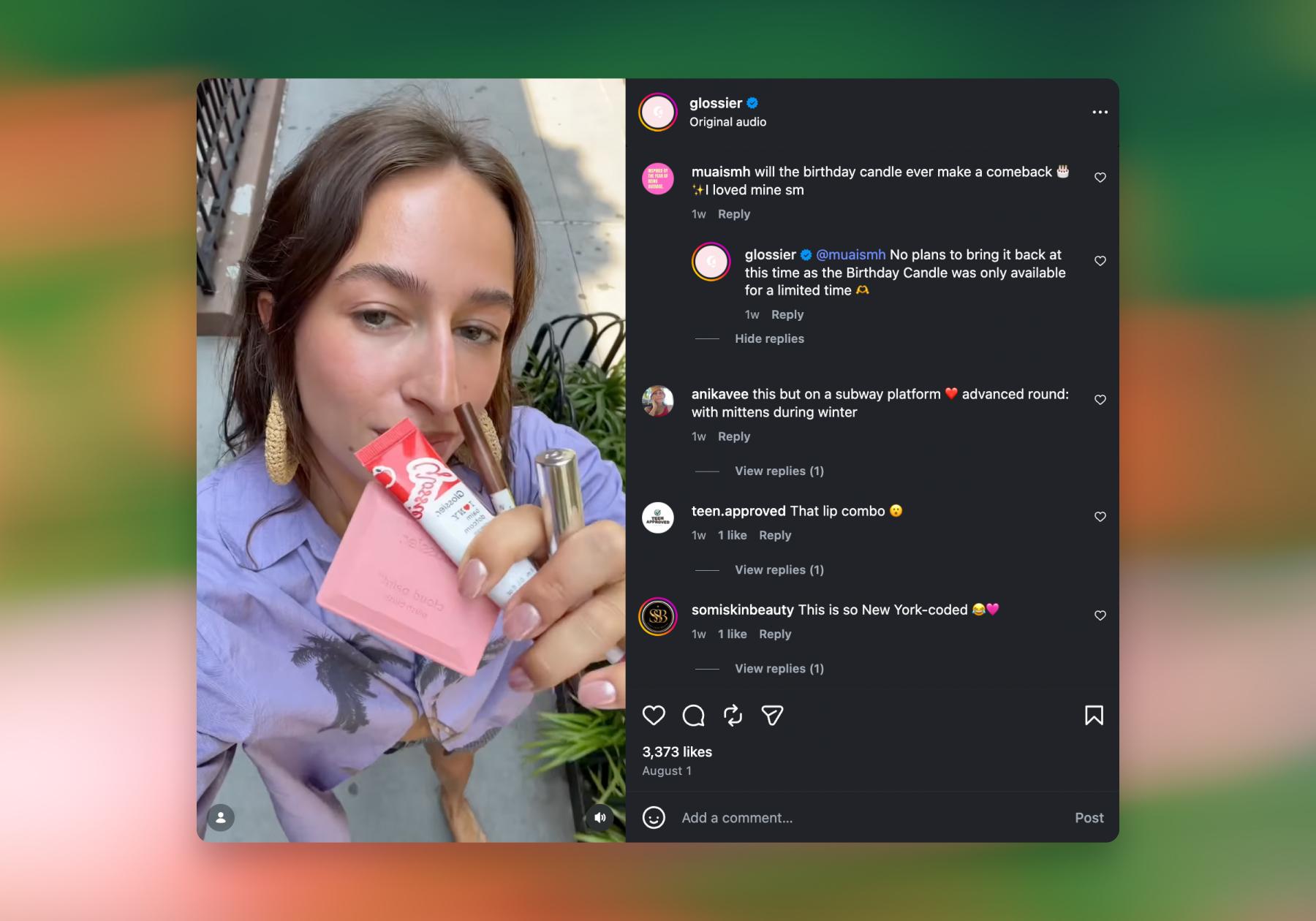
The birthday candle was a limited-edition item, so Glossier likely wouldn’t have any automation in place to handle this question. Situations like these are exactly why you always need to offer the option to speak with a person. In Glossier’s case, it looks like a social media manager jumped in and answered the question themselves. But you can set up your automations so that this option is easily accessible to followers.
In Manychat, this is called the “Handover Protocol.” It involves adding a “Talk to a human” button to your flows. Then, use an Action to mark the conversation open and Assign conversation to a team member or group.
Content Earns Engagement; Automation Makes Sure You Keep It

Everything in this guide comes down to one idea: strong content and smart automation aren’t competing strategies. They’re two halves of the same job.
Content is what earns the engagement in the first place; no automation, however clever, turns a flat post into comments, saves, or shares. But once that engagement shows up, whether it’s 12 comments or 12,000, automation ensures none of it goes to waste. It’s the difference between someone commenting “cookie” and getting the recipe in their inbox seconds later, versus that comment sitting there until someone gets around to it (if they ever do).
Skip the content side, and you’ve built a very efficient system for automating silence. Skip the automation side, and you’re back to manually replying to DMs at midnight, missing the exact window (those first 30 to 60 minutes) when the algorithm cares the most.
For the content half of the equation — what to actually post, and how to get people commenting and sharing in the first place — check out Want More Likes, Comments, and Shares? Try These Instagram Engagement Strategies. Pair that with the plays above, and you’ve got both sides covered.
Ready to stop leaving engagement on the table?
Sign up for Manychat and start automatically turning comments and DMs into real conversations.
Frequently asked questions
Yes — when you use Meta-approved automation to respond faster and more consistently, your engagement rate typically climbs because followers get instant, relevant replies instead of being left on read. Speed and personalization are what make the difference.
Automation through Meta-approved API partners (like Manychat) is completely safe and within Instagram's terms of service. The tools that get accounts flagged are unauthorized bots that scrape data or fake interactions — steer clear of those, and you're fine.
DM automation responds to messages people send you directly, while comment-to-DM automation monitors your post comments for specific keywords and then starts a DM conversation with the commenter automatically. One waits for the message; the other makes the first move.
The key is building multiple personalized flows in your actual brand voice — not one generic "thanks for reaching out!" reply — and including keywords to avoid triggering off of, so you don’t message people who aren't interested. Knowing when to hand off to a human helps, too.
It depends on where you and your customers are located. Meta requires businesses to disclose automated chat experiences when required by applicable law, including at the beginning of a conversation, after a significant lapse in time, and when a conversation switches from human to automated. Even when it isn’t legally required, Meta recommends letting people know they’re interacting with automation as a best practice.



Originally published: Dec 26, 2024, Updated: Aug 24, 2026
More stories worth reading
More content that's too good to miss