How Course Creators Use Instagram DM Automation to Sell on Autopilot

You spent 200+ hours building your course (after the 10,000 you spent becoming an expert, of course). Why are you spending another 200+ manually DMing people about it?
If you’re finding yourself hunched over your phone at all hours, answering the same questions about your course offerings repeatedly, then DM automation might be exactly what you’re looking for. You don’t have to wait until you “hit it big” for the manual messaging to become too much.
Set up automation to handle tedious tasks so you can spend your time where it matters most: developing your course further, launching a follow-up, and nurturing your community.
TL;DR
- DMs outsell landing pages: open rates are higher, and conversion rates are higher.
- How to build it: we take you through how to build a full comment-to-DM flow.
- Other automations you can sell with: it’s not just comment-to-DM!
Why DMs Outsell Landing Pages for Digital Products

You’ve set up your website. It’s beautifully designed. It’s… not converting at the rate you want. Being the wise person that you are, you do a little research and discover that DMs consistently outperform landing pages: DMs average 70-90% open rates within the first few hours, making automation key for building connections the moment someone expresses interest.
As for conversions from DMs? Qualified leads convert from 12-20%. Compare that to healthy landing page conversion rates, which average around 10% (and landing pages have a 160% higher conversion rate than most other sign-up methods).
Those are the stats, but they don’t tell the whole story of why. When someone lands on a website, if they don’t already have the intention to buy and/or a personal connection to the seller, they could decide to think about it and come back later (and later might never happen). When someone’s scrolling on Instagram and sees exactly what they need, tailored just for them? It’s a lot harder to resist that siren call — especially if the moment they leave a comment, a DM hits their inbox giving them a taste (free asset) of the larger course plus the information for the rest.
It feels more personal, especially if you, wise course creator, write personalized automations. People are more likely to buy from people they know, or feel like they know, because they are similar to them.
How to Build Out a Comment-to-DM Flow

You’ve built your course out, and you’re ready to capitalize on those DM conversion rates (we’ll cover a few different scenarios for using automations to sell your course in the next section). We’ll take you through exactly how to do that, step by step, with Manychat.
Step 1: Sign up for Manychat and connect your Instagram account
- If you don’t already have a Manychat account, take a minute to sign up.
- Next, connect your Instagram account to Manychat.
How to Create a New Manychat Account (step-by-step tutorial) 💬 Manychat Basics Ep. 1
Step 2: Find the ‘Auto-DM links from comments’ template
- Once you’re in Manychat, open the dashboard and head to Automations.
- Click + New Automation.
- Click on the Auto-DM links from comments template.
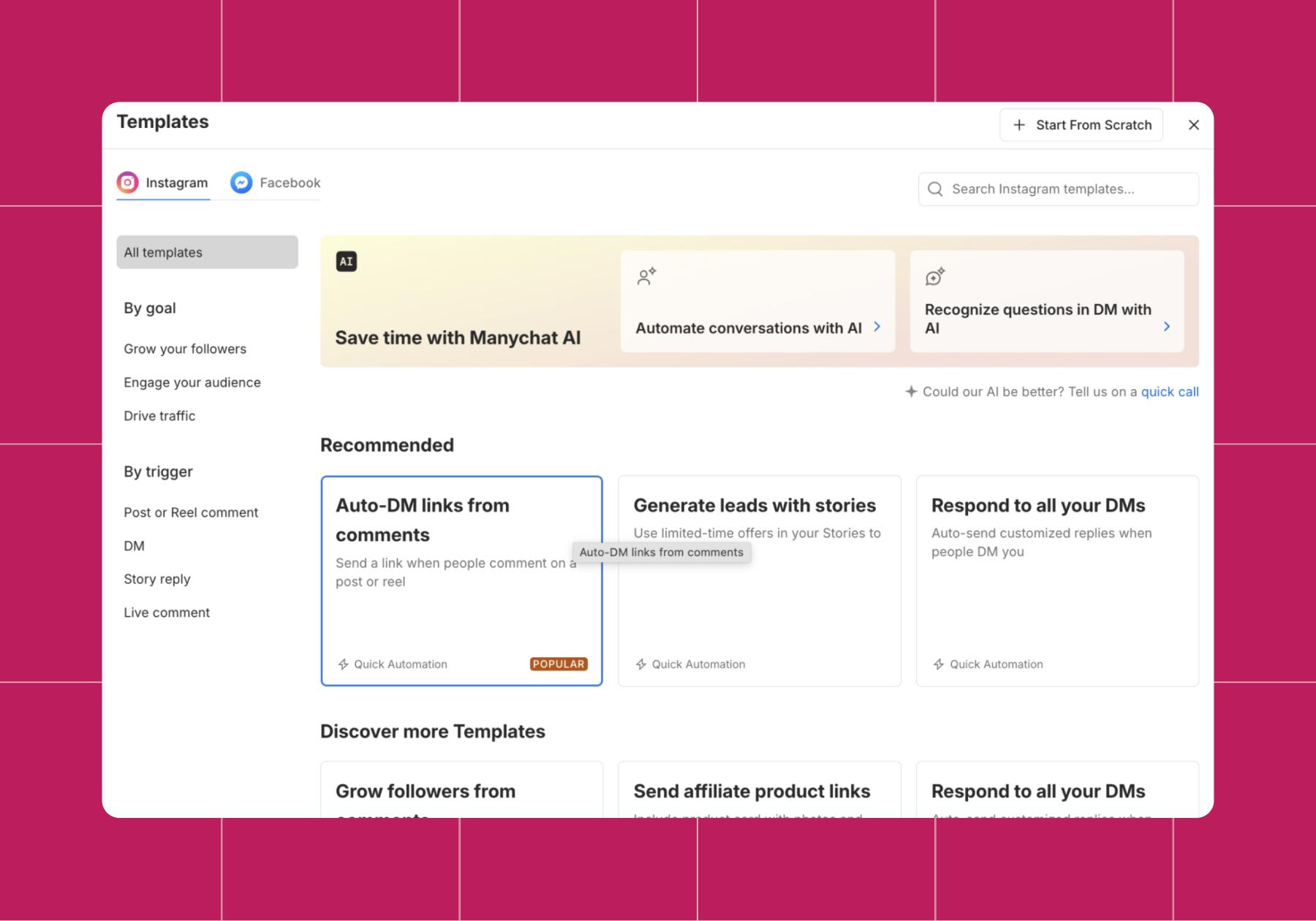
Step 3: Customize your comment-to-DM automation
You’ve found Manychat’s comment-to-DM template. Now, let’s talk about how to use it best.
- First, you have to choose whether the flow will trigger when someone comments on any of your posts, a specific post, or the next post.
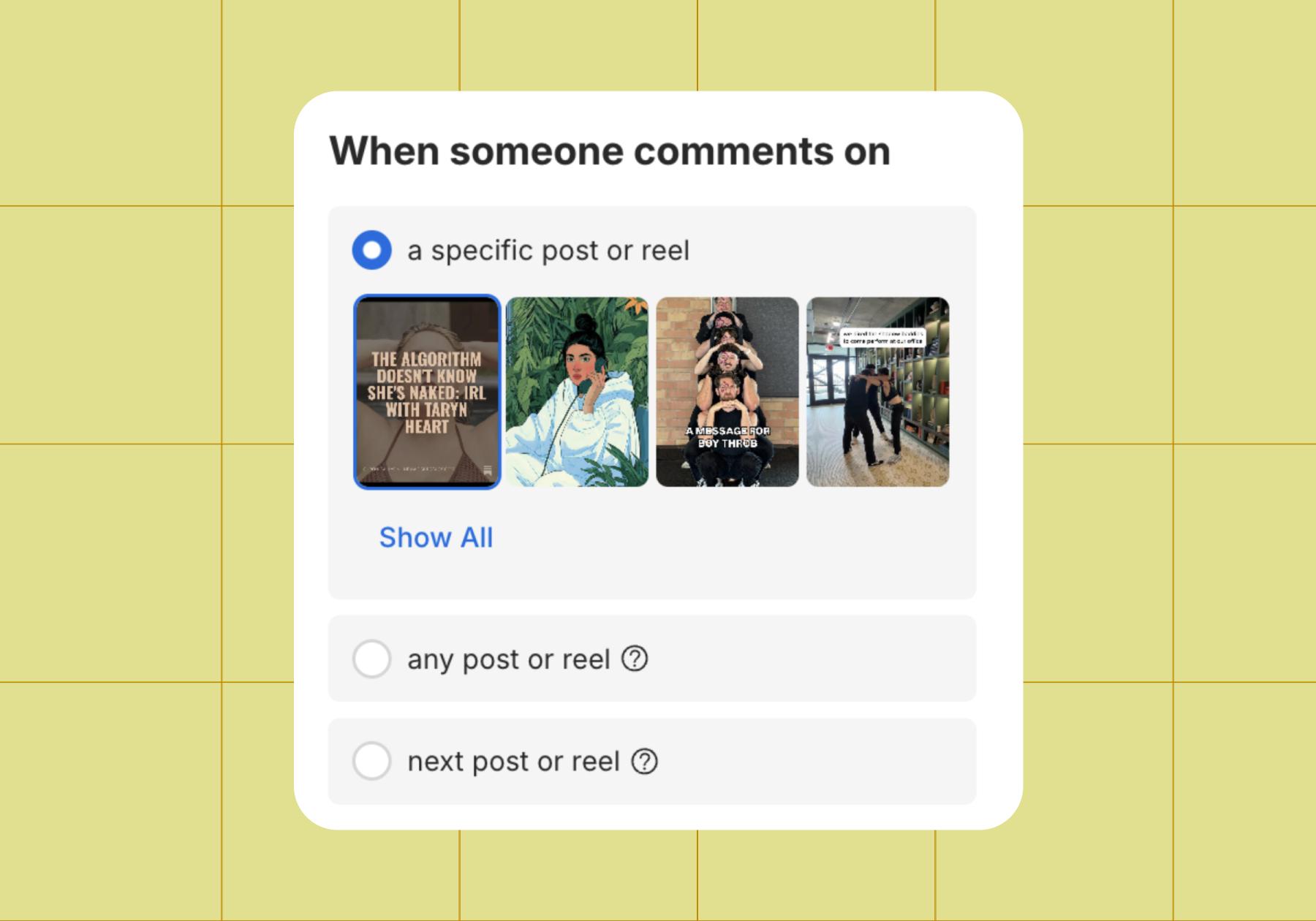
Choosing a specific post is recommended for most situations.
We only recommend having the automation trigger off all posts if you’re setting up an evergreen flow — something like sending people who comment “did a raccoon EAT MY ORDER” a DM with an email address they can reach out to for help. You can also choose “next post or reel,” but keep in mind it can get tricky if you have content scheduled to go out at certain times and you set up the automation without that calendar in mind.
For this example, we’ll walk you through an automation activated by a specific post.
- Then, choose whether to use a trigger keyword or have any comment trigger the automation.
Keywords are the best choice; you rarely want to slide into an inbox uninvited. At best, they’re less likely to comment on a future post of yours because you made it awkward. At worst, they’re going to block you for being annoying and tell all of their friends to avoid your brand. Yikes.
For a recent Chronically Online Magazine feature on Taryn Heart, we chose the keyword “heart” and the ❤️ emoji because they both related to the piece.
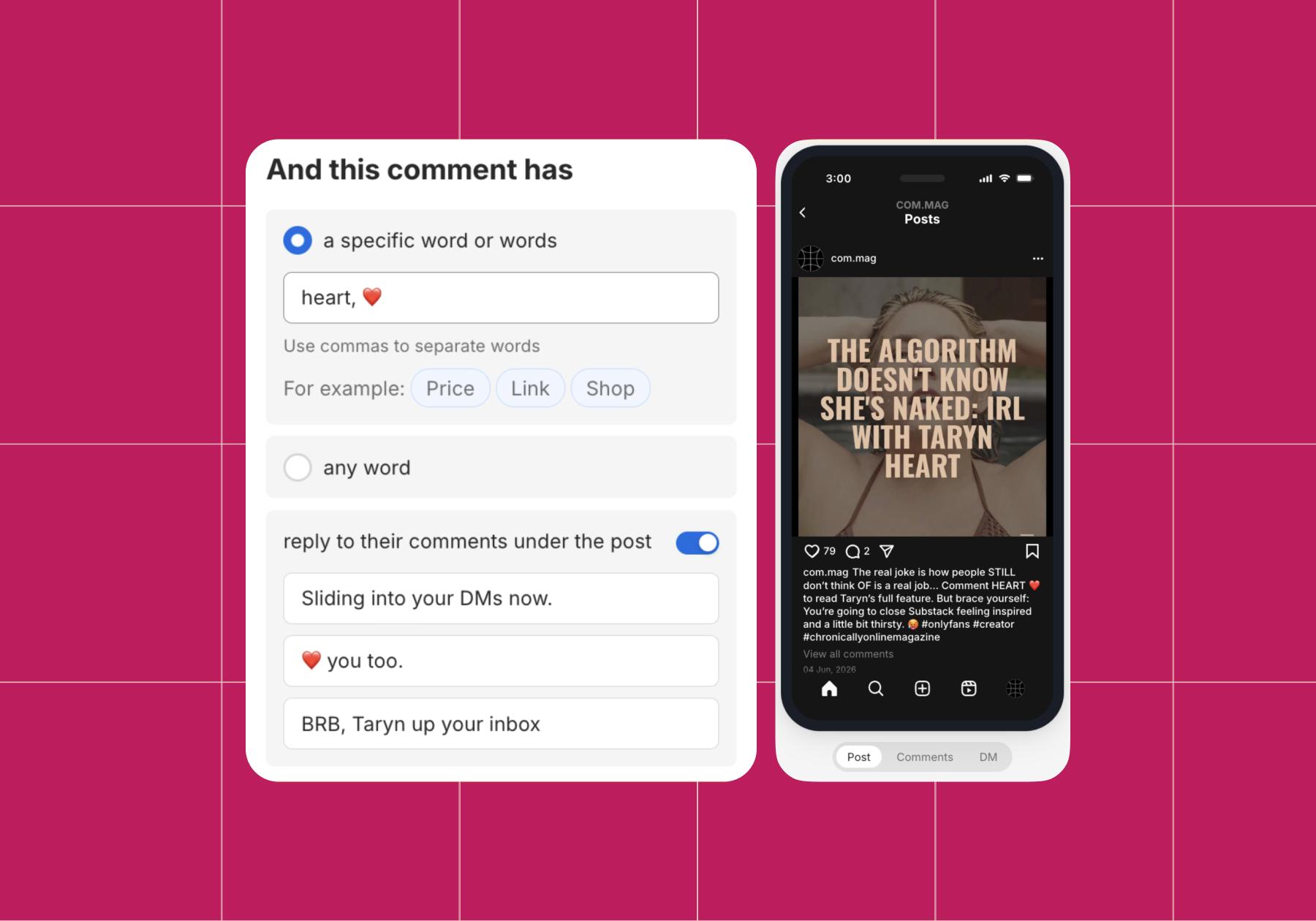
Simple keywords relevant to the content you’re posting are the best choice.
💡Tip: Typos are easy to make, so add a few common ones related to the trigger word(s). In this example, things like “haert, hart, hert,” and different heart emojis would all be smart to add.
Remember that the automation is triggered by any comment that includes the keyword on this specific post (or any post, if you choose that option). This is why you should avoid using a generic phrase or word that people say all the time as a trigger.
- What’s next? Decide if you want Manychat to respond to comments in addition to sending them a DM. Toggle on reply to comments under the post and write some responses that sound like you if that’s what you’re choosing.
The Instagram algorithm might seem mysterious, but it has always loved one thing: engagement. That includes content sparking discussion, especially soon after it’s posted, making automation valuable. Just keep in mind that the more comments you get, the more times your automated responses get seen by your audience.
If you expect a high volume of comments, it’s an even more important reason to write a variety of personalized responses. Audiences don’t mind automation; they mind impersonal, canned responses.
- The last thing? We recommend you customize the DMs that any scrolling audience member gets, starting with your opening DM.
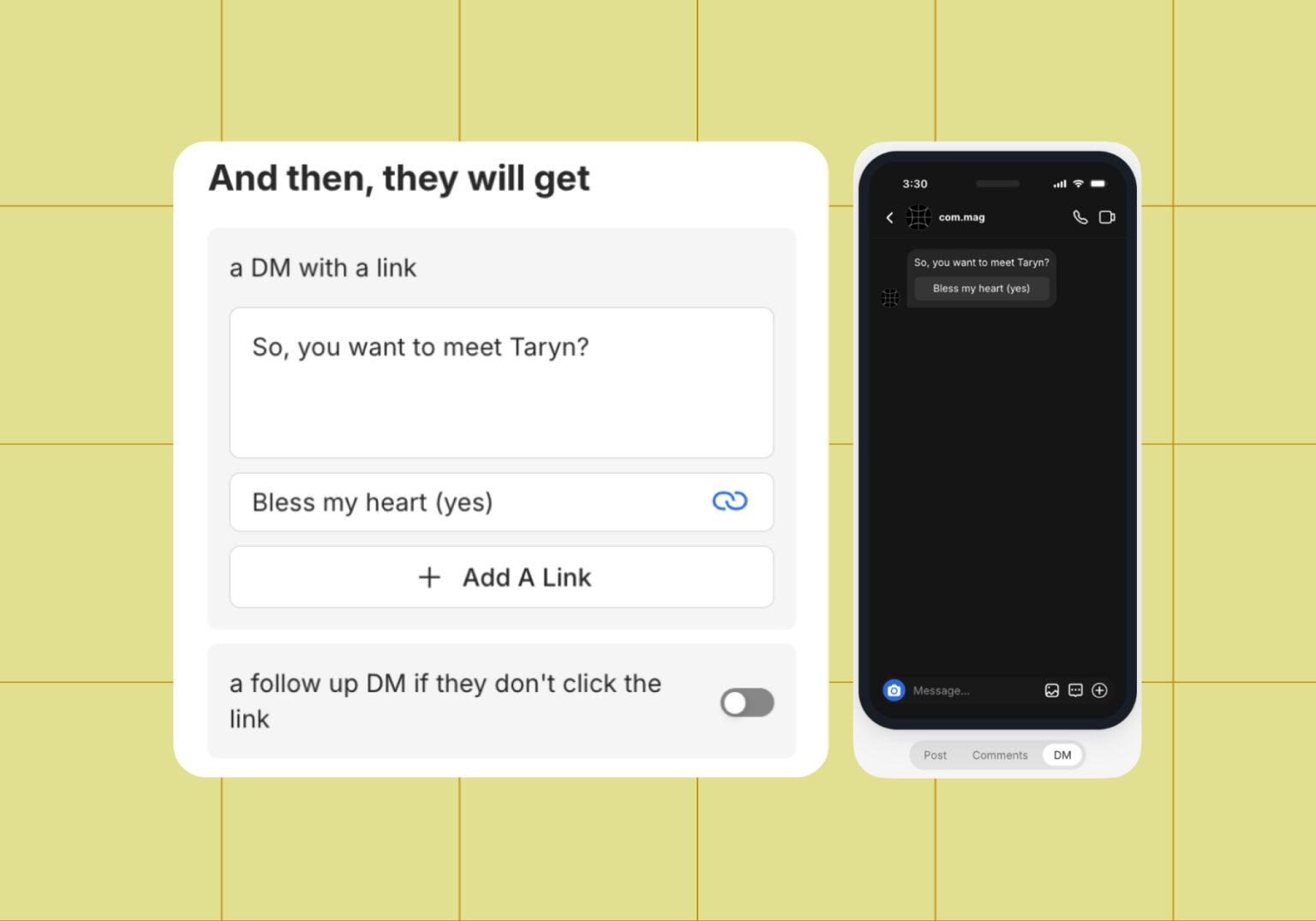
Opening DMs are optional, but a good move. You can use them to greet someone, and/or also ask them to follow you or provide their email address before offering a link.
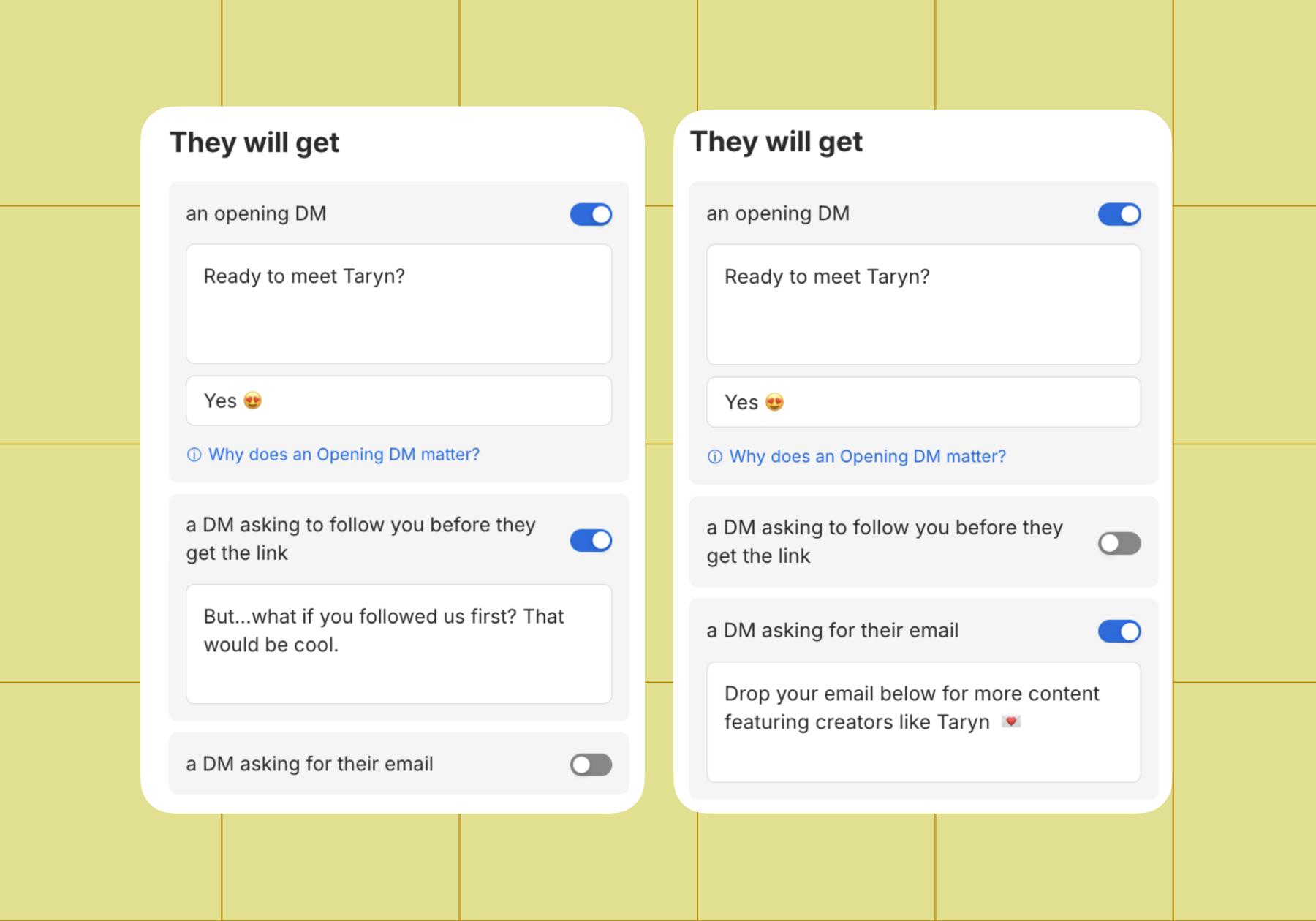
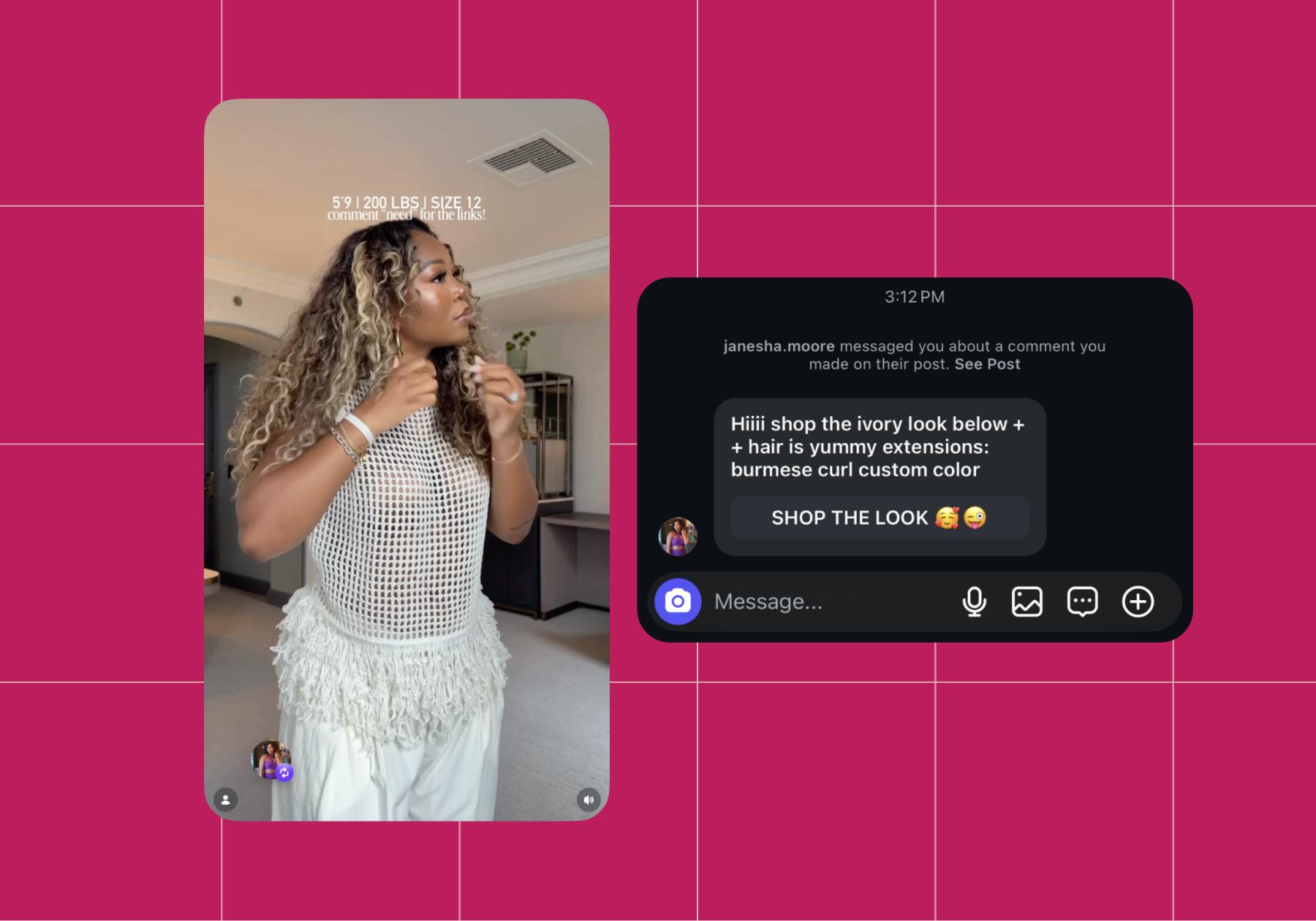
You can skip these steps by turning them off, but you still need to write a DM that comes before the button with the link. Janesha Moore (@janesha.moore), the affiliate marketer, does it like this:
And here’s what that would look like in Manychat (we’re going back to Taryn for the example below):
- Ready? Then click Set Live in the upper right corner.
You did it! Your comment-to-DM flow is done. Prefer a walkthrough in video? We’ve got you.
Other Automations You Can Sell With

Now that you’ve got the step-by-step breakdown for setting up a comment-to-DM flow, you can adapt it for other moments in your funnel.
The Pre-Launch Buzz Flow: Build Hype Before You Drop
You’ve built up your course, and you’re ready to launch it directly to your Instagram community instead of passively mentioning your website or sending them to a link-in-bio. Or you’ve built up your second course, and you’re ready to launch it. Either way, the right move is building the hype before it drops on Instagram.
Following the steps we just outlined, tweak them for this particular campaign:
- Create a “comment WAITLIST” trigger (remember to add those typo and emoji variations)
- Capture emails in the DMs to build your following where you own it (not daddy algorithm)
- Send countdown updates across your account to build up the hype:
- In Stories
- On the grid
- In the DMs (don’t overdo it)
If you build the hype right, you can turn all of that attention into sales as soon as you launch. Speaking of which…
The Launch Sequence: Turn Comments Into Sales in 48 Hours
Set up this sequence to follow your hype sequence:
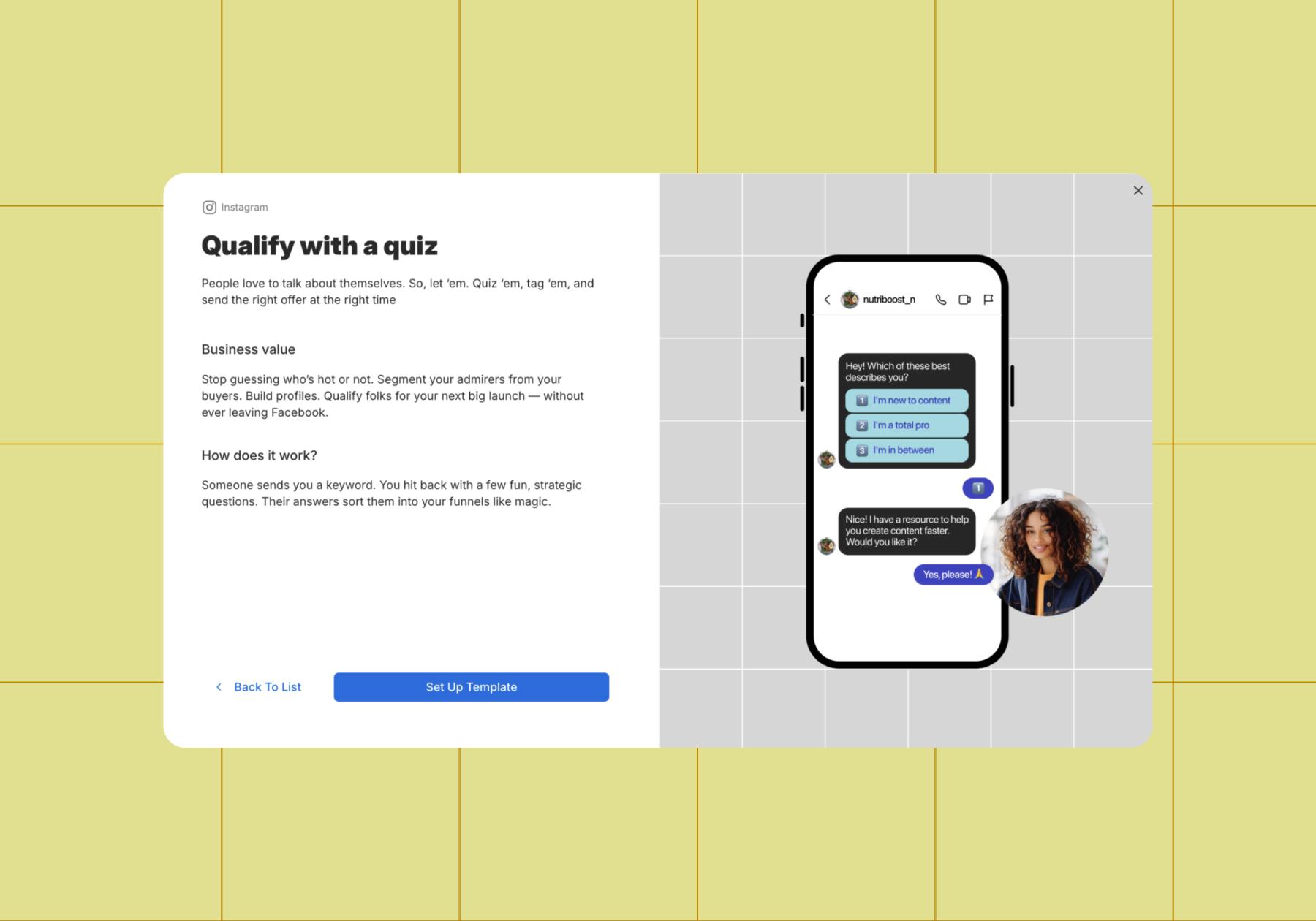
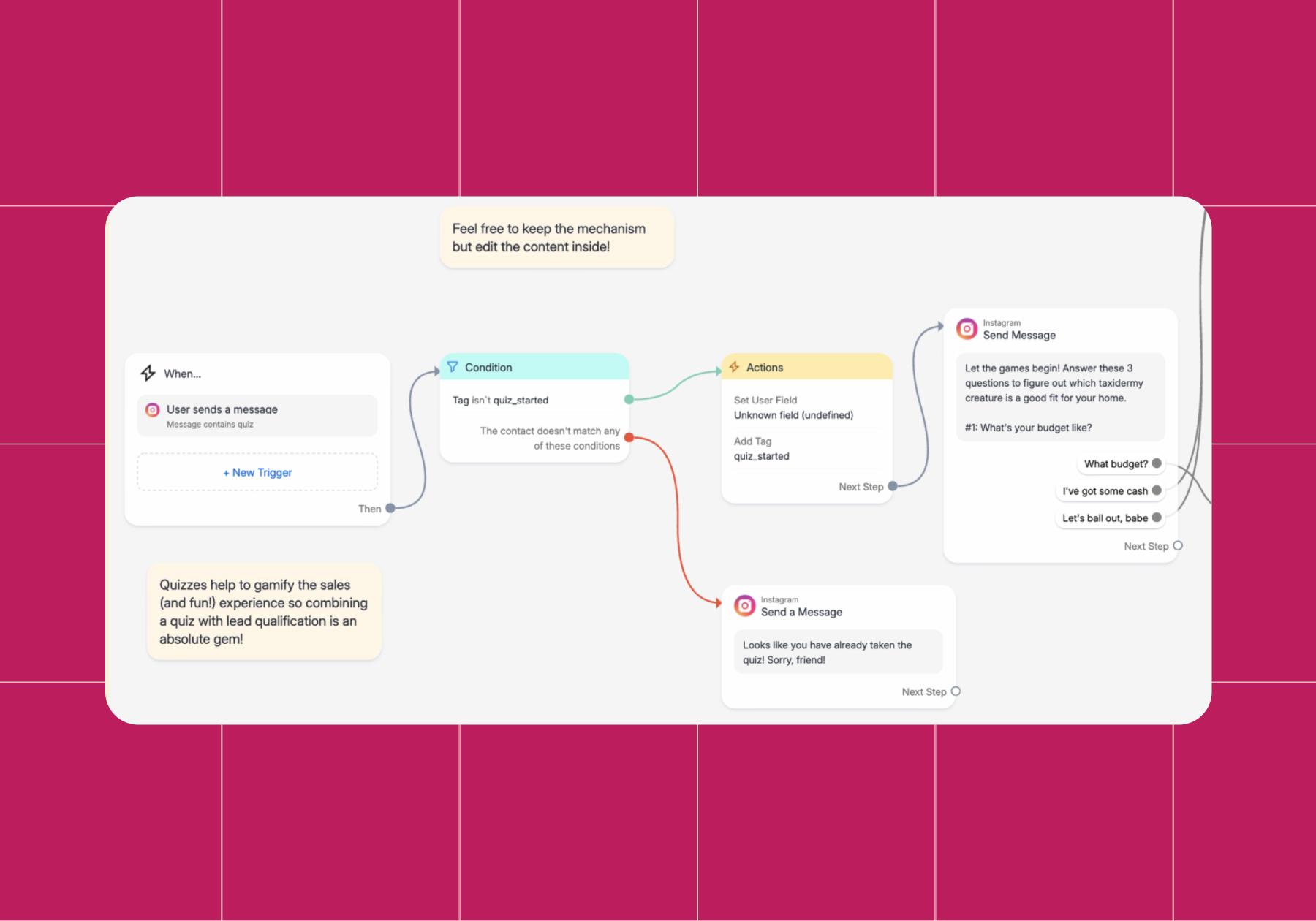
- Ask qualifying questions, like what someone’s budget or experience level is, to sort them into the right lead categories (someone who’s just curious about what you offer vs. ready to buy right away).
- Create personalized sales messages that build a deeper connection with your prospects.
- Make the sale as easy as possible with payment link delivery.
If you need a launching point, you can always use the Qualify leads with a quiz template, which can be found with a quick search in the Manychat template library.
The fewer friction points in your sales funnel, the more likely you are to close deals when your audience is most interested and primed to buy. Speaking of funnels…
The Evergreen Funnel: Sell While You Sleep
Different from most comment-to-DM campaigns, an always-on automation qualifies and sells without a specific launch window. You can set one up in a few different ways, including: with a keyword trigger on reels, auto-replies on Stories, or by setting up reply to DM, default replies, or conversation starters in your inbox.
A little upfront work to define your goals will make your funnel flow more smoothly. Start by deciding:
- The path you want each lead to take: Outline your goal (book more discovery calls, collect emails, send payment links to the most qualified leads), gather your content and offers (options for learning more, a free asset, or advanced course options), and decide how followers will enter your flow.
- How your funnel will guide and qualify respondents: Build your Manychat automation to ask qualifying questions, tag users, and route them where you want them.
- Where you want to step in: Let automation keep most of your pipeline running on autopilot 24/7, so you can take over when things need a personal touch.
Once you have that mapped out, you can build an always-on automation based on where your audience falls into your funnel: the top, middle, or bottom. We outlined the full process in Stop Losing Leads in the DMs: Build a Funnel That Follows Up for You.
💡Tip: Don’t forget to include follow-up messages as part of your flow. If a user doesn’t complete a flow, you can send a message after a set delay (2 hours, 1 day) to check back in using Smart Delay.
Your Course Deserves Better Than “Link in Bio”

You put a ton of work into building out your course. Don’t let that work languish on a landing page, where it’s harder to discover and less likely to convert those who do find it.
Meet your audience where they already are: on Instagram. Reduce friction by having your messages land right in their inbox, so they don’t have to take the extra step to the link-in-bio, find the link they’re looking for, and drop off if they get distracted or something doesn’t load fast enough.
Make it easy for them to discover everything you have to offer and send them exactly where they need to be in your flow, all without having to send endless manual messages. Get your life back and spend your time on what matters most: building out your offerings and nurturing your community.
Manychat automation’s got your back. Sign up now.
Frequently asked questions
Instagram DM automation lets course creators send instant, personalized direct messages to followers who engage with specific posts, Stories, or reels — without manually replying to each one. Manychat triggers pre-built message flows based on keywords or actions, so you can deliver lead magnets, course links, and more, 24/7.
Yes. Manychat is an official Meta Business Partner. Automation must be triggered by a user action (like commenting a keyword or tapping a Story reply) — unsolicited mass messaging is not allowed and can result in account restrictions or even a ban.
When a follower comments a keyword like “GUIDE” on your post, Manychat instantly sends them a DM with your product link, free preview, or payment link — capturing intent at its peak. This shortens the path from discovery to purchase, reduces drop-off, and works while you sleep.
Yes, and it’s one of the most effective uses. After someone triggers your flow, Manychat can ask for their email directly inside the DM conversation and sync it automatically to your email platform (Mailchimp, ConvertKit, ActiveCampaign, and others). This turns passive Instagram engagement into a warm, owned audience you can market to long-term, no matter algorithm shifts.
Yes. DM automation doesn’t require a large following to be effective; it works on engagement, not follower count. Even with a few hundred engaged followers, a well-timed reel with a keyword prompt can generate dozens of qualified DM conversations. Many creators use it to validate course ideas and pre-sell before they’ve hit 10K followers.


Originally published: Jun 15, 2026, Updated: Jun 15, 2026
More stories worth reading
More content that's too good to miss