ICYMI: In late 2024, Meta announced a major overhaul of how creators earn money on Facebook. The company rolled its fragmented monetization tools (In-Stream Ads, Ads on Reels, and the Performance Bonus program) into a single, streamlined system called Facebook Content Monetization. The idea? Make it easier for creators to earn across all types of content and manage everything in one place.
What does this mean for you? Now is a great time to revisit your Facebook monetization strategy, as the way you monetized your Page even a year ago may be outdated. Some older programs have shut down, new ones have launched, and long-standing features like Stars, Subscriptions, and Shops are being reshaped under Meta’s unified approach.
The good news is there are more ways than ever to turn your Facebook Page into real income — let’s take a look at five of the most effective options.
1. Sell Products with Commerce Manager

Got merch to hawk? Products to promote? To sell on your Page, you’ll need to use Commerce Manager, Meta’s platform for managing catalogs and sales.
Anyone can set up a catalog (a library of the products you want to promote in ads, posts, or tagged content) in Commerce Manager — you don’t need a Shop for that. You can set one up for physical products or listings for things like services, travel, or even vehicles.
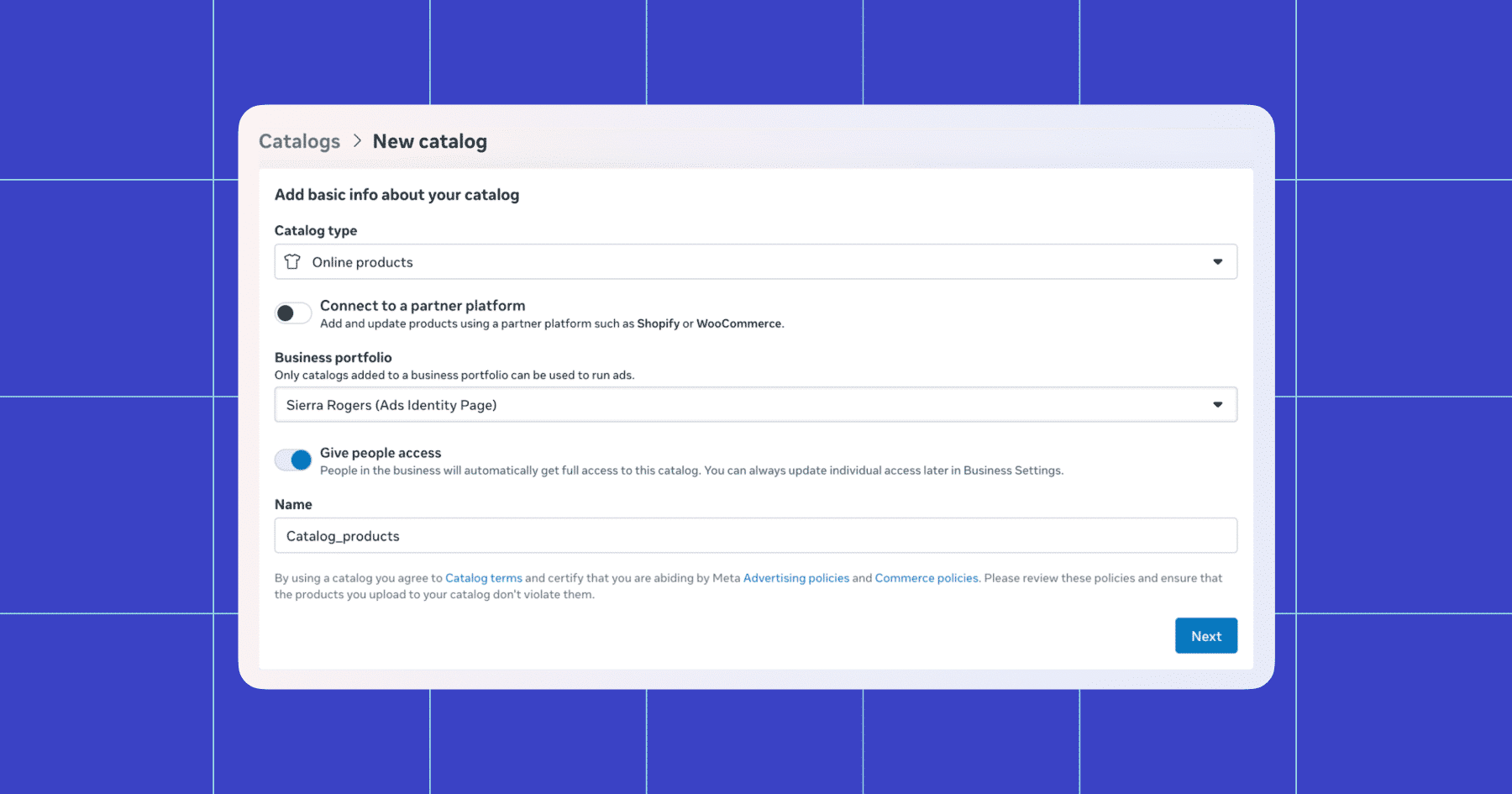
If you want to go further and create a Shop on Facebook or Instagram, setting one up automatically creates a commerce account. This unlocks additional features in Commerce Manager, such as the ability to organize products into collections, customize your storefront, and view insights into customer behavior and product performance. Customers can then browse your products on your Page, Instagram profile, or ads, and reach out to you through Messenger with questions.
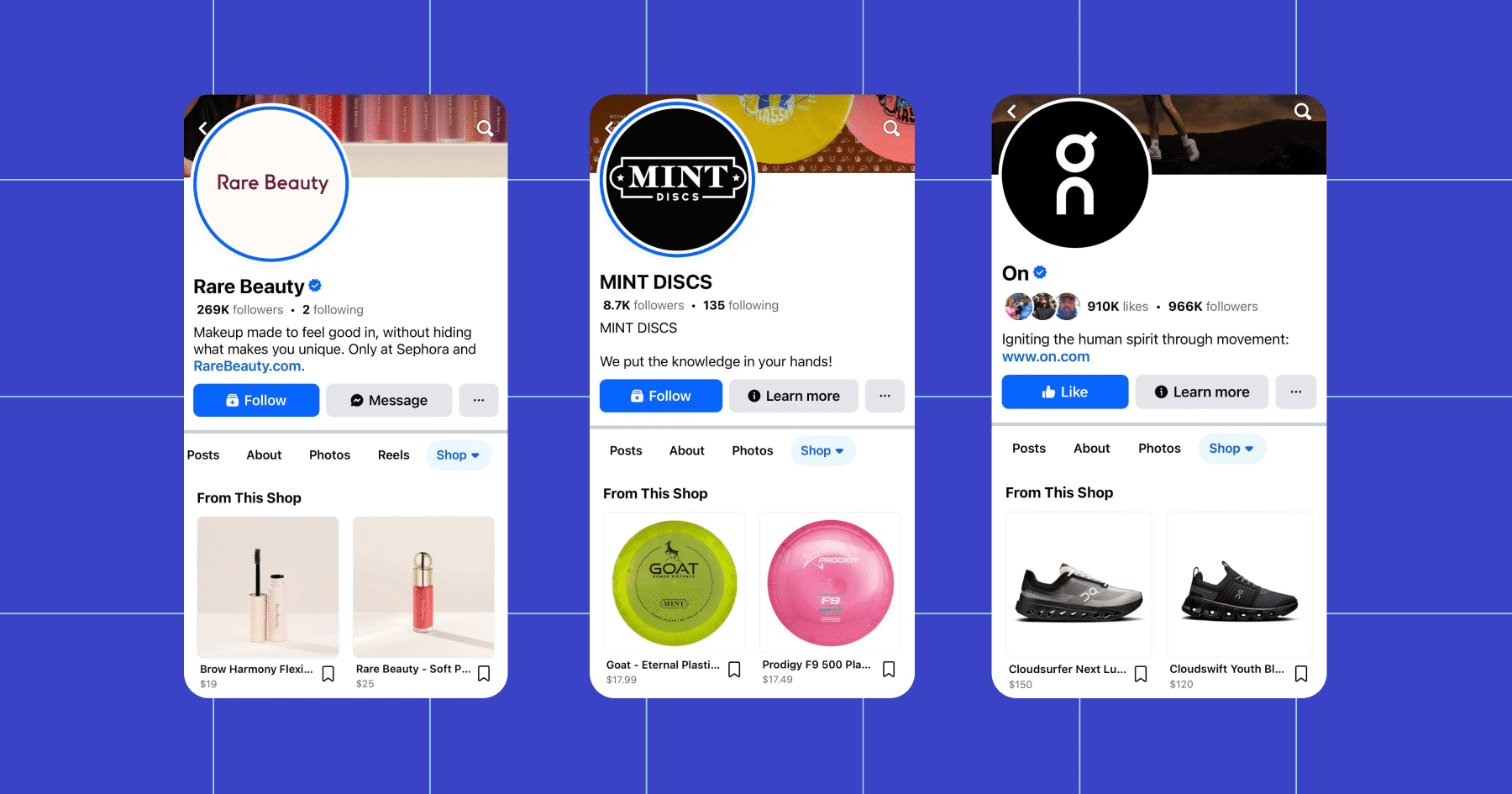
Notably, users will not be able to access your product listings on desktop — Facebook Shops are a mobile-only experience.
🚨FYI: As of September 2025, Meta has phased out several features related to Shops and in-app checkout on Facebook and Instagram. That means you can no longer process purchases entirely inside Messenger or Instagram. Instead, Messenger is now primarily a channel for answering customer questions, sharing product links, and supporting purchases made on your own website or another checkout platform.
2. Monetize Your Content with Facebook Subscriptions

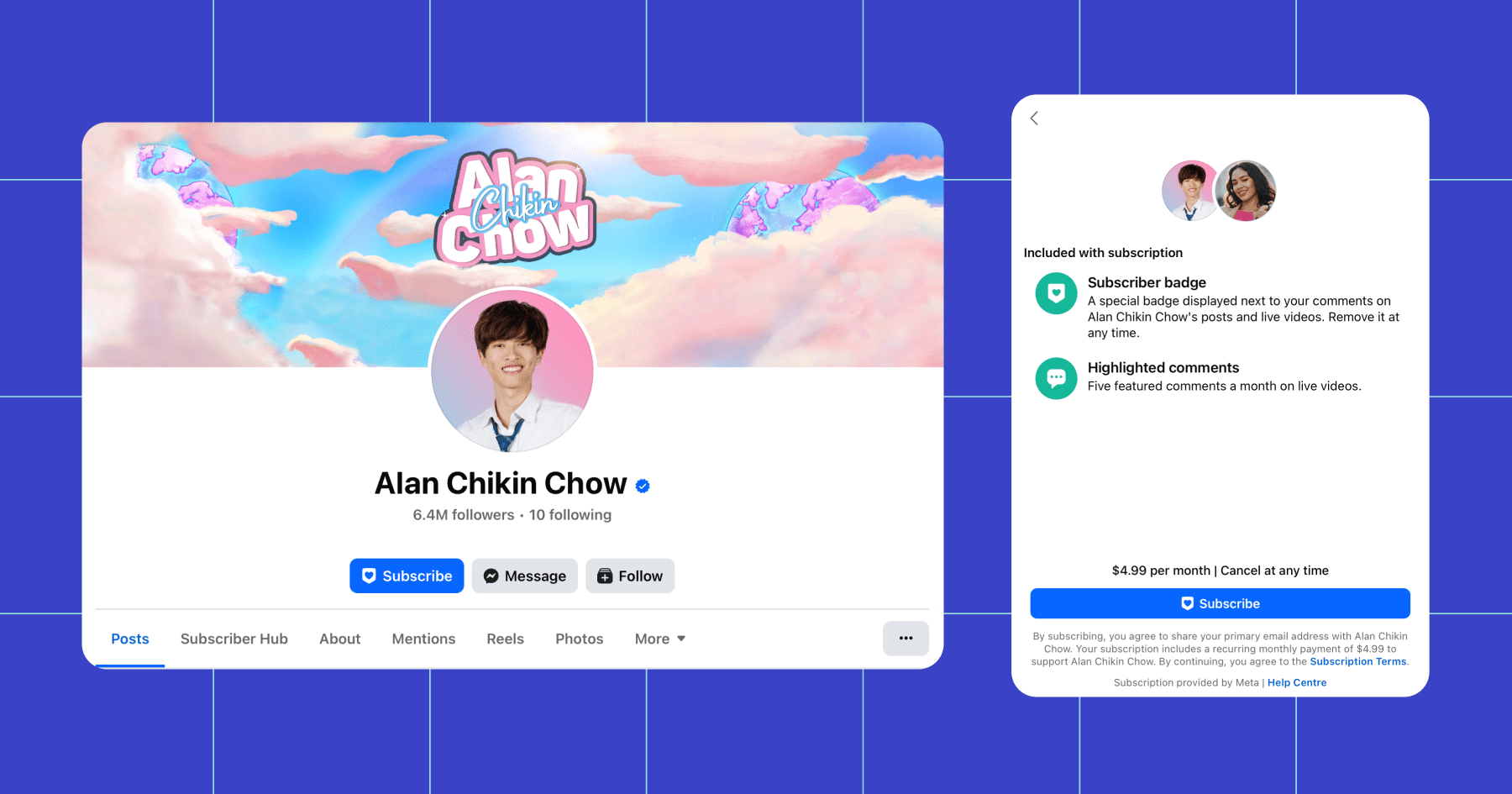
If you’re a creator, one of the most powerful ways to earn recurring income from your Page is through Facebook Subscriptions. This feature allows you to charge followers a monthly fee in exchange for exclusive perks, such as bonus content, private groups, or subscriber-only discounts on merch.
Subscriptions work well for creators because they drive consistent income and allow you to create a fan experience that fits your brand — anything from exclusive videos, to behind-the-scenes content, or something else.
How to set up Subscriptions
Setting up Subscriptions is pretty straightforward, but you’ll need to meet Meta’s eligibility requirements first (for example, having a Creator Page and being in an eligible region). Once you’re approved or invited, here’s how to get started on mobile:
- Go to your Professional Dashboard. Open your Page on mobile and tap Monetize, or head to your monetization tools in the dashboard.
- Find Subscriptions. Under Tools to try, tap Subscriptions.
- Agree to the terms. Review and accept the Fan Subscription Creator Terms.
- Set up payouts. Add a payout account so Facebook can pay you. (You’ll need to do this within six months of signing the terms.)
- Choose your price. Pick a monthly subscription price. You can adjust this later, but changes will only affect new subscribers.
- Optional: Offer a free trial. Switch on the toggle to offer top fans a 30-day free trial, if you’d like.
- Add Subscriber Benefits. Select what perks you’ll offer (exclusive content, private group, discounts, etc.).
- Submit for review. Tap Done to finish. Meta will review your Page to make sure you meet the eligibility requirements.
If you’re approved, you’ll get a notification to activate Subscriptions. Once live, fans can subscribe immediately and will display a subscriber badge.
💡Notably, Subscriptions pay out differently depending on where the user opts in from:
- On desktop, creators keep 100% of subscription revenue (minus applicable taxes).
- On mobile, Apple and Google charge up to a 30% fee for in-app purchases. (This drops to 15% after a subscriber’s second year.)
3. Collect Stars From Fans 🌟

Facebook Stars are a virtual currency that allows fans to support their favorite creators with small, one-time payments. For every Star you receive, Meta pays you $0.01. Fans can send Stars across multiple formats, including Reels, Live streams, on-demand videos, photos, and regular text posts.
To be eligible for Stars, you must:
- Meet Meta’s Community Standards and Partner Monetization Policies
- Have at least 500 followers for 30 consecutive days
- Live in a country where Stars are available
- Agree to the Stars Terms and Conditions
Stars are aimed at creators, not businesses, and are accessible through the Professional Dashboard once you qualify.
To activate Stars:
- Open your Professional Dashboard and go to Monetization tools.
- Select Stars and agree to the terms.
- Set up your payout account so Meta can pay you.
- Once approved, Stars will appear as an option on your content.
To get the most from Stars, engage with followers during Live streams and set Stars Goals so people know what their contributions support. Creators like Idressitalian (a travel vlogger) and Matthew Santoro (a video storyteller) have successfully used Stars Goals to drive massive engagement and income. Even comedy pages like Dry Bar Comedy use Stars to support talent and keep content flowing.
4. Use Click-to-Messenger Ads to Drive Conversions

Click-to-Messenger ads are one of the most direct ways to turn Facebook reach into real conversations (and sales). Instead of sending people to a landing page, these ads open a chat in Messenger when clicked, where you can greet customers with an automated welcome message, answer questions, or guide them toward a purchase.
Creators can run Click-to-Messenger ads to promote things like merch drops, online courses, or even tickets to a paid live event. Businesses can use Messenger ads to qualify leads, offer product recommendations, or book appointments, all within the same conversation flow.
To run a Click-to-Messenger ad:
- Open Meta Ads Manager and create a new campaign.
- Choose an objective that supports Messenger (Traffic, Engagement, Leads, or Sales).
- Select Messenger as your ad destination.
- Build your ad creative (image, video, or carousel). Make sure to include a strong CTA like “Message Us” or “Book Now.”
- Set up your welcome message — what people will see first when they click the ad.
- Launch the campaign and track performance in Ads Manager.
Once your ad is approved, it will appear in your chosen placements, and anyone who clicks will be dropped straight into Messenger with your business.
BTW, Manychat can manage your Messenger inbox
Manychat takes Messenger ads a step further by automating what happens after someone clicks. Instead of manually replying to every new chat, you can:
- Answer FAQs, collect emails, or share product links.
- Segment audiences so you can send follow-ups tailored to each follower or customer.
- Connect Messenger to other tools you already use (like Zapier or Google Sheets) to sync data or trigger actions automatically.
Or, sign up for Manychat — it’s free!
5. Earn Performance-Based Payouts on Content

Meta has shifted away from traditional ad revenue share (where you earned based on how many ads ran in your videos) to a simpler performance-based payout model. This new approach pays you for how your content performs — views and engagement — regardless of whether an ad actually appeared on it.
This program is only available to creators who meet Meta’s monetization eligibility requirements. If your Page is set up as a Creator Page with access to the Professional Dashboard, you can earn payouts on your public Reels and on-demand videos (rates vary by region and content quality).
Here’s why it matters:
- You no longer need to create videos of a specific length just to earn ad breaks.
- You receive direct rewards for content that resonates with your audience.
- Earnings are more predictable, since they’re tied to performance rather than ad inventory.
To participate, you’ll need to meet Meta’s monetization eligibility requirements and publish content that complies with Community Standards. Then:
- Apply in your Professional Dashboard under Monetization tools and agree to the terms.
- Set up a payout account so Meta can pay you.
- Publish eligible content. Focus on creating engaging Reels and videos your audience loves — Meta’s new model is designed to pay you for exactly that.
Bank On Your Page 💸

Meta’s shift to the Content Monetization program means creators and businesses alike have more tools than ever to turn engagement into income. Whether it’s selling products through Commerce Manager, building recurring revenue with Subscriptions, or connecting with fans through Stars, the opportunities are there — you just have to tap them.
Make sure your strategy isn’t stuck in last year’s playbook; with Meta’s changes now in full effect, it’s the perfect time to update how you use your Page to earn money and build stronger connections with your audience.
✋Frequently Asked Questions (FAQs)
1. Can I sell digital products through Commerce Manager?
Not directly. Commerce Manager is built for physical products and some service categories. For digital goods like presets, courses, or e-books, you’ll need to use an external platform and promote them on Facebook via Messenger or ads.
2. How do I know if I’m eligible for Subscriptions or Stars?
Check your Professional Dashboard. Eligibility depends on follower count, engagement, and compliance with Meta’s monetization policies. If you qualify, you’ll see Subscriptions or Stars as monetization tools you can enable.
3. What’s the best way for a creator to use Click-to-Messenger ads?
Think of them as conversation starters. Use them to promote whatever you’ve got (products, events, or services), then use Messenger (and Manychat) to guide fans through FAQs, collect info, and share purchase links.
4. Do performance-based payouts apply to all content types?
Not yet. Currently, payouts are applicable to public Reels and on-demand videos. Other formats, such as photos and text posts, aren’t widely monetized, although Meta may expand this in the future.
5. Does Meta take a cut of my Subscriptions or Stars revenue?
Yes. On desktop, Subscriptions pay out 100% (minus taxes). On mobile, Apple/Google take up to 30% (reduced to 15% after the first year). For Stars, creators earn $0.01 per Star after Meta’s small service fee.



Originally published: Apr 15, 2020, Updated: Nov 24, 2025
More stories worth reading
More content that's too good to miss