
Instagram launched its collaborative post feature nearly five years ago, allowing multiple accounts to be listed as authors on the same post. Creators and brands have been using it ever since because it’s a much better option than posting the same or similar content across multiple accounts.
Instagram detects when identical content gets posted multiple times. It can get flagged, which will reduce its reach. No one wants that; it’s hard enough as is to stand out in a crowded feed. So, if you’re partnering up with another Instagram creator or a brand, I say go ahead and take advantage of the platform’s collaborative tag feature.
How Do Instagram Collabs Work?

Instagram collabs allow you to co-author posts with other accounts.
Here’s how it works:
- The creator of the original post invites another account to collaborate.
- If the account accepts the invite, their username is added to the post, and the post is shared with their followers and appears on their profile.
Accounts that accept a collaboration invite see all the post’s likes and comments. They can remove themselves at any time, and the creator of the original post can also remove them.
To learn more about Instagram collabs, I talked to Cristy Stewart-Harfmann, who’s been a content creator (@happyfamilyblog) for over a decade and has worked with brands like Advil, Popeyes, and Airbnb. She’s also a professor at Florida Atlantic University, where she teaches courses in digital marketing, social media, and influencer marketing.
Cristy is active on Instagram, TikTok, Facebook, and Pinterest, but she posts the majority of her brand-deal content on IG. “Working with brands is my bread and butter,” she says. “And Instagram is my main platform because they make it so easy to work with brands and reach your target audience.”
How to Collab Post on Instagram
It couldn’t be easier to use Instagram’s collab tag:
- Open the Instagram app.
- Tap the + to create a post.
- Do your thing. Then, before you publish your post, tap Tag people.
- Tap Invite collaborators.
- Search for the account you want to add as a collaborator.
- Select their handle, then tap Done.
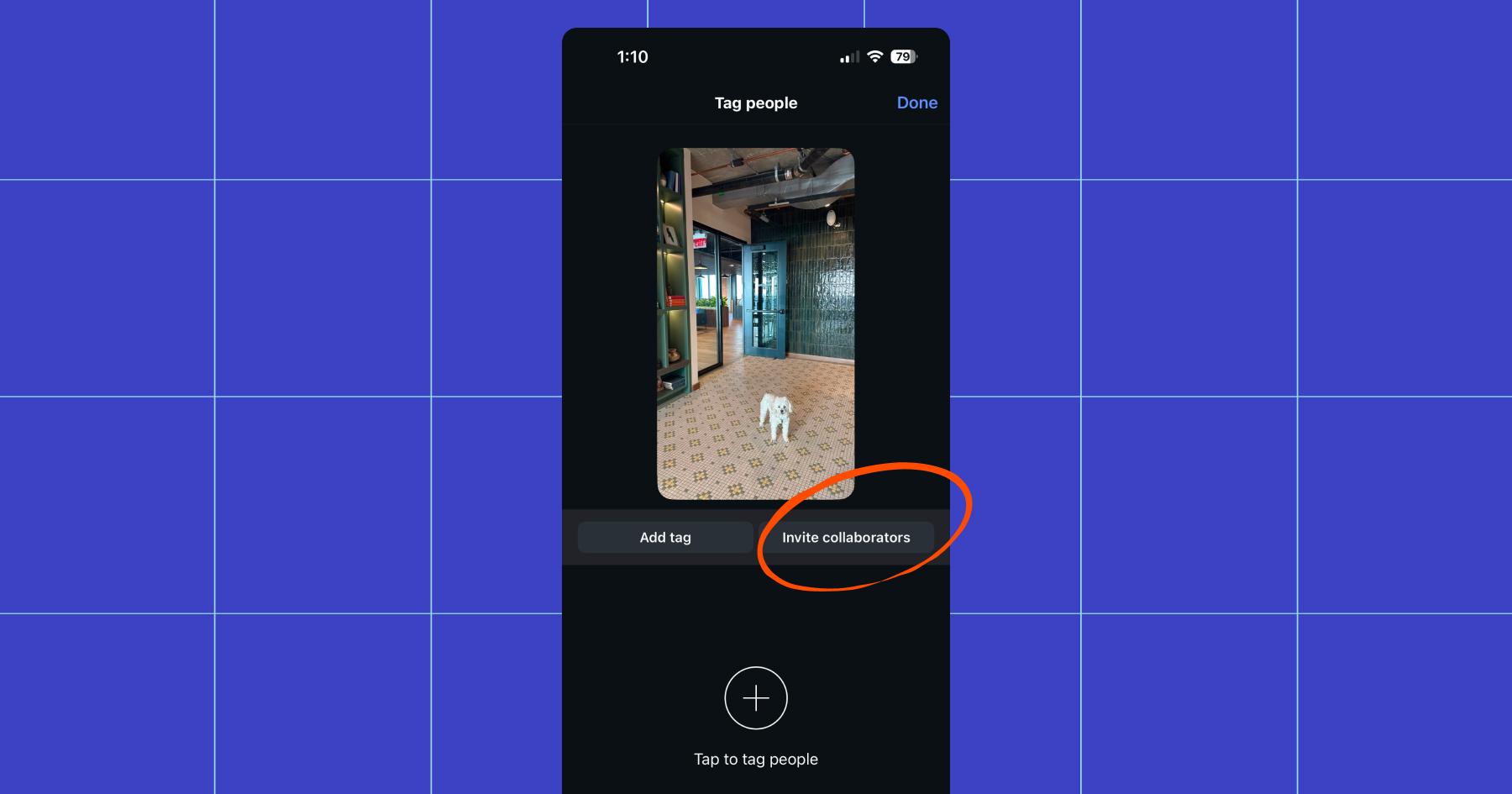
Up to five accounts can be added as collaborators.
When should you use the Instagram collab tag?
“I do a collaborative post when a brand asks for one. Most brands are not asking yet, which I’m always a little surprised about,” Cristy says.
“I always make the recommendation of using the collaborative post feature, because the brands usually need more content on their profiles. So if I’m in charge, I recommend that, but most brands are not asking for collaborative posts yet.”
A missed opportunity if you’re asking me — collaborative posts get the benefit of being shown to followers of each account associated with the post, which gives them a leg up when it comes to reach. Even so, not every post needs multiple authors.
If a brand specifically requests it or you’re working with another creator who wants the post published on their profile, use the collab tag. Otherwise, use the regular tag feature.
What about Instagram’s Paid Partnership label?
If you’re getting paid, you should be using Instagram’s Paid Partnership label. It’s required under FTC guidelines, which is why Cristy uses it every time she’s compensated for a post (even when it’s a free product).

That said, there’s a tradeoff. Paid partnership posts almost always get less organic reach. Meta knows there’s money to be made off-platform, and they’re incentivized to push brands toward paid ads instead.
Cristy’s tips for creating collaborative Instagram content
Are you thinking of pitching to a brand? Or in the early stages of working with one? If so, this section is for you.
- Start with alignment: Does the brand or creator you want to partner with fit in with your content? If not, don’t do it. Your audience will notice (and potentially unfollow you).
“If it doesn’t fit into what I think our audience wants — easy recipes, family fun, and family travel — and it’s not a product that I would spend my own money on, then I say no,” says Cristy. - Clarify expectations early: How many posts are we talking about? If it’s a brand, will they use your content to run ads? Will it be whitelisted (an ad run on your account) or boosted (a regular post with money behind it so it reaches more people)?
These are details you need to know before you pull your tripod and ring light out. - Always have a contract: “I never, ever, ever do anything without a contract, even if the only payment that we receive is product,” says Cristy. “If they don’t have a contract, I recommend getting an attorney to draft a contract that you can use.”
- Review campaign briefs carefully: Brands usually have rules about how you can refer to their products in content. “Oftentimes, it will be very, very specific, and it will spell out what you are and aren’t allowed to say.” Cristy gave the example of Advil asking her to promote a certain-size bottle (24 pills, not 48 to get specific). Just make sure you read through the brief and revisit it before finalizing your content.
- Use AI for brainstorming: When preparing pitches for brands, Cristy suggests using AI to generate ideas and hooks. “I used to research on Pinterest. I would sit down and do creative brainstorming, but now AI helps so much.” It’s true: Pinterest is great and always worth scrolling through for post-spiration, but if you need ideas quickly, it’s okay to ask ChatGPT (just make sure you craft a really thoughtful prompt).
- Pitch concepts before creating: Most brands will expect you to pitch your concept for approval before you start filming. You can show them a script or outline the general idea of your Reel or post.
“Most brands ask for two different ideas, and they want to know who will be in your content. So, for example, I’ll tell them: ‘It’ll be myself, my husband, and our two children. We’ll go to the beach, we’ll pick up the product, and we’ll film it here,” and so on.
Double the Reach, Double the Comments?

Now you know how to post an Instagram collab, and you know how to make it good.
But did you know that when a collab post takes off, the comment section gets busy with emojis, hype, and a lot of: “Where’s the link?”

Good news: Manychat is an official Meta Business Partner. You can use it to automatically answer all of those questions that flood your comments and DMs, and a whole lot more.
So, here’s a question for you: what are you waiting for? Sign up for Manychat.
Or, learn more about what Manychat can do: Always-On Automations: Put Manychat to Work While You Sleep
Frequently asked questions
According to Instagram’s help center, you can add up to five accounts as collaborators on a post.
If you don’t accept a collab invite, the post will publish normally on the original creator’s account. Your username won’t appear as a co-author, and the post won’t show up on your profile or be shown to your followers.
No. It won’t jump to the top of your feed. If you accept a collaboration invite weeks (or months) after the post was published, the post will appear on your profile grid but not be republished.
Yes…and no. If you created the post, Manychat will handle it for you.
If you’re a collaborator on someone else’s post, Manychat will NOT trigger automations from comments on that post.
Yes. You can remove yourself from a collaborative post at any time. If you are the original poster, you can also remove collaborators from the post.



Originally published: Feb 9, 2026, Updated: Feb 9, 2026
More stories worth reading
More content that's too good to miss