Always-On Automations: Put Manychat to Work While You Sleep 😴

If you’ve ever opened Instagram after a busy day and instantly felt a sense of dread, you’re not alone. Creators and marketers of all kinds are facing an endless stream of notifications, comments, and questions from their followers. And when it comes to responding, most of them are doing so manually (or not at all — woops).
It’s exhausting and easy to fall behind, but miss a few messages, and suddenly you’re stalling out — engagement takes a belly flop, and sales dry up.
Enter: Manychat’s always-on automations, your behind-the-scenes social team.
These features handle all the repetitive tasks — welcoming new followers, answering FAQs, acknowledging mentions, and guiding people on what to do next. You set them up, let them run, and enjoy the extra time you just found in your week.
5 Always-On Manychat Automations to Set Live RN

If you’re juggling content, community, and the occasional existential crisis, these five automations are about to revolutionize your routine.
They’re simple to use and work around the clock to help you grow, respond, and convert, even on days you’re too busy to open your DMs.
1. Follow to DM (New!)
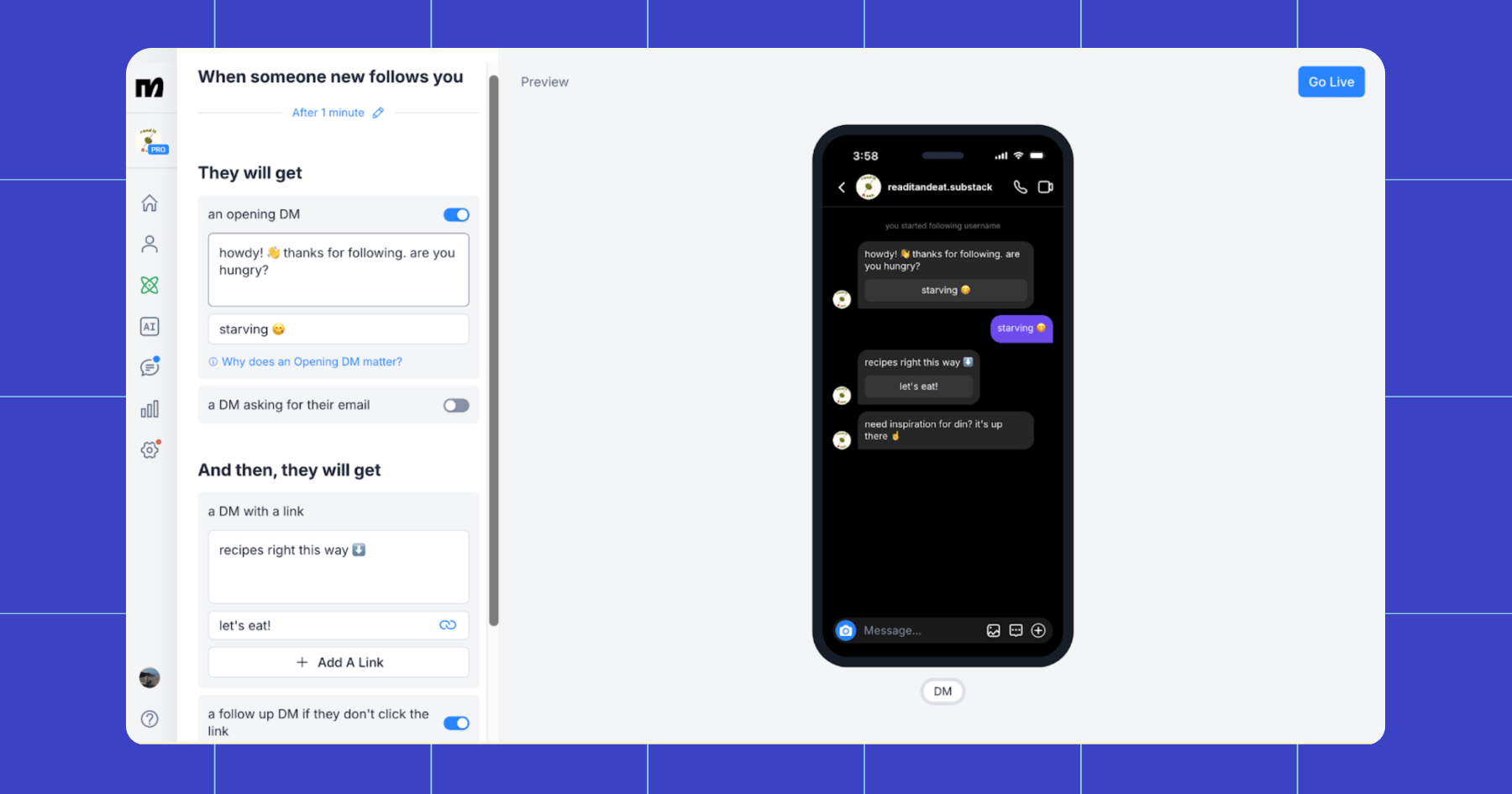
Follow to DM automatically sends a friendly message to users the moment they follow you on Instagram. It’s an automation that meets people at a moment of peak interest: the exact second they decide, “Yep, I like this person/brand enough to follow them!”
Once you greet them, you can ask for their email address or send them a link, turning a lukewarm tap into a hot lead with just a few simple messages.
Who can use it
Follow to DM is available to Free and Pro Manychat users. Free users can send an Opening DM and one follow-up with a link; Pro unlocks more options.
Want to learn more? The Smartest Way to Turn Followers Into Conversations (Without Feeling Like a Bot)
2. Default Reply
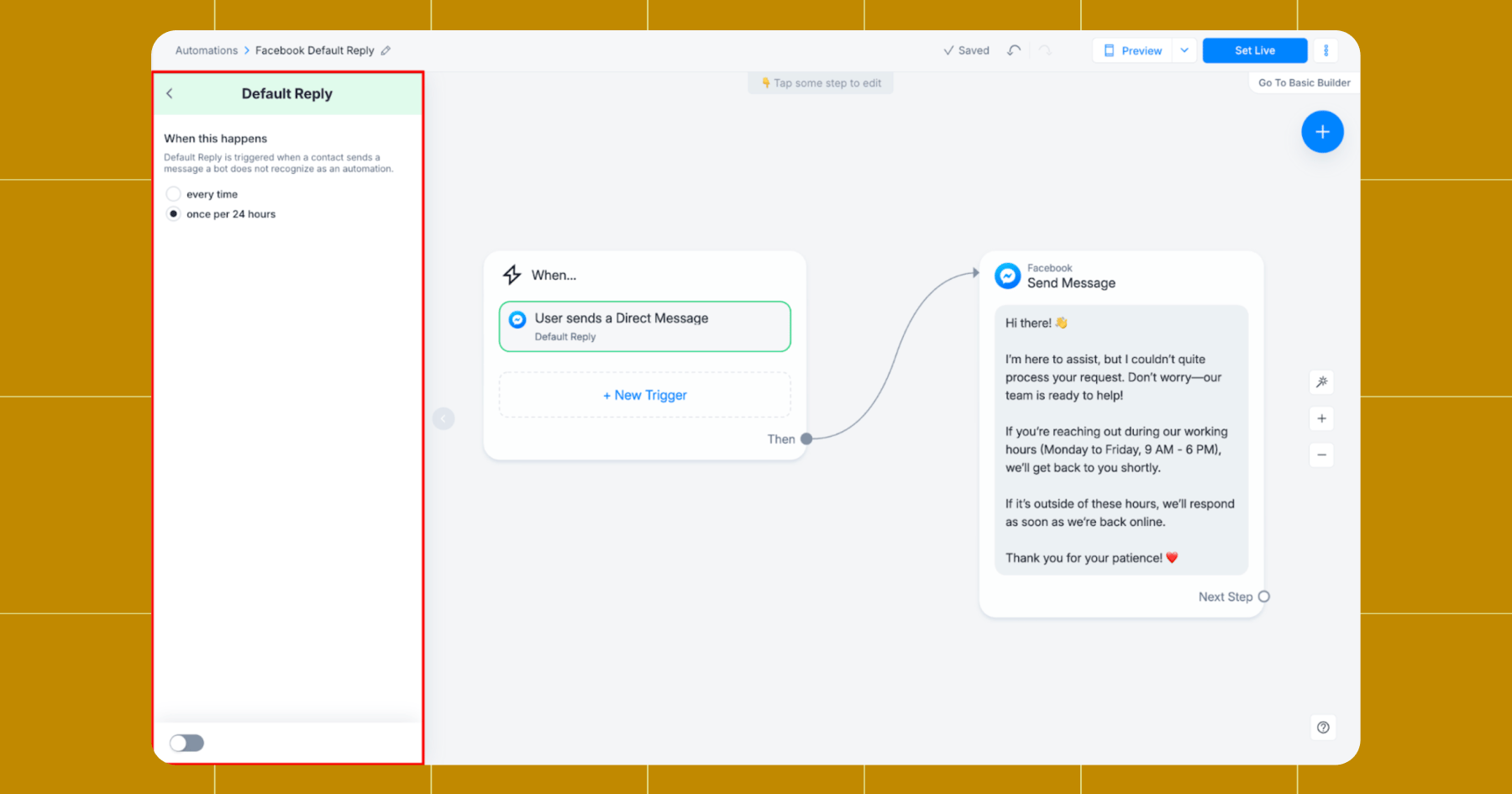
Default Reply is the “don’t leave anyone hanging” automation. Anytime someone sends you a message that doesn’t match a specific flow or keyword, Default Reply steps in.
You can set it up to say whatever you want, like:
- “We’re not here right now, but we’ll hit you up when we’re back.”
- “Need answers quick? Visit our website. ➡️”
- “Someone will be online soon. Got an urgent issue? Send us an email.”
For Instagram, you can also choose to configure the Default Reply to trigger exclusively for DMs (excluding story replies, so things don’t get spammy).
Who can use it
Default Reply is available across all major Manychat-supported channels: Instagram, Messenger, WhatsApp, and Telegram.
Both Free and Pro users have access to it; Pro simply gives more advanced actions if you want to extend the automation in Flow Builder.
3. Story Mention Reply
When someone tags your account in their Instagram Story, Story Mention Reply automatically sends them a DM. Whether you want to thank them for the shoutout, send them a special offer, or simply keep the conversation going, Story Mention Reply is ready to jump in right away.
A few specifics:
- The mention must start with “@” for the automation to fire.
- You can choose whether it triggers every time or once per 24 hours per user.
- You can optionally “like” their Story with a ❤️.
🎥 Watch: How to Auto-Reply to Instagram Story Responses with Manychat | 2025 Tutorial
Who can use it
You need to have a public Instagram account and a Free or Pro Manychat account to set up the Story Mention Reply automation. If you want to customize your replies, a Pro account is a better choice.
4. Conversation Starters
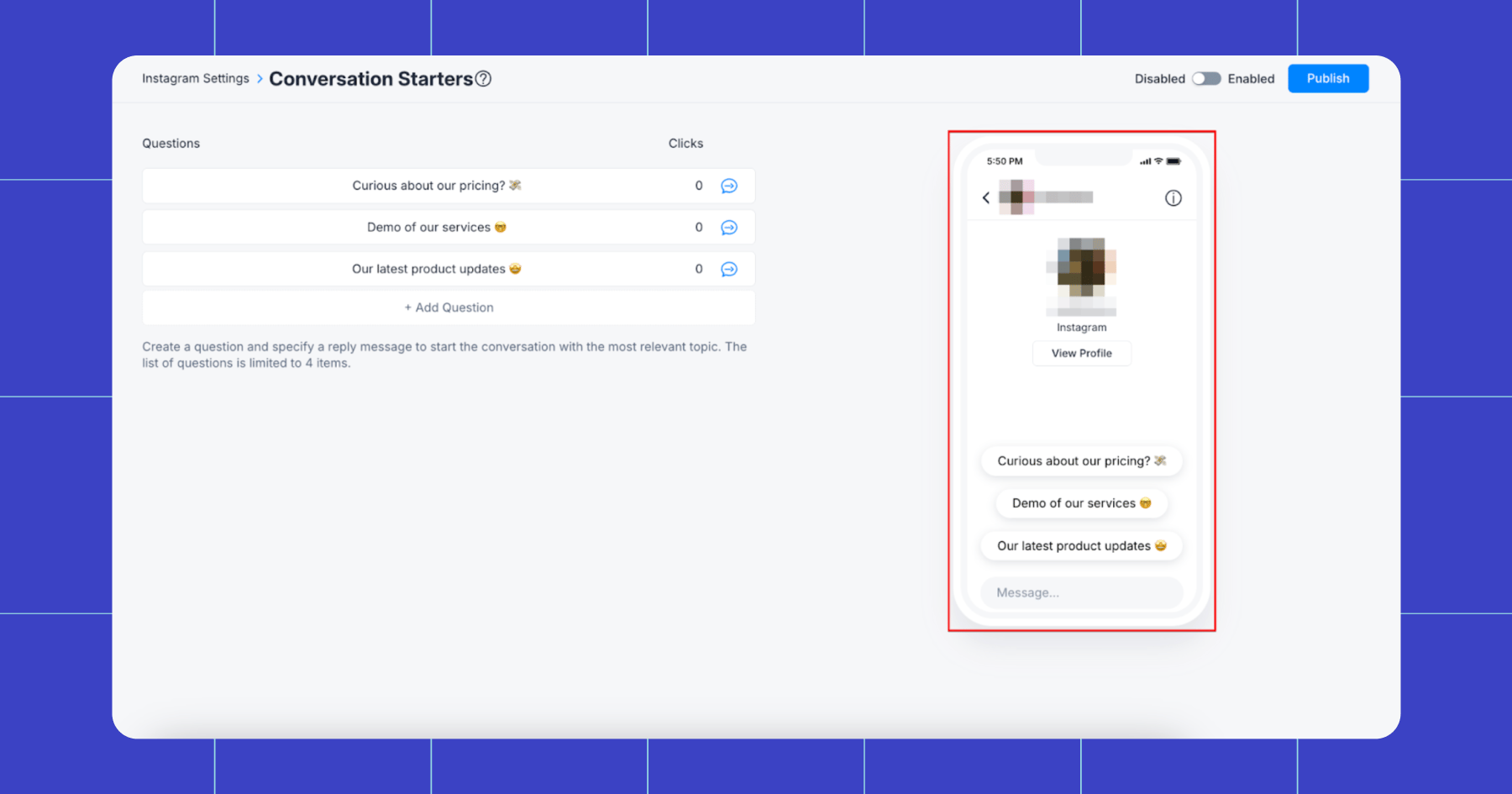
Conversation Starters give users a set of tappable questions the moment they open your DM inbox (before they’ve ever messaged you). Instead of staring at a blank message box, your audience gets helpful prompts like:
- Looking for a link?
- Want my most popular freebie?
- Ready to sign up for our newsletter?
Most people don’t know what to say when reaching out for the first time. Conversation Starters remove the awkwardness, gently steering people in the right direction from the moment they tap “Message.”
Note: Conversation Starters only appear when the user has no active conversation with your account. And once the user has messaged you, the prompt will disappear (due to a Meta limitation).
Who can use it
Conversation Starters are available to use on Instagram Business Accounts and Facebook Messenger. Both Free and Pro Manychat users can access this feature.
5. Main Menu
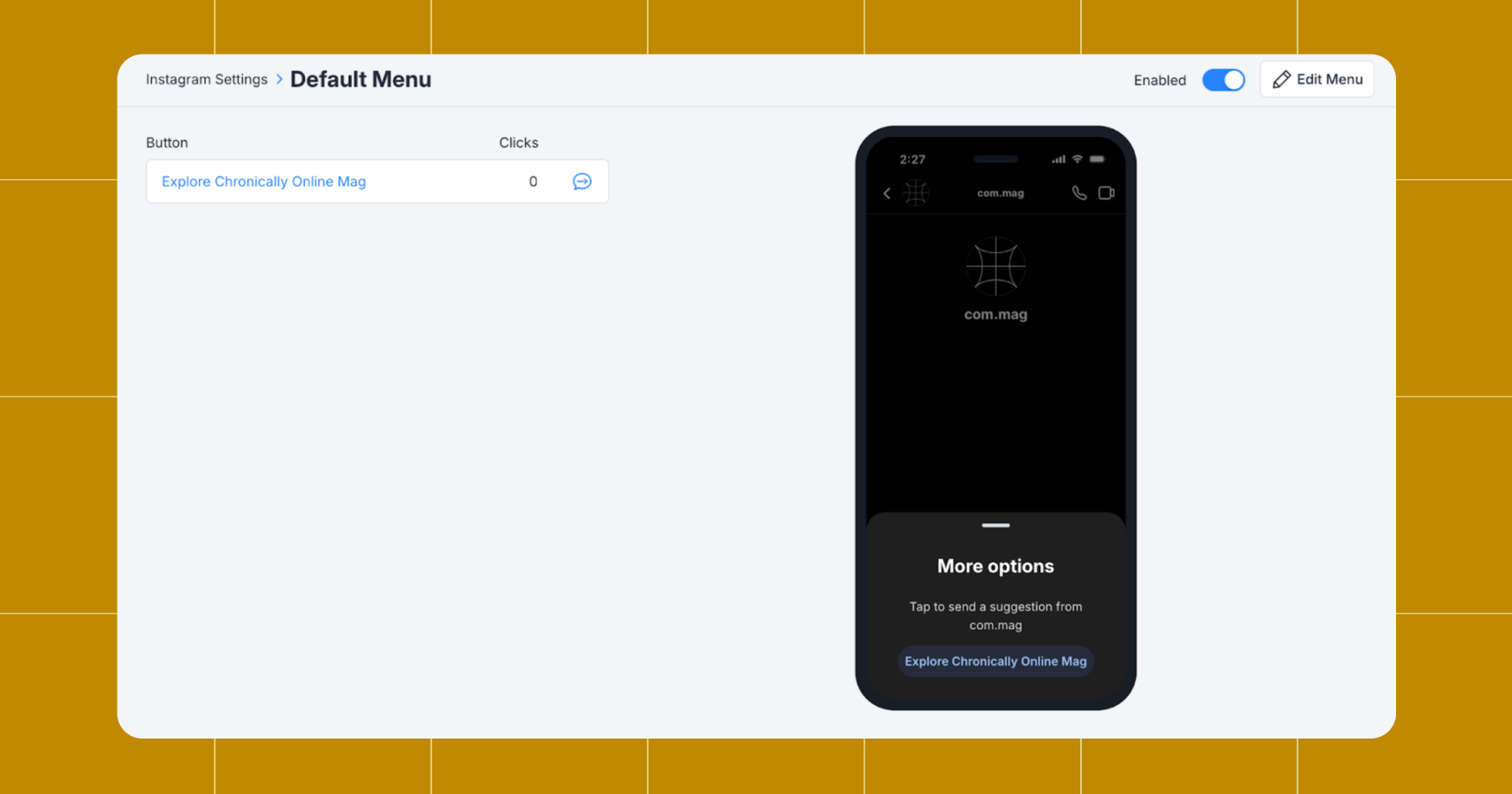
Main Menu (AKA Default Menu) gives your audience a clean, tappable set of options every time they go to start a DM with you. It’s sort of like a navigation bar for your Instagram or Messenger account — a place where followers can instantly find what they need without needing to scroll or search your page.
If this sounds similar to Conversation Starters, that’s because it is. Here’s the difference:
- Conversation Starters = for new users who haven’t said anything yet
- Main Menu = for everyone, every time they come back
Who can use it
Free and Pro Manychat users can use the Main Menu function on Instagram and Messenger. Pro accounts can add up to 20 menu items, while Free accounts are limited to three options. And if you want to get fancy and add a flow behind each button, you’ll need a Pro account to do that.
Do What You Love; We’ve Got the Rest

When you’re offline, on a shoot, or deep in your editing cave, the last thing you should be worrying about is the state of your inbox. You do the things you love, and Manychat will handle the rest — responding to mentions, comments, and DMs so no one’s left unseen.
Already have an account? Learn when to automate and when to jump in personally: To Automate or Not? Here’s How to Respond to Comments on Instagram.
👋 Frequently Asked Questions (FAQs)
1. How do I prevent automations from sounding like a bot?
Tone. Is. Everything. Add emojis, keep the text casual, and set up some smart delays to keep your automations feeling personal. (Five smart delays are available to Free users; Pros can add up to 60.) Additionally, automation works best when used in conjunction with personal replies, so be sure to jump in manually when the situation requires it.
2. Can multiple automated messages get sent to the same user?
Yes, automations can overlap. But when two or more automations are technically eligible to fire at the same moment, Manychat follows a priority system to decide which one should run.
Here’s how it works:
- Specific triggers beat general triggers. For example, if someone taps a button in a flow (to take a specific action) but also sends a message that could trigger Default Reply (a general action), the button-triggered flow will run.
- Manually triggered or user-initiated actions take priority. If a user intentionally performs an action — such as clicking a keyword, tapping a ref URL, or using a Conversation Starter — that automation will trigger over a catch-all, like Default Reply.
Think of it like this: The more “precise” the trigger, the higher it ranks. In other words, generic, always-on automations (such as Default Reply and Story Mention Reply) only fire when nothing more specific applies.
3. How can I segment my Instagram audiences better?
Segmentation is often thought of as a big, scary process that happens in other tools, but serving different audiences different messages can happen right in your DMs with Manychat. By adding Tags like “Requested Quote”, “Joined Newsletter”, “Took Quiz”, “Selected: Beginner level”, you can follow up with content, campaigns, or info that’s relevant to them. (Learn more: How to use segments.)
4. How do I track whether these automations actually make me money?
Manychat gives you multiple ways to tie DM activity directly to revenue. Here are a couple of ways you can understand what’s working:
- DM-to-conversion reporting: Manychat logs how users interact with every message connected to an automation made in the Flow Builder — opens, clicks, replies — and ties that engagement to the final action they take. This helps you understand which automations spark purchases, which need refinement, and which are quietly becoming your top performers.
- Channel insights/activity: The Activity tab for each Quick Automation displays real-time statistics, including the number of users who received messages, tapped buttons, clicked links, or dropped off. It’s a fast way to spot what’s generating revenue and what might need a tweak.



Originally published: Jan 5, 2026, Updated: Jan 6, 2026
More stories worth reading
More content that's too good to miss