
Here’s the uncomfortable truth about your Instagram following: you don’t own it. Instagram does. One algorithm shift, one account suspension, one platform outage — and every follower you’ve spent months (or years) building vanishes.
Your email list, on the other hand? That’s yours. Portable, under your control, and completely independent of whatever the algorithmic overlords decide to do next Tuesday.
So how do you actually collect emails from Instagram — without being the person who comments “LINK IN BIO” under every post? That’s what this guide is for. We’re covering lead magnets, DM automation, bio link strategy, stories, reels, pinned posts, and the legal stuff you can’t skip.
TL;DR
- Your Instagram followers aren’t yours; an email list is the one audience you actually own and can take anywhere.
- The fastest way to collect emails is through DM automation, where followers type their email right in the chat without ever leaving Instagram.
- Pair a solid lead magnet with stories, reels, pinned posts, and your bio link to drive signups without begging.
You Don’t Own Your Followers (But You Own Your List)

Good ol’ email has found a way — even in a world where teams chat with one another all day — to keep chugging along. And for good reason.
While Instagram is great for brand engagement, the inbox is unmatched for getting someone’s attention and keeping them informed about what you’re up to. You can export an email list into just about any app. You can reach people when they’re off social media. And if Instagram goes down tomorrow, your whole business won’t go with it.
Followers sharing their email addresses is a sign they want to support what you’re doing. It’s a bigger act of trust than tapping “follow.” Email marketing generates roughly $36 in revenue for every $1 spent, making it one of the highest-ROI channels available to creators and businesses. Meanwhile, organic reach on social media continues to shrink. 🫠
A curated email list is more valuable than Instagram followers, because with email, you’re not at the mercy of the algorithm. Algorithms can throttle the reach of content for arbitrary reasons, but email goes to the inbox with no gatekeeping (as long as you’re following the rules).
Lead Magnets That Actually Make People Offer Up Their Email

Shouting your CTA of choice from the rooftops doesn’t always work (trust us, we tried). You need to make an offer so compelling that people want to subscribe faster than you can say whatever new slang word is popping popular.
💡 Tip: Changing your lead magnet from time to time can actually help you better understand your Instagram followers. If one offer works better than another, it gives you some indication of the kinds of content you could consider making more of.
For creators and personal brands
Creators have something most businesses don’t: a personal connection with their audience. Your lead magnet should feel like an extension of that relationship.
- Free templates or resource packs: A fitness creator might offer a free weekly meal plan PDF. A designer could share a pack of Canva templates. The key is making it something your audience would actually use, not just download and forget.
- Exclusive or early-access content: Think behind-the-scenes breakdowns, early access to new videos, or a private weekly email with insights you don’t share on the feed. Instagram is even testing follower-only early-access reels, so exclusivity as a growth lever is only getting bigger. If your audience already loves your free content, they’ll jump at the chance to get more.
- Mini email courses: A five-day email series on a topic you’re known for (photography basics, creative writing prompts, gardening tips) gives people a reason to hand over their email AND stay subscribed.
For e-commerce and product-based businesses
Product-based brands have a built-in advantage because people already want what you’re selling. The lead magnet just sweetens the deal.
- Discount codes and free shipping: A unique 15% off code available only through email signup is the oldest trick in the book because it works. Pair it with a free shipping threshold, and you’ve got a one-two punch.
- Exclusive product drops and early access: Let your email subscribers be the first to know about new launches, restocks, or limited editions. Scarcity plus exclusivity equals signups.
- Loyalty perks: Birthday discounts, subscriber-only sales, or points programs that reward email engagement give people a reason to stay on the list long after they sign up.
Collect Emails Right Inside the DMs

Here’s where it gets fun. Instead of sending followers away from Instagram to fill out a form on some landing page, you can collect emails right where they already are — inside Instagram DMs.
The flow is simple: A follower comments a keyword on your reel (say, “GUIDE”), your DM automation sends them a message asking for their email, they type it in, and it’s captured and synced to your email platform.
The lead magnet gets delivered instantly; no bio link, no leaving Instagram, no friction.
This is the method competitors are building entire tutorials around, and it’s Manychat’s bread and butter.
DMs eat link-in-bio for breakfast
Think about what you’re asking someone to do when you say “link in bio.” They have to:
- Stop scrolling
- Navigate to your profile
- Tap the link
- Wait for a landing page to load
- Find the signup form
- Type their email
- And hit submit
That’s a lot of steps (seven, to be exact). DM automation skips all of that. The follower stays inside Instagram, the conversation feels personal, and the whole thing takes about 30 seconds. Less friction means more emails; it’s that straightforward.
Collect emails automatically with Manychat
Set this up in about 10 minutes
Good news, everybody: You don’t need any fancy automation skills to start building your email list. Sign up for Manychat. Then:
- Open Manychat and connect your Instagram account.
- In the left-side menu, hit Automations, then + New Automation.
- In the search bar, type “email.”
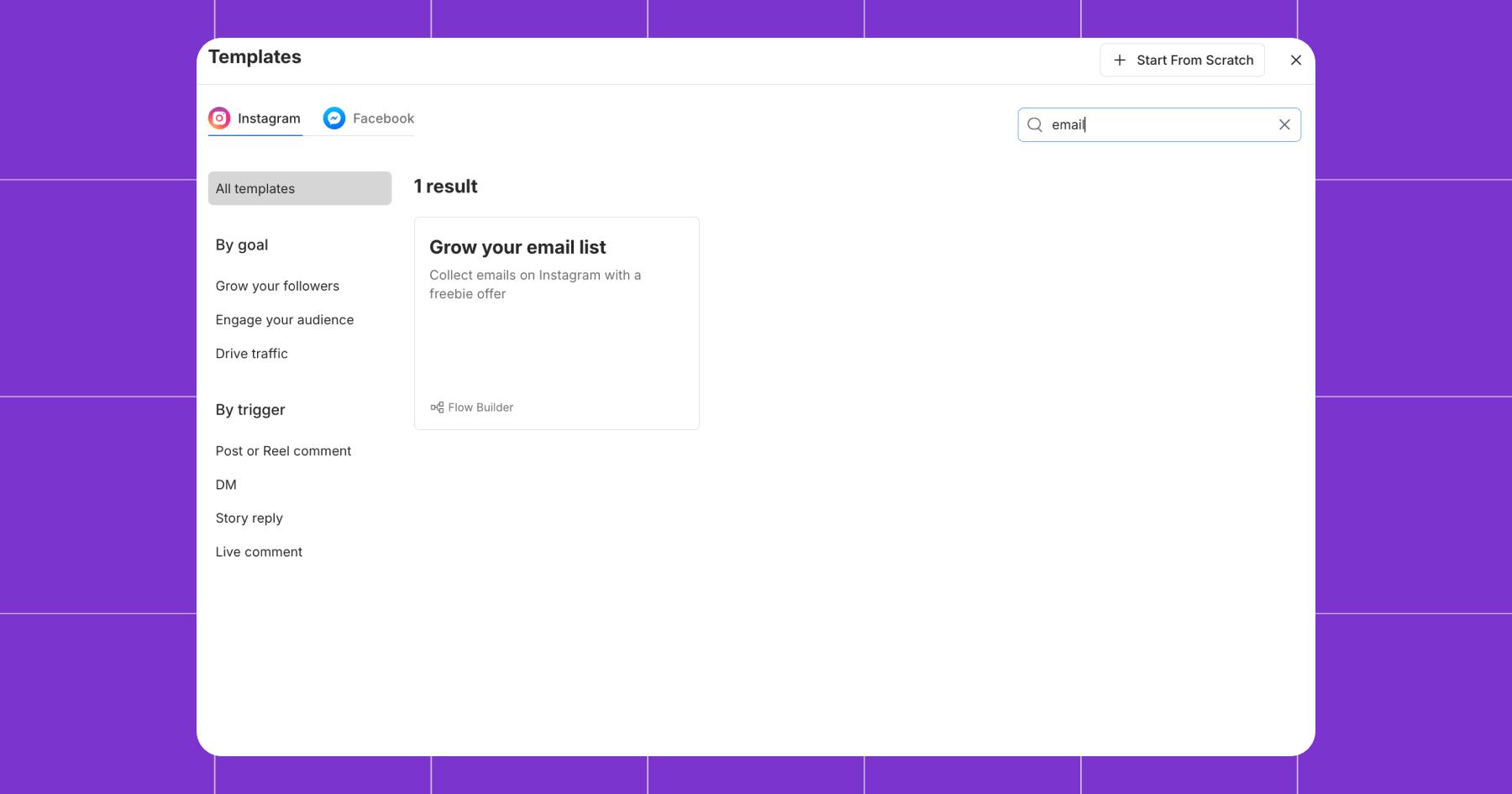
- Click on the Grow your email list template.
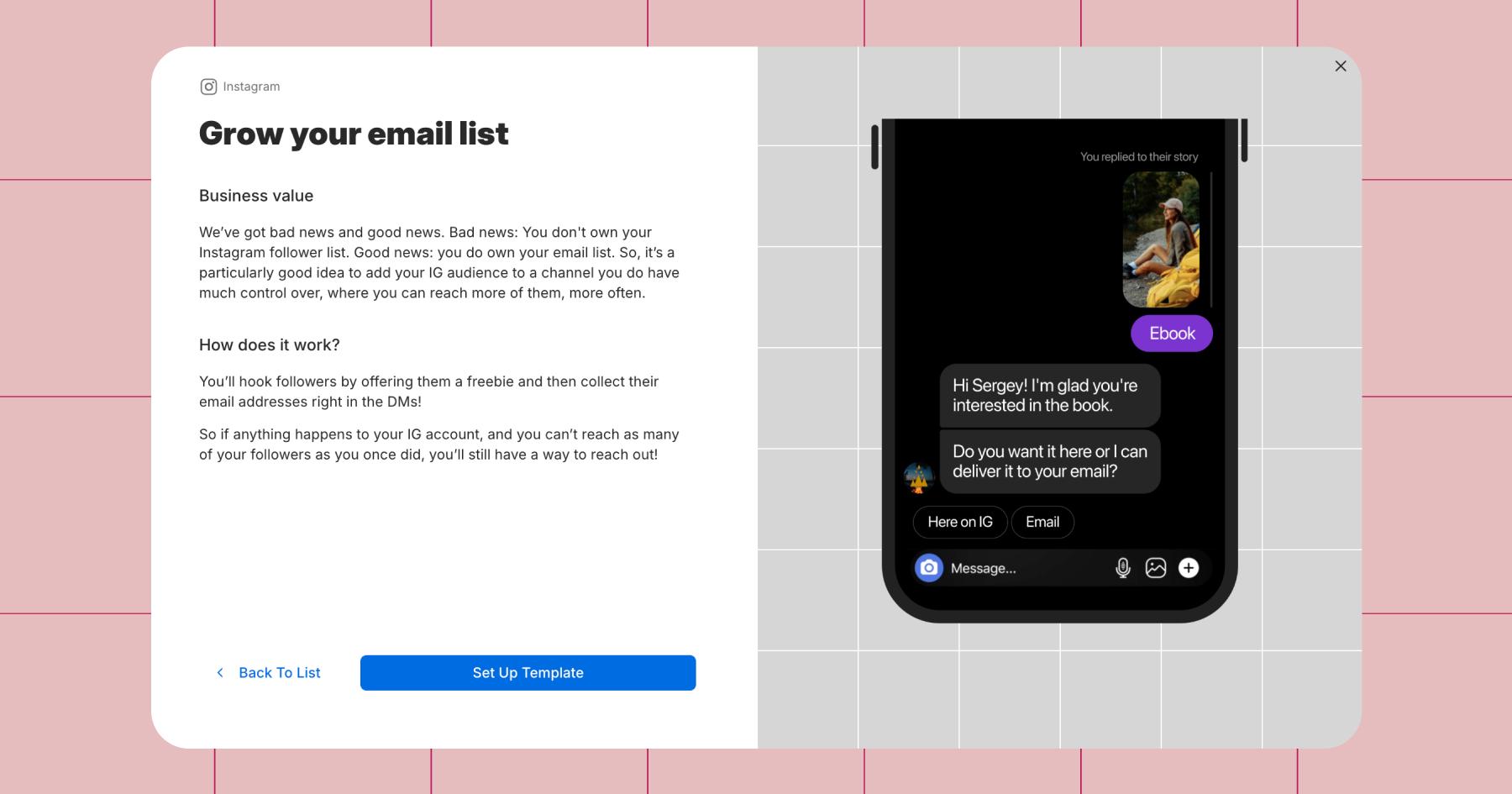
- Click Set Up Template.
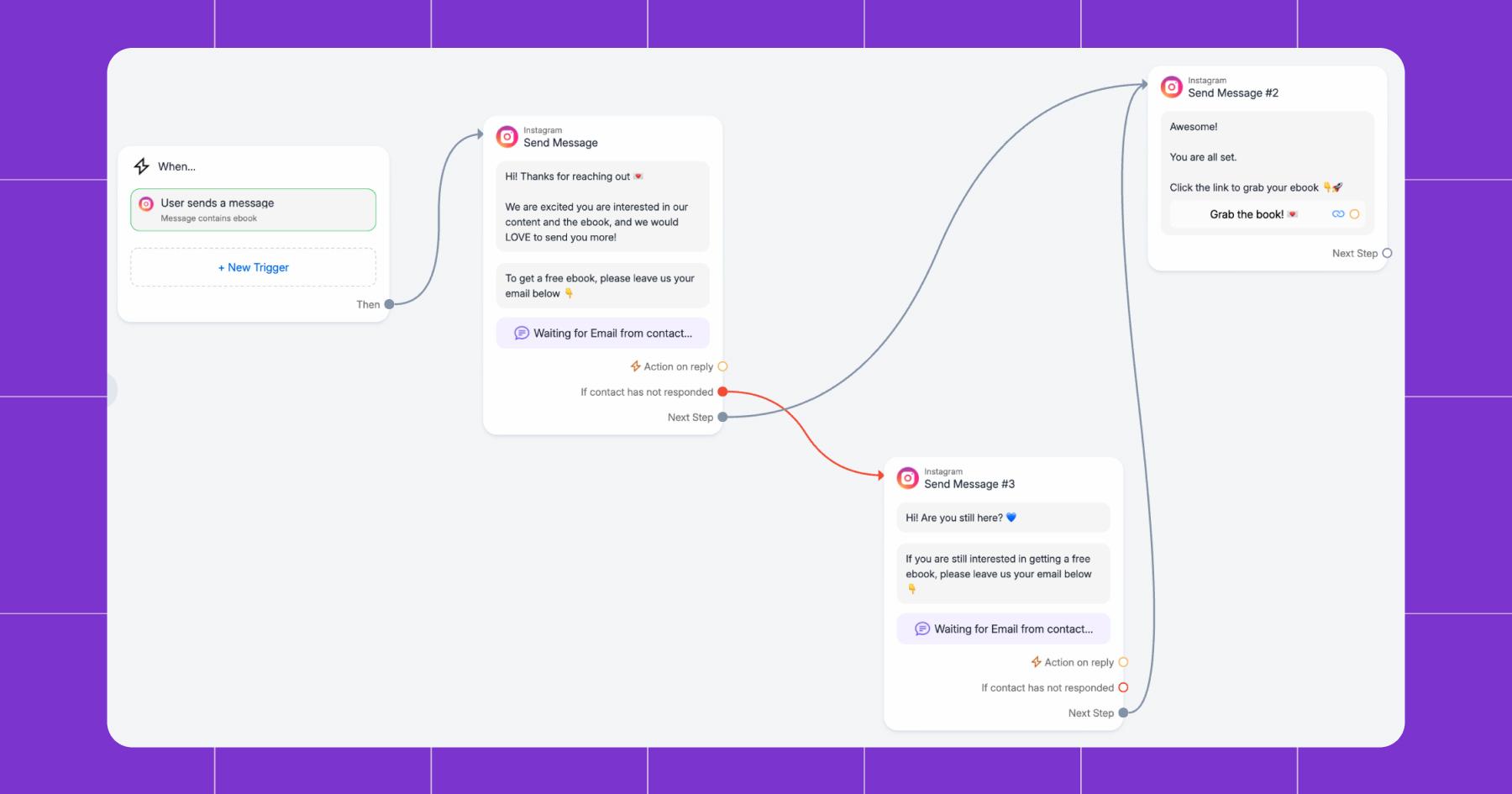
- Add a trigger keyword that relates to the freebie you are offering.
Note: You will need to prompt people to DM you the keyword. You can do this in Instagram Stories or via a feed post.
- Edit the messages as necessary to match your typical tone and voice.
- Add a link to your freebie.
- Press Go Live.
- Watch the email addresses roll in.
A quick comparison of email capture methods
Method | Friction level | Conversion potential | Setup effort |
|---|---|---|---|
DM automation | Low; stays in-app | High; personal, and instant | Medium; one-time setup |
Bio link | Medium; leaves Instagram | Medium; depends on landing page | Low; just a link |
Stories link sticker | Medium; leaves Instagram | Medium; works well with warm audiences | Low; per-story effort |
Pinned post + caption CTA | High; multiple steps to convert | Lower; passive discovery | Low; one-time setup |
Hook It Up to Your Email Platform

Collecting emails is only half the equation; those addresses need to land somewhere you can actually use them. The good news is that once you set up the integration, it’s hands-off. Emails captured through DM automation are synced directly to your list without manual exporting.
Manychat connects natively with platforms like Mailchimp, ActiveCampaign, and ConvertKit. For anything else — Salesforce, Zoho, or whatever your team runs on — Zapier bridges the gap. Set it once, and every new email flows into the right list, tagged and ready for your welcome sequence.
The point is: Your email list should grow on autopilot once the system is set up. Forget the spreadsheets, copy-pasting, and “I’ll get to it later” excuses.
Your Bio Link Is Doing the Bare Minimum

That Instagram bio? It’s primo real estate. Your call-to-action needs to be punchy, not just “Link in bio,” but something that tells people exactly what they’re getting. “Grab my free content calendar” hits different than “Check out my links.”
Use a link-in-bio tool to create a dedicated landing page where your email signup option is front and center — not buried under seven other links. And if you’re using Instagram growth tools alongside your bio link, you’re covering both passive and active collection simultaneously.
Keep your signup page stupid simple
Keep it stupid simple. One clear CTA, a benefit-driven headline (“Get weekly content ideas delivered to your inbox every Monday”), and a single form field — just the email address. Nobody wants to fill out their name, birthday, and blood type to get a free checklist.
The page should be mobile-first (because that’s where your Instagram audience is), load quickly, and deliver on the promise you made on Instagram. If your story says “free templates,” the landing page should say “free templates,” not “subscribe to our newsletter for updates and more.”
Stories, Reels, and the Art of the Tease

Instagram stories and reels are your hype machine for email signups, but only if you use them right.
The comment-keyword-to-DM play
This is one of the highest-converting combos out there. Post a reel about a topic your audience cares about — 46% of marketers rank video as their top content type — then tell viewers to comment a comment keyword (like “CHECKLIST” or “FREE”) to get your lead magnet. The comment automation picks up the keyword, triggers a DM, collects the email, and delivers the goods.
It works because the reel does the selling, and the DM collects. The follower never has to leave Instagram, and the whole thing feels like a conversation instead of a form.
Stories that sell the signup
Every account has access to the link sticker in stories — use it to send followers straight to your signup page. But use them sparingly, since link stickers reduce story views by sending people off-platform.
Stories are primarily shown to existing followers, making them ideal for converting warm audiences. Tease your non-subscribed audience with a taste of what they’ll get in your emails. Feature answers from your email community, share a snippet of your latest newsletter, or run a poll asking what topic you should cover next — then direct people to sign up for the full version.
Collabs with other creators work here, too. Team up for giveaways or co-hosted events that require email signups to enter. You expand your reach and tap into new audiences at the same time. And don’t sleep on Instagram Live — use Live sessions to connect with followers in real time, share snippets of what they can expect from your emails, and guide them toward subscribing.
Post It, Pin It, Profit

Pin a post to the top of your grid that highlights the benefits of joining your email list — use top-tier visuals and a captivating caption that demands attention.
Beyond the pinned post, let your captions do the talking in regular content too. Remind followers why joining your email list is the best decision they can make today. Be playful and bold, but be authentic. People love a good story, so spin one that makes your CTA a no-brainer. A carousel post breaking down “five things I only share with my email subscribers” does double duty; it’s valuable content AND a sign-up pitch.
Keep Them Subscribed (Not Just Signed Up)

Getting the email is step one. Keeping them on the list? That’s the real game. Here’s what separates a growing list from a leaky one:
- Deliver on your promises. If you said weekly tips, send weekly tips. If you promised exclusive content, make sure it’s actually exclusive. The fastest way to lose subscribers is to bait-and-switch them.
- Be transparent about what they’ll get. Set expectations upfront about what kind of content, how often, and why it’s worth their time. Transparency builds trust, and followers are more likely to subscribe when they know exactly what to expect.
- Show appreciation. Occasionally reward your subscribers with unexpected gifts, shoutouts, or early access to something special. A little gratitude goes a long way in building a loyal community.
- Encourage replies. Ask subscribers to respond to your emails. Personal interaction fosters a sense of belonging and turns a one-way broadcast into a two-way relationship.
The Legal Stuff (Quick and Clean)

If you’re going to maintain an email list, you can’t just email people whatever you want. Two laws matter most: The GDPR (which protects EU citizens’ data) and the CAN-SPAM Act (which governs commercial email in the U.S.).
The stuff you actually need to do
- Get explicit opt-in consent. People need to choose to subscribe actively; no pre-checked boxes, no sneaking them onto a list. Include a checkbox that reads, “I consent to receive emails and understand that my data will be used in accordance with the privacy policy.”
- Have a clear, accessible privacy policy. Explain how you’ll use subscribers’ data and make the policy easy to find.
- Include accurate sender info. Your “From” name and “Reply-To” address should clearly identify you or your business.
- Write honest subject lines. The subject line should reflect what’s actually in the email.
- Include a physical mailing address. Yes, really. It’s required under CAN-SPAM.
- Make unsubscribing dead simple. Every email must include a clear and easy way to unsubscribe. Process unsubscribe requests within ten business days.
- Honor data access and deletion requests. Under GDPR, subscribers can request access to their data or have it deleted — and you need a process to handle those requests promptly.
Frequently asked questions
You can collect emails directly inside Instagram DMs using automation. A follower sends a keyword or comments on a post, and the automated flow asks for their email right in the chat; no website, no landing page, no leaving the app.
Yes! DM automation tools like Manychat let you ask for and capture email addresses inside Instagram Direct Messages. The email is validated, added to your list, and automatically synced to your email platform.
The best lead magnets solve a specific problem your audience already has. Free templates, discount codes, exclusive guides, mini email courses, and early access to product drops tend to convert the highest. The more specific and immediately useful, the better.
Nope! You can start collecting emails with any account size. DM automation, bio links, and story link stickers are all available to every account regardless of follower count. (Instagram removed the 10K follower requirement for story links a while back.)
Yes, as long as you follow email marketing laws like GDPR and the CAN-SPAM Act. That means getting explicit opt-in consent, including an unsubscribe option in every email, and being transparent about how you’ll use their data.



Originally published: Aug 31, 2024, Updated: May 6, 2026
More stories worth reading
More content that's too good to miss