Manychat vs. ReplyRush: A Comparison of Features, Pricing, and More
If you’re shopping around for an Instagram automation tool, Manychat and ReplyRush have likely come up in your search. These two platforms offer similar functionality (namely, comment and DM automations), but there are notable differences between them.
To truly understand how ReplyRush compares to Manychat, I created accounts on both platforms and began automating. Below are the results of my research, with an in-depth analysis of where the two tools differ.
Note: The information in this content is up to date as of October 2026.
TL;DR
- Manychat and ReplyRush have some similar features, including comment-to-DM automation, Story replies, templates, and custom automations for Instagram and Facebook.
- Manychat supports more channels, including TikTok, WhatsApp, and Telegram, and offers a more visual building experience, advanced customization, and AI-powered conversations.
- ReplyRush includes tools for handling sudden engagement spikes, like Sendback and Safety Queue, to help address missed comments and viral moments.
- Both offer free plans. ReplyRush’s paid plans start at $10/month and are billed based on DM volume; Manychat starts at $17/month, billed monthly, and counts Active Contacts.
Manychat vs. ReplyRush: How Do They Compare?
Creators and brands use tools like Manychat or ReplyRush to communicate with their audience on Instagram and Facebook at scale. Here’s how their features, pricing, and user experience compare.
Manychat vs. ReplyRush feature comparison
- Platform connections: Manychat works with Instagram, Messenger, WhatsApp, TikTok, and Telegram. ReplyRush works with Instagram and Messenger. Both companies are Meta Business Partners, but only Manychat is a TikTok Marketing Partner.
- DM and comment automation: Both Manychat and ReplyRush allow you to automate DMs and public comment replies on Instagram and Facebook. Manychat has a feature called AI Comments that recognizes positive comments on Instagram posts and Reels and generates replies that reflect your brand’s tone.
Manychat also supports messaging automation on WhatsApp, TikTok, and Telegram, in addition to Facebook and Instagram, with different triggers and capabilities available on each channel. - Instagram Story automation: Both ReplyRush and Manychat allow you to automate responses to reactions, replies, and mentions in Instagram Stories.
- Default reply: Manychat and ReplyRush both offer a Default Reply that automatically responds when an incoming message doesn’t match any other automation, with options to control reply frequency and to exclude Instagram Story replies. Manychat supports more channels and can connect the reply to a longer workflow.
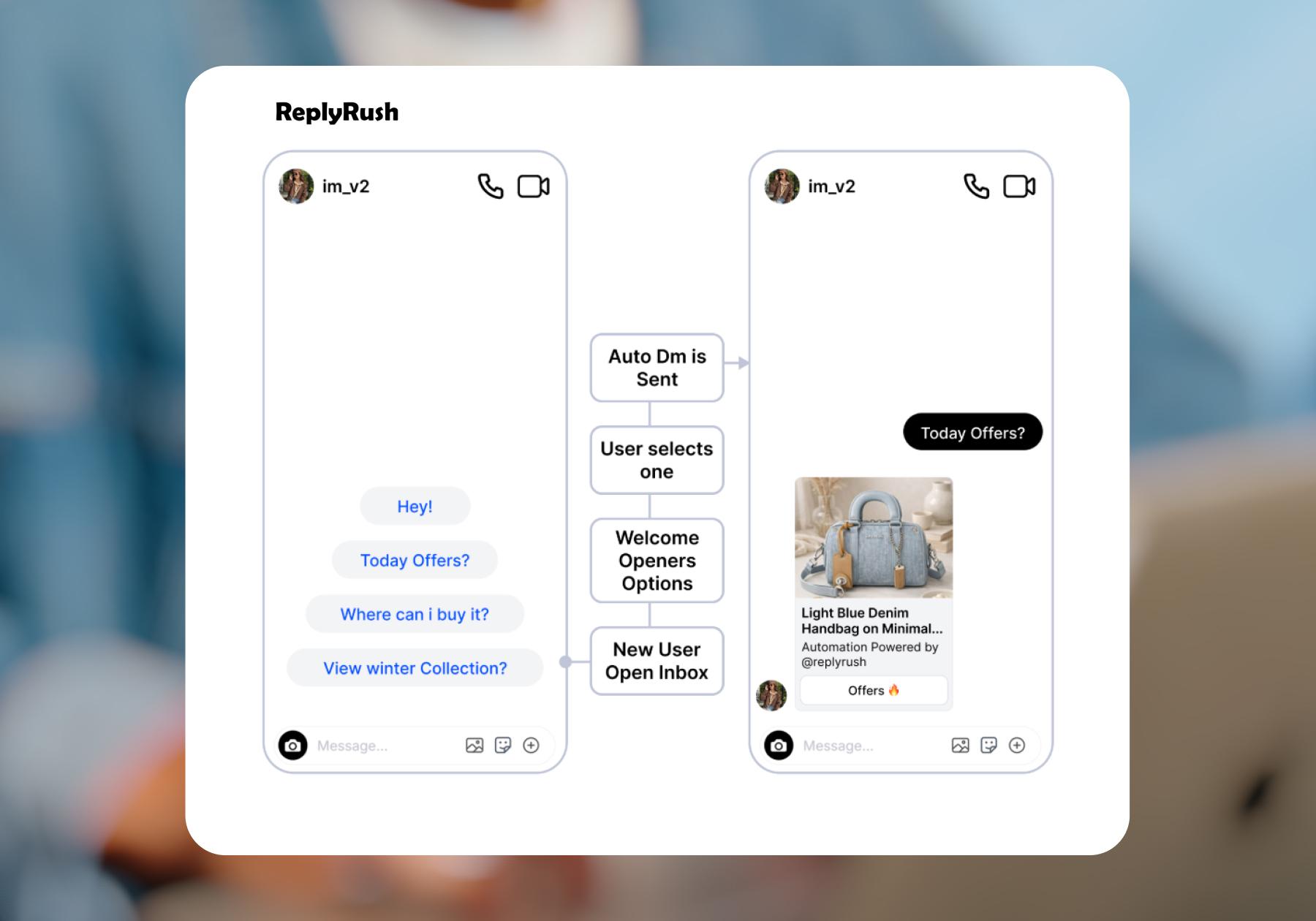
- Conversation starters: Manychat’s Conversation Starters and ReplyRush’s Welcome Openers serve the same purpose on Instagram: they display up to four preset prompts that new users can tap to receive an automated response, making it easier to ask questions or explore your offers.
- Manychat also offers Ice Breakers for Messenger, which work similarly by displaying tappable questions at the start of a new chat, each connected to an automation.
- Inbox menus: Both Manychat and ReplyRush let you build menus in Instagram and Facebook Messenger chats that users can tap to trigger automated responses. In Manychat, this feature is called Main Menu; in ReplyRush, it’s called Smart Menu.
With the free account I signed up for, ReplyRush allowed up to five menu items, compared to three on Manychat’s Free plan. Also, Manychat supports personalized menus for individual contacts on Messenger — for example, showing a first-order offer to new shoppers and different options after they buy.
- Sendback: ReplyRush has a feature called Sendback that lets you send an automated DM to people who previously commented on a post but didn’t receive a message because the automation wasn’t connected yet, or their comment didn’t match its trigger settings.
- Auto Pause: ReplyRush also has a feature called Auto Pause that stops all automated DMs for a duration you choose, while keeping your existing automation settings and linked posts intact. Messages resume automatically when the pause ends, making it useful for campaign breaks or account updates.
With Manychat, you can pause automations for individual contacts through Inbox, Flow Builder, or rules, including when a person takes over a conversation. - AI Replies: Manychat offers an AI-powered feature that uses intent recognition to respond to customer questions. Replies are sent based on information in your brand knowledge library, rather than on a specific keyword or a prewritten response.
During my research, I was unable to verify whether ReplyRush offers a similar feature. ReplyRush’s documented AI Trigger extracts keywords from your post captions to configure automations, which is different from understanding and answering incoming questions. - Follow-ups: Both Manychat and ReplyRush let you automatically follow up with people who haven’t clicked the offer in your DM. ReplyRush requires its Engagement Starter feature to be enabled, while Manychat offers follow-up options within its Quick Automations and more customization through the Flow Builder.
- Lead capture: Both platforms let you collect contact information through automated conversations. ReplyRush offers Email Collector and Lead Generation forms to gather details like email addresses and phone numbers. Manychat also collects contact information, with options to tag contacts and send their details directly to connected email marketing tools or a CRM, as well as automation templates built specifically for this purpose.
- Follower growth: ReplyRush’s Follow-Gated DMs and Manychat’s request-to-follow options let you ask someone to follow your Instagram account before receiving your offer. Manychat also offers Follow to DM, which automatically welcomes new followers with a message. (Follow to DM is currently in beta, with availability determined by Meta.)
- Human handoff: Manychat lets you pause automations for an individual contact so a team member can take over the conversation. On supported plans, you can also assign conversations to teammates and manage them through a shared Inbox. ReplyRush offers team member access, but I couldn’t verify whether ReplyRush supports assigning individual conversations to specific teammates.
- Upcoming posts: ReplyRush lets you prepare automations for upcoming posts so they’re ready when your content goes live. Manychat has a next-post option in its comment-to-DM Quick Automation that acts similarly.
- Related offers: ReplyRush’s Suggest More feature adds a button that people can tap to receive additional product cards or related offers. Manychat lets you build a similar experience using buttons and connected messages in the Flow Builder, giving you more control over the paths people take.
- Custom automations: Manychat’s Flow Builder is a visual automation editor that lets you connect messages, delays, actions, and conditional branches. For example, you can build flows that send people down different paths based on their answers or customer data.
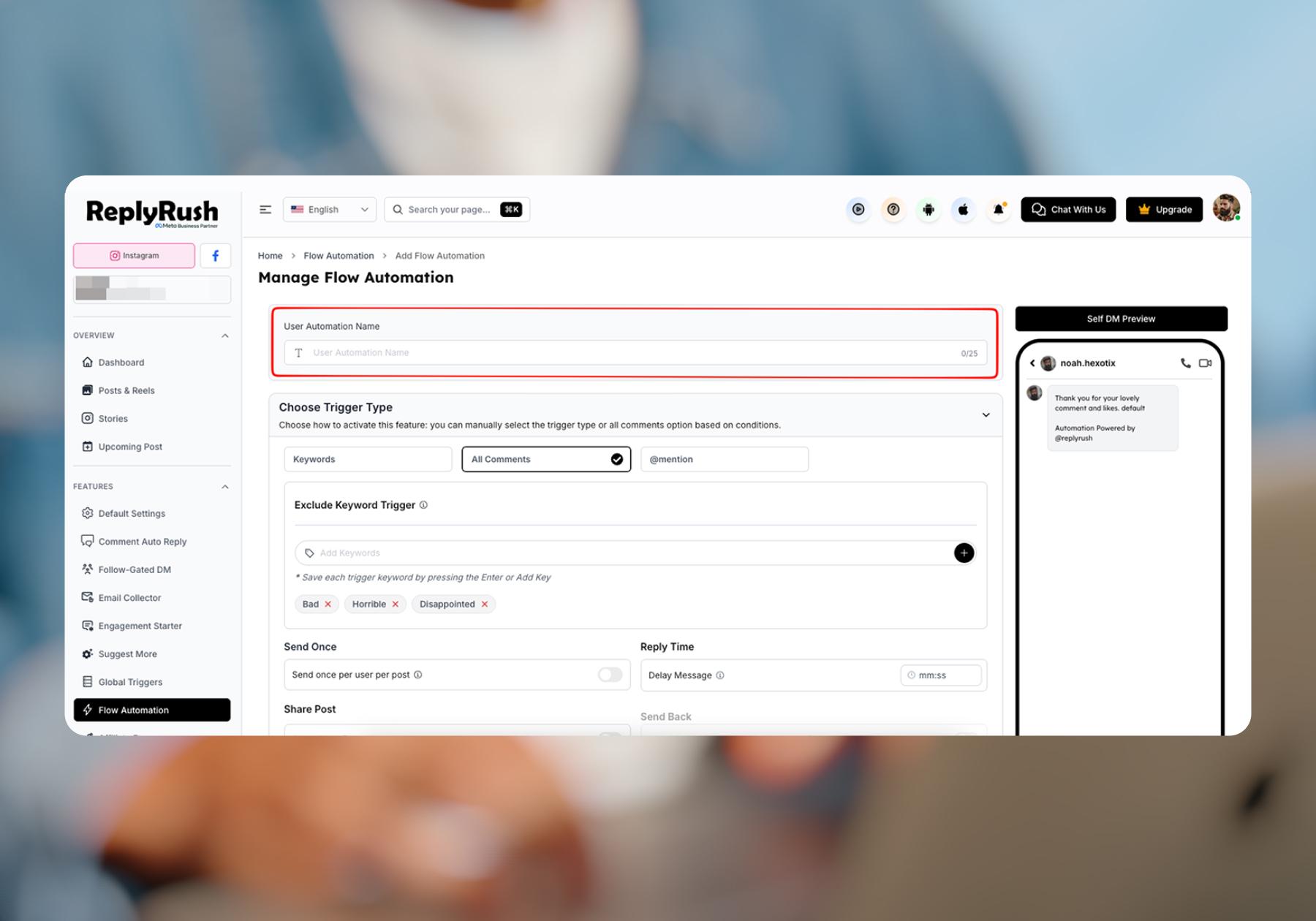
ReplyRush’s closest equivalent is Flow Automation, which supports up to 25 DMs in a reusable sequence, with delay and lead-collection options. But it’s not as visual as the Flow Builder; it looks more like a form you have to fill out than a flow.
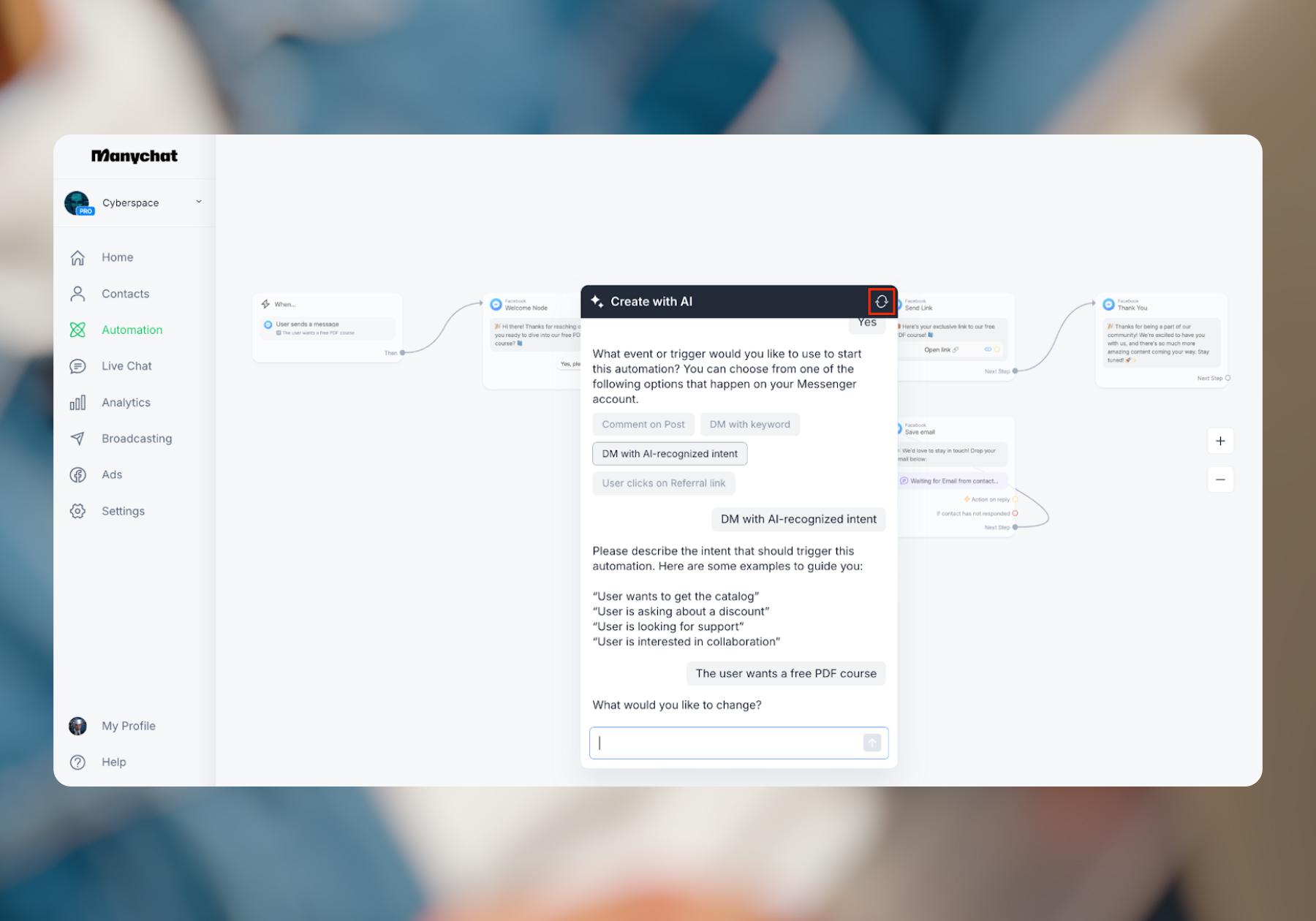
Manychat’s Flow Builder also offers the AI building assistant. This feature lets you chat with a virtual assistant who can help you quickly create automation tailored to your needs.
- AI Goals: Manychat’s AI Goals feature helps turn an answered question into a next step, guiding Instagram conversations toward sharing an offer, encouraging a follow, or collecting contact information. ReplyRush offers tools for those individual actions, but I couldn’t find a documented equivalent AI feature that guides the conversation toward them.
- Integrations: Manychat integrates with Hotmart, Flodesk, Klaviyo, Kit, Mailchimp, ActiveCampaign, HubSpot, and Google Sheets. ReplyRush doesn’t list any direct integrations; however, its users can connect to tools through Zapier. This does add a separate setup step and potentially an additional subscription cost.
Manychat vs. ReplyRush pricing
- Free plan: Both Manychat and ReplyRush offer a free plan, but they measure usage differently. Manychat counts Active Contacts (the people you interact with during a monthly billing period), while ReplyRush counts the DMs you send.
FYI: Multiple interactions with the same person still count as one Active Contact in Manychat.
ReplyRush’s free plan includes 1,500 DMs per month and connections for one Instagram account and one Facebook account. It includes post, Reel, and Story automation, but excludes features such as Email Collector, Follow Up, and Sendback.
Manychat’s free plan lets you connect two channels from Instagram, TikTok, Messenger, and Telegram, run four live automations, and interact with up to 25 Active Contacts per month.
- ReplyRush’s lowest paid tier, Lite, costs $10/month and includes 7,500 DMs, one Instagram account, and one Facebook account. It adds email collection, follow-ups, follow-gated DMs, and Sendback, but keeps ReplyRush branding. Boost costs $25/month for 40,000 DMs and removes branding, while Max costs $100/month for 400,000 DMs.
- Manychat’s lowest-paid tier, Essential, starts at $17/month when billed monthly, or $14/month billed annually. It includes unlimited custom automations, two connected channels, 250 Active Contacts per month, and no Manychat branding. Pro starts at $39/month billed monthly, or $29/month billed annually, with 2,500 Active Contacts, three connected channels, and Manychat AI included.
The allowances aren’t directly interchangeable: a five-message sequence sent to 100 people uses 500 DMs in ReplyRush, but those same 100 people count as 100 Active Contacts in Manychat. Manychat charges for additional Active Contacts beyond your paid plan’s allowance unless you set a limit; ReplyRush’s DM allowance resets on the first of each month, and unused DMs don’t roll over.
Basically, ReplyRush is likely cheaper for straightforward Instagram/Facebook automation reaching lots of people, but Manychat can become cheaper when you exchange many messages with a smaller audience.
For example, using monthly prices and assuming the features needed are included:
Monthly usage | ReplyRush | Manychat |
2,500 contacts receiving 3 DMs each | $10 Lite: 7,500 DMs | $39 Pro: 2,500 Active Contacts |
2,500 contacts receiving 20 DMs each | $100 Max: 50,000 DMs exceeds Boost’s allowance | $39 Pro: still 2,500 Active Contacts |
(This is an illustrative comparison based on published monthly allowances, one channel, and outgoing DMs; feature access differs by plan.)
Here’s the point: estimate how many people you’ll engage each month and how many messages each will receive to see which tool would be more affordable for you, rather than thinking about the starting price for plans alone.
Learn more about Manychat’s pricing: Manychat Pricing Explained: How Active Contacts, Plans, and Overages Work.
Manychat vs. ReplyRush user experience
- Manychat: On G2, Manychat has an overall score of 4.5/5 stars, with “user experience” and “ease of use” being the top two things reviewers mention. On Capterra, Manychat’s score is 4.6/5 stars.
- ReplyRush: On G2, ReplyRush has a 4.4/5 rating. However, at the time of writing, that score was based on only five reviews (whereas Manychat has 150+ reviews on G2). ReplyRush has a 5-star rating on Capterra, but it’s from just one review.
ReplyRush is straightforward to navigate. During testing, I found it easy to locate features and templates, and the home dashboard clearly shows how much of your monthly DM allowance you’ve used. There’s also a help widget where you can search support articles or submit a ticket without leaving the tool.
The biggest difference is how each platform helps you build. ReplyRush takes a less visual approach, while Manychat’s Flow Builder maps out messages, actions, and branches visually, and Quick Automations offer a guided setup with conversation previews.
Manychat also includes guidance in its templates and feature interfaces (as in the example below), so you can get instructions as you work instead of searching for a separate tutorial.
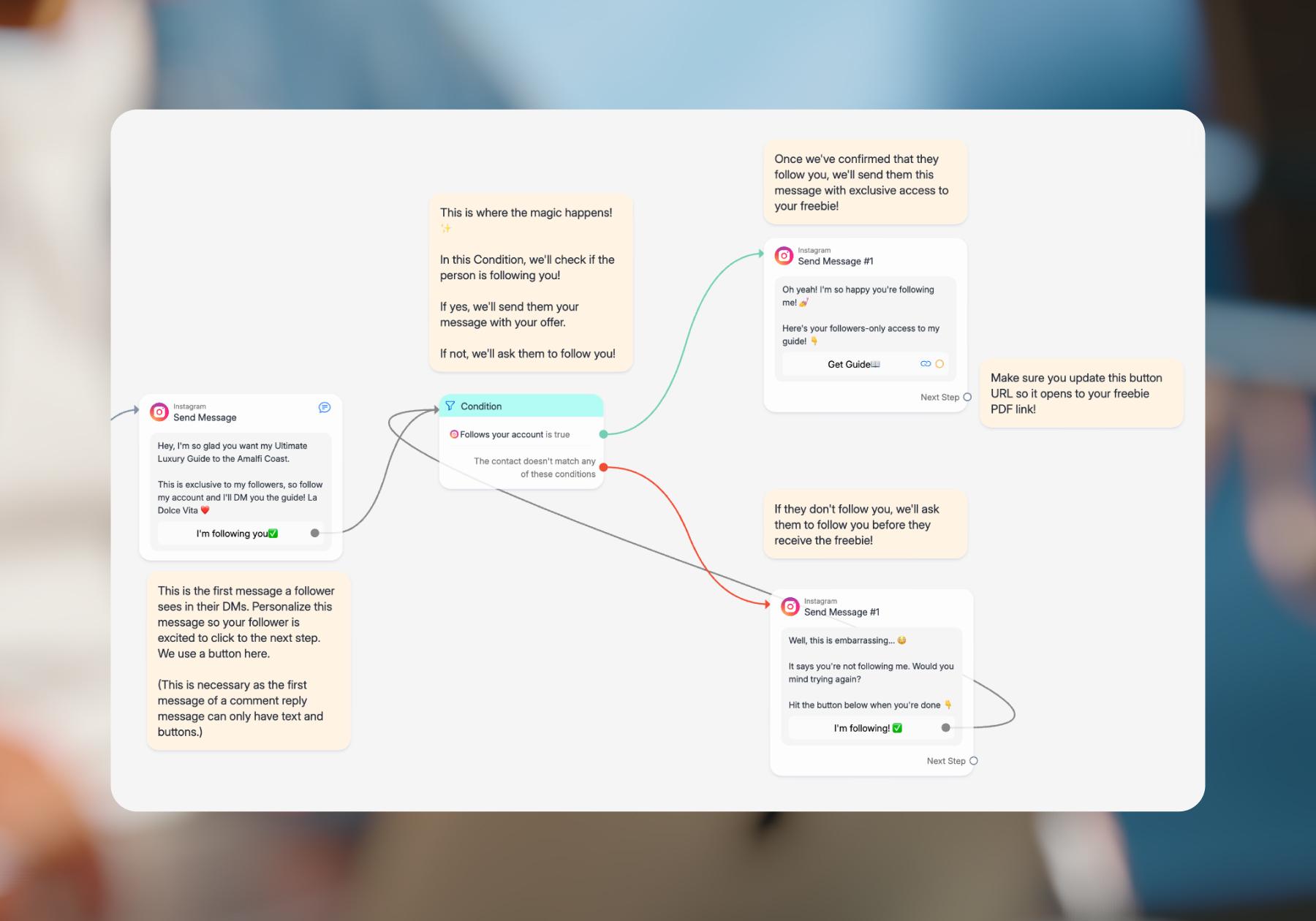
For visual learners, or anyone who wants to build something more customized, Manychat makes it easier to understand what happens next and how the pieces fit together. Its AI Flow Builder assistant can also help you create an automation based on your business and goals.
- Learning resources: Both ReplyRush and Manychat have help centers and YouTube channels, but I found ReplyRush’s educational content harder to browse. Its YouTube thumbnails all look very similar, and without playlists to group related tutorials, finding the right starting point takes some digging.
ReplyRush’s blog also leans heavily on comparisons with competitors. Those can help when choosing a platform, but they’re less useful when you’re looking for ideas about what to automate or how to improve your strategy.
Manychat also has a dedicated Community where users can ask questions, troubleshoot, and learn from one another. I couldn’t find a comparable official user hub for ReplyRush, so that’s something to consider if you value being able to talk with other users and attend events or workshops.
Manychat vs. ReplyRush: The Final Verdict
Let’s be real: Manychat and ReplyRush have a lot in common. Both handle core Instagram and Facebook automations, offer templates alongside custom options, and provide resources to help you get started. In testing, I found both straightforward enough to navigate.
Whether Manychat or ReplyRush would be better for you comes down to three things:
- Where you want to automate
- How much you want to customize
- What conversations typically look like for you
When to choose ReplyRush
ReplyRush is worth considering if Instagram and Facebook meet your needs and you expect to reach a lot of people with relatively short automations. Its Sendback feature helps catch eligible comments you missed, and Safety Queue manages sending during high-volume activity. Those are useful tools to have access to if you regularly go viral.
ReplyRush also has a lower starting price: Lite costs $10/month for 7,500 DMs, compared with Manychat’s Essential at $17/month for 250 Active Contacts. If you keep your conversations short, ReplyRush will often be the more affordable route. Longer conversations use more of ReplyRush’s DM allowance, so compare your expected message volume with Manychat’s Active Contact allowance before deciding which costs less.
When to choose Manychat
Manychat is the better fit if you want more channels, a visual building experience, and more advanced AI features. Beyond Instagram and Messenger, it supports TikTok, Telegram, and WhatsApp. Its Flow Builder lets you map out conversations and customize what happens based on someone’s answers or customer data. AI Replies and AI Goals add ways to answer questions and guide people toward the next step without scripting every exchange.
Manychat is also easier to build advanced automations in. Being able to visualize how messages connect and preview what someone will receive makes a difference when you’re creating flows that go beyond a basic reply. Also, there’s a playlist of tutorials for new users on Manychat’s YouTube channel, as well as the Community, which has a dedicated forum where creators can go to learn from each other.
So, if all you need is straightforward Instagram and Facebook automation, ReplyRush could work for you. If you want access to more channels, AI features, and more control over how conversations branch and adapt to each contact, Manychat is the better option.
Still not convinced? See how Manychat compares to other top automation platforms:
- Manychat vs. LinkDM: A Comparison of Features, Pricing, and More
- Top 10 Manychat Alternatives Comparison (Honest Breakdown)
- Manychat vs. The Competition: How We Stack Up to Other Automation Tools
Frequently asked questions
Manychat and ReplyRush both automate Instagram and Facebook conversations, including comments, DMs, and Story replies. Manychat also supports TikTok, WhatsApp, and Telegram, with more advanced customization through its visual Flow Builder and AI features. ReplyRush focuses on Instagram and Facebook, with tools like Sendback and Safety Queue to catch missed comments and manage high-volume activity.
ReplyRush’s paid plans start at $10/month, compared with $17/month for Manychat when billed monthly. However, ReplyRush counts DMs sent, while Manychat counts Active Contacts (each person you interact with during the billing month, regardless of how many messages you exchange). ReplyRush will often cost less for short automations reaching many people, while Manychat can be more affordable for longer conversations with a smaller audience.
Both platforms have straightforward navigation and templates to help you get started. ReplyRush uses a more form-based setup, while Manychat’s Flow Builder visually maps out messages, actions, and conversation paths. Visual learners and people building more customized automations may prefer Manychat, which also offers in-app guidance, an AI building assistant, and a user community.
Yes. ReplyRush is worth considering if you primarily need Instagram automation to deliver offers, collect leads, and follow up with interested users. Its lower starting price and DM allowances can suit accounts reaching large audiences with short message sequences. Manychat may be a better fit if you want AI to answer customer questions, more complex personalized workflows, or automation across additional channels.


Originally published: Oct 26, 2026
More stories worth reading
More content that's too good to miss