Manychat Growth Tools Are Now Called Triggers (+ a List of Almost All of Them)
You built a Manychat automation. You named it something professional-sounding like "Lead Magnet Flow v3." And then…nothing. No one actually triggers it. Why? Because an automation without an entry point is just a flowchart nobody sees.
That's the job growth tools do: they get people into your flows. And they can be anything because Manychat now runs across Instagram, TikTok, WhatsApp, Messenger, and SMS. Every one of those channels has its own way of pulling people in.
Whether you're new to Manychat or just need a refresher, consider this the master list of every Manychat growth tool you have available to you.
TL;DR
- Growth tools are the triggers and widgets that drive people into your automation flows: Instagram comments, DM keywords, website pop-ups, QR codes, and more.
- They span six channels: Instagram, TikTok, WhatsApp, Messenger, SMS, and your website.
- You'll find them inside Flow Builder; open an automation, then click + New Trigger on to browse your options by channel and widget type.
- On eligible paid plans, you can add Manychat AI to help respond and guide conversations automatically.
How to Find Growth Tools in Manychat

First of all, what are we even talking about when we say “growth tools”?
Well, the truth is it’s legacy lingo. In the past, Manychat called these features “Growth Tools.” That was back when the platform was mostly designed to help businesses get more Facebook Messenger contacts. The terminology became less useful as Manychat evolved because today Manychat isn't just about acquiring Messenger subscribers. You can use it with more platforms now — including TikTok, Instagram, and WhatsApp — and you can use it to enhance your customer support and experience as much as sales.
So, while you might see some references to “Manychat Growth Tools,” they’re now known as triggers, because that’s what they do: they trigger automations.
On that note, let’s talk about how to find all of the trigger options in Manychat.
- Start in the Automation tab in your sidebar, go to My Automations, then click + New Automation. You'll get a pop-up with ready-made templates, or you can hit Start with a blank canvas.
- Once Flow Builder opens, you’ll see two blocks. Click + New Trigger, which is where every trigger lives.
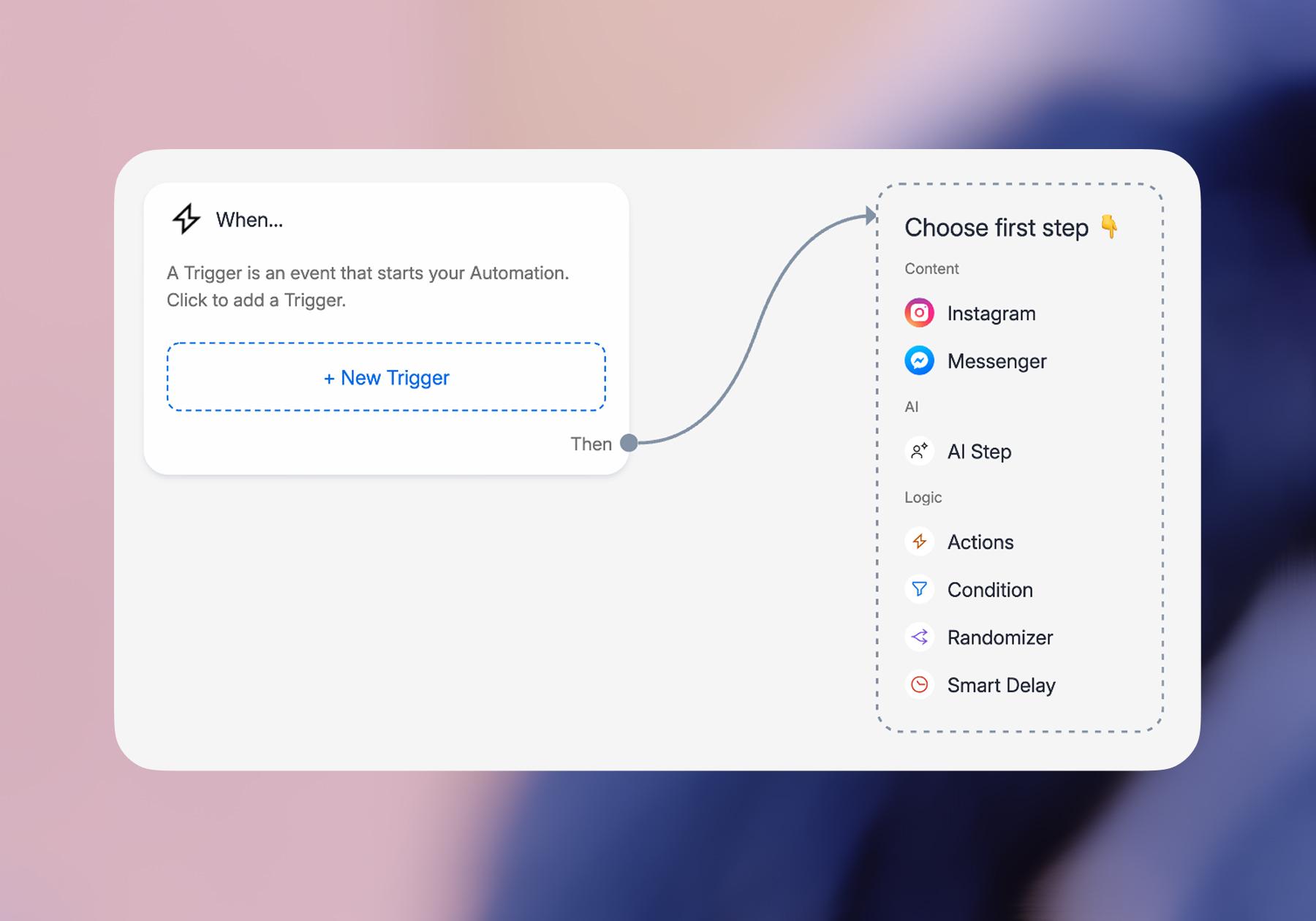
You'll see options grouped by channel (Instagram, Messenger, WhatsApp, TikTok, SMS). Pick the one you want, and a settings panel opens on the left where you customize copy, images, timing, keywords, and display rules.
Note: The options you see will depend on the platforms you’ve connected to Manychat, so if you only have Instagram connected, you’ll only see Instagram trigger options.
- When your flow is ready, add your follow-up message or action, hit Set Live, and toggle the trigger on. That's it. Now people have a way to enter your flow.
Instagram Triggers: Comments, DMs, and Stories

Instagram automation is one of the main ways people get started with Manychat. For common use cases, Manychat offers Quick Automations, which let you set up straightforward Instagram automations without having to build everything manually in the Flow Builder.
Here are some of the main ways people can start an Instagram automation.
Comment-to-DM
Comment-to-DM turns engagement on your Instagram posts and Reels into DM conversations. The setup you've probably seen goes like this: You ask people to comment a word — “guide,” “link,” “recipe,” etc. — and when someone leaves a matching comment, Manychat automatically responds with a DM that outlines the next step.
That could mean delivering a lead magnet or product link, inviting someone to an event, collecting contact information, or guiding them further toward a purchase.
Our Comment-to-DM guide walks through the setup step by step, so check that out if you’re new to comment automation.
DM Keywords
You can also start automations when someone sends your Instagram account a particular word or phrase in a direct message.
For example, a creator promoting an event could tell followers, “DM me ‘ticket’ for the link.” When that message arrives, Manychat can recognize the keyword and start the corresponding automation.
From there, you can do more than simply send a link. The automation can ask questions, collect information, deliver resources, or guide the person toward another relevant next step.
Story Replies and Mentions
Instagram Stories can start conversations, too.
With a Story Reply trigger, you can create an automation that responds when someone replies to your Story — for example, by sending a particular keyword.
Story Mention Reply works differently: when someone mentions your account in their Story, Manychat can automatically respond in their DMs. That could be a simple thank-you, a resource, an offer, or another relevant next step.
Story mentions can be especially useful for maintaining relationships with people who are already actively engaging with your account, while Story replies give you another way to turn Story content into one-to-one conversations.
As with other Instagram automations, Meta's messaging rules still apply to what you can send and when.
TikTok Triggers: Keywords, Ref URLs, and QR Codes

TikTok automation in Manychat focuses on turning TikTok Inbox conversations into lead-capture, engagement, and conversion opportunities.
Unlike on Instagram, where Comment-to-DM and Story triggers are major entry points, TikTok automations focus more on messages, keywords, Suggested Questions, links, and QR codes.
DMs and Keywords
One of the main TikTok entry points is keyword automation. You can ask people to send a specific word in TikTok Inbox — for example, “DM me ‘guide’ for the link” or “Message ‘info’ for details.” When Manychat recognizes the configured keyword, it can start the matching automation.
From there, you can send content, answer questions, collect email addresses or phone numbers, qualify the lead, or direct them to another destination such as your website or WhatsApp.
This is especially useful on TikTok because clickable links aren't available in comments, so moving interested viewers into the Inbox gives you a more direct path to the next step.
TikTok Ref URL Trigger
A TikTok Ref URL gives you a clickable way to send people directly into a TikTok messaging experience connected to a Manychat automation.
That makes it useful for driving traffic from outside TikTok — for example, a website, email, another social profile, or a campaign link.
Different Ref URLs can be connected to different automations, so you can tailor the conversation based on where the person came from.
TikTok QR Code Trigger
TikTok also supports a QR Code trigger, giving you an offline-to-TikTok entry point.
Someone can scan the QR code and enter the messaging experience associated with that automation. That makes QR codes useful for places like product packaging, in-store signage, event booths, menus, receipts, or printed materials.
It's the TikTok equivalent of using a Ref URL when there isn't a clickable screen in front of the person.
WhatsApp Triggers: Ref URLs, Keywords, and QR Codes

Manychat for WhatsApp lets businesses automate conversations for lead qualification, FAQs, customer support, sales, and follow-up. Businesses can also use approved WhatsApp Message Templates and broadcasts to proactively reach opted-in contacts where Meta's rules allow.
WhatsApp Ref URL Trigger
One way to bring people into a WhatsApp automation is the WhatsApp Ref URL trigger.
It creates a link that sends someone into a WhatsApp conversation with your business, with a prefilled message ready to send. Manychat also generates a QR code for the trigger, giving you both clickable and scannable ways to bring people into the same automation.
That means you can put the link in places like your social bio, email newsletter, website, or checkout confirmation, while the QR code can work on printed materials, packaging, signage, or at an in-person event.
There's an important detail: opening the Ref URL doesn't automatically make someone a Manychat contact. They need to send the message on WhatsApp.
The connected Ref URL automation also depends on the prefilled message being sent as intended. If someone replaces it with their own message, the Ref URL automation may not trigger.
A useful safeguard is to include a distinctive keyword in the prefilled message and create a corresponding Keyword Trigger. That gives Manychat another way to recognize the person's intent and route them into the appropriate automation.
WhatsApp Keywords
Keywords can also work as entry points on their own.
For example, you could ask someone to message “menu,” “book,” or “info” on WhatsApp. When Manychat detects the configured keyword, it can start the appropriate automation.
From there, you can answer common questions, collect information, qualify the lead, route them to a team member, or guide them toward a purchase.
WhatsApp QR Codes
Because the WhatsApp Ref URL trigger can generate a corresponding QR code, WhatsApp conversations don't have to begin online.
A business can place the QR code on printed materials or other physical touchpoints. When someone scans it, they're taken into WhatsApp with the configured message ready to send.
That makes it particularly useful for businesses connecting physical and digital customer journeys — for example, bringing someone from an event, store, appointment, packaging, or printed promotion into an automated WhatsApp conversation.
Messenger Triggers: Comments, Ads, Etc.

Messenger gives you several ways to turn Facebook traffic into conversations in Manychat — whether someone arrives from a link, comments on your content, or clicks a Facebook ad.
Messenger Ref URL
A Messenger Ref URL sends people from a link into a Messenger conversation connected to a specific Manychat automation. Add the URL to social profiles, marketing emails, websites, or anywhere else you want to bring people into Messenger.
You can use different Ref URLs for different traffic sources and tailor the automation accordingly. Someone arriving from an email, for example, could get a different welcome from someone coming from YouTube or another campaign.
For a new contact, Messenger may require them to tap Get Started before the automation runs. From there, normal Messenger messaging window rules apply.
The real value is connecting the rest of your marketing to Messenger: you can bring people in from email, social, your website, or other campaigns and give them a conversation that matches where they came from.
Facebook Comments Trigger
The Facebook Comments Trigger turns engagement on your Facebook content into Messenger conversations. Connect it to an organic Facebook post or supported ad, and Manychat can send someone a private Messenger reply when their comment matches your trigger.
To set it up, click + New Trigger and choose User comments on your post. You can connect the trigger to a specific post or multiple posts, choose which keywords should or shouldn't activate it, add a public auto-reply, and decide whether to trigger only from first-level comments.
There's one important opt-in detail: receiving the initial private reply doesn't automatically opt someone into Messenger or open the 24-hour messaging window. The person needs to interact with that message — for example, by replying or tapping a button — before you can continue the conversation under Messenger's standard messaging rules.
That makes the trigger useful for things like delivering resources, answering common questions, promoting offers, and turning engagement on Facebook content into a one-to-one conversation.
Facebook Ads Trigger
The Facebook Ads Trigger connects a Facebook ad directly to a Manychat Messenger automation.
When someone clicks a Send Message ad, they can enter the Messenger experience you've built in Manychat. From there, your automation can answer questions, deliver an offer, qualify a lead, collect information, or guide someone toward the next step.
Set up the opening experience in Manychat, then configure the ad in Meta Ads Manager. For the message template, choose Partner app, select Manychat, and connect the appropriate automation.
Clicking the ad alone doesn't automatically make someone a Manychat contact. They need to interact with the opening message — such as by tapping a button or sending a reply — to become a contact and continue the conversation.
If you've seen older Manychat tutorials referring to JSON ads, that's the legacy terminology. For current setups, look for the Facebook Ads Trigger instead.
Messenger QR Code Trigger
The Messenger QR Code Trigger provides a bridge from physical touchpoints to Messenger. Someone scans the QR code, opens Messenger, and can access the automation associated with it.
That makes QR codes useful anywhere your audience encounters you, away from a clickable link: think product packaging, printed materials, event signage, a conference booth, menus, receipts, or displays in a physical location.
Different QR codes can also connect to different automations, so the experience can match the context. A code at an event might deliver a resource, while one on packaging could start a support or feedback conversation.
As with other Messenger entry points, scanning the code isn't a blank check to message someone indefinitely. The contact still needs to interact with the Messenger experience, and Meta's applicable messaging rules and windows apply.
Other Options: SMS and QR codes

If you want to bring people into your Manychat automations from channels other than social media, you totally can with SMS and QR codes.
SMS subsribers
Manychat can collect phone numbers and send SMS messages as part of an automation, once the SMS channel is activated and the contact has provided the appropriate opt-in.
Businesses can use SMS for things like launch reminders, restock alerts, offers, and follow-up sequences. The key difference from older Manychat tutorials is that the former SMS Modal website widget is no longer available, so phone number collection must occur through a current, supported opt-in flow.
QR Codes: Connect Offline Moments to Messaging
On supported channels (TikTok and WhatsApp), Manychat QR code triggers can connect offline touchpoints to messaging automations. They’re useful for turning real-world touchpoints — like product packaging, event booths, in-store signage, menus, or receipts — into conversations, lead capture, support, or feedback.
For example, a customer could scan a QR code on packaging to start a support or feedback flow, or scan one at an event to receive information and continue the conversation in messaging.
In Manychat, QR codes are configured as triggers inside an automation, rather than through the old “Growth Tools” menu.
Which Trigger Should You Start With?

Start with the growth tool that matches where your audience is already interacting with you. You don't need to set up every trigger at once — one useful automation attached to an existing source of traffic is a much better starting point.
- If Instagram is your main channel, start with Comment-to-DM. It's a natural fit for turning engagement on posts and Reels into conversations: offer something useful, ask people to comment a keyword, and automatically deliver the next step in their DMs.
- If you're focused on TikTok, start with a DM keyword. Give viewers a simple CTA like “DM me ‘GUIDE,’ and I'll send it over,” then use that keyword to start the automation.
- For Facebook and Messenger, choose based on where the traffic comes from. Use the Facebook Comments Trigger for people engaging with your content, a Messenger Ref URL when you're sending people from email, websites, or other channels, and the Facebook Ads Trigger when you're paying to start Messenger conversations.
- For WhatsApp, a Ref URL is an easy starting point. Put it anywhere you already have attention — your bio, website, email, or checkout experience — and give people a direct route into a WhatsApp conversation. The accompanying QR code can do the same job for physical locations and printed materials.
- And if you're trying to connect offline traffic to online conversations, look at QR codes. They're a natural fit for stores, events, packaging, menus, signage, and anywhere else someone can scan rather than click.
The rule of thumb is simple: start with your biggest existing source of attention. Then give people a clear reason to interact — a useful resource, an answer, an offer, or something else they actually want.
Once that first entry point is working, add others around it. One automation may collect traffic from comments, keywords, links, ads, and QR codes without requiring you to reinvent the conversation every time.
Frequently asked questions
What used to be called Growth Tools are now generally set up as triggers inside your automations.
Go to Automation, open or create an automation, then click + New Trigger to see the available options. What you see will depend on the channels connected to your Manychat account and the features available on your plan.
Manychat offers automation entry points across channels, including Instagram, TikTok, WhatsApp, and Facebook Messenger. The exact triggers vary by channel.
For example, Instagram supports entry points such as comments, DMs, and Stories; Facebook Messenger supports comments, Ref URLs, ads, and other triggers; while TikTok and WhatsApp offer options including messages, links, keywords, and QR-code-based entry points.
There isn't a single universal growth tool that works the same everywhere; pick the trigger that matches both your channel and where your audience is already engaging.
Some triggers and automation features are available on Manychat's Free plan, while others require a paid plan. Your limits can also depend on the channel, number of active contacts, and features you're using.
Because Manychat's plans and feature availability can change, check the current pricing page before choosing a plan based on a specific trigger or channel.
Yes. In many cases, you can offer people multiple ways to enter an automation rather than building a completely separate experience for each source.
For example, you might use different entry points for comments, DMs, links, ads, or QR codes to guide people to the same resource or offer.
Just pay attention when you have multiple triggers that could respond to the same interaction. Some channels have priority rules that determine which automation fires.
Think of the trigger as the doorway and the automation as what happens after someone walks through it.
A trigger is the event that starts the experience — someone comments on an Instagram Reel, sends a keyword, clicks a Ref URL, or scans a QR code.
The automation is everything that follows: sending messages, asking questions, collecting information, delivering links, applying tags, or moving someone toward the next step.
Not always. It depends on the channel and trigger.
For some entry points, simply clicking a link, scanning a QR code, or receiving an initial message isn't enough. The person may need to send a message, tap a button, or otherwise interact with the conversation before they're considered a contact or before additional messaging is allowed.
That's why it's important to check the opt-in and messaging rules for the specific channel you're using.
Yes, on plans and channels where the relevant AI features are available. A trigger can bring someone into an automation, and Manychat AI can then help answer questions or guide the conversation based on how you've configured the experience.
The trigger still determines when the automation starts, while AI can help determine what happens during the conversation. Channel-specific messaging and opt-in rules still apply.



Originally published: Nov 18, 2021, Updated: Aug 31, 2026
More stories worth reading
More content that's too good to miss