You know how the lyrics go: it goes down in the DMs. And I believe Yo Gotti meant the Instagram DMs specifically when he said that, because Meta frequently rolls out new DM features to keep things fresh.
Today, people are sharing, replying, mentioning, and directly reaching out to other users via the Instagram inbox all the time. It’s the place to be, whether you’re a creator, brand, or everyday champion of scrolling like me.
Instagram automation is a handy way to be in the inbox when users are: 24/7. And Manychat is a safe, easy, and free Instagram automation tool. If you’re curious about how it works, what you can automate, and how to get rolling, read on.
TL;DR
- Instagram automation can be used to reply to DMs, comments, Story replies, and mentions while you’re away from your phone.
- Safe Instagram automation runs through Meta's official API (like Manychat). Don’t use shady bots, as they can get your account banned.
- Key automation features of Manychat include comment-to-DM flows, keyword triggers, AI replies, and Story mention responses.
- You can go from zero to automated in about ten minutes, no code required.
Instagram Automation, Sans the Confusion

Instagram automation (sometimes called Instagram DM automation or Instagram chatbots) refers to using software or apps to handle the repetitive parts of running an Instagram account, like replying to DMs, responding to comments, reacting to Story mentions, and capturing emails.
Instagram automation is not auto-liking random posts, follow/unfollow spam bots, or anything that fakes engagement. Those sketchy tactics are exactly the kind of thing that gets accounts flagged, shadowbanned, and sometimes even fully suspended. Real Instagram automation tools — the legit ones — run through Meta's official API.
Manychat is an official Meta Business Partner, which means it’s been reviewed by Meta and is approved to connect to Meta’s API.
3 common types of Instagram automation
Instagram automation typically falls into three buckets:
- DM and conversation automation: automated replies, keyword triggers, default replies, and conversation starters that handle messaging at scale.
- Comment and engagement automation: comment-to-DM flows, Story mention triggers, and automated comment replies that turn public engagement into private conversations.
- Growth and scheduling automation: tools that schedule posts and manage your content calendar. (We won’t go too deep into this category, since Manychat doesn’t offer these capabilities. But we have covered this on the blog before: The Best Way to Schedule Posts on Instagram.)
DM and conversation automation
With Instagram DM automation, you can reply to messages instantly, trigger entire conversations from a single keyword, catch every incoming message with a default reply, and greet brand-new visitors with conversation starters. The goal is to respond fast (because people expect that today) and give people exactly what they need when they want it. We'll go into more detail about how to do this in a moment.
Comment and engagement automation
Instagram comment automation allows you to trigger DM flows from keywords in comments on your posts. By asking for these comments (via a CTA like “comment FREEBIE to get my e-book”), you can also increase your content’s engagement and get a lift from the Instagram algorithm.
Growth and scheduling automation
Scheduling tools like Later and Buffer allow you to queue up content so your content calendar stays consistent. They're useful, especially if you batch content or aim for a specific Instagram grid aesthetic.
Instagram Automation Features and What They Do

Here's the breakdown of how Manychat’s Instagram automation features work.
(BTW, Manychat also works with Messenger, WhatsApp, TikTok, and Telegram.)
Instagram automation features at a glance | ||
|---|---|---|
Feature | What it does | Example use case |
Flow Builder | Builds automations visually, no code (you just click, type, drag-and-drop) | Map a whole sales chat in a flowchart |
Keyword triggers | Starts a flow when someone comments or DMs a certain word | "DM me GUIDE for the free PDF" |
Comment-to-DM | Replies in DMs when someone comments on your post | Comment "SALE" → get the discount link |
Story mentions | Auto-replies when someone tags you in a story | Tag us → get a thank-you + code |
AI replies | Uses intent recognition to answer DMs when you’re away | Handle "do you ship to Canada?" overnight |
Lead capture | Collects emails and phone numbers in chat | Trade a freebie for an email |
Conversation starters | Pre-filled buttons for first-time messagers | "Do you offer free shipping?" |
Live Chat | Hands off the chat to a human | Agent jumps in for a complex order |
Flow Builder
Manychat’s Flow Builder lets you build custom automations inside a flowchart-based interface. You can create different conversation "branches" based on a user's response to your automation, like when they click a button or give you their email.
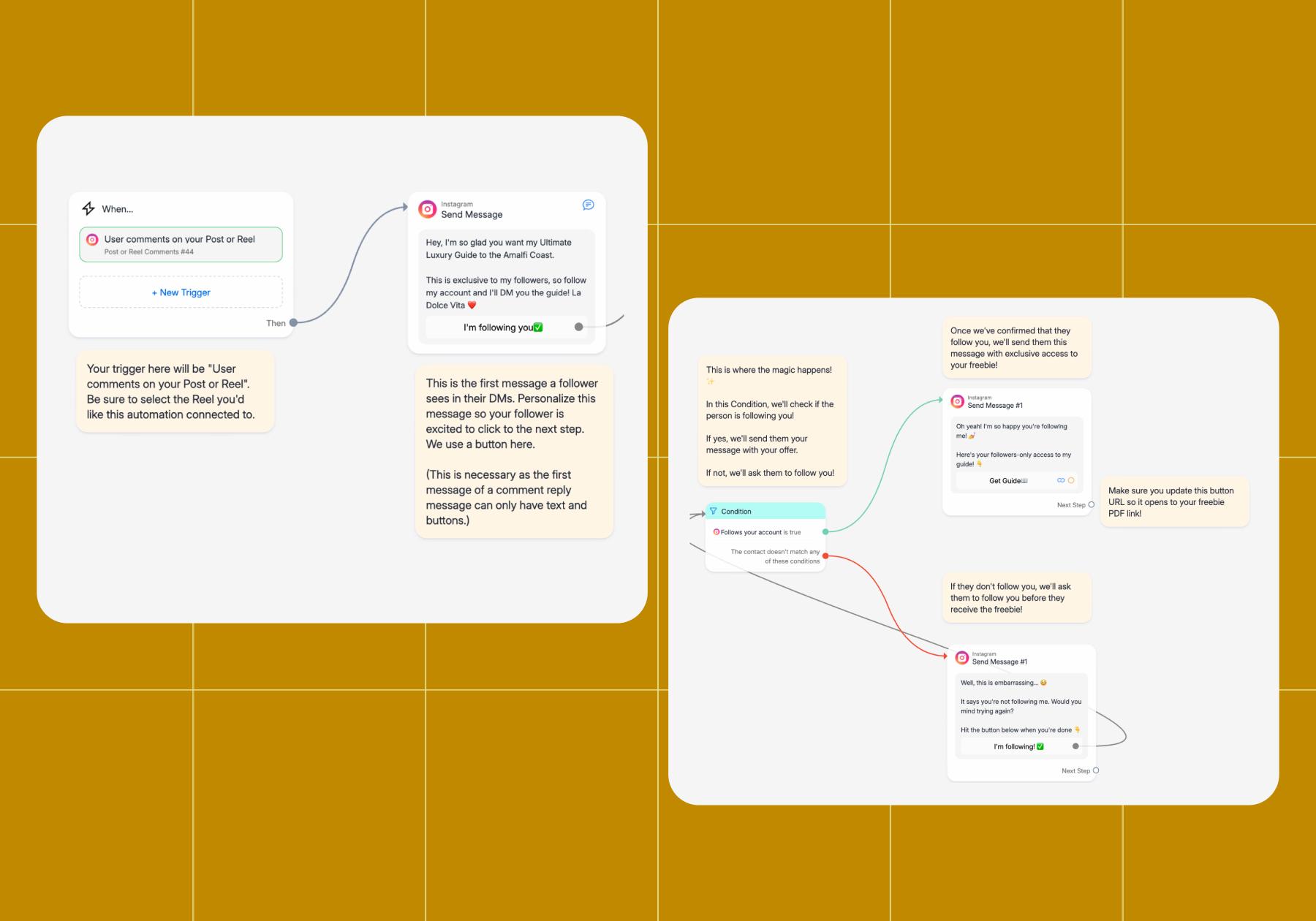
You can customize text, media, and links, all without writing any code. Need a head start? Lean on the AI Flow Builder Assistant to draft a flow for you, or grab one of the ready-made templates in Manychat’s template library.
Keyword triggers
Instagram keyword triggers fire off an automation the moment an Instagram user comments or DMs a specific word or phrase. Keyword triggers exist inside Quick Automations like comment-to-DM, but you can also use them in your own custom flows built in the Flow Builder.
Comment-to-DM
This is the feature everyone knows Manychat for. With comment-to-DM, someone comments a keyword on your post or reel — say "SALE" or "RECIPE" — and they instantly get a DM with whatever you've set up: a link, a lead magnet, or whatever flow you’ve built.
You can set up comment-to-DM in less than 10 minutes. Learn how, step by step: How to Set Up Instagram Quick Automation (A Comment-to-DM Guide)
Story mention triggers
The Instagram Story Mention Reply trigger automatically starts a conversation when someone mentions your account in their Instagram story.
If you’re a creator, you can set up the automation to ❤️their message and offer a casual thanks. If you run a brand or business account, you can send a thank-you with a discount code for their next order.
Get the full scoop: Instagram Story Going Stupid? 🫨 Use Manychat to Automate Replies
AI-powered replies
Sometimes people ask things that don’t perfectly fit a keyword automation you’ve set up. AI can help here; specifically, Manychat AI replies. You can add up to 250,000 characters of context to Manychat — things like FAQs, your brand voice, product details — so it learns how you talk and answers questions accordingly. There's AI for comments too, plus intention recognition that interprets what someone actually wants and routes them to the right flow.
Lead capture
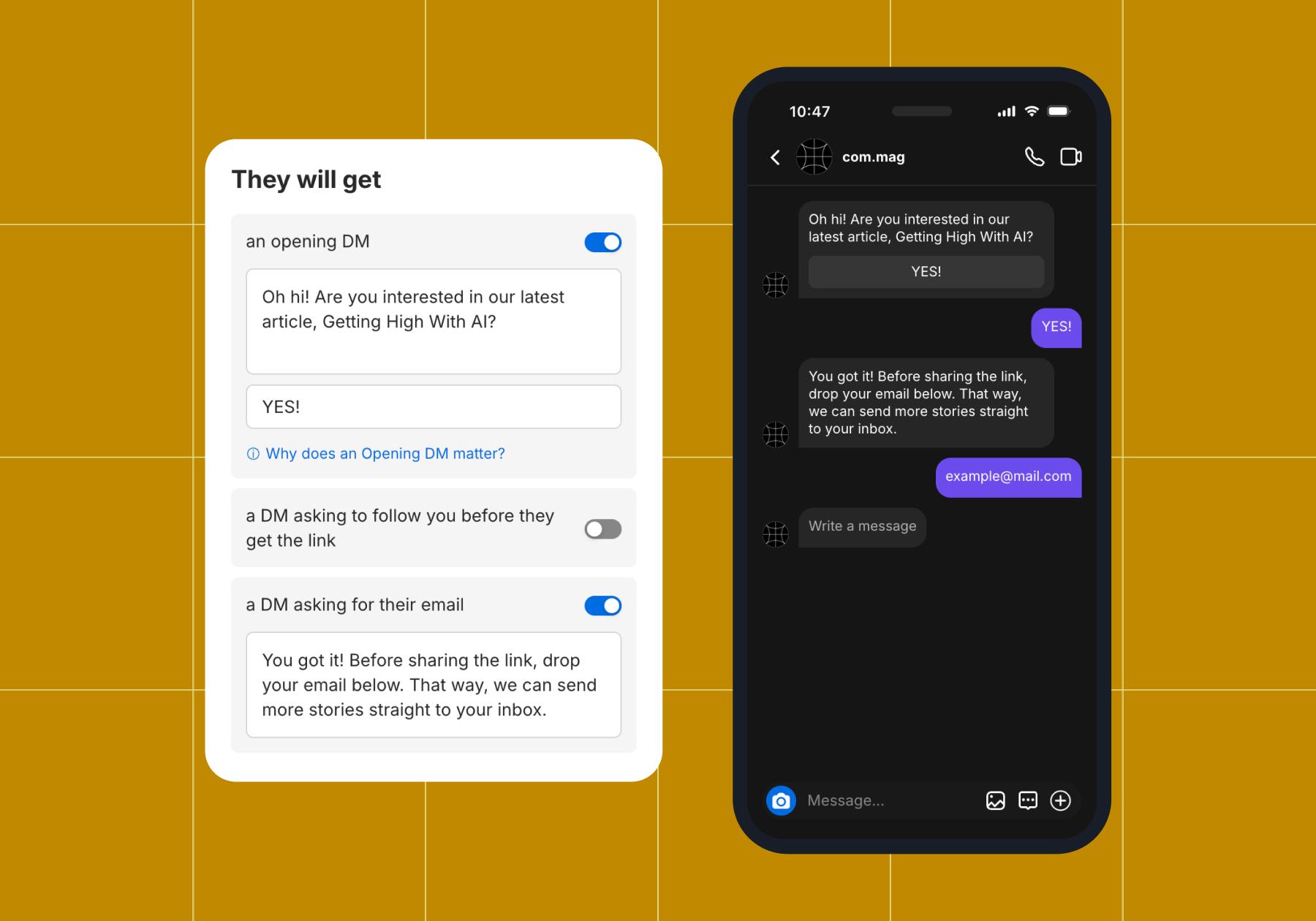
You can collect emails or phone numbers, store them in Manychat, and send them to another tool like Klaviyo or Mailchimp (both of which are Manychat integrations). Capturing emails is particularly simple because it’s an option you can toggle on in the comment-to-DM Quick Automation:
Conversation Starters
Conversation Starters are a Manychat Always-On Automation (which is different from a Quick Automation — Always-On Automations can be reached in Settings). With Conversation Starters, you can give people who've never messaged you before a menu of options to choose from. It’s the first thing they see when they go to open a DM with you.
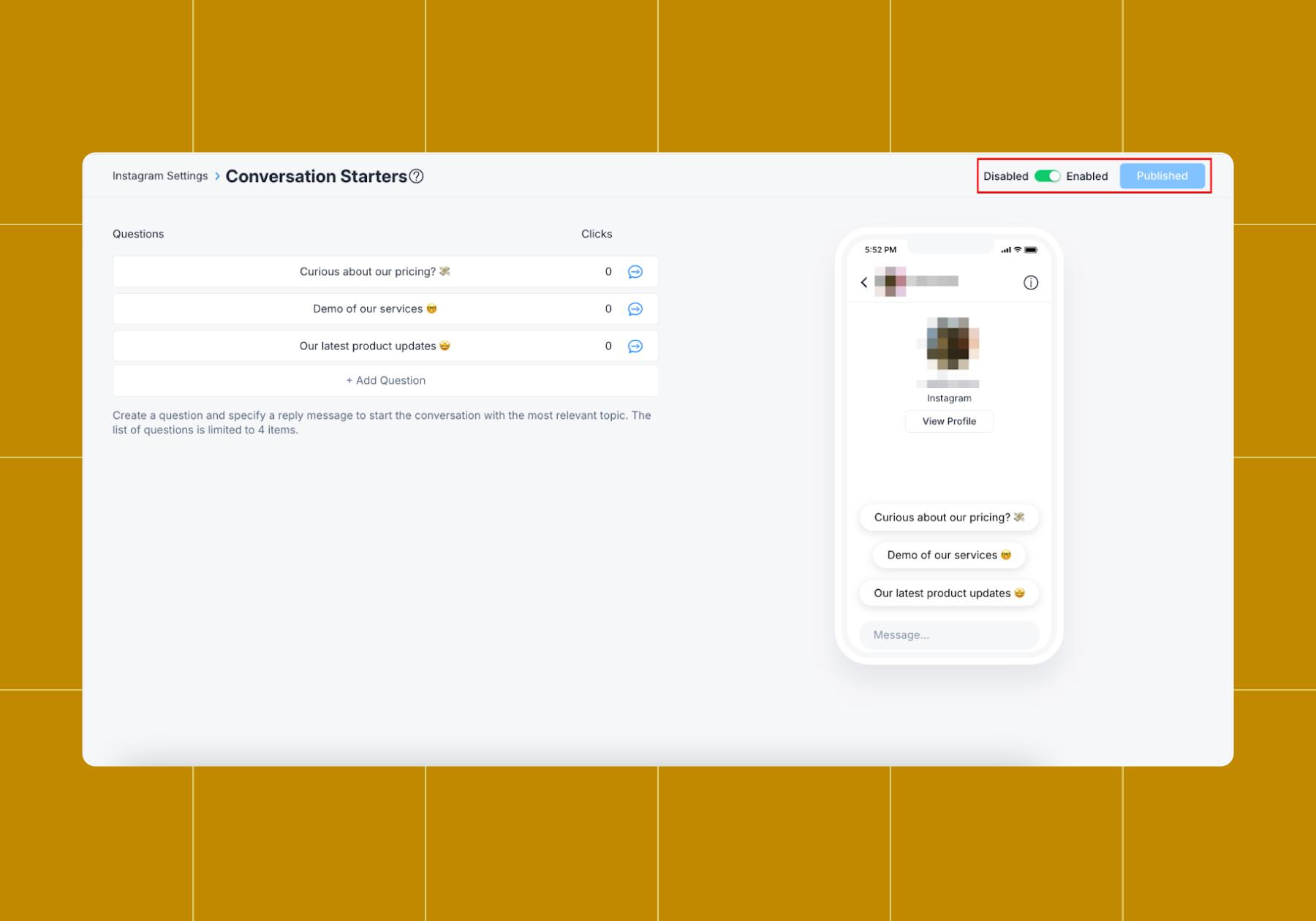
When a user taps one, it’ll trigger an automation about that topic. They're perfect for handling FAQs, since they only appear to folks who've never messaged you before.
Live Chat
Obviously, we’re pro automation, but some conversations require a real person. Set yourself and any team members up on Live Chat so they can jump into discussions with Instagram users whenever automation isn't enough.
Learn more about the balance between automation and authenticity: To Automate or Not? Here’s How to Respond to Comments on Instagram
Default Reply
With Default Reply, you'll never miss a customer message. It automatically responds to every incoming message with a custom note you create.
You control how often it sends, and most brands treat it like a menu, giving customers buttons or keyword triggers to navigate how they want to interact. The Default Reply fires for all incoming messages except those you've already set up with a keyword or comments automation. It's ideal for catching everything else, so no opportunity slips through the cracks.
Will you get banned for automating on Instagram?
Nope! Instagram automation is safe as long as you use a tool that runs through Meta's official Messaging API.
The tools that get accounts banned are the ones that fake activity: mass auto-liking, follow/unfollow loops, scraping, that kind of thing. Instagram's Terms of Use draw a hard line against that stuff. Approved messaging automation is a completely different animal because it only responds to people who message you or interact with your content first.
Manychat is an official Meta Business Partner, which means Meta vets it and connects through the approved Instagram messaging API. You're not sneaking around the rules; you're using an approved tool the way it's meant to be used. So no, legit Instagram automation won't get you banned. The sketchy "grow 10k followers overnight" bots? Those will. Stick with the approved ones, and you're golden.
Learn more about Manychat for Instagram
How to Start Automating in 10 Minutes

Want to get started immediately? Follow these five steps:
- First, make sure you have an Instagram Business or Creator account.
- Sign up for Manychat, then connect your Instagram account.
- Go to Automations, then choose a Quick Automation like comment-to-DM (AKA, the ‘Auto-DM links from comments’ template).
- Follow the prompts: choose a post, trigger keyword, and customize the messages.
- Hit Set Live when you’re ready to go.
Prefer the play-by-play? How to Set Up Instagram Quick Automation (A Comment-to-DM Guide)
Don't be THAT account (best practices to keep it cool)
Automation works best when it still feels human. Here are a few ground rules to keep your DMs from feeling like a conversation vending machine:
- Personalize it. Make the messages sound like you wrote them, even if they’re automated.
- Trigger on intent (a keyword, a comment, a mention), not on every interaction. Use the ‘every comment’ trigger automation sparingly.
- Always offer a human handoff. Give people an easy way to reach a real person when the automation can't help.
- Test right after you launch. Run every flow yourself first, so you catch awkward dead ends before your audience does.
Get those right, and your audience won't mind that it's automated.
Frequently asked questions
Instagram automation uses software or apps to handle repetitive tasks in your Instagram DMs and comments — like replying to messages, sending links, and collecting emails — so you don't have to do it manually. The good tools run through Meta's official API and focus on conversations, not fake engagement.
Instagram automation is safe when you use a tool that operates via Meta's official API, such as Manychat. The risky stuff is unauthorized bots that fake likes and follows; those can get your account flagged.
First, make sure you have an Instagram Business or Creator account. Then, connect your Instagram to an automation platform like Manychat.
An Instagram chatbot usually refers to AI-driven conversations that understand and respond to a range of questions, while DM automation covers a broader set of tools — including keyword triggers, comment-to-DM flows, and automated replies — that may or may not use AI. With Manychat, you get both under one roof.
Yes. Manychat offers a free plan that gives you access to core automation features, including keyword triggers and basic DM flows, so you can start automating without paying anything. You can upgrade later if you want advanced features like AI replies.



Originally published: May 14, 2021, Updated: Jul 31, 2026
More stories worth reading
More content that's too good to miss