Act Like a Bot, Get Banned: Your Guide to Tasteful Automation

“Thanks for your message! 👋 I’m here to help. Please choose from one of these options…also, I’m not a bot, I swear!”
It’s 2026. We are all familiar with automated messages. But honestly, the goal isn’t to pretend you’re not automating; it’s to automate in a way that protects the user experience on Instagram and Facebook. In fact, a handful of automation tools (including Manychat) are officially approved by Meta.
Automation in itself isn’t going to get your account banned, but if you use it in a way that feels spammy, salesy, or flat-out annoying to real people, that’s when things can go off the rails. Meta aims to provide a positive experience on its platforms. Manychat wants the exact same thing — AND we want to support creators with their monetization goals.
So, let’s talk about what Meta considers “bot behavior,” why even well-meaning accounts get caught in the crossfire, and how to use automation without putting your account at risk.
What Does Meta Flag as Bot Behavior?

Meta flags accounts for automated behavior when its systems detect patterns that don’t appear to be human. Even when you’re using Meta-approved automation tools like Manychat, you can still get flagged if your activity looks spammy, excessive, or unnatural.
Common triggers for Meta’s automated flags
- Rapid actions: Liking, following, commenting, or messaging too quickly in succession is a huge red flag. Humans take breaks; bots don’t…unless they break for real. So if you like 50 posts in a row right after opening the app, you might get flagged. Manychat is designed to help you avoid this. For example, you can use the Randomizer feature to personalize communication based on users’ interactions.
- Third-party apps: Using unapproved tools that promise likes, followers, or engagement almost guarantees problems. Beware any shady apps that ask you to connect your Instagram account.
- Data scraping: Automatically collecting data from Instagram (especially without user consent) is a fast track to getting your account restricted. If you use a tool that pulls usernames, emails, or follower lists from profiles or comments, Meta might ding your account.
- Multiple logins or locations: Logging in across various tabs, devices, or locations can look suspicious. This is a tricky one for people who manage multiple Facebook groups.
- Unusual spikes in activity: Sudden engagement surges or traffic from unexpected sources can trigger automated reviews. Let’s say you launch a new automation that sends hundreds of DMs in minutes after weeks of relatively low activity on your account. Meta won’t like that, and you might end up with a warning and restrictions. With Manychat, this is less of a concern because we have a safeguard in place to halt automated messages and comments if your post approaches a threshold that would trigger Meta’s alarms.
Get flagged? Here’s what to expect
While I dare not test Meta’s flagging system myself, I did take to Reddit to figure out why people get flagged and what usually happens next.
Short answer: It’s a little unpredictable. Scrolling through threads in r/Facebook, one thing is clear: Most people who get flagged aren’t actually trying to game the system.
One Reddit user described getting stuck in the dreaded ‘We suspect automated behavior’ loop despite never using automation at all, saying,
“I manage several regional Facebook groups and often open notifications across many tabs to work through them efficiently. Now it seems to happen every few commands — even when I’m only using a single tab. The experience is annoying and time-draining, and I fear that if enough ‘dings’ accrue, Facebook will lock me out.”
Not good. But here is some good news: getting flagged doesn’t usually mean an instant ban, and there are things you can do to recover your account.
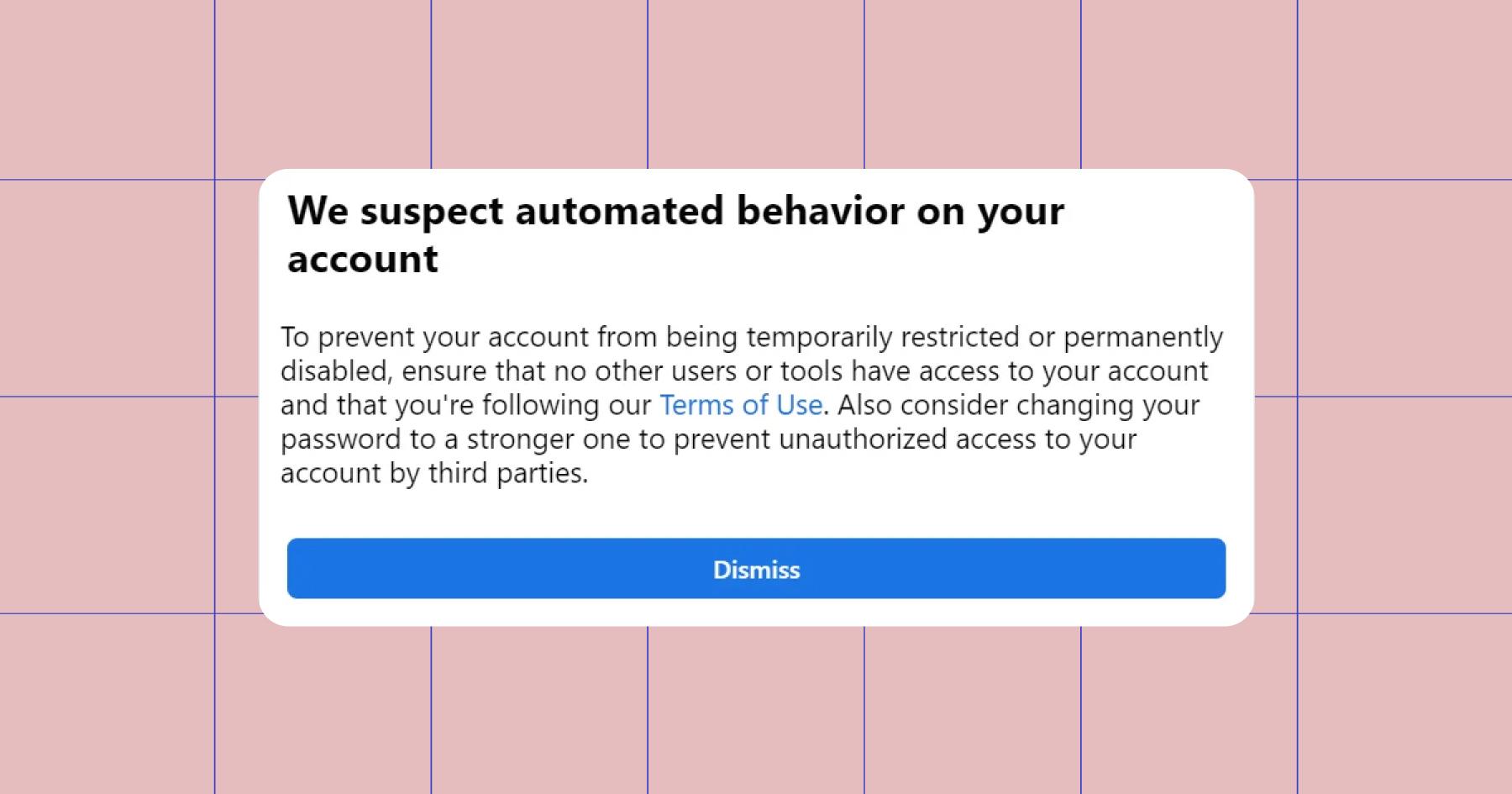
If your account gets flagged, a few things might happen:
- Account restrictions, such as getting temporarily locked out or stuck in a login or “prove you’re human” loop.
- Ad account weirdness, like automated rules firing unexpectedly, ads pausing, budgets changing, or audiences getting combined. This occurs when Meta shifts your account into a “risk mitigation” mode. Meta has assumed something is amiss and taken action to reduce potential damage.
- Content re-scans; when an account gets flagged, Meta doesn’t just look at what triggered the alert. It often re-evaluates the account as a whole, which can result in previously approved or reused posts getting flagged.
How to Prevent Automated Behavior Flags

If you’re already flagged or just trying to avoid it, here’s where to start.
- Secure your account. Change your password and unlink any apps you don’t recognize or no longer use.
- Slow down. This is a big one. Space out your actions (likes, comments, DMs, reshares, etc.) so your activity appears more natural. You are human, right? 🤨 If you’re using Manychat, add Smart Delays and ask for opt-ins.
- Appeal when needed. If you believe a restriction is incorrect, use Meta’s official appeal channels (like the Instagram Help Center).
- Review what you’re sharing. Remove sensitive information from posts and archive any screenshots or old memes that could look suspicious or spammy.
- Check Ads Manager (if you use it). Look for automated rules you didn’t create and disable anything that feels off.
Using Manychat? Here’s how to play nice with Meta
Manychat is Meta-approved, but that doesn’t mean you can do whatever you want with it. Ahead, a few best practices to help prevent your account from getting flagged.
Respect the 24-hour messaging window
Meta’s 24-hour messaging window means brands can only send promotional or automated messages within 24 hours of a user’s last interaction. After that, messaging must stop unless the user re-engages with your account.
Manychat users are not able to send messages outside of 24 hours, even if they create a flow designed to (nice try 😉). Never trust a third-party tool that lets you do this. It’s not worth the risk.
Manychat is built to protect you regarding the 24-hour window, so don’t try to outsmart it.
Do | Don’t |
Use always-on automations like Default Reply, Story Mentions, and Conversation Starters. | Use an unapproved third-party tool to send DMs after the 24-hour window has expired. |
Let the window refresh naturally through organic engagement. | Send 50+ automated follow-ups within 24 hours to everyone who triggers an automation. |
Ask for explicit opt-ins. (“Would you like to receive updates, reminders, and promotions?”) |
Pace your automations (you’re a human, remember?)
Meta flags patterns, so build your automations to mimic how a person would communicate. Limit your flows to just a few back-and-forth interactions and use Smart Delays to pause up to 10 seconds between messages.
Avoid long, uninterrupted message chains that you would hate to be on the receiving end of. The idea is to keep Instagram enjoyable for the person you are sending the message to.
Don’t automate everything
There are things you should automate (like FAQs) and things you shouldn’t (like getting to know a follower in the DMs). Use Manychat to handle the time-consuming, repetitive stuff, and jump in to handle the rest. This is the whole point of Manychat’s Live Chat/Inbox features.
Automate it | Keep it human |
Complex questions | |
Ice Breakers (FAQs) | High-intent buyers |
Check out To Automate or Not? Here’s How to Respond to Comments on Instagram for a more in-depth look at different situations and how to handle them.
Use Follow to DM wisely
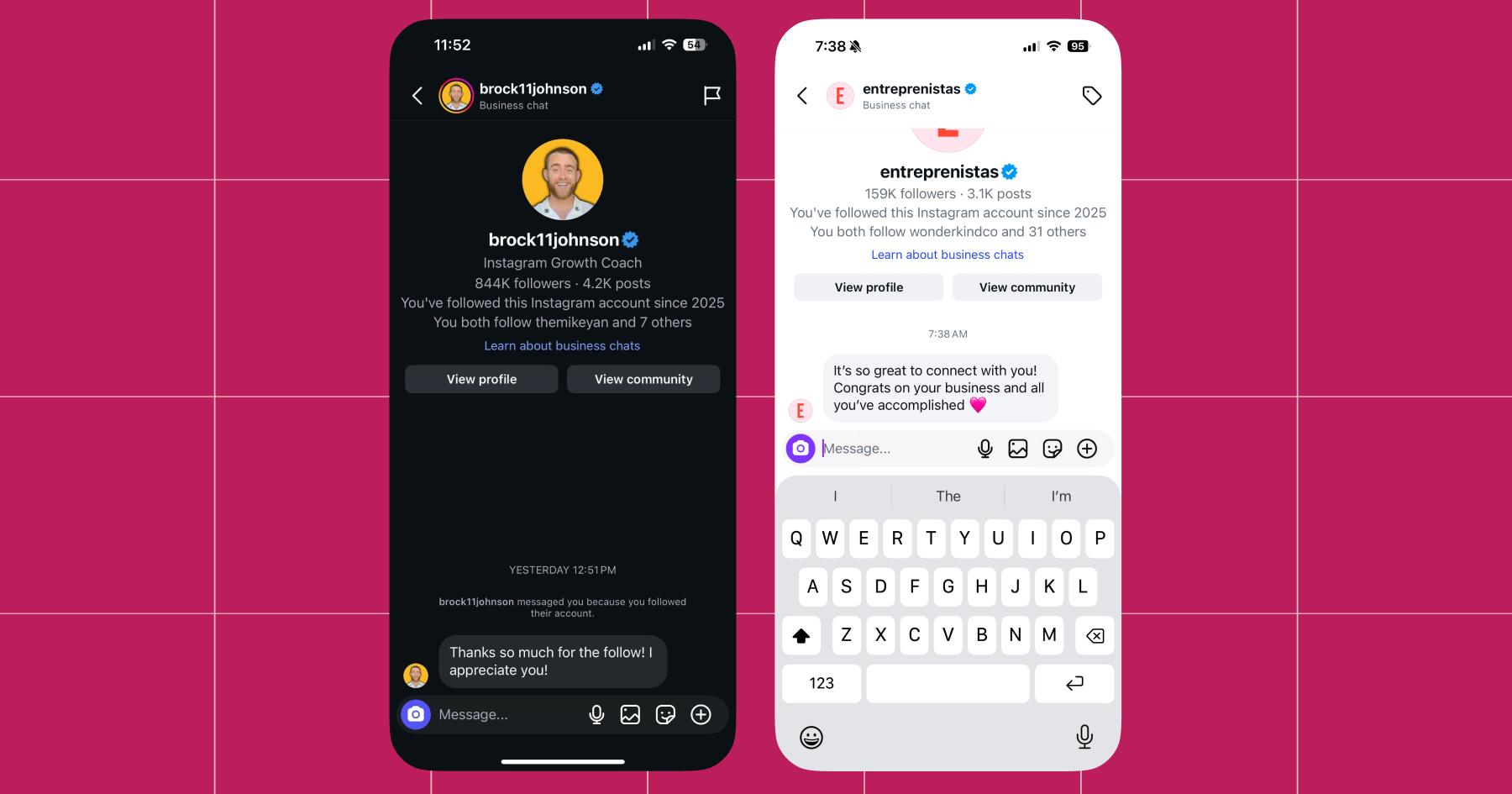
Follow to DM is a Manychat feature that sends users a message right after they tap the follow button. It’s a great way to start building a relationship with new followers right from the beginning.
But here’s the thing: Follow-to-DM is best treated like a door, not the start of a marketing funnel.
When a new user knocks on that door, greet them. Don’t launch into the full spiel.
Meaning:
- No links
- No complex sequences
At least not yet. Keep it short, friendly, and resist the urge to sell immediately.
Here are a few examples of what that looks like:
In Closing: Act Like a Human, Even When You Automate

Effective automation doesn’t require trickery or hiding. All you need to do is use a Meta-approved tool (like Manychat!) and build automations that behave the way a person would.
Do that, and you’ll stay compliant.
Want more pro-human content? Visit Chronically Online Magazine.



Originally published: Jan 17, 2026, Updated: Jan 17, 2026
More stories worth reading
More content that's too good to miss