
Pinterest has been around since 2009. It’s one of the original social platforms, and it still has a large, active user base today (about 661 million people use Pinterest monthly). Personally, I’ve been using Pinterest since high school, but I won’t specify exactly how long ago that was. 😉
When I open Pinterest, it’s usually just for a casual scroll; I use it to catalog outfit inspiration, recipes I want to try, and places I want to go someday. And that seems to be the theme for most users; in fact, 96% of top searches on Pinterest are unbranded, suggesting Pinners are open to new ideas.
If you’re running a brand or creator business, Pinterest can help you attract leads and drive traffic to your website, products, and services. To find out how, I asked people who are already doing it. This guide brings together their advice and practical steps to help you make the most of your presence on Pinterest.
TL;DR
- Pinterest can help creators and brands get discovered, drive website traffic, generate leads, and support sales.
- Use Pinterest search, Pinterest Trends, and Pinterest Predicts to understand audience interests and plan marketing efforts. Those insights can inform content, products, and campaigns on Pinterest and other channels.
- Turn existing content and offers into useful Pins. Test different headlines and visuals, organize Pins into relevant boards, and link each to a destination that delivers on its promise.
- Consider paid campaigns when you have a clear offer and a way to track results. Measure success against your original goal, using Pinterest Analytics and website data to understand what brings visitors, leads, or sales.
What Pinterest Can Do For Brands and Creator Businesses
Pinterest is where people go to look for guidance on things big and small, from their next big move to their next weeknight meal. For creators and brands, that represents an opportunity to put your content, products, or services in front of someone looking for exactly what you offer.
Take David Thompson, for example. David is the director of marketing at self-storage company Stuf Storage. David says Stuf Storage uses Pinterest as a marketing channel because people use it to prepare for life changes.
“[Pinterest] fits storage because people go there to plan, whether that’s a move, a renovation, or making a small apartment work,” he says.
Stuf Storage uses Pinterest as a paid channel alongside brand-building efforts like creator partnerships, community partnerships, and out-of-home advertising.
Depending on your business, you could use Pinterest to:
- Get your content discovered. Help new audiences find your recipes, tutorials, expert advice, or a preview of your exclusive content.
- Drive traffic to your website. Bring people to your blog, online store, course page, or digital product through Pins that give them a reason to click.
- Show people what you sell (and why they’d want it). For example, you could share a look inside your course, demonstrate your templates, or show your products in action.
- Grow your list of potential customers. Offer a free guide, a sample lesson, or a discount to encourage interested visitors to sign up for your emails.
- Turn inspiration into sales. Connect someone’s next project or goal with a relevant offer, whether that’s a physical product, a downloadable resource, a course, or a paid membership.
We’ll talk more about exactly how to accomplish these things next.
How to Use Pinterest to Grow Your Brand or Creator Business
Pinterest is worth exploring if your business helps people plan, learn, or find what they want to buy. Recipes, fashion, beauty, and home projects are natural fits. Educational resources, online courses, and digital products, too.
Ahead, five steps you can take to start using Pinterest to support the goals you have for your business.
1. Set up your Pinterest account around a clear goal
As with any new strategy, the first step is to decide on a goal. What do you want Pinterest to do for your business?
Do you want to send more readers to your blog? Grow your email list? Help people discover your products?
You can have more than one goal, but when you first start, pick a primary outcome to guide your content and give you something concrete to measure against.
Then, get the basics in order:
- Create a business account or convert your personal account if you’re a creator. A Pinterest business account is free and gives you access to analytics and advertising tools. You can start fresh if you’d prefer to keep your personal boards separate.
- Make your profile recognizable. Use your creator or brand name, a clear profile photo or logo, and write a bio that explains what you share and who it’s for.
Here’s an example from creator Janesha Moore. Janesha is an affiliate, so she includes her LTK profile link in her Pinterest bio and shares Amazon affiliate links as Pins.
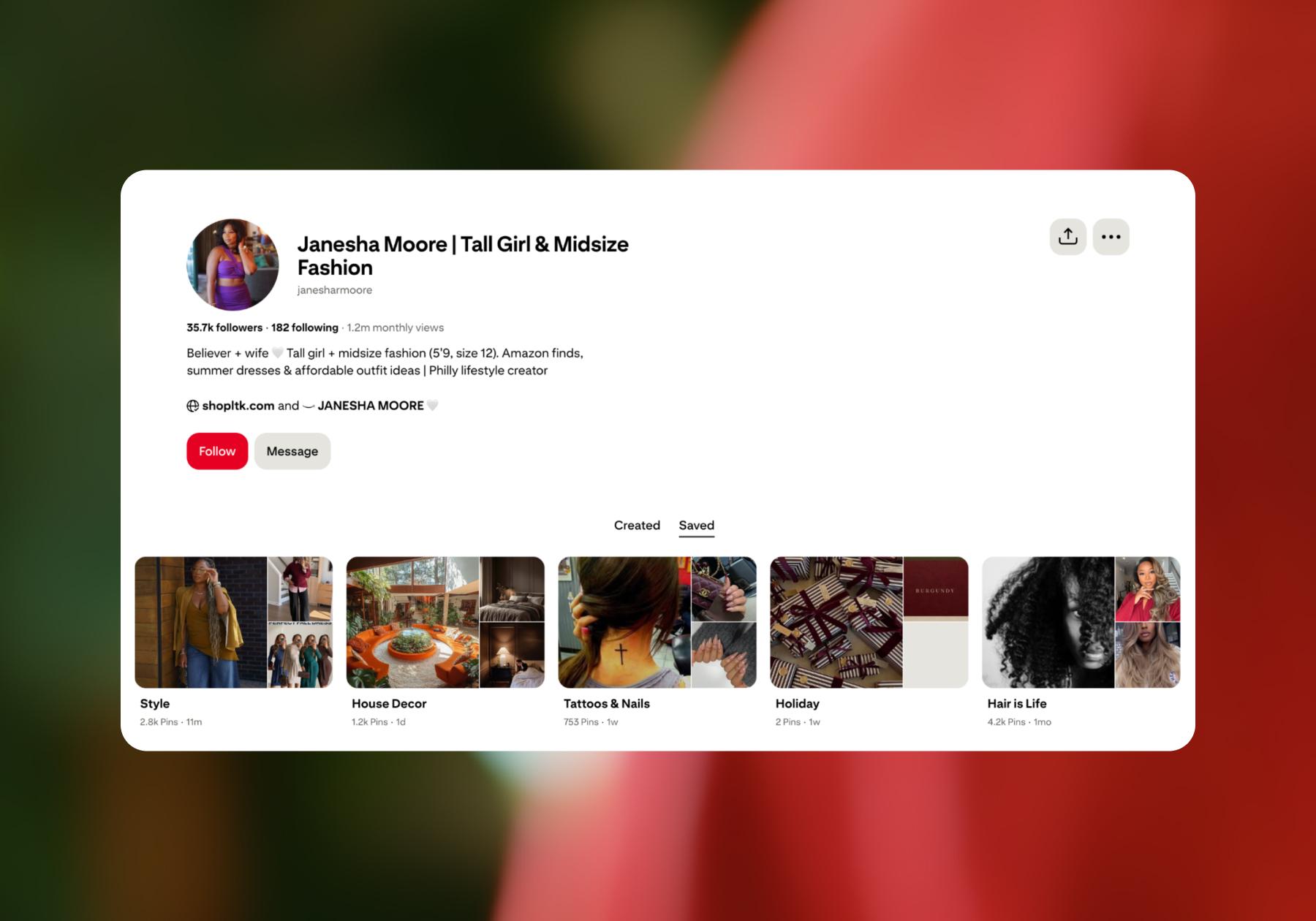
- Add your website and claim it if you own it. Adding a link helps people find your site. Claiming it also connects your profile to Pins saved from your website and gives you access to related analytics. Follow Pinterest’s website-claiming instructions to check eligibility and complete the process.
- Give your first Pins a purpose. Create boards around ideas people might search for related to your business. For example, Stuf Storage could do “small apartment storage ideas” or “cross-country move preparation.” As you add Pins, link each one to a relevant destination that supports your goal (email signups, website visits, sales, etc.).
2. Use Pinterest to research your audience and plan your strategy
Before you get too deep into your content strategy, do some research on Pinterest itself. Searches, Pins, and trend reports show what people want to learn, try, or buy, and you can use those insights to inform your next blog, social post, or ad.
Start with what people are searching for
Think about a topic related to your business and enter it into Pinterest’s search bar. Start broad, then use the suggestions to explore more specific interests. Pay attention to the questions, phrases, and types of content that come up.
For example, a search for “weekly meal prep” might show ideas for solo diners, families, or people following specific diets (e.g., healthy, vegetarian, gluten-free). The idea is to use Pinterest’s suggested terms to understand how people search for help with a particular need.
Elena Czarnowski, founder of educational business Kid Laboratories, starts with concerns she hears as a mom and educator, then translates them into language parents might search for.
Instead of “financial literacy curriculum,” for example, she explores phrases like “how to teach kids about money” and “money activities for middle schoolers.” She uses Pinterest’s search bar and autocomplete suggestions to explore those ideas, then follows up with Pinterest Trends.
“I think of Pinterest as a search and discovery platform, not simply another social media feed,” she says. “People are there looking for ideas and solutions. I want Kid Laboratories to be one of those solutions.”
You can apply the same thinking to your own offers. Look for questions you can answer from your own experience, rather than treating existing Pins as content to copy.
If you sell budgeting templates, investigate the situations people need them for: managing irregular income, saving for a wedding, or planning monthly expenses. Each angle you find can inspire a useful piece of content and a new way to present your product or offering.
Tip: Save references to your own private Pinterest boards as you go, adding notes about what you could do with the idea.
Use Pinterest Trends to investigate interest and timing
Once you have some ideas, head to Pinterest Trends to investigate how interest in a topic has changed over time. You can use the available market and audience filters to make the research relevant to the people you want to reach.
Look for when interest starts to climb, whether it follows a seasonal pattern, and whether you have enough time to create something useful before the moment passes.
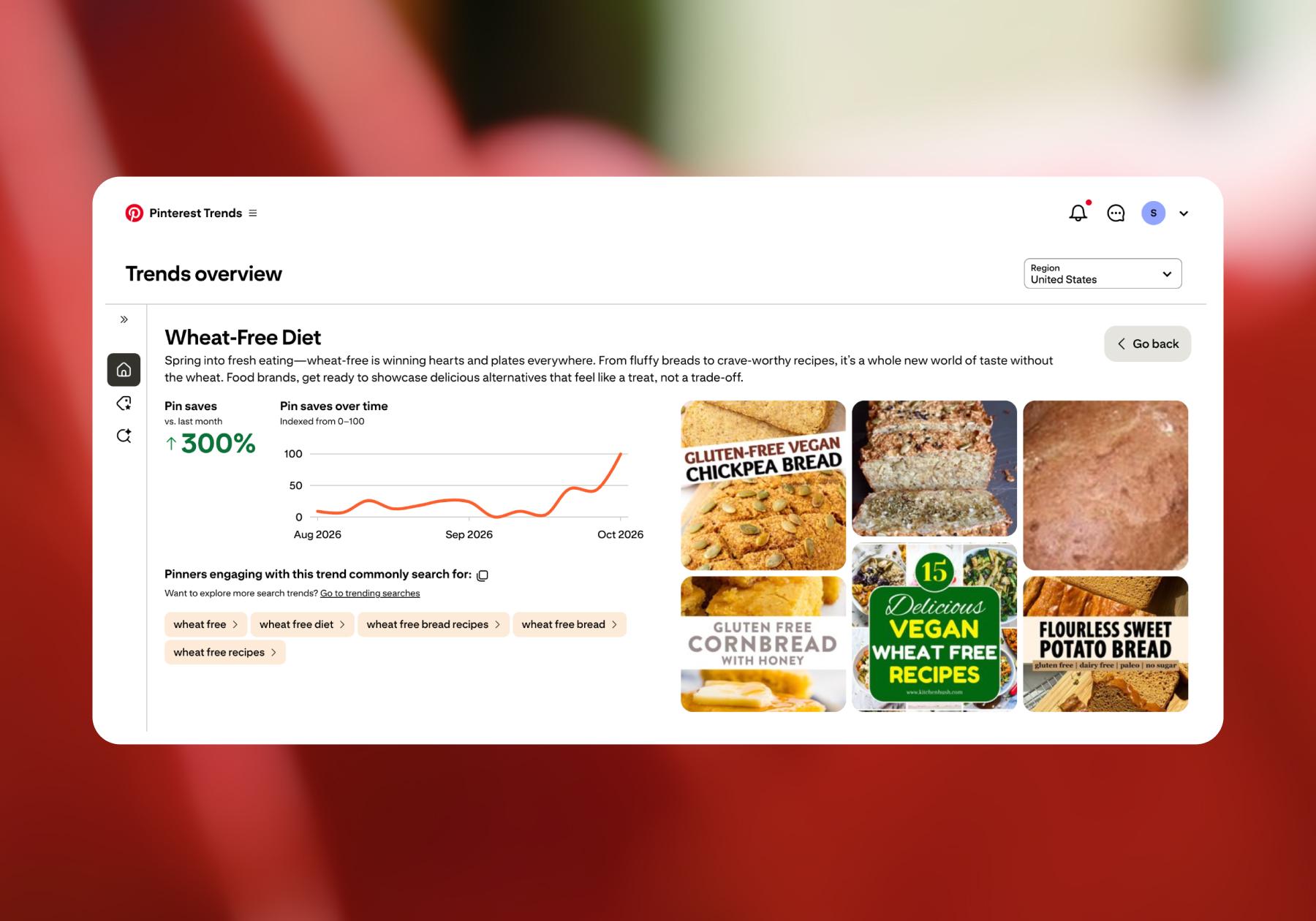
How to read a Pinterest Trends graph: Pinterest Trends shows relative search interest on a scale of 0-100, rather than raw search counts. A score of 100 marks a term’s peak interest within the period shown; it doesn’t mean 100 searches.
Ben Metcalfe, founder of the agency BlackFire Marketing, used Pinterest Trends while working with a handmade candle seller. His team identified growing interest in searches for “pumpkin spice” and “cinnamon fall,” then used those insights to inform advertising on Meta and Google.
With this client, Ben reported an 11% increase in total store traffic over seven weeks compared with the same period the previous year.
This reflects the broader campaign, rather than traffic directly from Pinterest, but his example shows how Pinterest research can inform your marketing across other channels, too.
Before recommending a trend, Ben’s team looks for:
- Recent growth: Their screening process includes checking for at least 20% growth over the previous 30 days. (This is just BlackFire’s own rule of thumb, but the idea is to check an idea against demand, relevance, and timing before committing resources.)
- A clear brand fit: The search term needs to relate directly to what the client offers.
- Enough interest to justify acting: They assess demand and cross-check the keywords in Google Trends.
- Time to prepare: Seasonal ideas need enough lead time for production, content creation, and promotion.
Use Pinterest Predicts to explore emerging ideas
Pinterest Predicts is Pinterest’s annual forecast of emerging trends for the year ahead. It groups growing interests into broader themes that can inspire content, products, and campaigns.
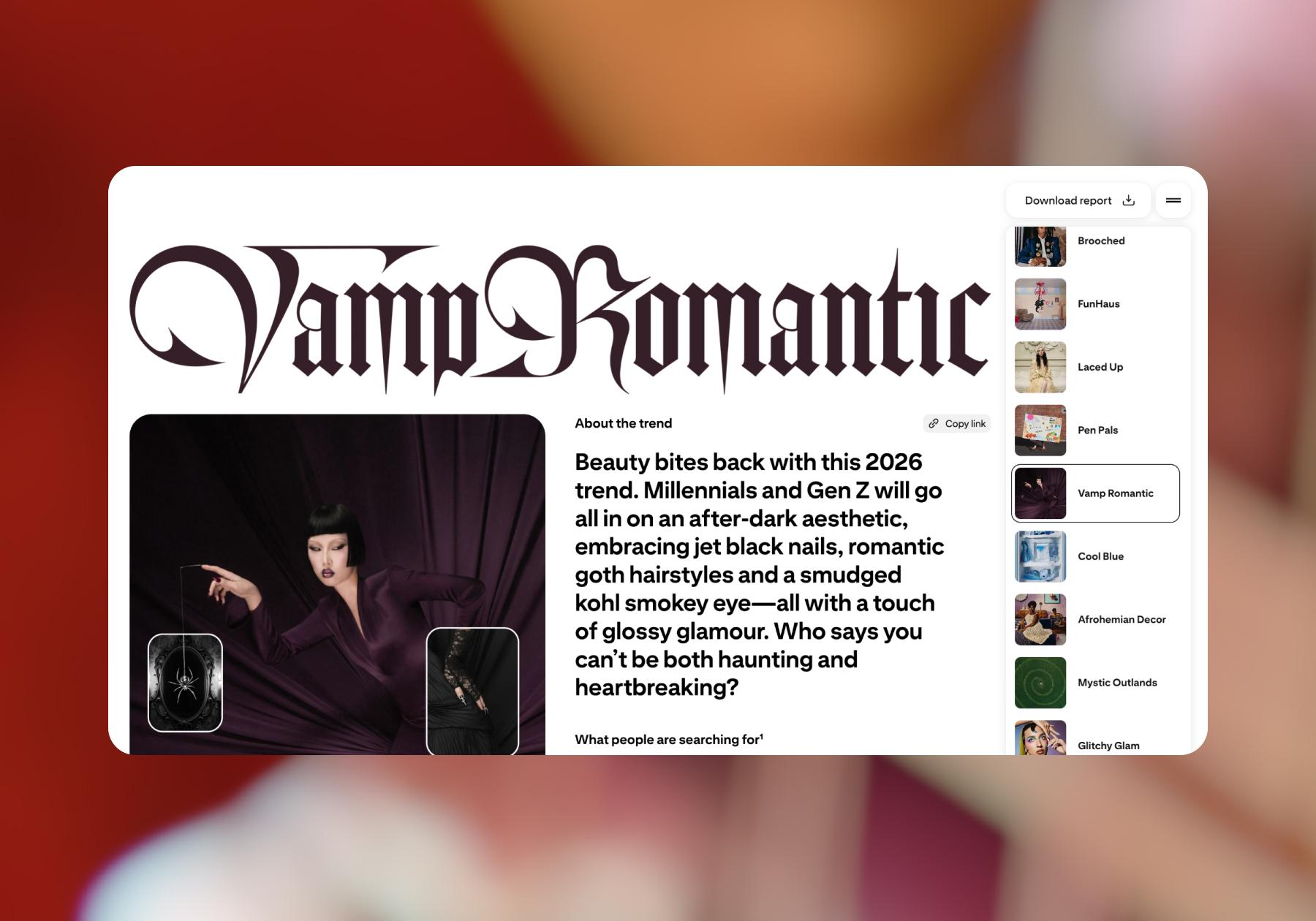
When browsing Pinterest Predicts, start with a theme that connects naturally to your audience, then explore the searches and ideas behind it. Ask yourself:
- Could I teach or share something with my audience related to this?
- Does one of my existing products or resources fit this theme?
- Could this theme inform a future campaign’s visuals or messaging?
For example, Pinterest’s 2026 report highlights renewed interest in letter writing and decorative stationery. So, a stationery brand could test content featuring letter-writing kits. A creator who teaches illustration could share envelope-design tutorials. You get it.
3. Build an organic Pinterest content strategy
You probably already have something worth sharing on Pinterest, like a blog post, a video, or a digital download. That’s a great place to start.
Turn existing content into useful Pins
Choose a resource or offer to turn into a Pin and identify the different reasons someone might want it.
Elena does this with her Talk to financial education content for kids, creating different headlines and visuals around the same educational theme. For example:
- “The Money Lesson I Wish I’d Learned at 13” leads to her Moneywi$e workbook.
- “How to Explain Compound Interest to a 12-Year-Old” leads to a parent-friendly lesson on her website.
- “Can Your Teen Make Smarter Money Decisions Than You?” leads to an interactive $1,000 Money Challenge.
Each gives parents a different reason to click, with a destination that matches the promise.
You can do something similar with your own content:
- Selling a course? Share a useful tip, a common mistake, or a preview of something students will learn.
- Offering a digital product? Show your template, planner, or workbook in use, with examples of the problems it helps solve.
- Running an online store? Demonstrate a product, show different ways to use it, or include it in a relevant gift guide.
- Publishing exclusive content? Share an excerpt or preview that gives people a reason to explore your paid offering.
- Building a service business? Adapt advice, project examples, or frequently asked questions into Pins that introduce your expertise.
Give each Pin a distinct purpose, so you offer people different reasons to explore what you’ve created.
Make each Pin easy to understand and discover
Someone should know what your Pin is about and what’s in it for them with just a glance. Lead with the idea, problem, or result they care about. As you create each Pin:
- Choose a clear visual. Use an image or video that helps explain the idea, whether that’s a finished recipe, a product demonstration, or a preview of your downloadable planner.
- Keep text readable. If you add text to the visual, make it easy to read on a phone and focus on one main message.
- Write a specific title and description. Use phrases your audience would search for, and explain what they will find when they click.
- Save it to a relevant board. Save Pins to boards that match their theme. This helps people discover your Pins in the first place, and discovering one Pin can lead to discovering another.
- Make sure the destination matches the Pin. Few things are more frustrating than tapping/clicking on something you’re interested in and landing on an unrelated page. Make sure your Pins are linked to pages that reflect what’s shown in the preview.
So, if you’re a food creator sharing a dish, the Pin should link to the recipe. If you’re an affiliate sharing an outfit or makeup look, your Pin should link to a blog post or shoppable list featuring those products.
Once your Pin is live, follow the link yourself to make sure the journey is straightforward and delivers what you promised.
Create a Pin publishing workflow you can maintain
Make Pinterest part of your existing publishing routine. When you publish a blog post, launch a product, or create a tutorial, create a few relevant Pins to publish alongside it.
A simple workflow for that could look like this:
- Choose what you’ll promote. Start with useful resources, current offers, and seasonal content you have time to prepare.
- Develop a few distinct angles. Use your audience research to decide which questions or needs each Pin will address.
- Batch the creative. Create reusable design templates in a tool like Canva or Adobe Express, then adapt the images, headlines, and descriptions to each idea.
- Publish or schedule. Choose a routine you can sustain alongside your other marketing work.
- Review and refresh. Check which Pins bring relevant visitors to your site, test new approaches, and update destinations when offers change.
Start with a manageable batch of Pins, learn what gets a response, and use that information to plan the next one.
4. Run paid Pinterest campaigns when they make sense
Paid advertising on Pinterest is worth considering when you have a clear offer, a relevant audience, and a way to measure what happens after someone clicks. That could mean promoting a course enrollment, introducing a product collection, or bringing potential clients to a service page.
Before putting money behind a campaign, make sure you know the answers to these questions:
- What outcome am I paying for? Choose a specific goal, like product purchases, qualified inquiries, or email signups.
- Why would this audience care? Connect your offer to something people want to learn, plan, or accomplish.
- Is the destination ready? Make sure the page explains the offer, works well on mobile, and makes the next step easy.
- How will I judge the test? Set a budget and decide what you’re willing to spend to acquire a lead or customer.
Combine organic content with paid promotion
Robin Dimond, founder and CEO of creative marketing agency Fifth & Cor, has helped brands across a variety of industries use Pinterest to drive product discovery, website traffic, and sales.
For one automotive retailer, her team combined organic content with paid campaigns to help people discover products and take the next step toward buying them.
“We developed a series of instructional, ‘how-to’ Pins demonstrating how to use the brand’s automotive products in practical, real-world applications,” Robin says.
Each Pin linked directly to the corresponding product on the retailer’s website, while paid Shopping campaigns helped expand product visibility.
“We recognized that consumers searching for automotive solutions were often looking for practical guidance, not traditional advertisements,” she says.
Over one year, the client saw a 445% increase in Pinterest-driven website traffic and a 155% increase in revenue attributed to Pinterest, compared with the previous year. Those results reflect the combined organic and paid strategy.
The point: Make your content useful and the path to purchase straightforward. In this specific example, organic and paid content supported those goals together.
5. Measure results against your original goal
You can start checking individual Pin stats pretty soon after publishing (many update in real time), and you can find a broader view of your performance in Pinterest Analytics.
There, the dashboard can tell you whether people are seeing and interacting with your content. But to understand whether it’s helping your business in the way that you want it to, you need to connect those activities to the goal you chose at the start.
Goal | What to pay attention to |
Getting discovered | Impressions and saves, plus the topics and creative approaches attracting interest |
Driving website traffic | Outbound clicks from Pinterest and visits recorded in your website analytics |
Generating leads | Signups or inquiries from Pinterest visitors, including whether those leads fit your offer |
Making sales | Purchases, revenue, and the rate at which Pinterest visitors become customers |
Running profitable ads | Cost per lead or purchase, return on ad spend, and whether the revenue supports your costs |
Choose a few metrics tied to your goal, review them at consistent intervals, and record what you changed. For seasonal content, compare similar periods where possible.
Use tracking links and website analytics to see what visitors do after they leave Pinterest. Add UTM parameters (labels attached to your destination URLs that help analytics tools identify where traffic came from) to distinguish Pinterest visits and compare campaigns or individual Pins.
If you’re running ads, set up conversion tracking before spending so you can evaluate the actions you’re paying to encourage.
It also matters how you compare results. For Fifth & Cor’s automotive campaign mentioned above, the agency used a third-party platform with last-click attribution. Pinterest received credit as the final tracked touchpoint before a purchase. That tells you something specific about the customer journey, rather than capturing every way Pinterest might have influenced it.
The point of tracking is to learn where your strategy needs adjusting, so use your findings to make your next decision. If people see your Pins but rarely click, test the message or creative. If they visit your site but don’t sign up or buy, examine the offer and destination page.
Make the Vision Board a Reality
You have goals for your business. Why not see if Pinterest can help you reach them? Your next subscriber or customer could be there, scrolling and looking for something you’ve already created.
This guide gives you a starting point, so get out there and start Pinning. Build some boards, share your work, and see what gets people interested. Who knows, maybe I’ll see you there.
Frequently asked questions
Start by creating a free Pinterest business account or converting your personal account. Complete your profile, add your website, and claim it if you own it. Choose a primary goal, such as website traffic, email signups, or sales. Then create relevant boards and publish Pins that link to useful content or offers. Use Pinterest Analytics and website data to track progress toward your goal.
Post content that helps your audience solve a problem, learn something, or plan a purchase. Tutorials, product demonstrations, digital resource previews, and practical tips can all introduce your business. Start with content you already have, then create Pins around different audience needs. Use clear visuals, descriptive titles, and relevant keywords, and link each Pin to a page that delivers on its promise.
Yes. Organic Pinterest content can help people discover your business and visit your website without paid promotion. Focus on relevant audience searches, useful Pins, and a publishing routine you can maintain. You can also use Pinterest research to inform your wider marketing. Ads are an optional way to expand distribution; they aren’t required to start building a presence.
There’s no guaranteed timeline for Pinterest traffic or sales. Individual Pin stats can appear soon after publishing, but meaningful business results take time to evaluate. Your content, audience demand, offer, and destination page all influence performance. Review patterns across multiple Pins and consistent reporting periods, tracking outbound clicks, signups, or purchases rather than judging success by early impressions alone.



Originally published: Nov 3, 2026
More stories worth reading
More content that's too good to miss