
If you’re doing business on WhatsApp, you’re in good company. Approximately 200 million businesses worldwide use the app to field customer questions, complaints, and requests, with 64% of small and mid-sized companies saying WhatsApp chatbots are crucial for growth and customer service.
But as your business grows, and the active customer base you have on WhatsApp does too, you’ll eventually hit a point where you either have to hire someone to manage your inbox or set up some automations.
Hiring someone is always a great choice, but let’s say you keep growing (yay!), and now your new team member is burnt out from answering the same questions over and over again (boo).
This is exactly why 5+ million businesses use the WhatsApp Business API, the tier built for automation, chatbots, and CRM integration. If you’re interested in automating on WhatsApp, you’ve come to the right place. For starters, we put together a guide of platform options for you (The 7 Best WhatsApp Automation Tools for Brands and Businesses), so check that out.
But today, we’re going to focus on using Manychat, because ICYMI, this is the Manychat blog. And that’s not all: Manychat is actually a great option for businesses that want to automate, organize, and scale customer conversations inside WhatsApp.
TL;DR
- Using WhatsApp to communicate with customers is a great way to reach them where they’re already at, but as you grow, it becomes difficult to manage your inbox alone.
- Automation can help by answering frequently asked questions and qualifying and nurturing leads.
- You can set up automations without any coding skills. With a no-code chatbot tool like Manychat, all you have to do is click, drag, drop, and type.
Why Manychat is a Great WhatsApp Chatbot for Customer Support

Manychat for WhatsApp can answer common questions, qualify leads, collect customer details, route conversations to the right person, send follow-ups or broadcasts, and hand a conversation to a human when automation has done enough.
What makes Manychat an especially good choice for a chatbot is that it’s not really just an “FAQ bot.” It’s designed around the whole customer journey:
- Someone messages you.
- You understand what they want.
- Automate the repetitive bits.
- Collect useful context.
- Move them toward a purchase or resolution.
- Bring in a human when necessary.
If you’re ready to get started today, sign up for Manychat. Then, keep scrolling.
How a typical Manychat WhatsApp flow works
In Manychat, the process to set up a WhatsApp automation typically looks something like this:
- Connect your business's WhatsApp to Manychat.
- Decide what you want Manychat to handle automatically. Usually, that's repetitive questions like hours, location, pricing, availability, shipping, returns, basic product information, etc.
- Start to build your automated flows in Manychat. Unlike Instagram, there aren't Quick Automations for WhatsApp, so automations have to be built in the Flow Builder.
- Choose how Manychat understands what someone wants. You’ve got options (keywords, Conversation Starters, and AI intent recognition) when it comes to how automated conversations are triggered.
- Determine how the automated journey will unfold. You can set up your automations to answer immediately, ask another question, collect customer information, and/or direct them toward the appropriate next step.
- Hand off to a person when necessary. Manychat's Live Chat feature is available so that a human can take over when appropriate.
How to automate FAQs, step by step
One of the most popular ways to use Manychat for WhatsApp is to answer frequently asked questions. You probably have a few in mind; if you have an answer typed out in your Notes app to copy and paste, you’ve got an FAQ.
Let’s walk through how you could build FAQ automations in WhatsApp.
- First, list your FAQs and note which are the most common. Automating one to three questions is a great start and will give you a significant amount of time back in your week.
- Create an automation in the Flow Builder for each FAQ. For example, if you get questions about your shipping policies, you could create a flow called Shipping FAQ.
To access the Flow Builder, go to Automation → + New Automation → + Start from scratch → Start from a blank canvas.
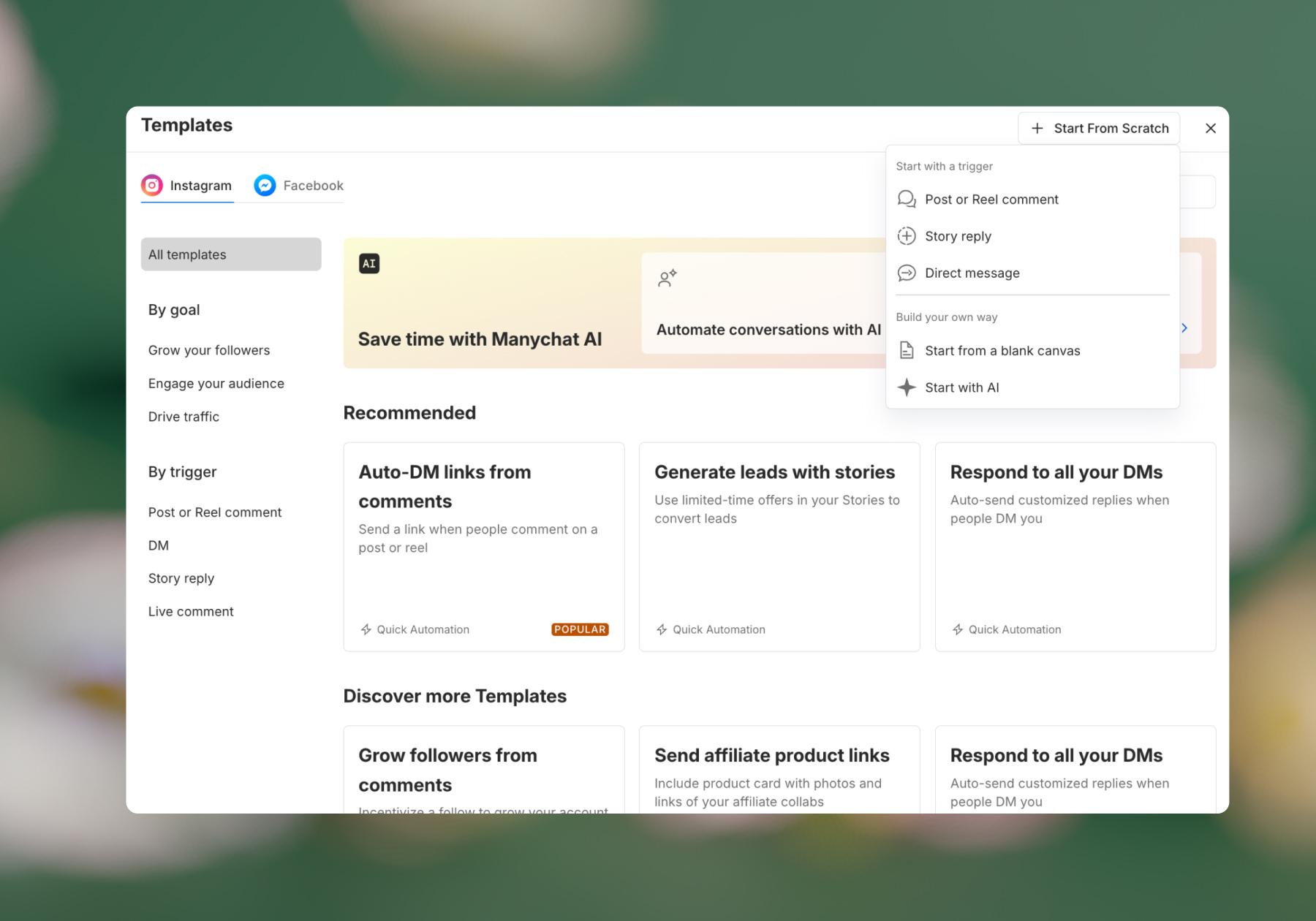
- Choose what should trigger the flow. You can use keywords for very explicit matching. For example: “shipping,” “delivery,” or “international” could all be trigger keywords for your Shipping FAQ flow.
Optional: Use AI intent recognition for more natural questions. This feature is useful when customers ask the same questions in lots of different ways (like, “Hey, I ordered this thing ages ago and haven't seen it yet, any idea what's happening?”).
Instead of trying to predict every possible wording, AI intent recognition can help identify what the person is asking about. - Write the automated response. Keep it short, useful, and in your brand voice. For example: “Yes, we ship internationally. Standard delivery is 5 to 8 business days. Need help with an existing order?”
- Add a next step instead of ending the conversation abruptly. For example, “Get help with an order” could be an optional next step after answering an FAQ about your shipping policy.
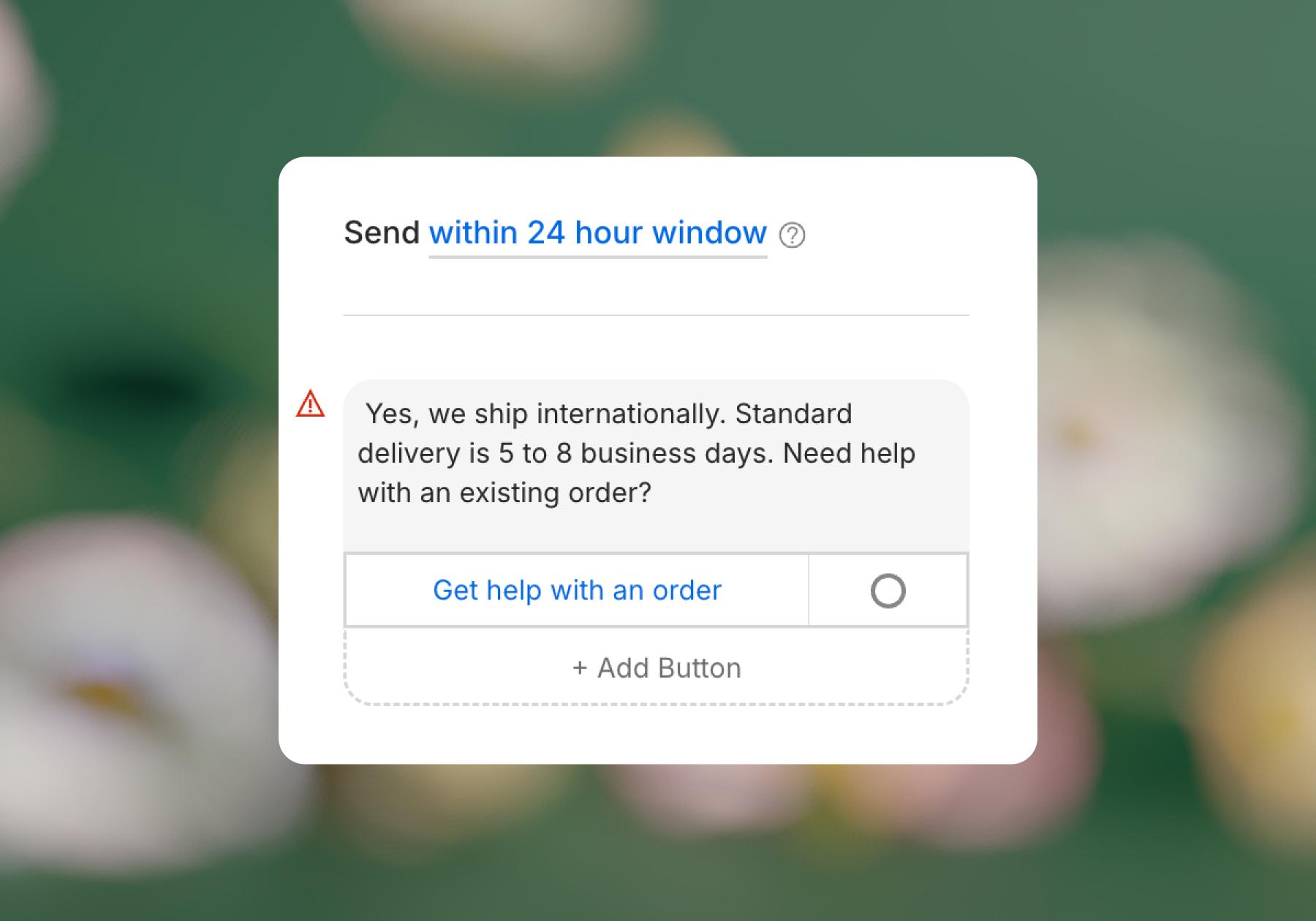
- Create a human-handoff path. If the customer says something like “My package says delivered, but I never received it,” that probably should be answered by a person.
Manychat’s WhatsApp setup includes Live Chat. So, you could connect the button above — Get help with an order — to an Action. Specifically, the “Assign conversation” action assigns the conversation to a member of your team to continue.
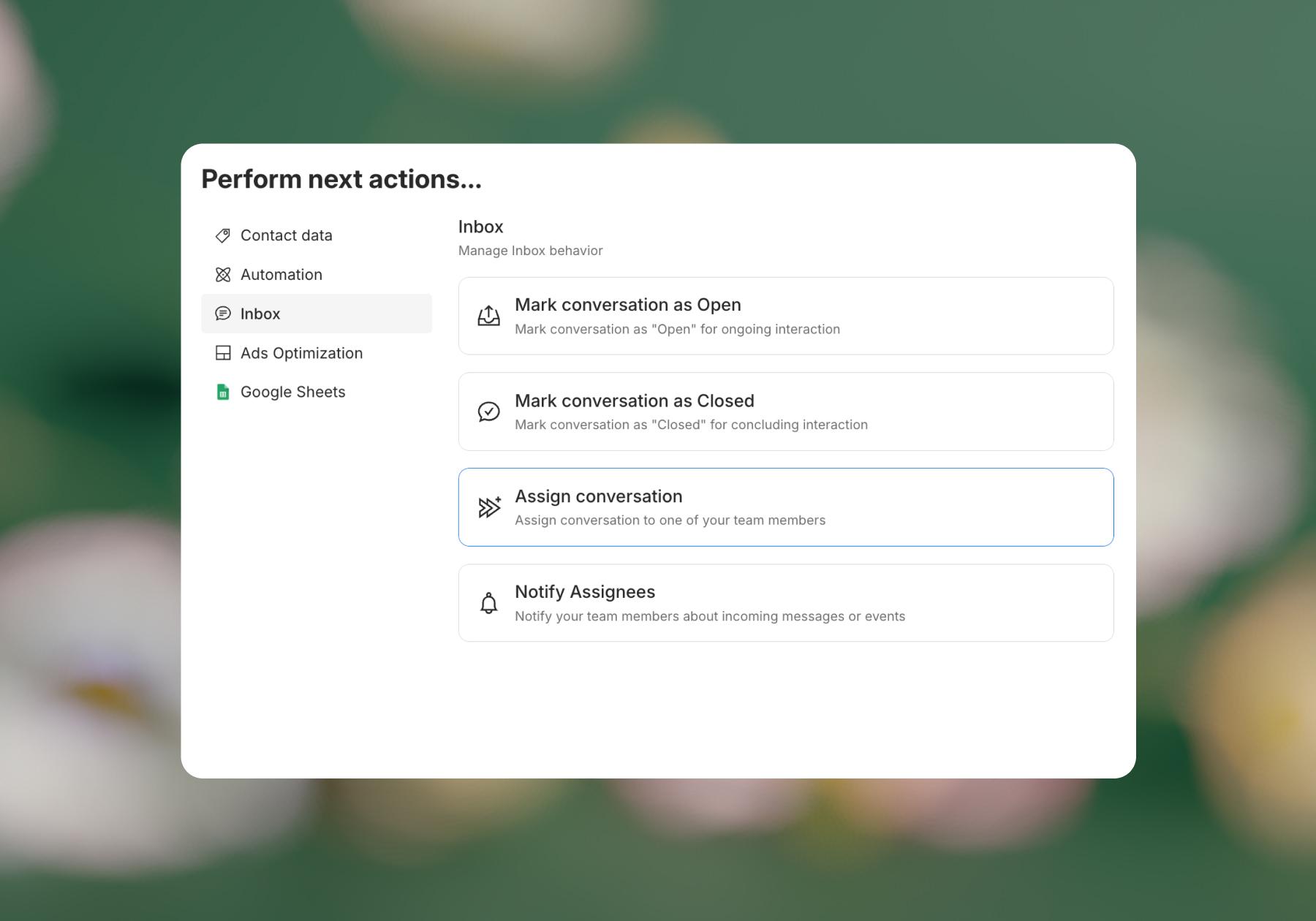
- Test it like a customer. Once you send an automation live, test it like you’re a customer. Message your WhatsApp questions that contain the trigger keywords you set up, then navigate the flow as if you were actually trying to get help. Adjust your automation if you notice any errors or gaps in the flow.
Need a play-by-play? We've got you covered:
What Else Can You Automate With Manychat on WhatsApp?

FAQs are a great place to start and get an easy win, but they're definitely not where WhatsApp automation has to end. Once you're comfortable building simple FAQ automations, you can start using Manychat to help with other parts of the customer journey too, like closing sales.
Qualify leads
Not every person messaging your business is looking for the same thing. Manychat can ask qualifying questions, save people's responses, use conditions and tags to organize them, and help identify which conversations to pass to your team.
For example, a real estate business could ask about location, budget, and desired move-in date before sending a promising lead to an agent.
Learn more: Use Manychat for Automated Lead Qualification.
Collect customer information
You can also use WhatsApp conversations to collect useful customer information rather than sending everyone to another form.
Depending on your use case, that could include contact information, preferences, location, or other details you need to provide better service.
Manychat can store that information or pass customer data to other tools, helping you personalize future conversations rather than treating every message as if it's coming from a stranger.
Help customers complete a purchase
WhatsApp doesn't have to be purely a support channel. Manychat automations can help move someone from "I'm interested" toward "I'm buying" by answering questions, gathering relevant details, sharing links, and directing customers toward checkout.
On this topic: How to Create a WhatsApp Sales Funnel.
Follow up and re-engage customers
Customer relationships don't end when one conversation does.
Depending on WhatsApp's messaging and opt-in requirements, businesses can use Manychat to send approved proactive messages and broadcasts to relevant contacts — for example, about offers, events, launches, or other updates.
Segmentation using information such as customer interests or previous interactions can also make those messages more relevant.
Make it Easy on Yourself: Automate Your WhatsApp With Manychat

Before you go wild automating everything, you should know that WhatsApp has rules governing when and how businesses can message customers, including requirements around customer-initiated conversations and business-initiated messages.
What you're allowed to send can depend on the type of conversation and when the customer last interacted with your business. This matters when you move beyond answering incoming support questions and start sending follow-ups, broadcasts, promotions, or other proactive messages.
And breaking the rules isn't something businesses can afford to shrug off. Your WhatsApp account is a direct line to your customers, so protecting it matters just as much as automating it.
That's one reason why Manychat is a strong choice for businesses using WhatsApp automation. Manychat is built to work within Meta's messaging requirements, with applicable restrictions reflected in the product as you build and send automations. In other words, you're not left to remember every messaging rule every time you create a flow.
Of course, automation software isn't a permission slip to message anyone about anything. You'll still need to follow WhatsApp's policies, collect the appropriate consent, and ensure the messages you send are relevant and expected. But you also don't need to become a Meta policy scholar to automate repetitive conversations.
Essentially, with Manychat, you get:
- Less time babysitting your inbox.
- More time helping the customers who need you.
- And fewer reasons to worry about whether your automation is playing nicely with WhatsApp.
Frequently asked questions
To create a WhatsApp chatbot for customer support, first connect your business’s WhatsApp account to an automation platform like Manychat. Then, identify the customer questions you want to automate and build flows that respond when someone messages you.
With Manychat, for example, you can use keywords or AI intent recognition to understand what a customer needs, automatically answer common questions, collect information, and direct them to the appropriate next step. For questions that need a human touch, you can hand the conversation over to your team using Live Chat.
A good place to start is with the three to five questions your team answers most often. Once those are running smoothly, you can expand from there.
The WhatsApp Business API is designed for businesses that need more advanced messaging capabilities than the standard WhatsApp Business app provides.
It allows businesses to connect WhatsApp with platforms like Manychat to automate conversations and build more sophisticated customer journeys. That can include answering FAQs, qualifying leads, collecting customer information, routing conversations to team members, and sending approved proactive messages.
If the WhatsApp Business app is essentially your business’s WhatsApp inbox, think of the API as the infrastructure that lets other business tools work with that inbox.
With Manychat, you can create an automation in the Flow Builder, write the message you want customers to receive, and then choose what should trigger it.
For example, you could create an automated shipping response and set keywords like “shipping,” “delivery,” and “international” as triggers. When a customer's message matches your setup, Manychat can automatically send the appropriate response.
You can also use AI intent recognition when customers ask the same question in many different ways. And instead of stopping at the auto-reply, you can add buttons, ask follow-up questions, collect information, or hand the conversation to a person.
Yes. You don't need to be a developer to build a WhatsApp chatbot with Manychat.
Manychat's Flow Builder lets you visually create the conversation and determine what should happen at each step. You can set triggers, write responses, add conditions, collect information, and create human handoffs without writing code.
That means your first chatbot can be pretty simple: customer asks a common question → Manychat recognizes it → customer gets an answer → automation offers the next step.
You can always make your automations more sophisticated later — no computer science degree required.



Originally published: Aug 18, 2026
More stories worth reading
More content that's too good to miss