If you’re active on TikTok, you’ve probably scrolled past a LIVE and wondered just what exactly is going on. The truth is, TikTok LIVE has everything from QVC-coded TikTok Shop demonstrations to strange performances from people pretending to be NPCs.
It’s where the internet gathers to interact in real-time, and whatever the draw, there’s an audience: TikTok LIVE generated more than 8 billion hours of global watch time in the first three months of last year, second only to YouTube LIVE.
For creators, TikTok LIVE represents a chance to turn a passing scroll into an actual conversation (and potentially, income). If that’s enticing to you, stick with us, because we’re about to cover how to go LIVE, different ways to monetize LIVEs, and how to plan a stream that people actually want to watch.
TL;DR
- To go LIVE on TikTok, you need to be 18 years old and have at least 1,000 followers. You also have to follow TikTok’s rules.
- There are several ways you can monetize TikTok LIVEs: You can receive Gifts from viewers, offer exclusive content to Super Fans, become a TikTok affiliate, land a brand deal for a co-hosted livestream, or sell your own goods on TikTok Shop.
- Certain best practices can help make your LIVE a success. We’ve compiled our advice into four steps.
What Are the Requirements to Go LIVE on TikTok?
To go LIVE on TikTok, you must:
- be at least 18 years old
- have at least 1,000 followers
- follow TikTok’s Community Guidelines and Terms of Service
Note: According to TikTok’s help center, LIVE isn’t available everywhere, and the follower threshold to join can also vary by region.
How to go LIVE on TikTok
Going LIVE on TikTok is super simple. To go LIVE:
- Open the TikTok app
- Hit the + at the bottom of the screen
- Swipe right at the bottom to LIVE
Swiping over to LIVE doesn’t start a broadcast. It opens the setup screen, where you can add a title, use LIVE tools, and adjust settings. Notably, you can also add a goal for your LIVE to encourage scrollers to participate and help contribute:
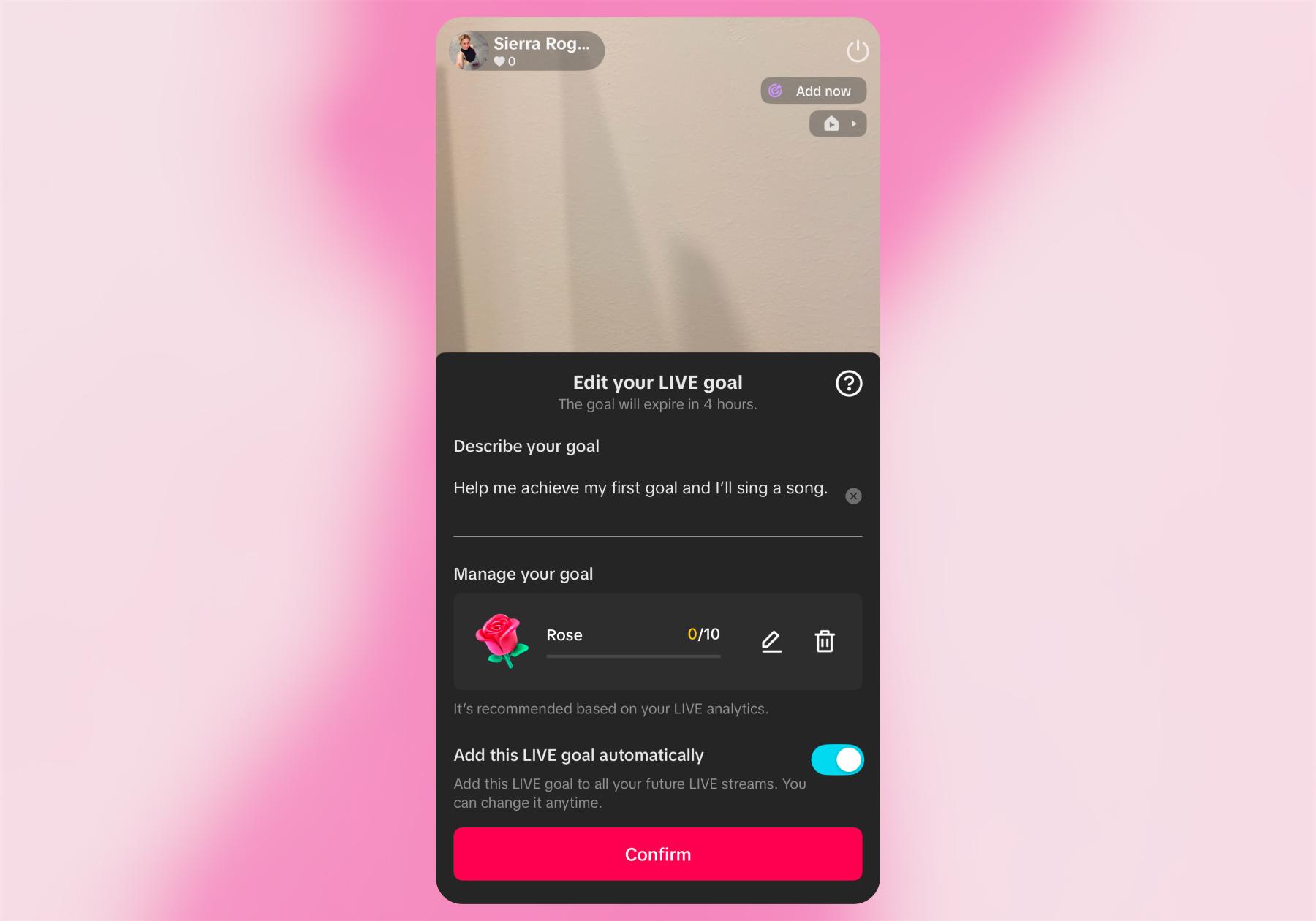
- When you’re ready to start broadcasting, tap Go LIVE
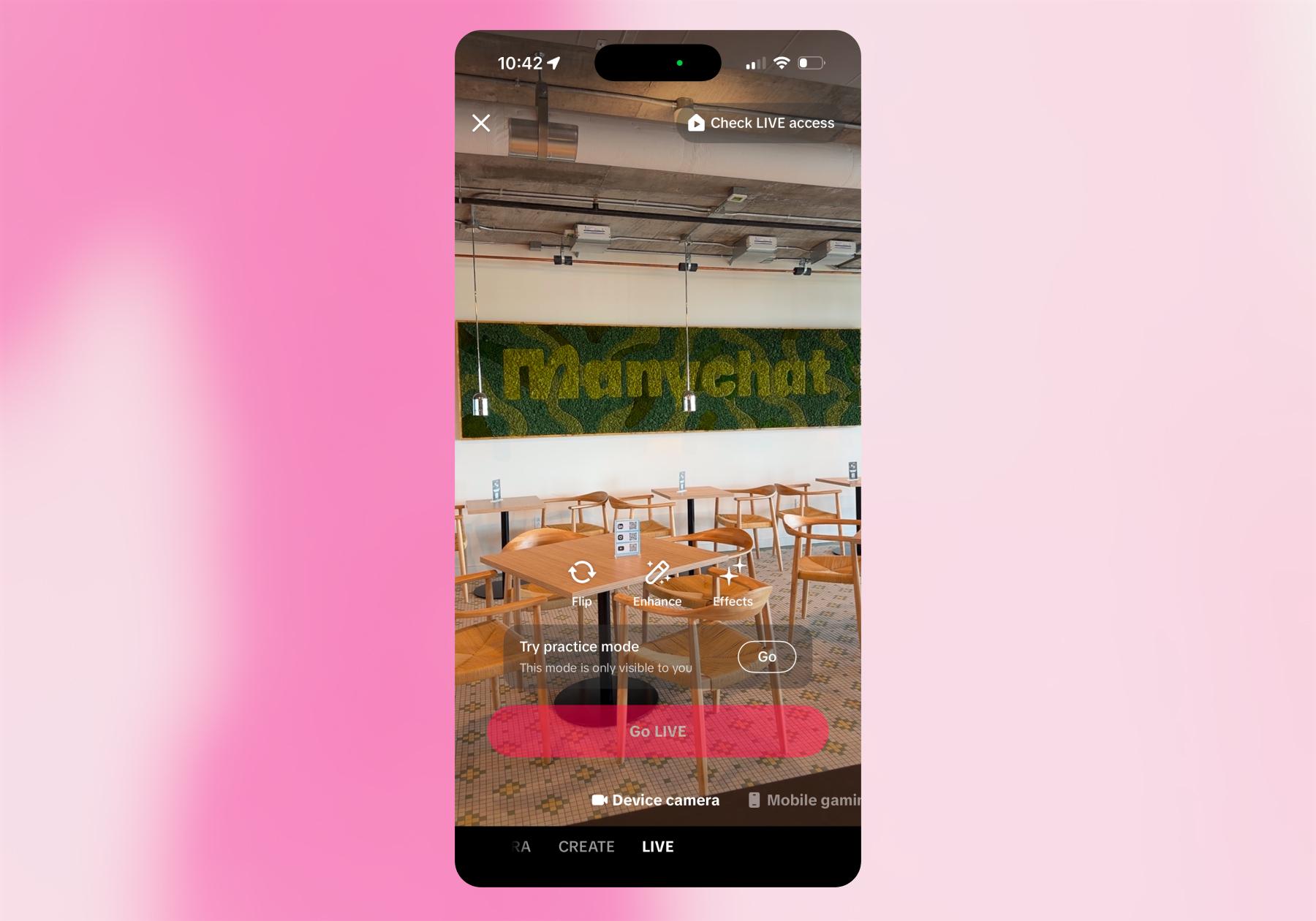
Note: If you don’t meet the requirements to go LIVE, you’ll see the option to Try practice mode (like in the screenshot below). This is a great way to explore TikTok LIVE features, and you can also hit Check LIVE access to see exactly which requirements you’re missing.
How to Make Money on TikTok LIVE

From viewer Gifts and paid memberships to product sales and brand partnerships, there are several ways to turn your time on TikTok LIVE into income. Here’s how each one works.
1. Receive LIVE Gifts
TikTok LIVE Gifts are paid virtual reactions. They’re a part of TikTok’s native monetization system.
Our deep dive on TikTok Gifts is worth reading, but here’s a simple overview of how they work:
- Viewers buy Coins with real money.
- They spend Coins on Gifts during eligible LIVE streams.
- TikTok awards creators Diamonds based on Gifts and other measures of their contribution and popularity on TikTok.
- Diamonds help determine LIVE rewards. When your LIVE ends, your end-of-stream summary shows the Diamonds you collected.
FYI: Diamonds are just one factor in the rewards calculation, not a promise that you’ll receive the amount viewers spent on Gifts.
How to enable LIVE Gifts
You must be 18 years old (19 in South Korea) and eligible to go LIVE to enable Gifts. You also have to live somewhere LIVE Gifts are available.
Then:
- Tap + and swipe to LIVE.
- On the LIVE setup screen, tap Settings.
- Turn LIVE Gifts on.
FYI: TikTok may restrict monetization for prerecorded videos presented as live, unattended streams, or content that lacks meaningful creator participation. Deceptive Gift baiting and pressuring viewers to spend are also not allowed. Give people something worth watching, thank them for their support, and let them decide whether to send Gifts.
2. Build recurring income with Super Fans
TikTok’s Super Fan feature lets viewers pay a monthly fee for exclusive LIVE experiences and perks. For creators, that represents an opportunity to earn recurring income alongside any LIVE Gifts you receive.
What do Super Fans get?
Depending on what you offer, benefits can include:
- Exclusive LIVEs, such as members-only Q&As or private after-shows
- Super Fan-only chat during a stream
- Badges and custom emotes that help members stand out
- Community spaces and custom perks, such as shoutouts or opportunities to suggest LIVE topics
Super Fan membership costs $9.99 USD per month or the local equivalent, but the monthly fee a Super Fan pays isn’t the amount you pocket. Creators receive up to 50% of TikTok’s Super Fan revenue after payment-processing fees.
How to set up Super Fan
If Super Fan is available for your account, you can enable it by going to LIVE Center → Fan Club → Manage Super Fan benefits. You can also review your Super Fan rewards through the Fan Club section.
For your Super Fan LIVE content, consider creating a recurring experience fans can look forward to. Start with something specific that you can consistently deliver: a weekly private performance, a monthly workshop, or a members-only Q&A. Then, use your public LIVEs to promote the Super Fan membership option. Explain what’s included and share when the next exclusive session is happening.
3. Earn commissions through TikTok Shop LIVE
The TikTok Shop Affiliate program allows creators to promote other brands’ products and earn commission on qualifying sales. TikTok affiliates can feature products during a shoppable LIVE stream.
How to join the TikTok Shop affiliate program
In the U.S., the current requirements to be a TikTok affiliate include:
- Being at least 18
- Being based in the U.S.
- Having 1,000 followers
- Passing identity verification
- Meeting TikTok’s account and policy requirements
FYI: If you have fewer than 5,000 followers, you’ll enter a pilot program with restrictions on shoppable content, including LIVEs. For more information on this, check out How the TikTok Shop Affiliate Program Works
If you meet these criteria, here’s how to apply and get started:
- Go to TikTok Studio → Monetization → TikTok Shop for Creator → Join now, and complete onboarding.
- Choose affiliate products: Browse the Product Marketplace or accept a brand’s collaboration invitation. Review the commission offered and any approval requirements.
Beauty and fashion products are strong starting points (Sprout Social reports that lifestyle, beauty, and fashion content alone generate more than 217 billion engagement interactions on TikTok). But audience fit and demonstration potential matter more than popularity.
Before choosing a product to promote, ask yourself: Would my audience want it? Have I tested it? Can I demonstrate it clearly? Is the seller reliable? Is the commission worth the time?
- Get products to demonstrate: Request available samples or buy products you want to test. TikTok’s LIVE preparation guide recommends reviewing samples, reviews, and other creators’ examples when selecting products.
- Add products to your LIVE shopping bag: Select products before broadcasting, then demonstrate them and answer questions that come from viewers during the LIVE.
When promoting TikTok Shop products during a shoppable LIVE, direct viewers to the attached product links. TikTok Shop prohibits sending shoppers to external websites, DMs, or other platforms to purchase those products.
What kind of payouts can TikTok affiliates expect?
There’s no standard payment per LIVE or universal affiliate commission rate. Sellers establish commission offers, so earnings depend on the products you promote, their eligible sale value, your rate, and how many qualifying orders you generate. Refunds can also reduce the final commission.
For example, if a product has a $30 commission base and a 10% commission rate, you’d earn $3 per qualifying sale. Sell 20 during your LIVE, and that’s $60 in commission before expenses and taxes (assuming no refunds).
Payment also takes time. TikTok’s U.S. guidance states that creator commission is paid 15 days after delivery, or later if the seller’s settlement period is longer. The estimated commission shown after a purchase may change before settlement.
4. Use LIVE to sell your own offers or work with brands
You can use TikTok LIVE to build trust in something you sell, or demonstrate that value on a brand’s behalf. The resulting income comes from your customers or commercial partnerships. You earn because someone buys your offer or a brand pays you to host, not because TikTok rewards your stream.
There are two main approaches here:
Option 1: Promote your own products or services
Use a LIVE to demonstrate your expertise, answer questions, and introduce a relevant paid offer. For example:
What you sell | Possible LIVE format |
A course or workshop | Teach a useful mini-lesson, then explain what the full program covers |
Services or coaching | Walk through a common problem and explain how clients can work with you |
Digital products | Demonstrate a template, guide, or resource in action |
Your own merchandise | Show the products, explain details, and answer buyer questions |
Here, earnings depend on your pricing and sales. So, for example, five sales of a $100 workshop generate $500 in gross revenue before expenses, refunds, processing fees, and taxes are factored in.
Option 2: Host sponsored LIVEs for brands
A brand can also pay you to feature its products or sponsor a stream. You could pitch:
- A sponsored tutorial using the brand’s product
- A product launch party with audience Q&A
- A recurring LIVE series with a presenting sponsor
- A co-hosted LIVE with a brand representative
With this approach, you negotiate the compensation directly. You can ask for a flat hosting fee, a package covering the LIVE and promotional content, or a fee plus separately agreed performance incentives. The deal structure is up to you.
Before you promote: Make sure you turn on TikTok’s content disclosure setting when your LIVE promotes your own business or a brand partner. Select Own brand for a Promotional content label or Branded content for a Paid partnership label. You can find these options under Settings → Content disclosure on the LIVE setup screen.
How to Plan a TikTok LIVE Worth Showing Up For

Hitting Go LIVE is the easy part. Giving people a reason to show up, stick around, and take the next step takes a little planning.
If you’re using LIVE to earn money, the best place to start is with two questions:
- What do I want this stream to accomplish?
- What will viewers get out of it?
For your goal, “make money” is a starting point, but you need to be more specific. Are you hoping to receive Gifts, attract Super Fans, sell affiliate products, or promote your own product/offer? Your answer should shape the format of the LIVE and how you measure success.
Then, make sure you give viewers a reason to tune in: something to learn, a product to see in action, or an experience they can participate in.
1. Start with one main goal
You can earn money in more than one way during a LIVE, but choose one priority for each session. Encouraging viewers to shop, subscribe, send Gifts, and book a consultation all at once is simply doing too much.
Goal | What to plan | What to track |
Receive Gifts | An interactive experience worth supporting, such as a performance, engaging Q&A, or behind-the-scenes session. Acknowledge Gifts naturally. | Gift-related rewards alongside viewing time and repeat attendance |
Attract Super Fans | A public LIVE that gives viewers a taste of your membership. Explain the specific perks and when the next Super Fan session is happening. | New Super Fans and member renewals |
Earn affiliate commissions | Hands-on demonstrations of products you’ve tested. Prepare answers about features, sizing, price, and common concerns, and make the relevant Shop product easy to find. | Product clicks, qualifying orders, and settled commissions |
Sell your own offer | A useful lesson or demonstration connected to your course, service, or product. Explain who the offer is for and how to take the next step. | Relevant inquiries, bookings, or sales |
Host a sponsored stream | A format that suits your audience and the brand. Agree on key messages, deliverables, and reporting expectations before broadcasting. | The results you and the brand agreed to measure |
2. Give people a reason to put it on their calendar
Promote the reason to watch your LIVE, not just the fact that you’re going LIVE. “Join me Thursday!” is easy to scroll past. “Thursday, I’m testing three heatless curling tools and answering your hair questions!” tells people what’s in it for them.
If you have access to TikTok LIVE Events, schedule the stream so viewers can register and receive notifications. Share the event in advance, include the time zone, and post a reminder closer to the start.
Sketch out a loose plan for your opening, main segments, and closing. You don’t need to script every sentence, but knowing what comes next makes it easier to stay on track while keeping up with the chat.
Then, make sure you’re prepared:
- Test your connection, microphone, lighting, and camera framing.
- Have products, demonstration materials, and notes within reach.
- Configure relevant features, such as Gifts or your LIVE shopping bag.
- Review moderation settings and arrange help with the chat if needed.
- Turn on commercial content disclosure when promoting your business or a sponsor.
3. Host your LIVE like a pro
Open your LIVE session with what viewers came for. Introduce the topic and get into the demonstration, lesson, or conversation instead of spending the opening minutes waiting for more people to arrive.
People will join your LIVE at different points, so it is a good idea to pause and re-establish context throughout the stream. Explain what you’re doing, which product you’re demonstrating, or what question you’re answering without repeating yourself too much.
Ask questions, respond to comments, and let viewers influence what you cover next. Mention your next step when it feels natural; explain where to find the Shop product after demonstrating it, or introduce your Super Fan sessions after a lively Q&A.
Before ending, recap the main takeaway, remind people of the next step, and tell them when you’ll be LIVE again.
4. Make your LIVE go further
Your LIVE may be over, but the content can keep working. TikTok keeps your LIVE replay available for you to review and download for 30 days; it doesn’t automatically become a public post. Download your LIVE, pull out useful demonstrations, memorable moments, or answers to audience questions, and turn them into separate posts.
Also, figure out how it went relative to your goal. Did viewers stick around, click products, become Super Fans, send Gifts, or inquire about your offer? Compare any earnings with the time you spent preparing and streaming, too.
Let the results shape your next session. Give popular segments more airtime, shorten your introduction if you lost viewers at the top, or build your next LIVE around a recurring question.
Long LIVE Your Content

Still got questions? Don't worry; your first LIVE doesn’t need to be a full production. Start with a clear goal, give viewers something worth showing up for, and build on what works.
Want to do more with the conversations your TikTok content starts? Learn how Manychat can help with that:
Frequently asked questions
You generally need 1,000 followers to go LIVE on TikTok, although TikTok notes that follower requirements can vary by region. You must also be at least 18 years old and follow TikTok’s Community Guidelines and Terms of Service. LIVE isn’t available everywhere.
Some creators can go LIVE with fewer than 1,000 followers because TikTok’s follower requirements vary by region. However, access isn’t guaranteed below that threshold. Check whether the LIVE option appears after tapping the + button in your app, and review any eligibility information TikTok displays.
You may be unable to go LIVE on TikTok because you don’t meet the age or local follower requirements, LIVE isn’t available in your region, or your account has a LIVE restriction. If you believe you qualify, check for account notifications, update the app, and report the issue through TikTok’s support options.
TikTok doesn’t offer payment for LIVE views. Creators can earn through LIVE Gifts, Super Fan memberships, TikTok Shop affiliate commissions, sponsored streams, or their own offers.
No, you don’t need to join TikTok’s Creator Rewards Program to earn from LIVE Gifts. They are separate monetization features with different requirements. To receive LIVE Gifts, you must be eligible to go LIVE, be at least 18 (or 19 in South Korea), live in a supported location, and have an account in good standing.



Originally published: Oct 21, 2026
More stories worth reading
More content that's too good to miss