What Does Repost Mean on TikTok? (Hint: Exactly What You’d Think)

Reposting on TikTok is pretty straightforward, but it works a little differently than sharing on other platforms. If you want to know exactly what happens when you hit the repost button (and when you should go for it), scroll on.
TikTok’s Repost Feature, Explained
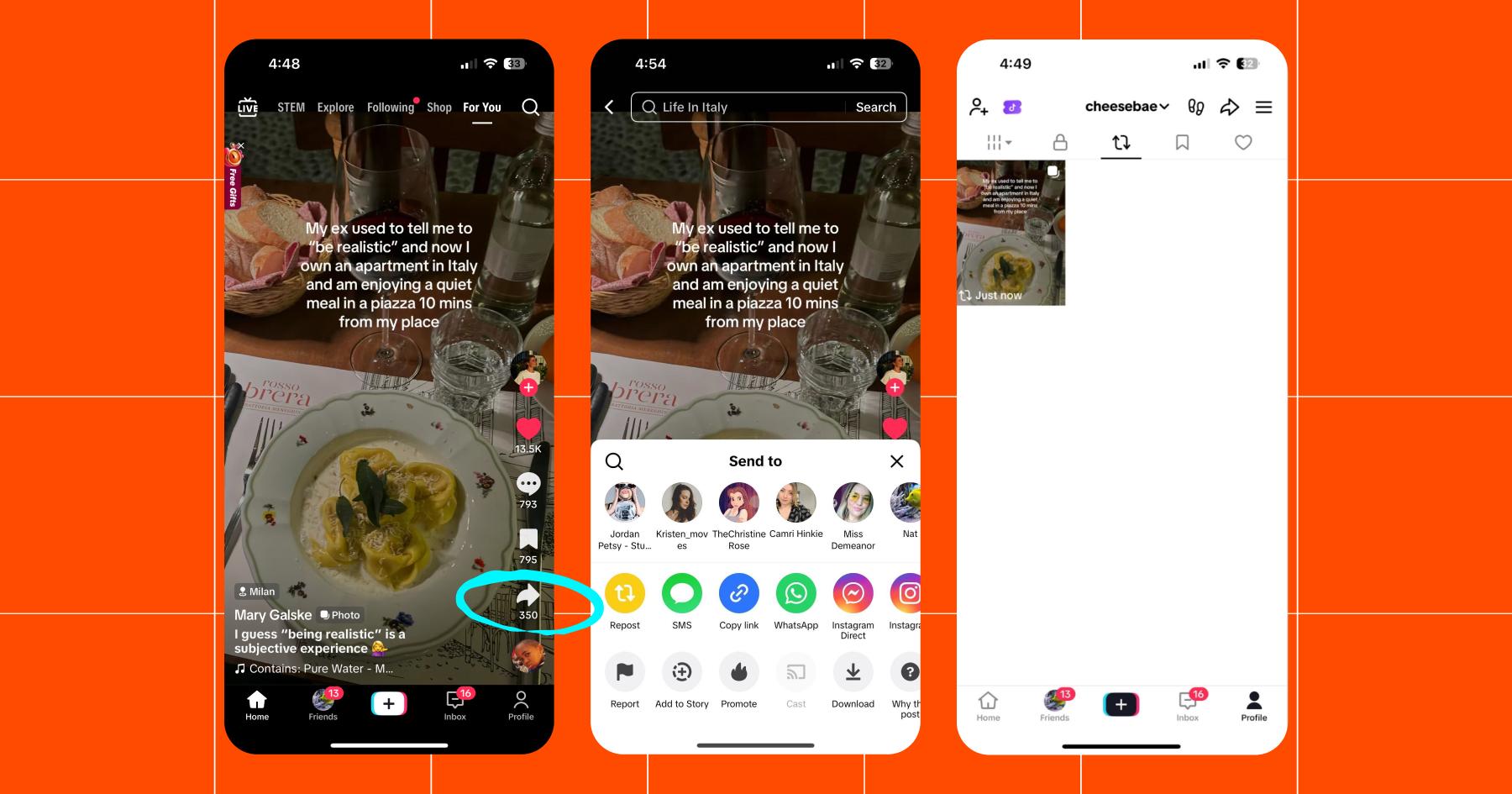
TikTok’s repost feature allows you to share someone else’s video with your followers. When you repost a TikTok, the video will appear in your followers’ feeds with a label noting you reposted it. It will also show up on your TikTok profile in the reposts section.
The original creator of the TikTok video will not get notified when you repost their content. However, if they have a Pro or Business TikTok account, they’ll be able to see the total number of shares their content gets.
How to repost a TikTok
Reposting on TikTok is super easy. Here’s how to do it:
- Open the TikTok app.
- Go to the video you want to repost.
- Hit Share on the right-side menu.
- Hit Repost.
Once you’ve reposted a video, it will appear in the repost tab on your profile. (You won’t see this tab until you repost something.) Instagram works in the same way, sharing reposted content to followers and showing it on your profile’s repost tab.
If you ever want to remove a repost, this is the easiest way to do so. Navigate to your repost tab and find the video you’d like to remove. Tap the Share button, then tap Remove repost.
What kind of TikTok content is worthy of a repost?
Reposting TikTok videos willy-nilly isn’t a good strategy (but it is a good way to lose followers). Use the repost button sparingly and think of your repost tab as a *~curated collection~*.
Best practice is to keep your reposts limited to:
Collab/partner content
If a brand or creator posts content you’re connected to (tagged, mentioned, whatever), resharing is a great way to boost its reach. Just make sure it’s something your audience will enjoy or relate to.
Content your audience would love
If you come across a video and think, “My followers would looooove this,” that’s a solid sign it’s worth reposting. Tips, memes, and trends/challenges in your niche all fall into this category.
Opinions and advice you agree with
A TikTok repost is an endorsement. Whether you’re a creator or a business, your reposts will shape how people perceive you. Make sure you only repost content you support. (And watch videos all the way through before you hit repost. You never know when you’re going to get got.)
Trend/challenge starters
Reposting trends or challenges can be great if your following consists of other people who like to make content.
Let’s say there’s a trend going around where people share how they cope with hard days on the job. If your audience is made up of healthcare workers, teachers, or some other group of notoriously hard workers, that could be good to repost. But if it doesn’t fit your niche or audience, it’s best to skip it.
So, Should You Repost on TikTok?

Yes, if it makes sense for your audience.
No, if it’s just filler content.
Reposting content is just one small way to stay active on TikTok. It’s waaaaaaay more important to post original content and engage with your audience. And when it comes to doing the latter…Manychat can help with that.
Learn more: Manychat x TikTok: The Future of Creator Conversations is Finally Here (Now Live in the U.S.)
Frequently asked questions
Yes. When you repost a video, it will appear in your followers’ For You feeds with a label showing that you reposted it. It will also be visible in the repost tab on your profile.
The TikTok repost button lets you share someone else’s video directly to your followers’ feeds. It’s the modern version of Twitter’s old retweet button.
You can repost TikTok Shop videos, but reposting alone won’t drive direct sales. Reposts are best used to share content you’re already associated with or to highlight products organically, while conversions typically happen through original posts, comments, or direct sharing links.



Originally published: Feb 6, 2026, Updated: Feb 6, 2026
More stories worth reading
More content that's too good to miss