How Long Does TikTok Shadowban Last? (And How to Check if You’re Banned)

If your TikTok videos are getting literally zero views, there’s a chance you’ve been shadowbanned. Unlike a traditional ban, where you receive a notification that your account is suspended, a shadowban happens under the radar.
One day, the likes are rolling in, the next, you’re refreshing the notification tab, wondering where everyone went. It’s an emotional roller coaster, but don’t worry — we’re here to help you figure out whether you’ve been shadowbanned and how to get your account back in good standing.
How Shadowbans on TikTok Work
TikTok isn’t forthcoming about how shadowbans work, and in fact, TikTok has never used the term “shadowban.” However, the phenomenon of shadowbanning — where content fails to appear on the For You Page (FYP) or get views due to visibility restrictions — is very real.
Essentially, when you’re shadowbanned on TikTok, your content’s reach will be throttled.
This happens when users violate TikTok’s Community Guidelines by posting spam, inappropriate content, or copyrighted material.
6 signs you’ve been shadowbanned on TikTok
TikTok won’t let you know if you’ve been shadowbanned, so keep an eye out for the following warning signs.
- A sudden drop in views: Your videos stop reaching the For You Page and only get views from existing followers (or far fewer views than usual).
- Little to no engagement: Likes, comments, shares, and saves drop sharply from your typical performance.
- Hashtags stop working: When you search for a hashtag you used and scroll through the “recent” results, your video doesn’t appear.
- New follower growth stalls: You stop gaining new followers altogether, even though you’re posting consistently.
- Analytics show limited reach: In TikTok analytics, traffic from the For You Page drops to almost nothing.
- Older content performs fine, but new posts don’t: Your past videos may continue getting views, while new content struggles to gain traction.
How long do TikTok shadowbans last?
Shadowbans typically last between two weeks and one month, though shorter restrictions (three to five days) can occur for minor, first-time offenses.
How to Check Your Account Status on TikTok
The best way to check for a TikTok shadowban is to use TikTok Studio’s built-in account check feature. Third-party tools shadowban checkers exist, but TikTok itself offers the most reliable way to see violations.
- Open TikTok and head to your profile.
- Tap the menu (three lines) in the top right.
- Tap TikTok Studio, then scroll down to More Tools.
- Tap Account check.
This is where you can see any outstanding violations or restrictions. Surprisingly, one of my videos was flagged and restricted for users under 18.
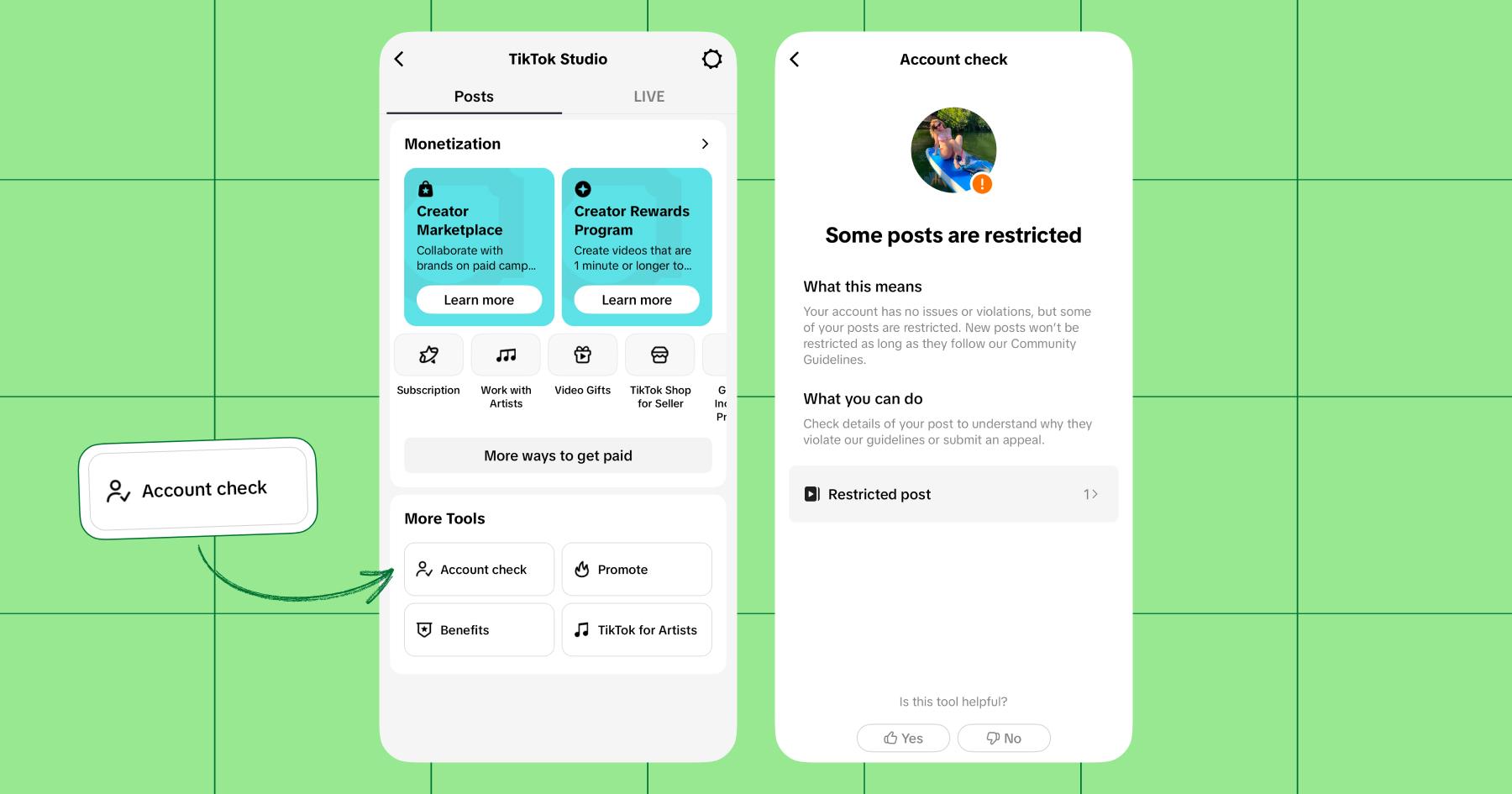
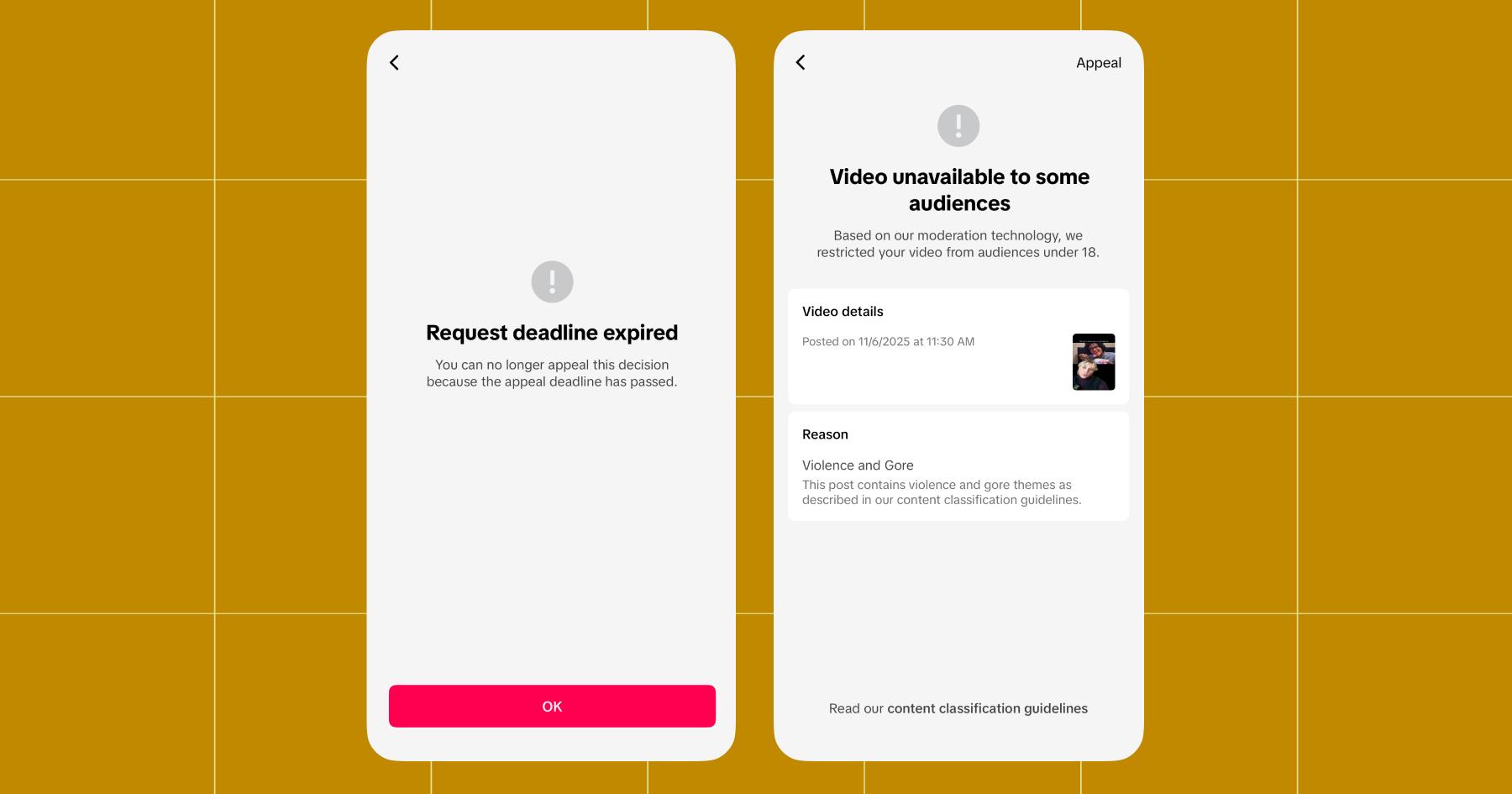
You can click on restricted posts to learn more about why TikTok flagged them. For me, the video I posted “contained violence and gore themes,” so TikTok blocked users under 18 from viewing it.
If you believe one of your flagged posts has been incorrectly restricted, hit the Appeal button in the top right corner. If it’s been more than 30 days since the violation, you won’t be able to appeal (this happened to me).
If it hasn’t, submit an appeal and hold tight — it usually takes about seven calendar days to hear back.
TikTok hasn’t published any rules like “three violations = shadowban.”
Instead, visibility restrictions happen on a case-by-case basis, depending on:
- Severity of the violation (e.g., minor policy issue vs. hate speech or explicit content)
- Frequency of violations (repeat behavior raises risk)
- Type of violation (copyright, spam behavior, misinformation, etc.)
- Account history (new accounts are often scrutinized more closely)
If you have one minor violation, you’ll face a temporary post restriction (age gating, limited FYP reach, etc).
If you commit a serious violation, you may face more severe consequences, including account suspension.
How to Fix a TikTok Shadowban

In most cases, TikTok restrictions are temporary, but there are steps you can take to improve your account’s standing.
- Remove or appeal flagged content: If any of your posts are flagged, either remove them or submit an appeal if you believe the restriction was a mistake.
- Stop posting (only for a few days): Taking a short break (48 to 72 hours) can help reset your account activity, especially if the restriction was triggered by spammy behavior.
- Avoid banned or risky hashtags: Some hashtags are restricted without warning. Avoid using hashtags associated with spam, misinformation, or inappropriate content.
TikTok doesn’t publish an official list of banned hashtags, so the safest way to check is to search the hashtag directly in the app and look for warning messages or missing recent posts.
- Only post original content: Reposted videos, copyrighted clips, and watermarked content from other platforms are all likely to get restricted or taken down.
Related reading: Don’t Know What to Post on TikTok? Give These 8 Ideas a Try
- Follow TikTok’s Community Guidelines carefully: Even minor violations can trigger reduced visibility, so make sure you understand the expectations.
Get Back on the FYP (and Stay There)
In most cases, TikTok shadowbans are temporary and fixable. So, skip the crashout and focus on what you can control instead:
- Creating original content,
- following TikTok’s Community Guidelines, and
- building relationships with your audience.
One of the easiest ways to do that list part (build relationships) is to use Manychat.
TikTok’s algorithm rewards creators who drive engagement: comments, shares, saves, etc. When people interact with your content, TikTok takes that as a signal that it’s worth showing to more users.
As an official TikTok Business Partner, Manychat is an approved TikTok automation tool.
So, instead of worrying about whether TikTok is limiting your visibility, focus on creating content that gets people talking and use Manychat to keep those conversations going long after the video is posted.
Frequently asked questions
Not if you use an approved automation tool like Manychat. While TikTok flags spammy, repetitive, or bot-like behavior, using an approved tool will not cause it to restrict visibility on your account.
Yes. Every comment and reply sends signals to the TikTok algorithm that your content is driving engagement. Using automation to respond to comments and DMs instantly keeps that engagement momentum going even when you’re offline.
TikTok heavily favors:
– Comments (especially back-and-forth threads)
– Shares
– Saves
– Watch time
Likes are helpful, but conversations are better.
Not really. You can’t engage your way out of a restriction, but strong engagement signals will help once your account is back in good standing.
After a restriction lifts, TikTok re-evaluates your content performance. If your new posts get a lot of comments, your reach will rebound faster.
They keep posting without changing anything.
– Appeal violations and/or remove restricted content.
– Take a break from posting.
– Come back with high-quality, original content.



Originally published: Mar 2, 2026, Updated: Mar 2, 2026
More stories worth reading
More content that's too good to miss