
Considering a WhatsApp Business account? Good choice. Your customers are probably already on the app, sending voice notes to their group chat and reacting to their cousin's vacation photos.
Plus, a growing number of users are messaging businesses on WhatsApp to ask about their hours, return policies, and whether the item they really want is back in stock yet.
This guide breaks down what WhatsApp Business actually is, what it costs, which version you need, and how to set it up without losing an afternoon.
TL;DR
- WhatsApp Business is a free app that can turn WhatsApp into a real sales and support channel for businesses of any size.
- Core WhatsApp Business features include business profiles, product catalogs, automated greetings and away messages, quick replies, lists (formerly labels), and broadcasts.
- The free WhatsApp Business App is perfect for small teams doing things by hand. The WhatsApp Business Platform (also called the WhatsApp Business API) supports more advanced automation and messaging at scale.
- Messages sent outside the 24-hour customer service window must use an approved WhatsApp Message Template, and messaging charges may apply.
What Is WhatsApp Business and How Does it Work?

WhatsApp Business is Meta's version of WhatsApp, designed for companies rather than group chats.
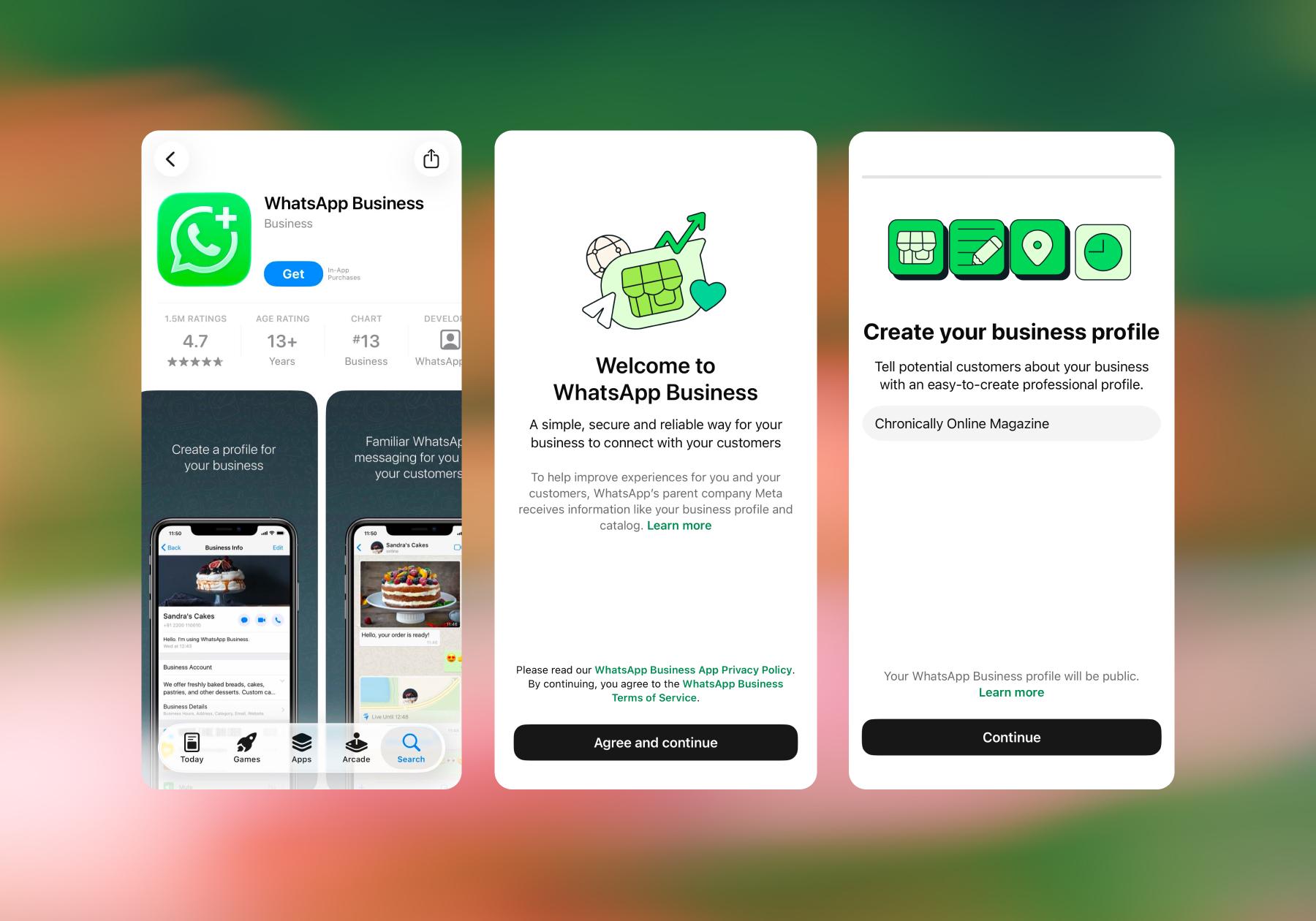
It’s the same WhatsApp interface your customers already know, with some extra tools that let you look like an actual business: a profile with your hours and website, a product catalog, saved replies, and automated messages for when you're away from your phone.
Why does it exist? Meta noticed that shop owners were running their entire operations from a personal WhatsApp account and decided to build them something better.
Notably, WhatsApp Business comes in two versions:
- A free app you download from the App Store called WhatsApp Business.
- The WhatsApp Business Platform (also called the WhatsApp Business API) enables businesses to use automation, integrations, and other tools to manage WhatsApp conversations at scale.
The WhatsApp Business App is free to use. If you use the WhatsApp Business Platform through a tool like Manychat, additional Manychat plan costs and WhatsApp messaging charges can apply. WhatsApp's charges vary based on factors such as message type and recipient market.
Personal WhatsApp vs. WhatsApp Business: What's Actually Different?

Personal WhatsApp is for your friends; WhatsApp Business is for your customers.
WhatsApp Business adds a whole layer of merchandising and organization tools that don't exist on the personal side, including the ability to build a business profile with your address and hours, a product catalog, saved replies, chat organization, and stats on how many messages were actually read.
You can absolutely run both personal WhatsApp and Business WhatsApp on the same phone. You just need a different phone number for each, because WhatsApp ties one account to a single number. Plenty of owners keep a personal account on their SIM and a business account on a second line or landline.
Feature | Personal WhatsApp | WhatsApp Business App | WhatsApp Business API |
|---|---|---|---|
Price | Free | Free | Free to set up; messaging charges may apply |
Built for | Friends and family | Small businesses handling chats by hand | Teams that need automation and volume |
Business profile | No | Yes | Yes |
Product catalog | No | Yes | Depends on your setup/provider |
Automated greeting and away messages | No | Yes | Advanced automation available via your platform/provider |
Quick replies and lists | No | Yes | Yes, via your provider |
Automation | No | Basic | Full — flows, tags, conditions, integrations |
Devices and users | Phone plus linked devices | Phone plus linked devices | Access varies based on the provider and plan |
Analytics | No | Basic message stats | Detailed messaging, template, and pricing analytics |
Here's what you actually get when you download the free WhatsApp Business app:
- Business profiles: Your virtual storefront, including logo, business description, category, address, hours, and a link to your website.
- Automated messages: Set a greeting message that fires when someone messages you for the first time, and an away message for nights and weekends.
- Quick replies: Shortcuts for the responses you type 40 times a week. Assign a keyword like /thanks, type "/" in any chat, and the full message drops in. You can store up to 50 quick replies.
- Default replies: The app can auto-generate quick replies from your profile info, so you can send your hours, your address, or your whole profile without typing a word.
- Lists (formerly labels): Tag conversations — "new lead," "pending order," "VIP" — so you never lose a chat in the pile. You can create up to 20 labels, color-code them, and send messages to everyone in a list at once.
- Catalogs and collections: Create a browsable menu of products or services that lives in the chat. Group items into collections so customers can find things faster.
- Broadcasts: Send one-to-many messages for promos, restocks, and announcements.
- Click-to-chat links and QR codes: Create a link that opens a WhatsApp chat with you, then drop it in your Instagram bio, on your packaging, or on a table tent so people can start a conversation without saving your number.
- Linked devices: Answer messages from your laptop or desktop while your phone stays in your pocket.
- Message statistics: Track basic counts of messages sent, delivered, read, and received.
The product catalog feature
Of all the WhatsApp Business features, the product catalog is one that most businesses forget to set up, which is a shame, because it can make it much easier to turn product conversations into orders. Instead of typing prices for your offerings over and over, you can send a catalog link and let people browse on their own.
Setting one up is straightforward:
- Open the Catalog from your Tools tab and tap Add new item.
- Upload images, name the product or service, and add the price, sale price, description, website link, and a product code.
- Tap Add to catalog, and you're done.
Every image is reviewed against WhatsApp's commerce policy, and items only appear to customers once they're approved. If something gets rejected and you think that's wrong, you can request another review right from the item.
You can hide out-of-stock items instead of deleting them, and group items into collections so a customer shopping for skincare sees more related products.
Using Manychat for WhatsApp? Here’s What to Consider

You can use Manychat to automate parts of your WhatsApp customer journey, from answering common questions and collecting customer information to qualifying leads, following up with prospects, and routing conversations to your team. Before you start building automations, though, there are a few things worth understanding.
Initial setup
Manychat offers you two different ways to connect a WhatsApp number, giving you the flexibility to choose what works best for your business:
- Connect your existing number
- Create a new WhatsApp number
Before building anything, determine which connection method makes sense for your business and whether continuing to use the WhatsApp Business app is a better option for you. Remember, the WhatsApp Business App includes basic automation options, such as greeting and away messages, plus quick replies to send saved responses manually.
If you want to use Manychat, your next step comes down to one question: do you already have a phone number to use for WhatsApp?
- If yes, choose the appropriate connection method for your existing number.
- If no, you can get a new WhatsApp number through Manychat during setup.
Once you’re set up, you need to think about your goals. Unlike a channel, where the primary objective might be to generate an initial audience, WhatsApp conversations tend to begin after someone has already shown interest.
That distinction can help you design a better automation strategy in Manychat. Instead of asking, “How do I get as many people as possible into WhatsApp?”, start with questions like: Where are my WhatsApp conversations coming from? What does someone usually want when they contact me? And what should happen next?
For example, someone coming from an ad might need to be qualified before speaking with sales. An existing customer might need support. Someone responding to a promotion may already be close to making a purchase.
Map those entry points and desired next steps before you start building. Your automation will be much more useful when it reflects the conversations your business is already having on WhatsApp.
Automation rules
WhatsApp automation isn't a free-for-all. Meta has rules governing when and how businesses can contact customers on WhatsApp, and understanding those rules should be part of your automation strategy from the beginning.
- One of the most important concepts is the messaging window. When a customer messages your business, a window opens in which you can continue the conversation with them. For messages sent through Manychat, you can send regular messages during the 24-hour customer service window after a customer interacts with you. Once that window closes, you'll need an approved WhatsApp Message Template to contact them again. You'll also need the appropriate customer consent for proactive messages.
- Consent matters, too. Having someone's phone number doesn't automatically mean you can send them any marketing message you want. Your WhatsApp strategy needs to account for the appropriate opt-in and messaging requirements, particularly when you're planning promotional or re-engagement campaigns.
This shouldn't scare you away from automation. It just means you should design the customer journey around WhatsApp's rules rather than creating an elaborate automation first and then discovering that parts of it can't run as you expected.
For example, think about what you can accomplish while a conversation is active. You might answer the customer's question, collect useful information, identify what they're interested in, qualify them, provide the appropriate next step, or hand them over to a member of your team.
Then, if you want to reconnect later, build that re-engagement into your strategy using the appropriate WhatsApp messaging mechanisms.
What you can automate
Once you're set up and understand the rules, this is where things get interesting.
- A useful starting point is incoming conversations. Small businesses often receive more messages than they can realistically answer manually, and slow responses can mean interested customers go cold. Manychat can respond immediately and keep the conversation moving until you or someone on your team needs to step in.
From there, look for the repetitive conversations consuming your time.
- FAQs are an obvious example. If customers repeatedly ask about prices, products, availability, locations, services, or other basic information, you don't necessarily need a person typing the same answer every time. Manychat can use tools such as keywords and AI-powered capabilities to help customers automatically find relevant information.
- You can also collect customer information conversationally. Instead of immediately sending someone away to complete a long form, you can ask questions within the conversation and capture information such as their email address, location, requirements, or product preferences. That information can then be stored in Manychat or passed to other tools in your customer stack.
That leads naturally into lead qualification.
- Suppose you run a service business where not every inquiry is equally valuable. You could ask prospects a series of relevant questions, save their responses, use conditions and tags to organize them, and determine which people to prioritize. Manychat can do some of that work before a salesperson becomes involved.
And automation doesn't mean removing humans from the experience.
- In fact, one of the more valuable applications is deciding when a human should enter the conversation. Once someone reaches a particular stage, needs specialist help, or demonstrates strong purchase intent, you can route the conversation to the appropriate person on your team.
How to maximize your ROI
Setting up more automations doesn't guarantee you’ll get more value from WhatsApp. The real goal should be to make the conversations you're already having on the platform more useful for your customers and your business.
Start by focusing automation on the moments closest to a meaningful outcome. If someone is asking you about pricing, availability, a particular service, or how to buy, they're giving you valuable information about their intent. Use Manychat to recognize those signals and give high-intent conversations a clear next step, whether that's more information, a checkout link, or a handoff to your sales team.
Keep the journey short, though. Every unnecessary question or step in your flow gives someone a reason to drop off. Only collect information you'll actually use, and once you know what a customer needs, help them get there as directly as possible.
As your contact base grows, segmentation becomes increasingly important. Rather than treating every WhatsApp contact the same, use the information you've collected to make future communication more relevant. This is especially useful when sending promotions, launches, or other re-engagement messages to eligible contacts.
Learn how: Advanced Targeting in Manychat: How to Send Leads Targeted Offers
It's also worth connecting WhatsApp to the rest of your customer journey. Customer information stored in Manychat can be shared with other tools, helping your sales and marketing systems use what you've learned from customer conversations on WhatsApp.
Finally, measure the business outcome, not the # of times your automation ran. A high number of automated conversations might look impressive, but metrics such as qualified leads, conversions, response time, sales, and time saved tell you much more about whether your WhatsApp strategy is working.
Frequently asked questions
WhatsApp Business is a version of WhatsApp designed to help businesses communicate with customers. The free WhatsApp Business app includes tools such as a business profile, contact organization, quick replies, greeting and away messages, and other features that make it easier to manage customer conversations.
WhatsApp Messenger is primarily designed for personal conversations, while the WhatsApp Business app is built for businesses communicating with customers. WhatsApp Business includes additional features such as business profiles, contact organization, catalogs, and messaging tools that aren't available in the standard WhatsApp app.
Yes. The WhatsApp Business app is free to download and use on iPhone and Android. However, some optional business features and services may cost money, including certain business broadcasts, advertising tools, and Meta Verified subscriptions.
WhatsApp Business is designed for businesses that want to communicate with customers through WhatsApp. The WhatsApp Business app is particularly suited to small and medium-sized businesses, while businesses that need to manage higher volumes of conversations or more advanced integrations can use the WhatsApp Business Platform.
You can't use the same phone number for WhatsApp Messenger and the WhatsApp Business app simultaneously. If you want to use both apps simultaneously, you'll need a different phone number for each. You can, however, move an existing number between WhatsApp Messenger and WhatsApp Business.
WhatsApp uses end-to-end encryption for messages in transit, and businesses should also follow appropriate security practices for any customer data handled through their business tools and integrations.
WhatsApp also offers security features such as two-step verification, passkeys, and app locks. Businesses should still follow account security best practices and WhatsApp's Business and Commerce policies.
WhatsApp Business can be worth using if your customers already use WhatsApp and you want an easier way to manage conversations, answer common questions, share business information, and connect with potential customers. The WhatsApp Business mobile app is free, making it a relatively low-cost option for small businesses that want to use messaging for customer service, lead generation, or sales.



Originally published: Feb 25, 2022, Updated: Sep 25, 2026
More stories worth reading
More content that's too good to miss