Embrace Your Star Power: Get More Facebook Reviews with Manychat

Where do you go when you’re thinking about making a purchase? For most of us, the answer lies in the reviews section, where everyday consumers are (sometimes brutally) honest about their experience with a product or service.
Facebook plays a bigger role here than many realize — it holds nearly one in every five customer reviews. It ranks just behind Google, Yelp, and Tripadvisor as the go-to site people check before visiting a business. In fact, two out of three Facebook users visit a local business Page every week, and more than half say it’s their most common place to learn about new brands and products.
The challenge, of course, is getting customers to leave reviews on your Facebook Page — ideally, positive ones. With Manychat, you can build a simple flow that prompts people to provide feedback and then directs it to the right place: publicly if it’s positive, privately if it’s not.
Customer Reviews: Your Shortcut to Sales

Today, shoppers rely on reviews more than ever to make purchase decisions. Nine in ten consumers say they consider reviews before hitting “buy,” and almost half of consumers (45%) won’t purchase a product if there are no reviews at all.
In other words: No matter how slick your copy or stunning your product photos, the absence of social proof can bring sales to a screeching halt.
But it’s not just about having the reviews — it also matters where those reviews live. Over a third of consumers (37%) use Facebook to discover new products, making it a prime place to start stacking those five-star ratings.
Why Use Manychat to Collect Reviews on Facebook?

Manychat makes collecting reviews seamless by automating when and how you ask for them, while protecting your brand reputation along the way.
You can ask for reviews at the perfect moment
Timing is everything. With Manychat, you can automatically trigger a review request at critical moments, like right after a purchase, once an order is delivered, or following a customer support interaction.
You can route feedback intelligently
Not every interaction should be public. Manychat’s AI Intention Recognition can interpret the sentiment behind customer feedback and take the right next step.
Here’s how it works:
- You create a flow that’s triggered when a user sends you a message.
- Then, you use the AI Intent Recognition to determine if a user is providing feedback.
- 👍Positive feedback? Manychat will prompt them to leave a review on your Page.
- 👎Negative feedback? Manychat will route the conversation to Live Chat for resolution.
This way, you turn happy customers into public advocates, while addressing issues privately before they hurt your reputation.
You can run a campaign across channels
Whether your customers connect with you on Messenger, Instagram, or WhatsApp, Manychat centralizes the workflow. One automation strategy covers multiple touchpoints, giving your business a scalable, consistent way to request and manage reviews.
How to Build a Simple 3-Step Review Flow in Manychat

A good review flow should feel like a natural extension of the customer experience — not like you’re asking for a favor. With Manychat, you can design a flow that’s conversational, personalized, and intelligent. Here’s how to structure it:
1. Start with an intro message
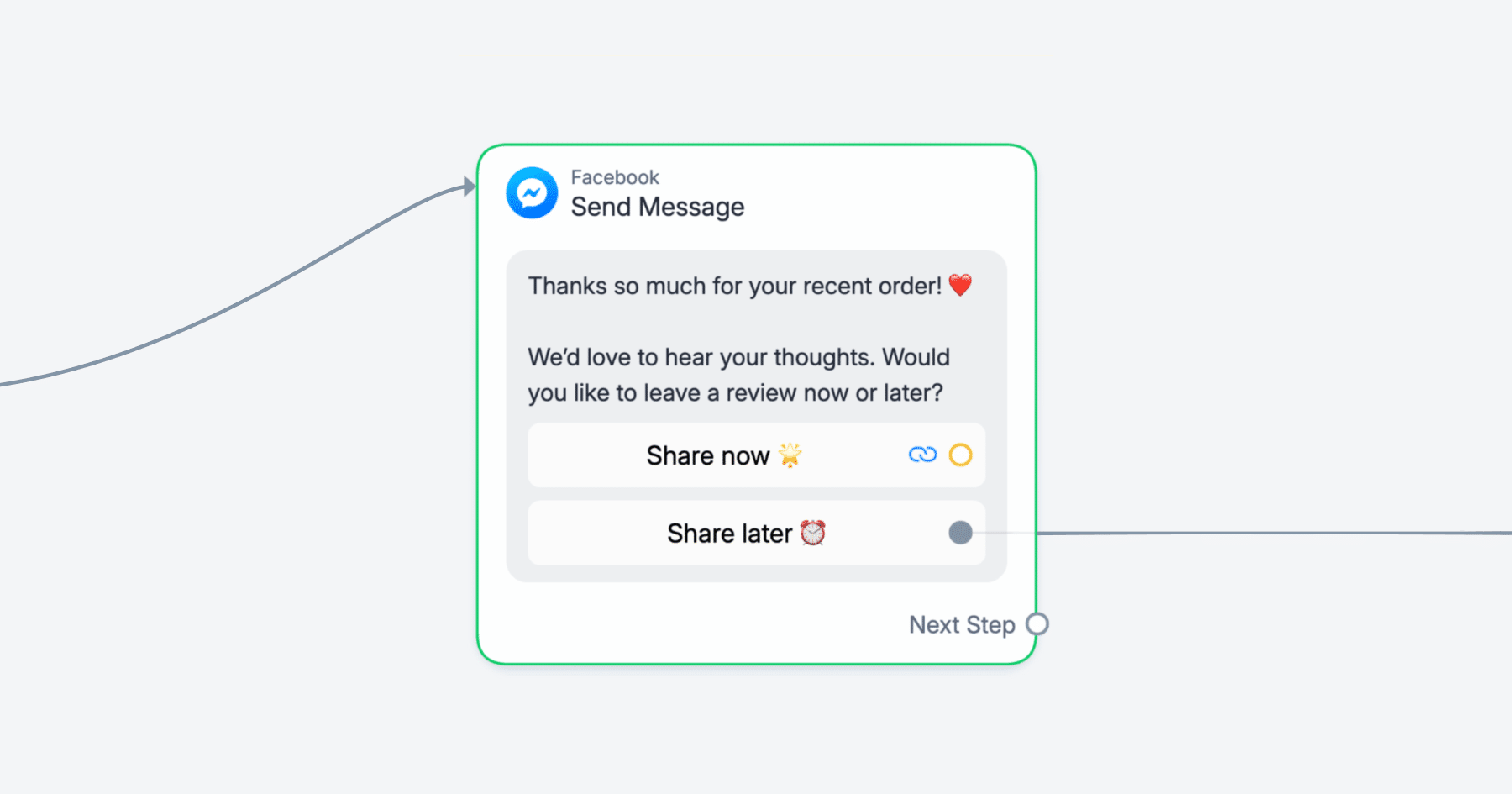
Kick things off by thanking the customer for their recent interaction — whether that’s a purchase, a delivery, or a support resolution. Something like, “Thanks so much for your recent order! We’d love to hear your thoughts. Would you like to leave a review now or later?”
Then, you can use Quick Reply buttons to direct users wherever makes sense:
- Share now ⭐ → Sends them into your star rating flow
- Share later ⏰ → tags the customer (e.g., Feedback_Later) and either snoozes them for a reminder message or ends the conversation gracefully.
In Manychat, your intro message can be triggered by a Keyword (like “review” or “feedback”) that the customer replies with, or from a comment-to-DM automation if you want to capture feedback right from your Facebook posts.
If you’re determined to set up a post-purchase flow, you have a couple of options:
- Zapier: Zapier connects Manychat to e-commerce platforms like Shopify and WooCommerce. When a new order is completed, Zapier can automatically trigger your review flow.
- Hotmart: If you sell digital products or courses on Hotmart, you can trigger review requests right after a purchase event.
- Google Sheets: You can log new orders into a Google Sheet and use that as the trigger for your review flow if preferred.
2. Use Quick Replies to capture feedback
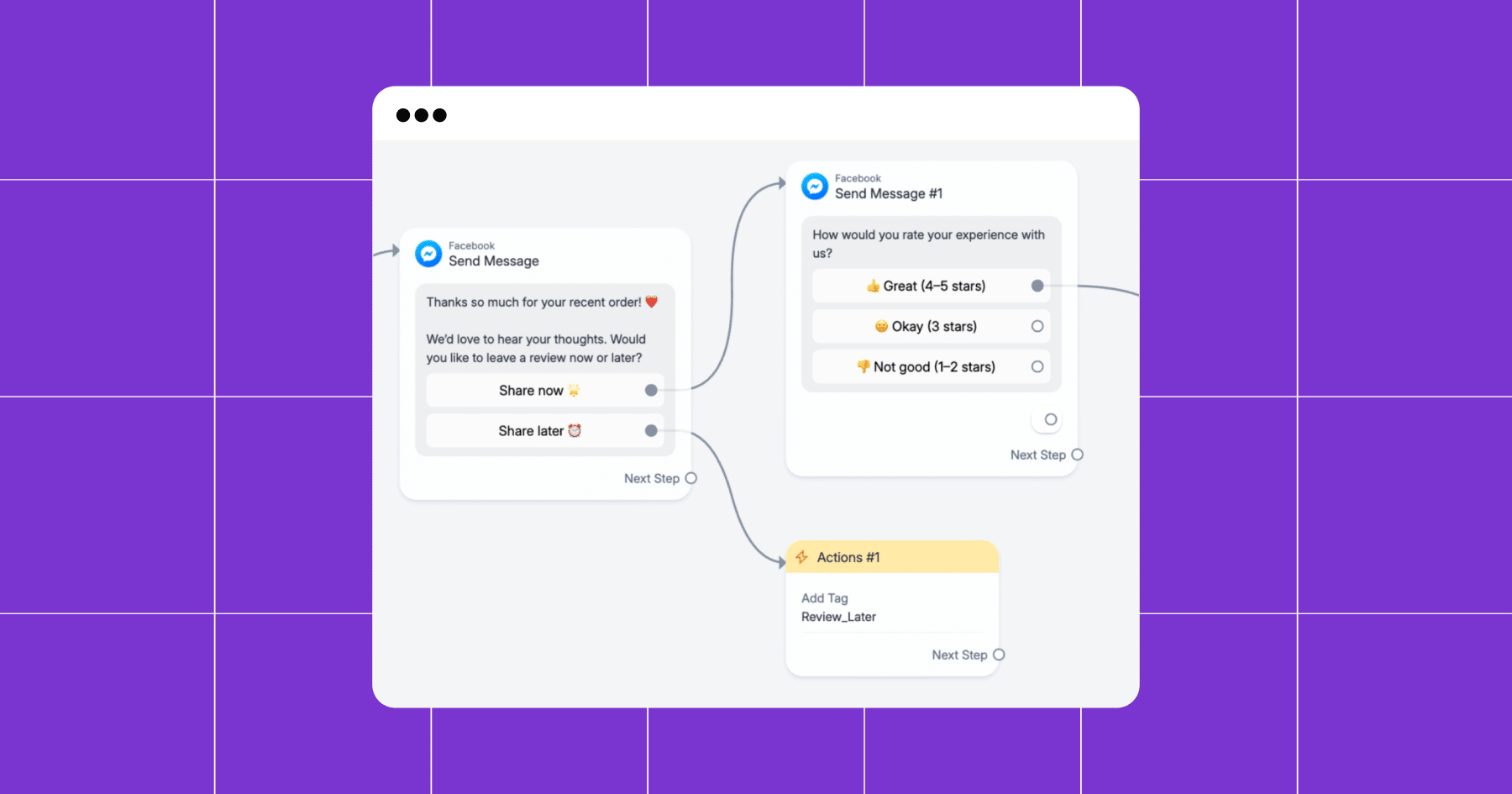
When a user taps the “Share now ⭐” button in your intro message, you can present them with a quick rating scale using Quick Reply buttons.
In Flow Builder, add a new message block with something like: “Thanks for your feedback! How would you rate your experience with us?”
Since Messenger and Instagram only allow up to 3 quick replies per message, keep it simple and group the ratings into three categories:
- 👍 Great (4–5 stars)
- 😐 Okay (3 stars)
- 👎 Not good (1–2 stars)
3. Route each response to its own path
Each Quick Reply button should connect to a different path in your flow.
- Great (4–5 stars) → Thank the customer and share a direct link to your Facebook Page reviews (or Google, Tripadvisor, etc.). To get that link, go to your Facebook Business page, click on the Reviews tab, and copy the URL. For example, ours would be www.facebook.com/Manychat/reviews.
- Okay (3 stars) → Route to a light follow-up flow asking for more context (e.g., “How can we improve?”), prompting the user to give you a free-text response. If you have a Manychat Pro account, you can add an AI Step here to interpret the user’s feedback.
With a clear prompt, it can also:- Summarize the user’s feedback for you, or
- Follow a specific goal (like spotting sentiment, identifying themes, or choosing the next step).
When you use an AI Step here, it also takes over what happens in Send Message #3 — meaning the AI decides how you respond based on what the user wrote.
- Not good (1–2 stars) → In the unfortunate case they choose 1-2 stars, you can tag them with something like “Negative_Feedback” or “Detractor” and route to Live Chat to resolve the issue.
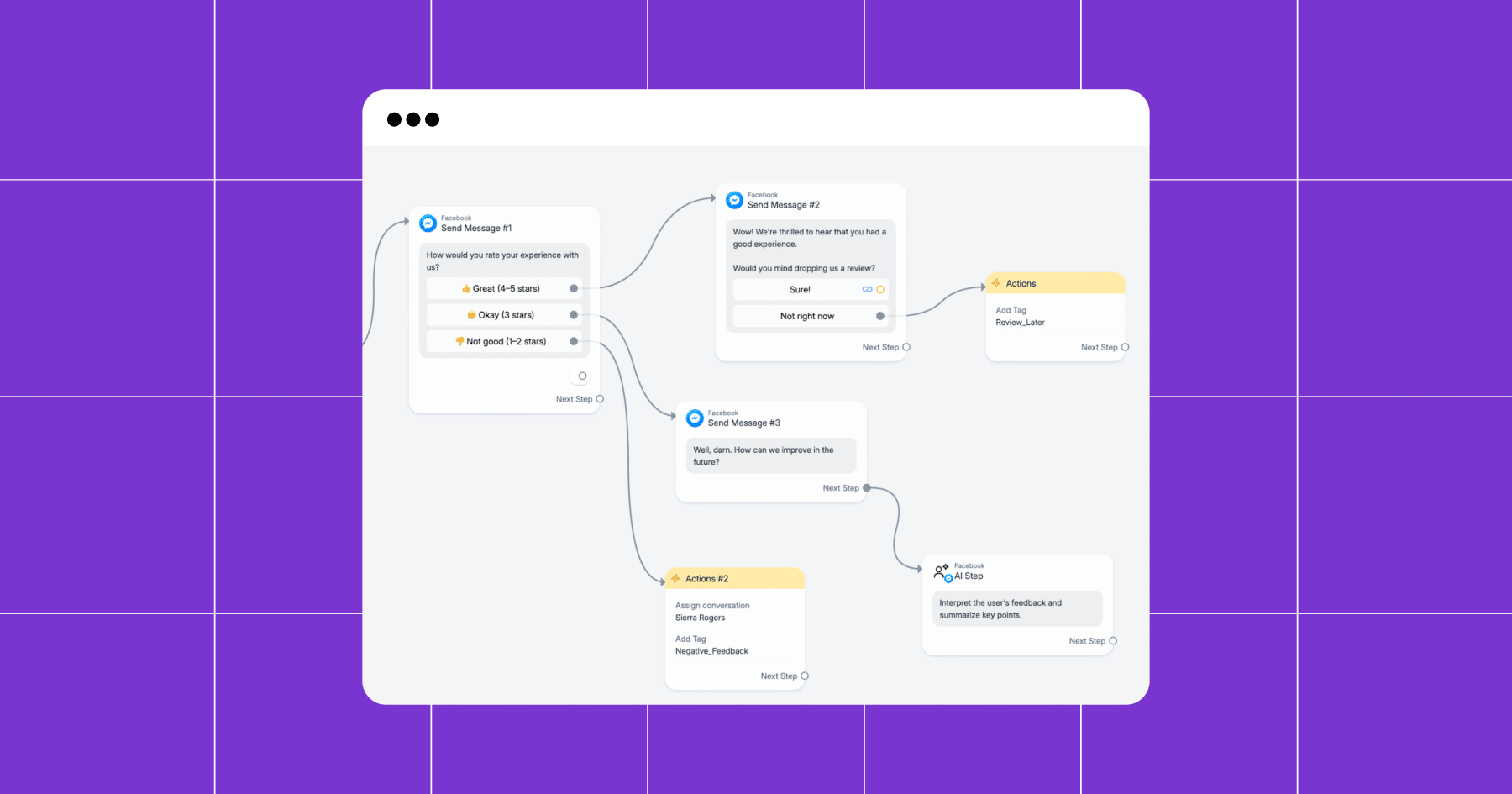
This approach helps you maximize the number of positive reviews on your Page while addressing negative feedback privately.
Now, here’s what to do with that Review_Later tag
If someone is tagged as Review_Later (or whatever you choose as your tag), you don’t want to just forget about them. The idea is to bring them back into the review flow without being pushy.
- First, set up a reminder flow. After tagging a user with Review_Later, trigger a Delay Step (e.g., 24 to 48 hours).
Then, follow up with a friendly nudge: “Hey, just checking in. 👀 Did you still want to share your feedback?” Include the same Quick Reply buttons as earlier (Share now ⭐ and Share later ⏰).
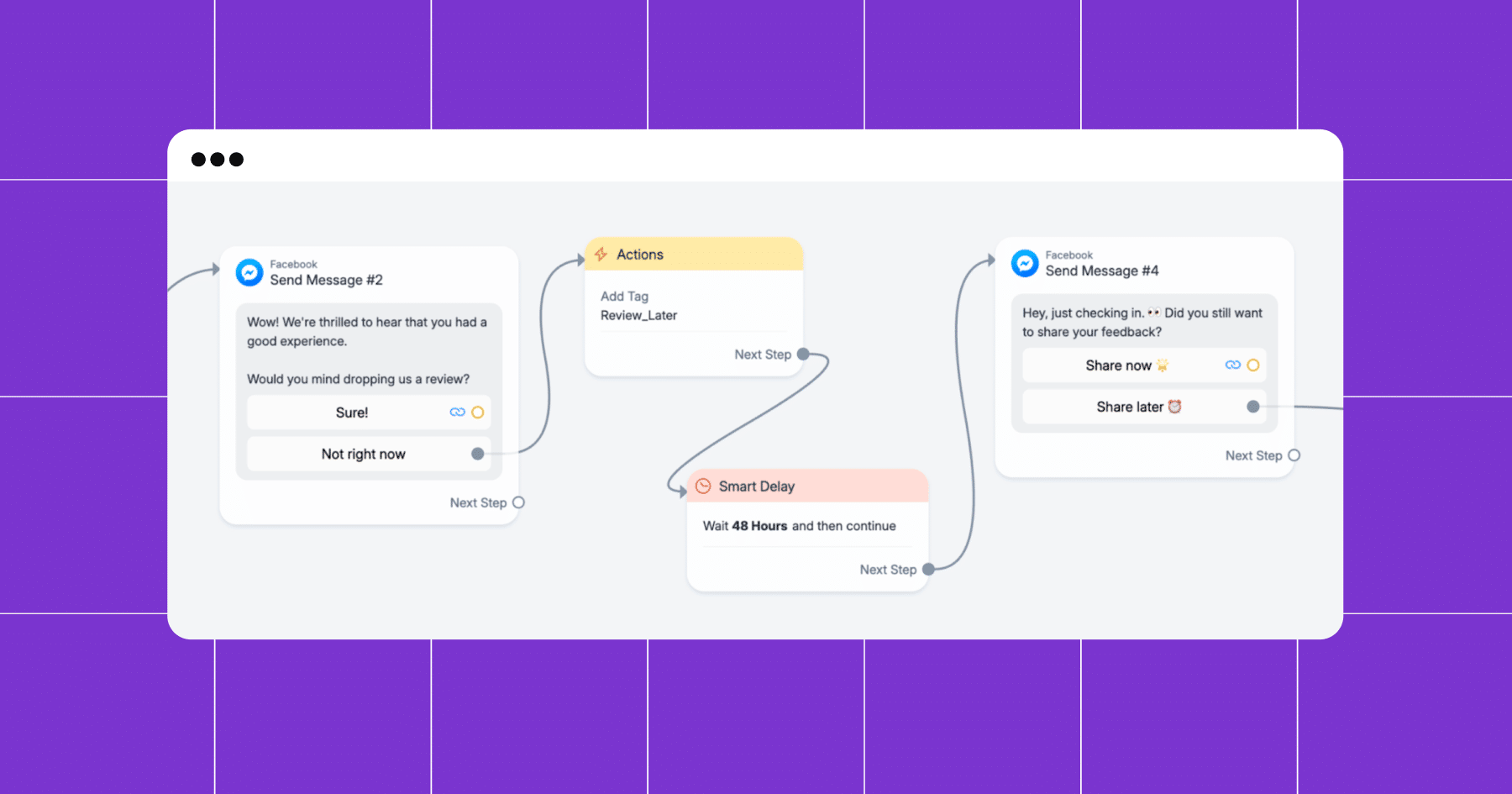
- Limit the number of reminders you send — one to two follow-ups is enough. And if they ignore you, don’t keep nudging (you don’t want to piss someone off).
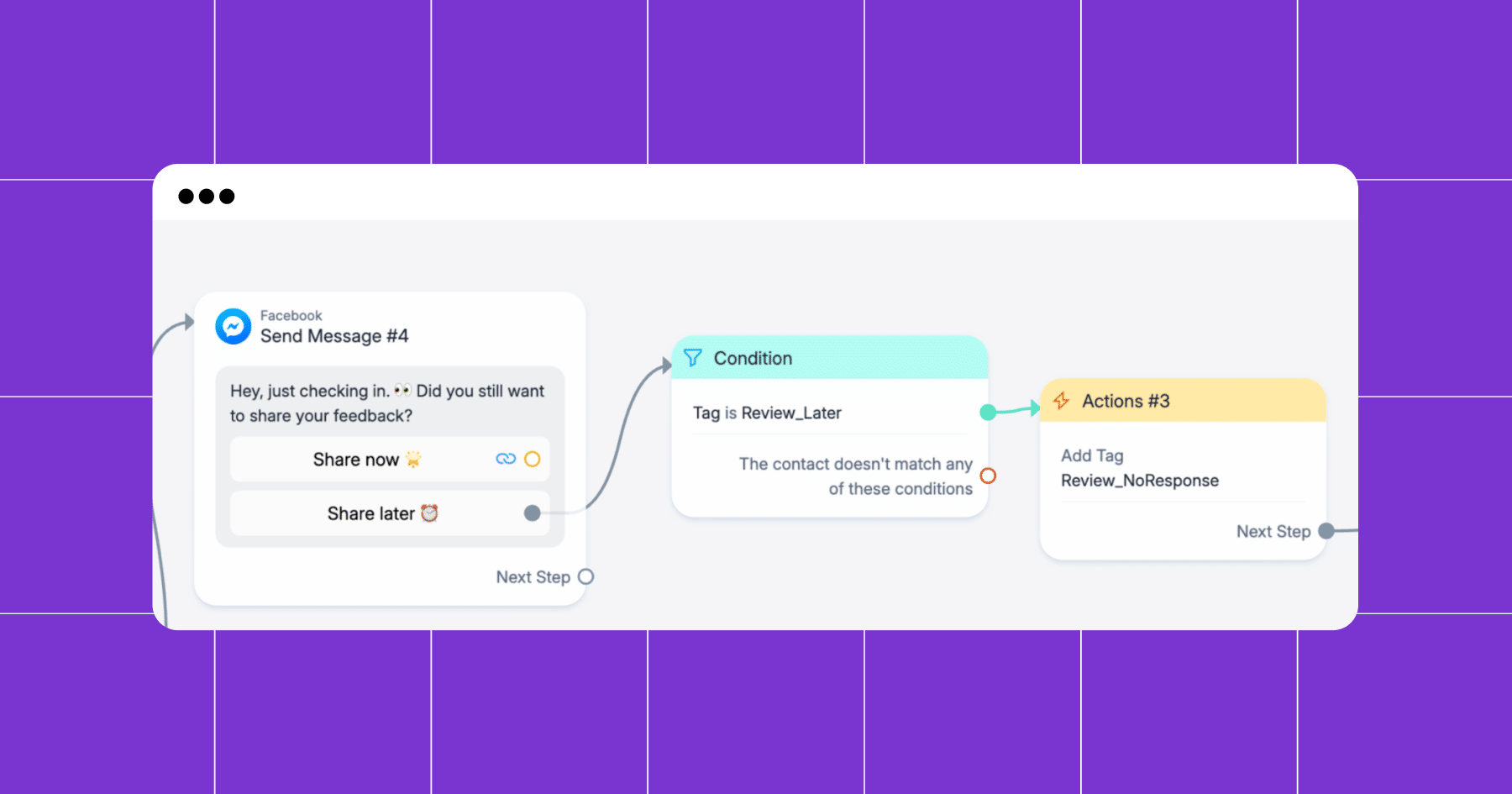
- If someone hits the Share later ⏰button a second time, you can use a Condition block to tag them as Review_NoResponse and exclude them from future follow-ups. (Heads-up, though, Condition blocks are a Manychat Pro feature.)
Go Pro, Get More Reviews
A simple review flow can work with just Quick Replies and tags, but to build a self-sufficient system that runs in the background, you’ll want Manychat Pro. Advanced features, such as AI Intent Recognition, Conditions, and multiple Tags, enable you to automatically route feedback, filter out unhappy customers, and send review requests at the exact right time.
In other words: Pro unlocks the tools you need to scale reviews without scaling your workload. More automation = more authentic reviews = more trust (and sales) for your business.
So, what are you waiting for? Sign up for Manychat.
✋ Frequently Asked Questions (FAQs)
1. What if customers ignore my review request or keep hitting “Later”?
You don’t want to nag endlessly. Use tags like ‘Review_Later’ or ‘Review_NoResponse’ to limit how often you follow up. Two nudges max are enough. After that, focus on protecting your relationship.
2. Can I collect reviews on other platforms besides Facebook?
Yes. You can swap the review link in your “Great (4–5 stars)” path for Google, Tripadvisor, Yelp, or any other site that matters for your audience. Rotate between platforms to build your presence across channels.
3. Do I need Pro to make this work?
A basic flow is available on the free plan, featuring Quick Replies and tags. But if you want the flow to really run itself (using Conditions, AI Intention Recognition, and more advanced routing), you’ll need Manychat Pro.
4. What if someone leaves negative feedback? Will that hurt my reputation?
The flow described in this guide is designed to catch negative feedback privately. Customers who tap “Not good” (1–2 stars) or whose “intention” is identified as negative are never directed to public review sites — they’re routed to Live Chat or tagged for follow-up. That’s how you turn a potential bad review into a second chance.



Originally published: May 27, 2020
More stories worth reading
More content that's too good to miss