
If you’re selling something, you need to be on Instagram. What started as a photo-sharing app has morphed into one of the busiest e-commerce platforms on the web. 44% of users shop on the platform every week, making it one of the best places to turn scrolling into sales.
Of course, that’s easier said than done. With 78% of customers (yep, more than three-quarters) using social media to message brands, an influx of DMs isn’t random. It’s the norm. And if you’re still replying to every message manually, you’re probably burning hours on repetitive tasks and missing sales.
The fix? Automation. ✨
With just a few flows, you can help shoppers find the right products, answer questions fast, recover abandoned carts, and seal the deal without leaving your DMs (or hiring extra help). We’ll walk you through five e-commerce automations you can set up in Manychat, complete with step-by-step instructions.
Not ready for the nitty-gritty details of Instagram automation? Check out our related content:The Only Instagram E-Commerce Guide You’ll Ever Need.
1. Collect and Segment Customer Data

Before selling anything, you’ve got to know who you’re talking to (at least, it certainly helps). Collecting and segmenting customer data lets you learn about your audience — who they are, what they like, and which of your offerings they’re most likely to buy.
This is ideal; instead of blasting one-size-fits-all content, you can tailor your messages based on real info. For example, a skincare brand could ask followers, “What’s your skin type?” and tag customers as oily, dry, sensitive, combo, etc. Once tagged, the business can personalize customer experiences by recommending relevant products, offering targeted discounts, or following up with content from creators with similar skin concerns.
Customers have come to expect this kind of individualized communication; 71% of consumers expect brands to deliver personalized interactions, and 76% get frustrated when that doesn’t happen. 😬
Make it happen in Manychat
To automate collecting and segmenting customer data, you’ll use the Flow Builder: Manychat’s drag-and-drop interface to create automated conversations. Essentially, the goal is to guide someone through a short interaction (like answering a few questions) and then tag their responses so you can use that data later.
1. In Flow Builder, create a question with multiple-choice buttons like:
🛍️“What are you shopping for?” → “Shoes,” “Accessories,” “Skincare,” or
💪“What kind of pet do you have?” → “Cat,” “Dog,” “Turtle”
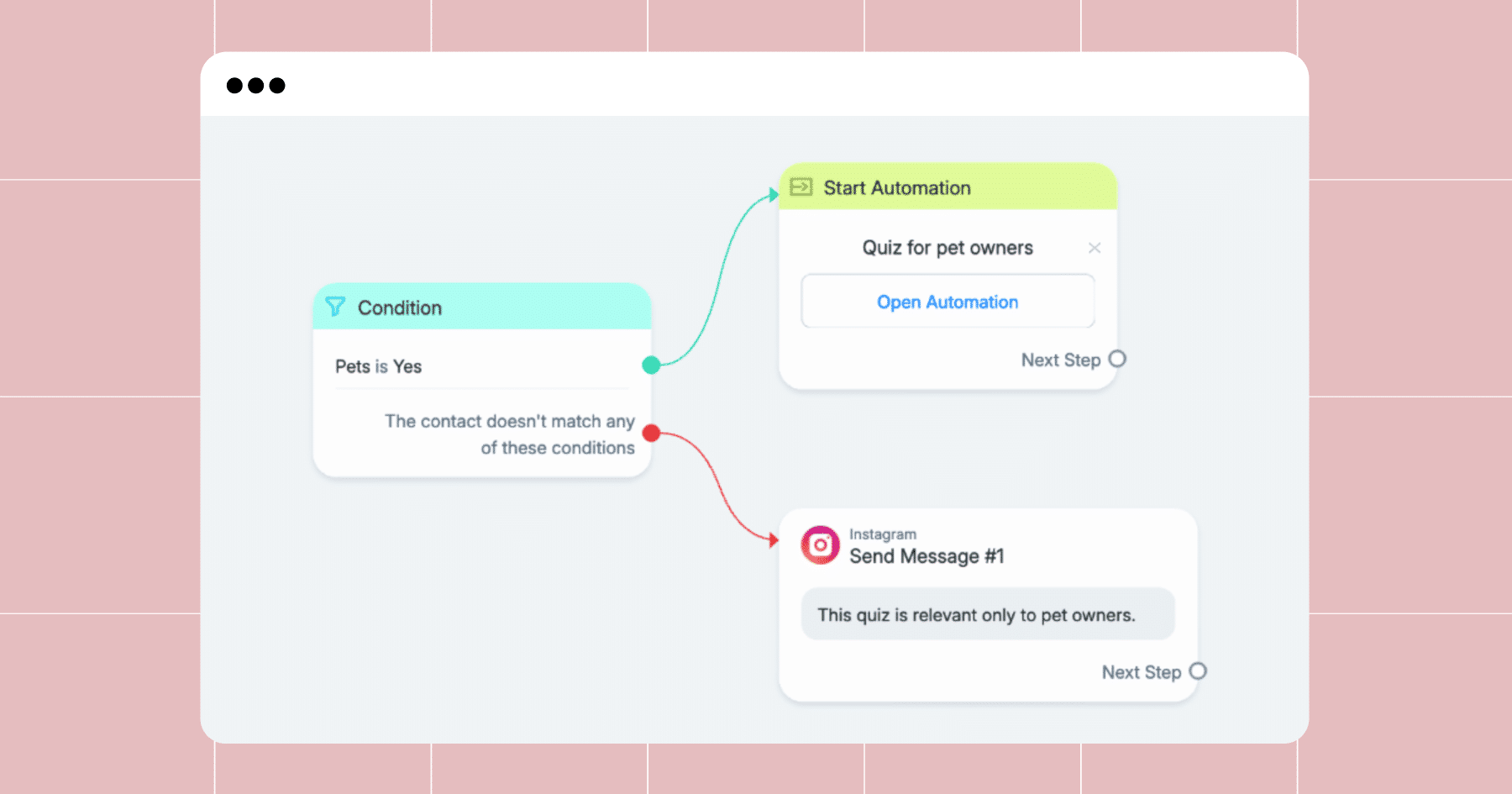
2. Use Action Steps to apply tags based on each response.
👟For example, a tag could be “Shoes Shopper” or “Yogi.”
3. Want to capture more details, like their email address or budget?
👤Add a Data Collection block and save their response to a Custom User Field.
4. Later, you can trigger specific flows, offers, or broadcasts based on your collected tags. (It’s like segmenting your email list, but faster and inside Instagram DMs.)
2. Provide Fast and Friendly Customer Service

💬When will my order ship?
💬Do you have this in size medium?
💬What are your store hours?
If you’re tired of answering questions like these over and over again, we’ve got good news: You can automate that. With the right flows set up, you can offer 24/7 customer support on Instagram without hiring a team of agents. This keeps response times short, customers happy, and your sanity intact.
And those response times? They matter more than you might think. 32% of customers expect a response within 30 minutes, and 42% expect one within an hour when they message a brand on social media. Miss that window too often, and you risk losing the sale and the relationship.
Make it happen in Manychat
The easiest way to level up your customer support strategy is through FAQ automations.
- In the Flow Builder, set up a flow with FAQ buttons like “Shipping Info,” “Returns,” “Size Guide,” or anything else your customers constantly ask about. Each button should link to a friendly, helpful answer.
- Use Keyword Triggers to launch the flow when someone types “shipping,” “product,” “return,” etc., so they don’t need to tap around.
- Add a Default Reply for unexpected questions (something like “We’ll get back to you soon!”) and include a Notify Admin step to alert your team.
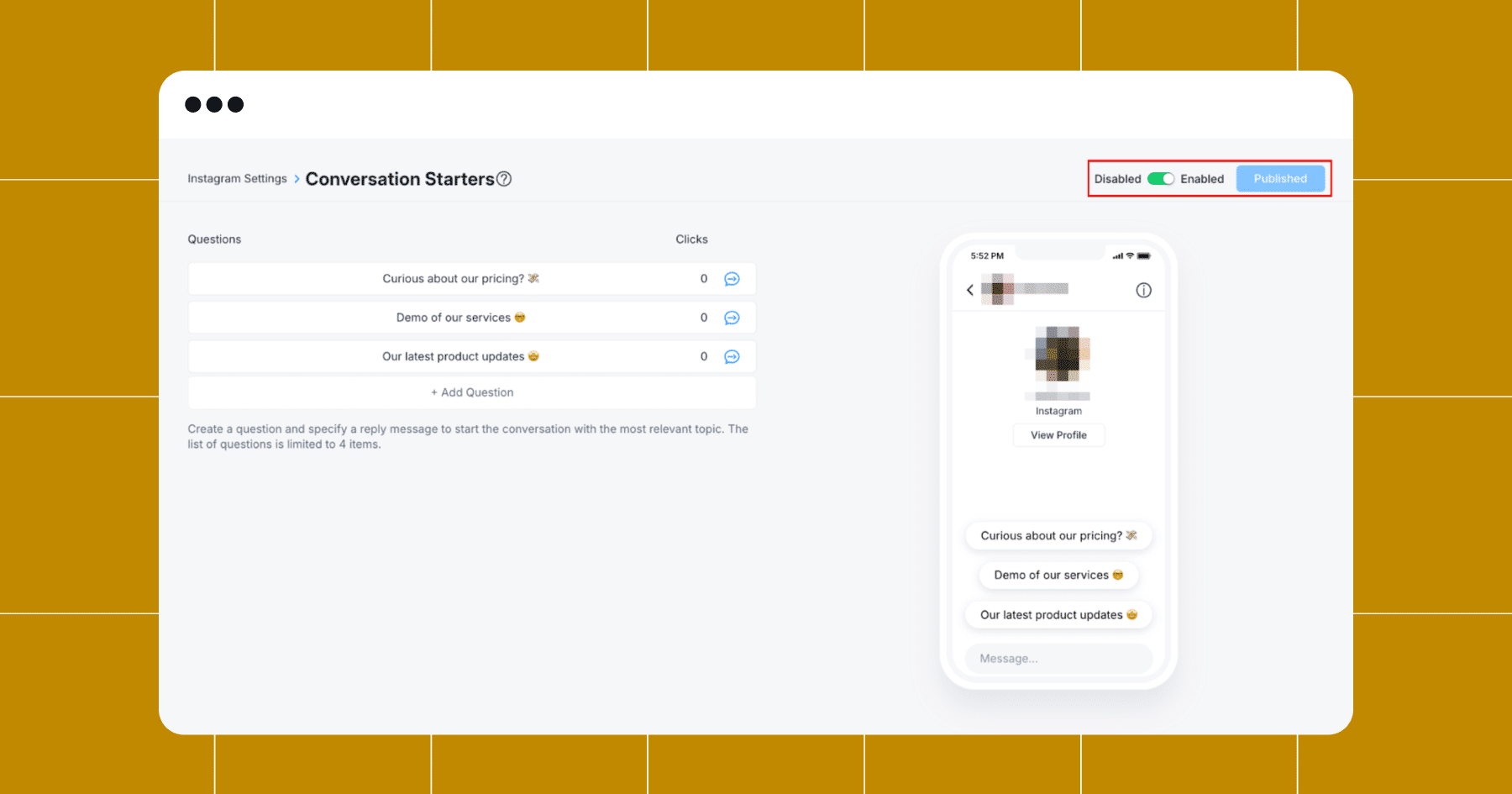
Aside from FAQs, you can also use Manychat’s Main Menu and Conversation Starters features. With Main Menu, you can add quick-access buttons (like “Order Help,” or “Contact Us”) so followers can find answers without waiting for a manual reply. Similarly, Conversation Starters use tappable prompts to guide the user in the right direction from the first moment they open a DM with your account:
3. Send Personalized Offers to Followers

We pointed this out earlier, but when a message feels personal, it’s way more likely to lead to a sale. So, once you’ve collected some basic info about your followers (like their preferences, interests, or shopping habits), you can use that data to send product offers or promos that convert.
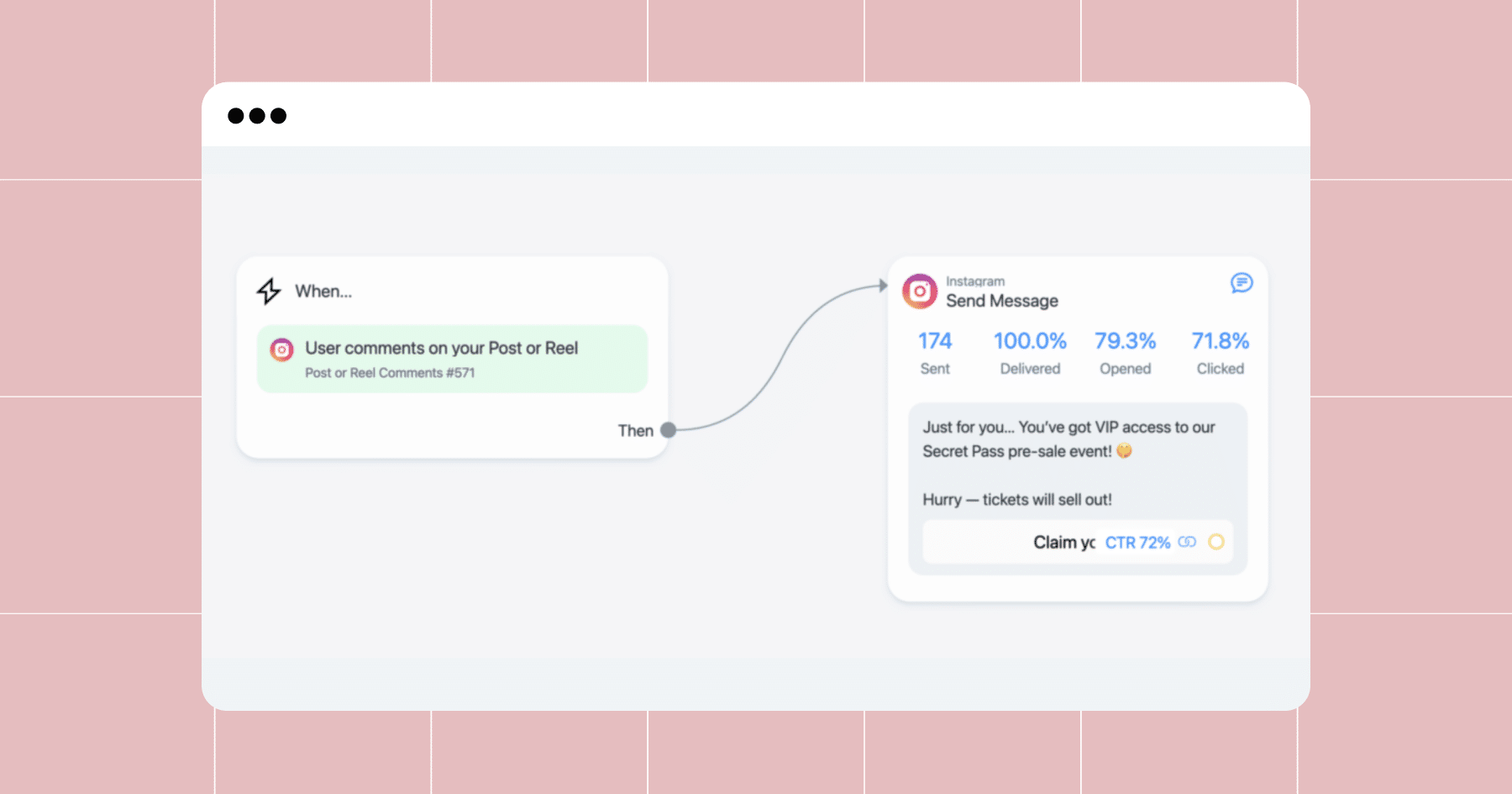
No guessing. No spraying and praying. Just targeted offers that feel timely and relevant to your audience.
Continuing with the skincare example, let’s say a follower took a quiz and got tagged as “Dry Skin.” You can automatically follow up with a message like, “Hey! We just added a new moisturizer that’s perfect for parched complexions. Want 15% off?”
Make it happen in Manychat
In Manychat, you can use Conditions and Tags to send custom offers based on what you already know about a user.
- Start a new flow or build on an existing one. This could be a follow-up from a quiz, a comment trigger, or a Story reply.
- Add a Condition Step to check for a tag or custom field.
For example:
- “If tag is Dry Skin”
- “If tag is Men’s Sneakers”
- “If Custom Field: Budget = Under $50”
- Then, create different message paths for each condition. For someone tagged “Dry Skin,” you can recommend a specific product and provide a promo code just for them. For other users, the flow could lead to a different offer entirely.
4. Recover Abandoned Carts

Cart abandonment happens — a lot. The average cart abandonment rate is a little over 70%, and it’s even higher for mobile users (aka your entire Instagram audience).
Automation can help you reclaim lost revenue by re-engaging customers who clicked through a product flow but didn’t buy. Maybe they needed more info. Maybe they got distracted. Maybe they needed a little nudge. Whatever their reason for falling short of checking out, a quick message like “Still thinking about it?” or “We saved your cart! Want 10% off to make it official?” can be just the thing that brings them back.
Make it happen in Manychat
There are a couple of ways to approach an abandoned cart flow, but the core idea is this: Identify the people who showed interest but didn’t finish, and follow up with the right timing and message.
Note: For this to work, you need to integrate Manychat with your e-commerce platform.
- Inside your product flow, add a Button that leads to your checkout once a user expresses interest in purchasing a product.
- Add Smart Delay near the end of the flow (~30 minutes to an hour after you send the button). ⏰
- Add Tags to the Button to track user actions (for example, click through and no click through)
- After the delay, add a Condition Step to check the Tag that identifies whether the user has clicked the Button.
If they didn’t click through to checkout, send a friendly reminder message; something like “Still deciding? How about free shipping to sweeten the deal?” 📦
💡Tip: Add urgency by saying the deal expires soon or that inventory is limited. Messages like “Hurry — only 3 left in stock!” work surprisingly well.
For users who complete their purchase, you can end the flow or move them into your post-purchase experience. (Keep reading for more information on how to do that!)
5. Send Post-Purchase Follow-Ups and Thank Yous

A sale might seem like the finish line, but it’s the start of a longer relationship with your customer. Following up after a purchase (even with something as simple as a thank-you message) shows customers you appreciate their business.
And it pays off: Brands that engage customers with post-purchase emails can boost repeat purchase rates by up to 27%.
People expect to hear from you, too. Salesforce reports that 64% of consumers expect companies to respond promptly after purchasing. Post-checkout communication is an essential part of a positive customer experience, whether you’re confirming the order, sharing shipping info, asking for feedback, or offering a discount on their next purchase.
Let’s say someone just bought your new vitamin C serum. You could automatically send them a friendly “Thanks so much for your order!” followed by a helpful message a few days later, like, “Here’s how to incorporate your serum into your skincare routine ✨.”
Make it happen in Manychat
Following up after a purchase isn’t just polite; it’s one of the simplest, most impactful ways to boost retention and make your brand unforgettable. Here’s how to do it.
- After a customer makes a purchase, use an Action Step to tag them or set a custom field like “Last Product Bought = Candle Set.”
Want to deliver digital products? Just drop the download link or access instructions into the first message after purchase.
- Add a series of Smart Delays and follow-up messages:
⏱️After one hour: Send a thank-you message like “Thanks for shopping with us! You’ll get a shipping update soon.”
📆After three days: Check in with a quick tip or a simple “How’s it going?” message.
🗓️After seven days: Offer a personalized discount, recommend a related product, or invite them to leave a review.
Note: Smart Delays do not reopen the 24-hour window. So, if a contact interacts with your automation and then enters a Smart Delay lasting longer than 24 hours, a regular message will not be delivered. However, some contacts may still receive the message if they reopen the 24-hour window later, for example, by sending a message in DMs.
Did we lose you? Don’t worry, we’ve got a video tutorial for this one as well: Automate Follow-Up Messages on Instagram (Manychat DM Tutorial)
Now, Go Forth and Automate
Incorporating these flows into your e-commerce strategy can help you save time and boost your bottom line. Set them up once, and let them work in the background, converting followers into buyers on autopilot.
Want to skip the setup and get started faster?
Grab pre-built versions of these automations and install them with just a few clicks.
Learn how to import Manychat templates
✋ Frequently Asked Questions (FAQs)
1. Why aren’t my automations leading to more sales?
You might be automating at the wrong moment. The highest-converting automations usually happen after someone interacts with your content, like voting in a poll or clicking a product. Start there.
2. Do I really need to collect tags or data? Can’t I just send everyone the same message?
You can, but it won’t perform as well. When someone sees a message that matches their needs (like skincare for oily skin or shoes under $50), they’re way more likely to click and buy. Tags = personalization. Personalization = sales.
3. Should I wait until I’m bigger to start automating?
Nope! Automation helps smaller creators the most because it frees up your time and makes you look more pro without hiring anyone. It also enables you to quickly learn what your audience wants by tracking how they interact with your flows.
4. What’s one automation I shouldn’t skip?
Post-purchase follow-ups. They’re easy to forget but insanely powerful. A quick “thanks,” a tip, or a bonus discount makes people feel appreciated and more likely to buy again or tell a friend.
5. Why do some followers drop off mid-flow?
Usually, your message is too long, too confusing, or doesn’t feel relevant. Fix this by keeping flows short, using emojis/buttons to guide people, and leading with something they want (like a discount or tip). Also: test where people are dropping and tweak from there.
6. How do I know if automation is “working”?
Are more conversations starting from the content you post? Are people clicking, replying, or buying inside flows? Are you getting new emails/phone numbers you can use later? If you see any of these results, you’re doing it right.



Originally published: Jun 3, 2022
More stories worth reading
More content that's too good to miss