
With over 2.5 billion active users, WhatsApp has established its reputation as one of the world’s most popular messaging apps. It’s been downloaded more than five billion times across Android and iOS, and it’s the #1 messaging app in over 100 countries.
For businesses, this represents a massive opportunity — and a massive challenge. WhatsApp users expect fast, personal replies, but keeping up manually just isn’t realistic (unless you’ve figured out how to clone yourself…affordably).
Manychat helps you automate WhatsApp conversations so that you can provide fast, helpful responses to every person in your inbox. To help you get started, we’ll walk through four of the most practical use cases every Manychat user on WhatsApp should know.
1. Automate Your Inbox 📧

WhatsApp is the world’s busiest messaging app, facilitating more than 100 billion messages every single day. And unlike email, the pace is lightning-fast: on average, WhatsApp users reply in under one minute. That speed is great for users, but overwhelming for you.
With Manychat, you can put your inbox on autopilot and reply to everyone in under 60 seconds. There are a few key features you can get started with, including:
- Default Reply: A safety net that guarantees no message goes unanswered, even if it’s just a quick “Thanks, we’ll get back to you soon!”
- Ice Breakers: Preset buttons that appear when someone starts a chat with your WhatsApp Business account. Instead of typing, they can tap options like “Book an appointment,” “See product catalog,” or “Talk to sales.”
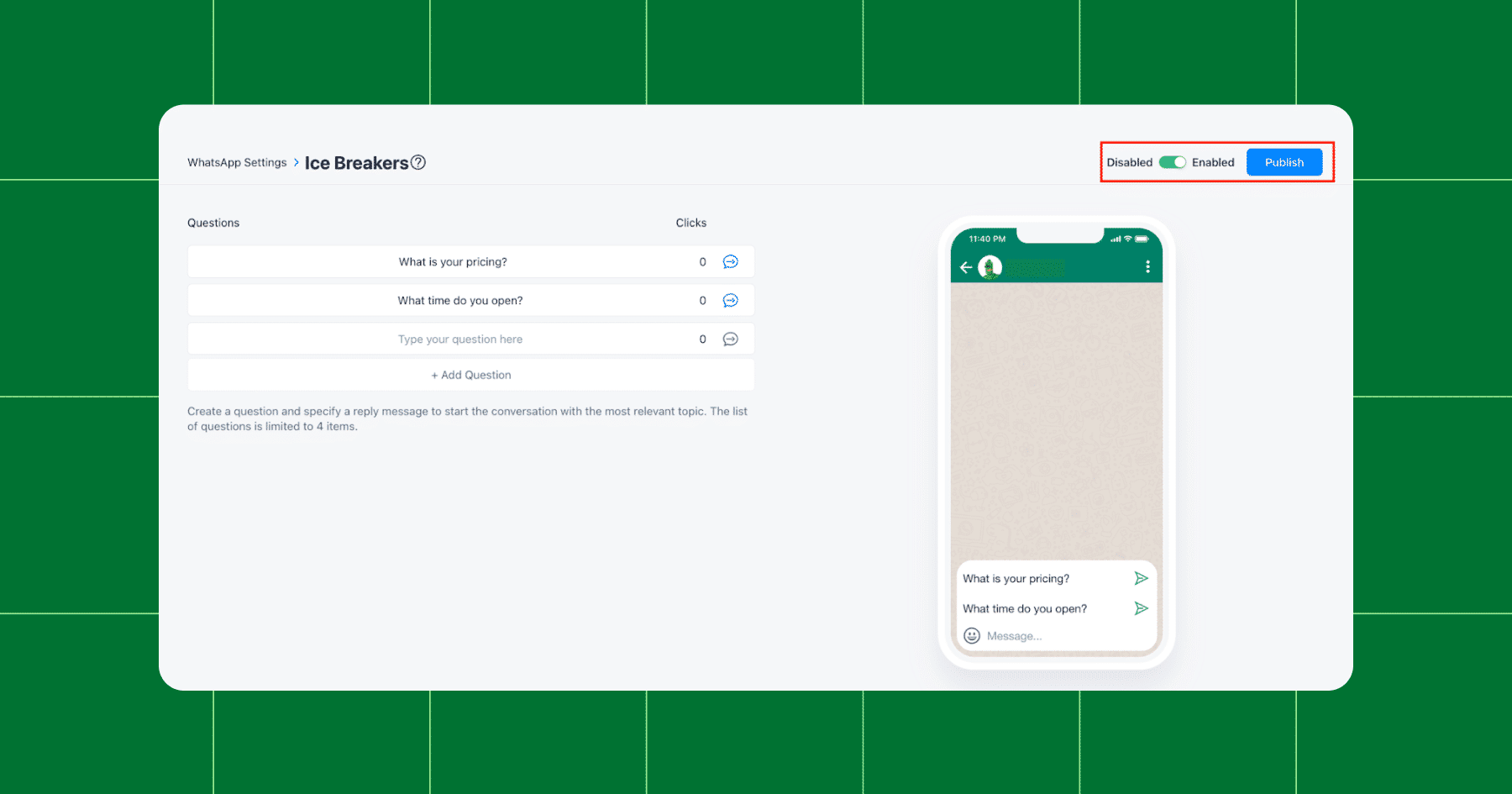
- AI Step: Smart replies that conversationally handle intent-based questions.
Instead of scrambling to keep up with a flood of conversations, you can welcome customers, set expectations, and route people in the right direction automatically. ✨
Want help getting set up? Check out our tutorial on YouTube: Set Up WhatsApp Auto Replies FAST with Manychat 🔥 Step by Step Tutorial
2. Qualify Leads and Get Them to the Finish Line 🏁

WhatsApp isn’t just for chatting with friends anymore — 50% of users report making purchase decisions through the app, highlighting just how powerful the platform has become for e-commerce.
Even so, not every person who messages you will be ready to buy. Some are browsing, some are curious, and only a fraction are truly ready to take action. Manychat helps you distinguish casual conversations from hot leads and nudge those leads across the finish line. There are a few ways you can go about doing this, including:
- Custom flows: With the Flow Builder, you can design a customer journey that makes sense for your business. Want to greet new leads with a welcome message, ask a few qualifying questions, and then share a product link? Easy. Or maybe you’d rather guide them toward booking a call or signing up for a newsletter. With custom flows, you’re in control — every step of the WhatsApp conversation can be tailored to match your sales process.
- AI Lead Qualification: You can use AI Step to ask questions like “What are you shopping for today?” or “What’s your budget?” Then, Manychat will automatically tag users and route them down the right path.
- Conditions: Condition blocks allow you to set rules that treat high-intent leads differently (e.g., send to sales rep or checkout link) while keeping low-intent users nurtured with educational content or offers.
- Data Collection: Manychat’s Data Collection blocks make it easy to gather customer info without it getting awkward. You can start with small details (like their product preference) and only ask for more (like contact info) when it makes sense.
Want to convert followers from TikTok? We’ve got you covered: Turn TikTok Views into WhatsApp Customers (3 EASY WAYS!)
3. Share Updates and Promotions 📣
One of WhatsApp’s biggest advantages is that people check it constantly — most users open the app between 24 and 25 times daily. So, when a message lands there, it gets attention.
With Manychat, you can keep customers engaged between purchases and bring them back when you’ve got something new to share, like:
- Product launches and new arrivals: You can announce your latest offering (products, services, menu items, or digital content) directly in chat.
- Exclusive discounts and offers: Reward loyal subscribers with time-limited promos that feel personal.
- Event reminders: Got a workshop, webinar, or store opening to promote? Send out timely nudges so no one forgets about your upcoming events.
- Reactivation campaigns: Haven’t heard from someone in a while? Trigger a friendly follow-up with an offer to re-engage them.
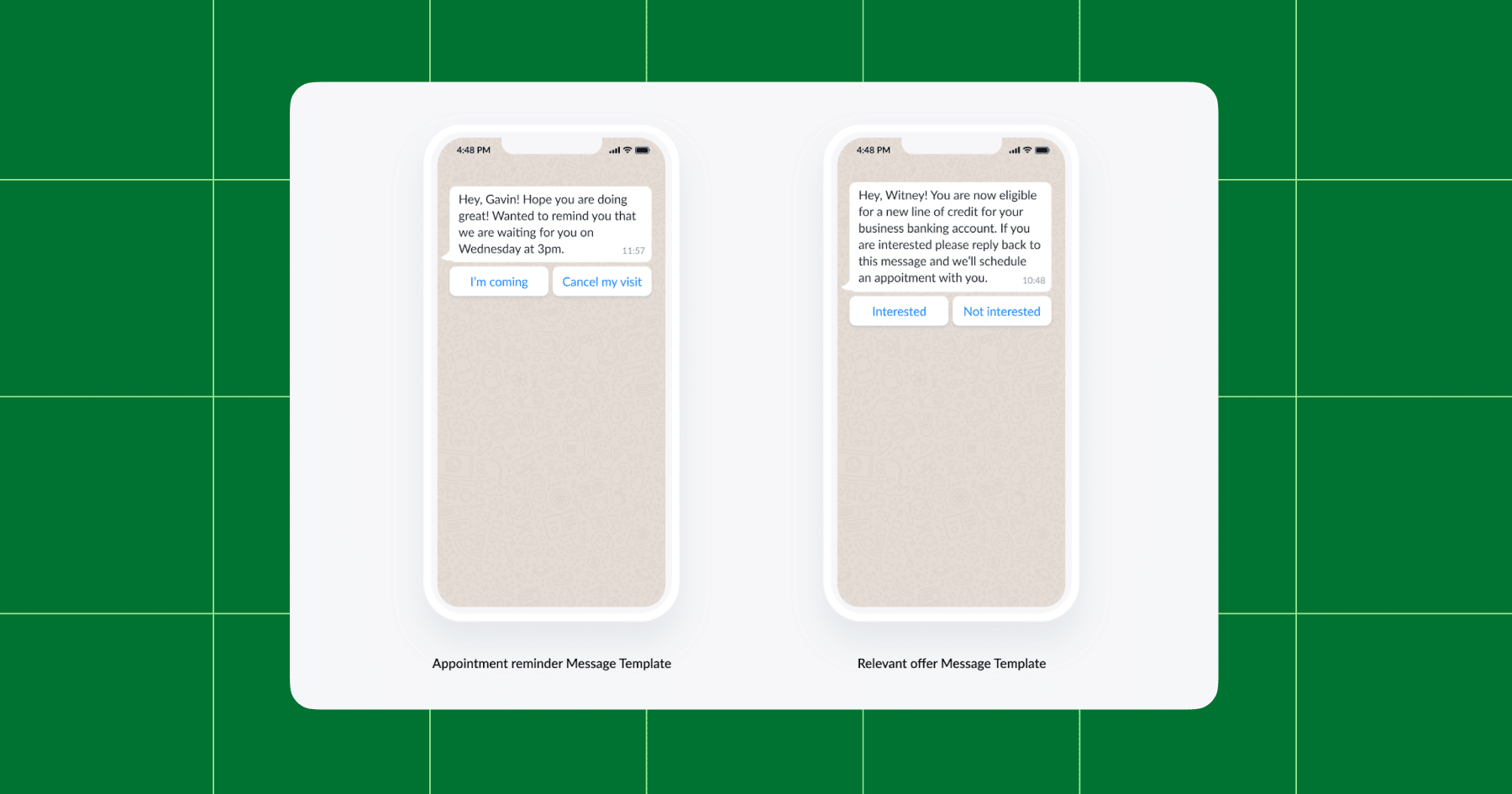
You can share updates on WhatsApp using either Broadcasts or Message Templates, depending on timing.
Broadcasts let you send a message to multiple contacts at once, similar to an email blast, but within WhatsApp. You choose who gets it (all contacts, or a specific segment), write your message, and Manychat delivers it.
Message Templates come into play if it’s been more than 24 hours since someone last interacted with you. WhatsApp requires pre-approved templates in these cases, but don’t worry — Manychat handles the setup so you stay compliant.
4. Provide Speedy Customer Service 🛎️

We’ve already established that WhatsApp users expect answers fast. Unlike email, where a reply in a few hours feels reasonable, WhatsApp users expect near-instant responses. If you leave them hanging, chances are they’ll move on.
Instead of manually typing the same answers over and over (or copy-pasting them from Notes app), you can set up smart replies that trigger based on keywords.
Here’s how it works:
- Keyword detection: You can set up specific keywords that are relevant to your business (like “hours,” “menu,” or “pricing”). When a customer sends you one of those words in WhatsApp, Manychat will deliver the reply you’ve prepared instantly. Whether 10 or 1,000 people ask, “What’s your return policy?”, everyone gets the same answer.
- Multi-layered FAQs: For more complex queries, you can set up branching answers. For example, when someone types “delivery,” they’re given options such as “shipping times” or “track my order.”
- Live Chat hand-off: If the question goes beyond the basics, Manychat can seamlessly tag and route the conversation to a person, so no customer feels stuck with a bot.
Put Us In, Coach

Keeping up with your WhatsApp inbox doesn’t have to drain your time and energy. With Manychat, you can put conversations on autopilot, and the good news is you don’t have to go all-in right away — you can get started for free and upgrade to Pro when you’re ready.
Take the first step: Explore Manychat for WhatsApp.
✋Frequently Asked Questions (FAQs)
1. Do I need to get “opt-in” before messaging someone on WhatsApp?
Yes. Unlike Instagram, where followers can easily trigger automations, WhatsApp requires that a person actively opts in before you can send them proactive messages. This means your growth strategy must include clear opt-in paths — such as Click-to-WhatsApp ads, QR codes, or links within your content. Without opt-ins, your list won’t grow.
2. What’s the “24-hour rule,” and how does it affect my automations?
WhatsApp lets you message people freely within 24 hours of their last interaction with you. After that, you can only reach out with approved Message Templates. This rule shapes how you design your flows: You’ll want to capture attention and move people toward action quickly, while also setting up templates for re-engagement.
3. Can I send broadcasts to all my WhatsApp contacts anytime?
Not quite. You can broadcast freely inside the 24-hour window, but beyond that, you’ll need to use templates — and only to contacts who’ve opted in. Understanding these guardrails ensures your account remains compliant and your audience remains engaged.
4. How do I actually turn WhatsApp conversations into revenue?
Design flows that match your customer journey: capture leads (like emails or phone numbers), deliver freebies, or recommend products. Creators who treat WhatsApp as part of a funnel — not just a support channel — see the biggest payoff.



Originally published: May 11, 2022, Updated: Nov 12, 2025
More stories worth reading
More content that's too good to miss